Roblox Studio
Roblox Studio is a free development environment for building, scripting, testing, and publishing Roblox experiences.
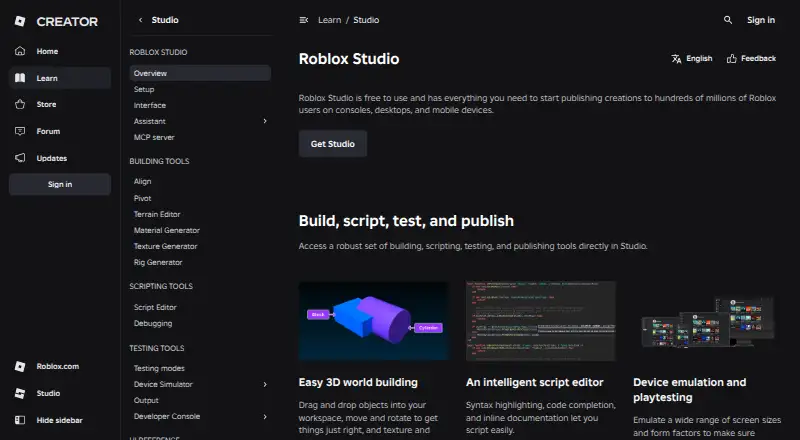
What Roblox Studio is
Roblox Studio is a free development environment for building, scripting, testing, and publishing Roblox experiences. Its 3D tools let creators place, move, rotate, and texture objects, and its script editor includes syntax highlighting, code completion, and inline documentation. Device emulation and playtesting help check experiences across screen sizes and form factors. The built-in Assistant can answer questions, update the data model, modify scripts, generate materials and textures, and automate bulk actions. Studio supports real-time collaboration and group-based access controls for projects and assets. The Creator Store offers models, meshes, images, sounds, videos, and plugins. Open Cloud provides REST APIs for Roblox resources, though Engine Open Cloud APIs are in beta, limited to reading and updating script objects, require API-key authentication, and cap request bodies at 200 KB. Studio runs on Windows and macOS, with Windows 10 and macOS 10.14 listed as minimums and Windows 11, macOS 14+, and 8 GB RAM recommended. The listed plan requires a Roblox account and notes a 3 GB RAM minimum.
Good
- Includes 3D tools, scripting, and built-in playtesting
- Supports real-time collaboration and group access controls
- Assistant can modify scripts and automate bulk actions
- Free to use on Windows and macOS
Watch out
- A Roblox account is required
- Engine Open Cloud APIs are in beta and limited
- Minimum operating systems are Windows 10 or macOS 10.14
Who it suits
Roblox Studio suits creators building and publishing Roblox experiences who want tools for 3D creation, scripting, testing, and team collaboration. Developers using Engine Open Cloud APIs should account for their beta status and listed limits.
Verdict
Roblox Studio combines creation, scripting, testing, and collaboration tools for Roblox experiences. Its system requirements and Engine Open Cloud API limits are worth checking before getting started.
Plans and prices
From Roblox Studio's own pricing page, checked 21 Sep 2026.
| Plan | Price | What it gives you |
|---|---|---|
| Free | Free | 3D world building · Scripting and testing tools · Publishing to Roblox · Real-time collaboration |
| Roblox Studio | Free | Windows 10 or macOS 10.14 minimum · 3 GB RAM minimum · Roblox account required |
The facts
Each one read from Roblox Studio's own pages, with the date it was checked.
What it does
- 3D creation
- Studio provides drag-and-drop 3D world-building tools for placing, moving, rotating, texturing, and polishing objects.checked 1 Oct 2026
- AI assistant
- Assistant can answer questions, update the data model, modify scripts, generate materials and textures, and automate bulk actions.checked 1 Oct 2026
- API security
- API keys support granular permissions, optional IP restrictions, and expiration dates.checked 1 Oct 2026
- Assets
- The Creator Store provides millions of models, meshes, images, sounds, videos, and plugins for Studio and games.checked 1 Oct 2026
- Authentication
- Open Cloud supports API keys and OAuth 2.0, and Roblox uses OpenID Connect as an identity layer for OAuth authentication.checked 1 Oct 2026
- Collaboration
- Studio supports real-time collaborative creation and group-based access controls for projects and assets.checked 1 Oct 2026
- External integrations
- Open Cloud provides REST APIs for updating games, restarting servers, accessing data stores, managing restrictions, and other Roblox resources.checked 1 Oct 2026
- Open Cloud limitation
- Engine Open Cloud APIs are in beta, can only read and update script objects, require API-key authentication, and limit request bodies to 200 KB.checked 1 Oct 2026
- Purpose
- Roblox Studio is an all-in-one IDE for building, scripting, testing, and publishing Roblox experiences.checked 1 Oct 2026
- Safety compliance
- Roblox is a recipient of the kidSAFE+COPPA seal and says its content moderation includes human moderators and automated systems.checked 1 Oct 2026
- Scripting
- Studio includes a script editor with syntax highlighting, code completion, and inline documentation.checked 1 Oct 2026
- Support
- Roblox provides documentation, tutorials, videos, a Developer Forum, community advice, and bug reporting resources.checked 1 Oct 2026
- System requirements
- The setup documentation lists Windows 10 and macOS 10.14 as minimum operating systems, Windows 11 and macOS 14+ as recommended, and 8 GB RAM as recommended.checked 1 Oct 2026
- Testing
- Studio supports device emulation and playtesting across screen sizes and form factors.checked 1 Oct 2026
The company
- Founded
- 2006checked 28 Sep 2026
- Headquarters
- San Mateo, California, United Stateschecked 28 Sep 2026
Alternatives to Roblox Studio
- 1

Unity
Free planAndroidiOSWebAPI8.4Free plan - 2

Unity Version Control
Free planWebAPILinuxmacOS8.1Free plan - 3

Ren'Py
Free planOpen sourceAndroidiOSWebAPI7.9Free plan - 4

Construct 3
Free planAndroidiOSWebLinux7.8Free plan - 5

CopperCube
Free planAndroidWebExtensionmacOS7.7€37 one-time - 6
Clickteam Fusion 2.5
Free planAndroidiOSWebmacOS7.6$99.99 one-time