
Ridvay
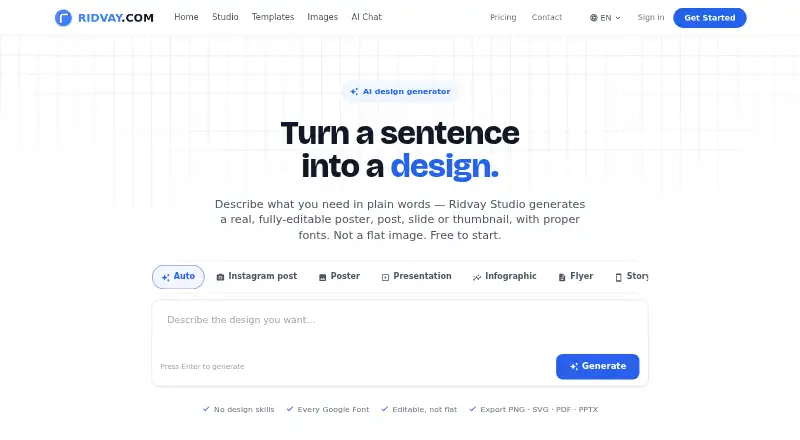
Ridvay Studio creates editable posters, social posts, slides, thumbnails, and multi-page designs from plain-language descriptions.
What Ridvay is
Ridvay Studio creates editable posters, social posts, slides, thumbnails, and multi-page designs from plain-language descriptions. Generated designs use layers and elements that users can move, restyle, or remove. The Recreate feature turns an uploaded screenshot, photo, or old flyer into a design with editable text and layers. Brand kits store colors, fonts, logos, and a brand voice for use during generation and refinement. Designs can be exported as PNG, SVG, PDF, PowerPoint, GIF, or MP4, and shared through editable links. Free exports include a small “Made with Ridvay” credit; paid plans remove it. A hosted MCP server connects with clients including Claude, ChatGPT, Cursor, and GitHub Copilot in VS Code, allowing agents to create or refine designs, export and share them, and update design variables. The Free plan includes five AI designs and three AI images per day, plus unlimited manual designs and templates. Ridvay has no mobile apps.
Good
- Generated designs have editable elements.
- Brand kits store colors, fonts, logos, and voice.
- Supports PNG, SVG, PDF, PowerPoint, GIF, and MP4 exports.
- Free plan includes unlimited manual designs and templates.
- MCP supports design creation, refinement, exports, and sharing.
Watch out
- Free exports carry a “Made with Ridvay” credit.
- Free plan limits AI designs to five per day.
- No mobile apps.
Who it suits
Ridvay suits people creating posters, social posts, slides, thumbnails, or multi-page designs who want editable layers and brand kits. It may also suit users working with supported MCP clients to create or revise designs through an agent.
Verdict
Ridvay combines AI-assisted design generation with editable elements, brand kits, and several export formats. Consider the daily free limits and export credit, or the absence of mobile apps, if those affect how you work.
Plans and prices
From Ridvay's own pricing page, checked 2 Oct 2026.
| Plan | Price | What it gives you |
|---|---|---|
| Free | Free | 5 AI designs/day · 3 AI images/day · unlimited manual designs and templates · PNG, JPG, PDF exports |
| Plus | €5.99 a month | 300 AI designs/month · 40 AI images/month · 5 AI video exports/month · no daily limit · Billed monthly |
| Ultimate | €17 a month | Unlimited AI designs (fair use) · 200 AI images/month · 20 AI video exports/month · Imagen 4 and Nano Banana Pro · priority render queue · Billed monthly |
The facts
Each one read from Ridvay's own pages, with the date it was checked.
What it does
- AI processing
- Depending on the selected model, chat messages, study content, and uploaded images may be processed by third-party AI providers.checked 2 Oct 2026
- Brand kits
- Brand kits store colors, fonts, logos, and a brand voice, and can be applied during generation and refinement.checked 2 Oct 2026
- Design formats
- Studio supports multi-page designs such as decks, carousels, and documents.checked 2 Oct 2026
- Editing
- Generated designs use editable elements that users can move, restyle, or delete.checked 2 Oct 2026
- Exports
- Designs can be exported as PNG, SVG, PDF, PowerPoint, GIF, or MP4, and shared using an editable link.checked 2 Oct 2026
- Image recreation
- The Recreate feature can turn an uploaded screenshot, photo, or old flyer into a design with editable text and layers.checked 2 Oct 2026
- MCP capabilities
- Through MCP, an agent can create or refine designs, export them, share them, and update variables in a living design.checked 2 Oct 2026
- MCP integrations
- Ridvay provides a hosted MCP server that can connect with clients including Claude, ChatGPT, Cursor, and GitHub Copilot in VS Code.checked 2 Oct 2026
- Privacy
- Ridvay says it does not share conversations with third parties for training, marketing, or purposes beyond generating requested AI responses.checked 2 Oct 2026
- Product
- Ridvay Studio turns a plain language description into an editable poster, social post, slide, or thumbnail with fonts and design layers.checked 2 Oct 2026
- Security
- Ridvay says its services are hosted on Google Cloud Platform, primarily in US data centers, and that it uses reasonable measures to protect information.checked 2 Oct 2026
- Support contact
- The privacy policy directs questions to Ridvay SIA at [email protected].checked 2 Oct 2026
- Target users
- Ridvay describes Studio as a tool for creating posters, social posts, slides, and thumbnails, and its pricing page says the editor is free while paid plans expand AI allowances.checked 2 Oct 2026
Money
- Free export limit
- Free exports carry a small “Made with Ridvay” credit; paid plans export without it.checked 2 Oct 2026
The full review of Ridvay
Overview
Ridvay Studio turns written prompts into editable posters, social posts, slides, and thumbnails, with tools for adapting existing images and applying brand styles. It suits people who need flexible visual assets across formats, especially when AI generation is useful but a fixed, uneditable result is not. The trade-off is a browser-centered workflow without mobile apps and with daily AI limits on the free plan.
Key features
Generated designs are built from elements users can move, restyle, or delete, giving more control than a finished image alone. Recreate extends that flexibility to uploaded screenshots, photos, and old flyers, converting them into designs with editable text and layers. That makes Ridvay useful for refreshing existing material as well as starting from a prompt.
Brand kits retain colors, fonts, logos, and a brand voice for use during generation and refinement. Multi-page support covers decks, carousels, and documents, while custom dimensions and print-ready output serve work beyond standard social graphics. Exports include PNG, SVG, PDF, PowerPoint, GIF, and MP4; an editable link offers another way to share a design.
Ridvay also provides a hosted MCP server that can connect with Claude, ChatGPT, Cursor, and GitHub Copilot in VS Code. Through those clients, an agent can create or refine designs, export and share them, and update variables in a living design. This is a meaningful option for users who want design work within an agent-assisted workflow, rather than only through the editor.
Ridvay says it does not share conversations with third parties for training, marketing, or purposes beyond generating requested AI responses. Its services run on Google Cloud Platform, primarily in US data centers, with reasonable measures to protect information. Depending on the selected model, messages, study content, and uploaded images may be processed by third-party AI providers; that distinction matters for sensitive material.
Pricing
The Free plan costs nothing and includes 5 AI designs per day, 3 AI images per day, unlimited manual designs and templates, and PNG, JPG, and PDF exports. It is a practical way to explore the editor or produce occasional work, but daily AI caps constrain heavier use. Free exports carry a small “Made with Ridvay” credit.
Plus costs €5.99 a month, billed monthly, and raises the allowance to 300 AI designs and 40 AI images per month, with 5 AI video exports and no daily limit. It fits regular individual use that exceeds the free daily caps. Ultimate costs €17 a month, billed monthly, and offers unlimited AI designs subject to fair use, 200 AI images, 20 AI video exports, Imagen 4 and Nano Banana Pro, and a priority render queue. That higher allowance and queue priority make it the stronger fit for frequent, demanding generation.
Paid plans remove the free export credit. Ridvay offers a 7-day trial, but its duration alone does not establish which plan features the trial includes.
Platforms
Ridvay is available on web and lists Android, iOS, and API platforms, but it has no mobile apps. Readers looking for a native phone or tablet app should not assume the mobile platform listings mean an app is available. Its hosted MCP server also supports connections with several AI clients.
Who it's for
Ridvay is best suited to creators, marketers, and other visual-content makers who need editable prompt-generated graphics, reusable brand styling, or multiple output formats. The free plan can cover manual design and light AI use; frequent generation, video exports, or credit-free exports point toward a paid plan. It is a weaker fit for anyone who requires a native mobile app or wants AI usage without quotas.
Pros and cons
- Pro: Editable layers and image recreation let users adapt both new generations and existing visual material instead of accepting a static result.
- Pro: Brand kits and multi-page formats support repeatable, on-brand work across posters, social content, decks, carousels, and documents.
- Pro: A broad export selection, print-ready output, and editable links accommodate different delivery needs.
- Con: Free AI allowances are capped daily, and free exports carry a Ridvay credit.
- Con: There are no mobile apps, despite Android and iOS being among the listed platforms.
- Con: Depending on the AI model, content may be processed by third-party providers, a consideration for sensitive uploads or prompts.
Alternatives
Browse AI Poster Generators to compare tools across the category. PosterGen is a free option for readers who want Linux, macOS, Windows, or self-hosted availability. Choose Bibby AI if its API, extension, or self-hosted platforms suit the workflow better.
Kittl is another web-based freemium option; its free plan provides 5 projects and 100 one-time AI tokens, which may suit a reader with a small project count and modest initial AI needs. PosterMont offers a guest quota of 2 poster images and 1 short video per day without an account or card, though guest images carry a watermark and are not saved. Piktochart may fit teams: its free plan covers 1–4 members, 2 downloads, 1 GB storage, and 60 AI credits.
Pixazo AI Research Poster Maker is a browser-based alternative for research posters, with image generation using a Pixazo Playground account. Any2Poster is a free choice for Linux, macOS, or Windows users. LightX AI Poster Generator spans Android, iOS, web, and API platforms and includes a free plan and free trial, making it worth considering for readers seeking a mobile-oriented alternative.
Verdict
Ridvay is a strong fit for people who want AI-assisted visual creation without giving up control over layers, brand styling, or export formats. Its most compelling advantage is the combination of editable generation and tools for turning existing images into reusable designs. Choose it if that flexibility and its agent connections matter more than native mobile access; look elsewhere if you need mobile apps or the free daily AI limits and export credit are deal-breakers.
Getting started
- Open the Ridvay website
- Choose the Free, Plus, or Ultimate plan
- Create or recreate a design in Studio
- Apply a brand kit or adjust editable elements
- Optionally connect a supported MCP client
- Export or share the finished design
Limits worth knowing
The Free plan allows five AI designs and three AI images per day, while manual designs and templates are unlimited. Free exports carry a small “Made with Ridvay” credit; Plus and Ultimate raise AI allowances, with Ultimate offering unlimited AI designs under fair use.
Questions
Is Ridvay free?
Yes. The Free plan costs nothing and includes five AI designs and three AI images daily, plus unlimited manual designs and templates.
What do paid plans cost?
Plus costs €5.99 a month, and Ultimate costs €17 a month, both billed monthly.
Which platforms support Ridvay?
Ridvay lists Android, iOS, web, and API access. Its product details state that it has no mobile apps.
Can Ridvay remove branding from exports?
Paid plans export without the small “Made with Ridvay” credit applied to free exports.
Which AI clients can connect through MCP?
The hosted MCP server can connect with Claude, ChatGPT, Cursor, and GitHub Copilot in VS Code.
How does Ridvay handle uploaded content and conversations?
Ridvay says it does not share conversations for third-party training or marketing. Depending on the selected model, messages, study content, and images may be processed by third-party AI providers.
Alternatives to Ridvay
- 1

Poster
Free planAndroidiOSWebAPI8.1From $7 a month - 2
LightX AI Poster Generator
Free planAndroidiOSWebAPI8.0From ₹999 a month - 3
Designkit
Free planAndroidiOSWeb7.8From $15 a month - 4

Piktochart
Free planWeb7.5From $39 a year - 5
Kittl
Free planWeb7.3Free plan - 6
Kodo
Free planWeb6.7From $12 a month