LightX AI Poster Generator
LightX AI Poster Generator turns text prompts into printable posters, with style presets for changing layout, colors, imagery, and composition.
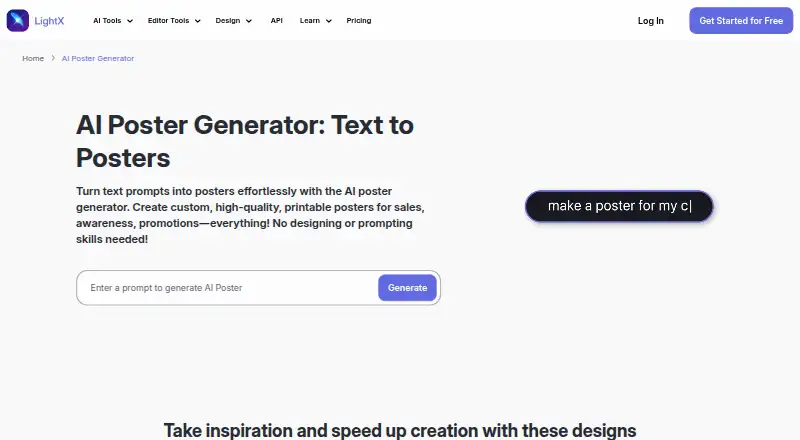
What LightX AI Poster Generator is
LightX AI Poster Generator turns text prompts into printable posters, with style presets for changing layout, colors, imagery, and composition. You can refine a design by adjusting its prompt rather than using editing tools, and LightX says its AI can place supplied text with accurate spelling and select matching fonts, sizes, and colors. The tool says it can generate a poster in under 5 seconds. Posters can be downloaded as JPEGs and shared on social platforms. Listed uses range from product, business, and educational posters to events, concerts, movies, announcements, political campaigns, public notices, and festivals. LightX also offers APIs for image generation, background removal, avatars, cleanup, product photoshoots, and headshots, with examples in CSS, React, Tailwind, JavaScript, and Python. It is available on web, Android, and iOS, with free and paid plans. The Starter plan is free and includes six daily AI credits; Pro is $4.33 a year, billed €51.99 yearly, and AI Credits cost 8.99 USD once.
Good
- Prompt-based poster creation and refinement
- Style presets adjust layout, color, imagery, and composition
- JPEG export and social sharing
- Starter plan includes six daily AI credits
- Available on web, Android, and iOS
Watch out
- Pro is billed €51.99 yearly
- AI Credits plan is a one-time 8.99 USD purchase
- Pro price is listed as $4.33 a year
Who it suits
It suits creators, businesses, brands, and others who need posters for print or social sharing. It may also fit developers seeking LightX image APIs and integration examples.
Verdict
LightX combines prompt-based poster creation with style presets and several export and sharing options. Check the plan billing details and available credits against your needs before choosing a paid option.
Plans and prices
From LightX AI Poster Generator's own pricing page, checked 15 Oct 2026.
| Plan | Price | What it gives you |
|---|---|---|
| API Starter | Free | 25 free API credits · lifetime |
| Starter | Free | 6 daily AI credits · basic photo editor · free design/video templates · 1GB cloud storage · JPG export at 512px · lifetime |
| API Subscription | ₹5.79 a month | monthly credit bundles · custom credits option · 100 credits/month at ₹5.79 per credit; larger tiers available |
| API Flexi | ₹8.64, paid once | one-time credit bundles · custom credits option · 100 credits at ₹8.64 per credit; larger bundles available |
| AI Credits | ₹499, paid once | 400 credits · up to 400 images · up to 16 videos · premium AI tools · no watermark · lifetime validity |
| Pro Subscription | ₹999 a month | 1,000 AI credits/month · up to 500 images/month · up to 20 videos/month · premium tools/templates · no watermark · unlimited storage · ₹11,988 yearly or discounted ₹4,900 yearly |
The facts
Each one read from LightX AI Poster Generator's own pages, with the date it was checked.
What it does
- API authentication
- The API examples use HTTPS POST requests with an x-api-key header and JSON image URL parameters.checked 15 Oct 2026
- API code samples
- The API page provides examples for Python, JavaScript, Swift, Kotlin and cURL and links to separate documentation.checked 15 Oct 2026
- API credit model
- Each API call consumes credits according to the selected service, with background removal and cleanup listed at 0.50 credit per generation and avatar at 1.00.checked 15 Oct 2026
- API integrations
- LightX offers APIs including text-to-image, background removal, avatar, cleanup, product photoshoot, and headshot generation, with integration examples for CSS, React, Tailwind, JavaScript, and Python.checked 30 Sep 2026
- API security
- LightX says its API uses encryption, secure access controls, and continuous monitoring for data protection.checked 30 Sep 2026
- Audience
- LightX describes its AI design tools as suitable for creators, businesses, brands, startups, artists, designers, authors, musicians, and users of any skill level.checked 30 Sep 2026
- Broader editor
- LightX combines AI photo editing, design templates, video editing, avatars, background removal and product photoshoots.checked 15 Oct 2026
- Compliance
- LightX says its AI photoshoot processing is GDPR compliant and that uploaded photos are not stored for training purposes.checked 30 Sep 2026
- Content restrictions
- LightX prohibits nudity, pornography, sexually explicit or suggestive content, including AI-generated content.checked 30 Sep 2026
- Developer API
- LightX publishes APIs for background removal, avatars, text-to-image, cleanup, product photoshoots and headshots.checked 15 Oct 2026
- Documentation depth
- The public API page exposes endpoint examples and a documentation link, but no SDK package is identified on that page.checked 15 Oct 2026
- Export
- Generated posters can be downloaded in JPEG format and shared on Facebook, Instagram, X, and other social platforms.checked 30 Sep 2026
- Face-data policy
- The policy says facial processing generally occurs on-device and that face data is not used for identification, advertising or model training, except temporary partner processing for requested generation.checked 15 Oct 2026
- Generation speed
- The poster tool says it can design a poster in under 5 seconds.checked 30 Sep 2026
- Image handling
- The privacy policy says selected images may be sent to LightX or generative-media partners for requested AI effects, then deleted within 30 days or sooner.checked 15 Oct 2026
- Limit: AI credit economics
- The Lifetime Deal review warns that included AI credits are a finite one-time pool and later top-ups use regular pricing.checked 15 Oct 2026
- Limit: connectivity
- A Google Play reviewer reports the app repeatedly claiming it is offline even when other internet services work.checked 15 Oct 2026
- Limit: crashes and lost work
- App Store and JustUseApp reviewers describe crashes or kick-outs during editing that can force them to redo work.checked 15 Oct 2026
- Limit: desktop workflow
- The Lifetime Deal review says its deal covers the web editor only and excludes the separate mobile subscription.checked 15 Oct 2026
- Limit: feature bugs
- A reviewer says the Cutout tool remained restricted to once daily despite a paid upgrade, and the developer acknowledged the issue.checked 15 Oct 2026
Money
- API free access
- API signup supplies 25 credits without requiring a credit card.checked 15 Oct 2026
Where it runs
- App privacy disclosures
- Apple’s listing says location, contact information, identifiers, usage data and diagnostics may be linked to the user or used for tracking, depending on features.checked 15 Oct 2026
The company
- Company facts
- LinkedIn lists AndOr Communications Pvt Ltd as privately held, founded in 2015, headquartered in Noida, Uttar Pradesh, with 11–50 employees.checked 15 Oct 2026
- Company legal name
- The Google Play listing identifies the developer as Andor Communications Private Limited.checked 15 Oct 2026
The full review of LightX AI Poster Generator
LightX AI Poster Generator makes posters from text prompts, aimed at people who want a quick route from an idea to a print or social graphic.
Overview
The tool targets a broad range of poster jobs, from product and business promotions to education, events, concerts, films, announcements, campaigns, public notices and festivals. LightX says generation can take under five seconds, but the more useful distinction is the workflow: users refine a design by revising prompts rather than working with editing tools. That keeps iteration simple for people who can describe what they want, but may frustrate anyone who needs precise manual adjustments.
Key features
- Prompt-based creation: Generate a custom poster from text and refine the result by changing the prompt. This is a direct approach for exploring concepts, not a substitute for element-by-element editing.
- Style presets: Presets adjust layout, colors, imagery and composition, helping users try different visual directions without specifying every design choice.
- Typography: LightX says it can place supplied poster copy with accurate spelling and choose compatible fonts, sizes and colors. That could save effort on text-heavy promotional designs, though copy and visual hierarchy should still be checked before publishing.
- Output: The generator supports print-ready output and custom dimensions, but downloads are JPEG. That is suitable for many common print and social uses, while anyone who needs another export format should compare alternatives.
- Broader tools and integrations: LightX also offers APIs for text-to-image, background removal, avatars, cleanup, product photoshoots and headshots, with examples for CSS, React, Tailwind, JavaScript and Python. These integrations matter more to developers than to someone making a single poster. LightX says its API uses encryption, access controls and ongoing monitoring; it also says AI image inputs are not used for training, one tool page says uploaded files are never stored, and its AI photoshoot processing is GDPR compliant.
- Use boundaries: LightX prohibits nudity, pornography and sexually explicit or suggestive content, including AI-generated material.
Pricing
LightX is freemium, with a free plan and a 7-day trial. The Starter plan costs nothing, billed lifetime, and includes six daily free AI credits, photo-editor tools, and free design and video templates. It is a sensible way to try the workflow, but the daily credit allowance is the main constraint for repeated poster generation.
Pro Subscription costs $4.33 a year, billed €51.99 yearly. It includes 1,000 AI credits monthly, up to 500 images monthly and all AI tools, so it is the clearest fit for frequent users who can make use of that monthly capacity. AI Credits cost $8.99, paid once for 200 credits, up to 50 images and all premium AI tools; this one-time option suits occasional bursts better than a steady monthly workload, but offers less total capacity than Pro.
Platforms
LightX lists Android, iOS, web and API access, and says its app is available for iPhone and Android. That gives mobile users an app route alongside browser and developer integrations.
Who it's for
LightX describes its AI design tools as suitable for creators, businesses, brands, startups, artists, designers, authors, musicians and users at any skill level. In practice, the poster generator is best for people who want to move quickly from a written concept to a graphic and are comfortable steering results with prompts and presets. It is a weaker match for designers who depend on fine manual control or need downloadable formats beyond JPEG.
Pros and cons
- Pros: Prompt refinement and style presets offer two straightforward ways to steer a design; supplied-text placement is intended to preserve spelling and match typography; print-ready output, custom dimensions and mobile apps broaden its use.
- Cons: The prompt-led process does not provide the manual editing control some designers need; JPEG is the stated download format; free use is credit-limited, and Pro's stated image allowance is capped at 500 monthly.
Alternatives
Browse AI Poster Generators to compare more options. Choose Designkit if its free tier's 20 first-login credits and up to 20 images suit a limited trial, or if you want its stated video-tool previews. Ridvay is worth considering for a free allowance of five AI designs and three AI images per day alongside unlimited manual designs and PNG, JPG and PDF exports. Pick Piktochart if a web-based, team-oriented option with a free tier for one to four team members, two downloads, 1 GB storage and 60 AI credits better fits the job. Kittl is another web option, with a free tier of five projects and 100 one-time AI tokens. Bibby AI is an alternative to consider. CREVION offers a web free tier with five monthly AI generations, PNG-only export and a basic canvas editor, which may suit someone who wants a canvas rather than a prompt-only workflow. Pixazo AI Research Poster Maker is a browser-based alternative for research posters. PosterMont is another web-based option.
Verdict
Choose LightX if you want prompt-guided poster creation, preset visual treatments and a path to print-ready output across web and mobile. Its strongest case is quick iteration without manual editing; look elsewhere if you need more precise layout control, non-JPEG downloads or a less credit-dependent workflow.
Getting started
- Open the LightX AI Poster Generator website.
- Choose web, Android, or iOS access.
- Enter a text prompt for the poster.
- Use a style-transfer preset or revise the prompt to refine the result.
- Choose Starter, Pro, or the one-time AI Credits option.
- Download the completed poster as a JPEG or share it on a social platform.
Limits worth knowing
Starter includes six daily AI credits. Pro lists 1,000 credits and up to 500 images monthly; the one-time AI Credits option provides 200 credits.
Questions
Is LightX AI Poster Generator free?
Yes. Its Starter plan is free and includes six daily AI credits.
What paid plans are listed?
Pro is listed at $4.33 a year, billed €51.99 yearly. AI Credits cost 8.99 USD once for 200 credits.
Which platforms are available?
The listed platforms are web, Android, iOS, and API.
What format can I download posters in?
Generated posters can be downloaded as JPEG files.
Can I refine a poster after it is generated?
Yes. You can change the text prompt, and style presets can adjust the layout, colors, imagery, and composition.
What API integrations does LightX list?
Integration examples are available for CSS, React, Tailwind, JavaScript, and Python.