Designkit
Designkit helps sellers and brands create product visuals, videos, and marketing content with AI.
What Designkit is
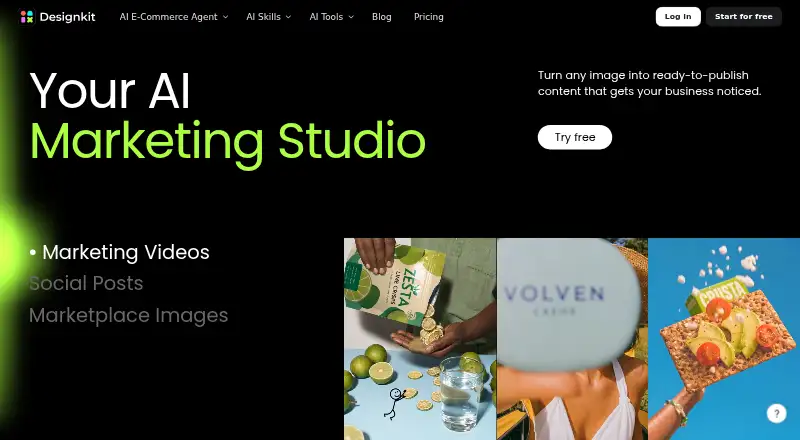
Designkit helps sellers and brands create product visuals, videos, and marketing content with AI. Users can start with one product image to generate listing images, lifestyle visuals, product videos, AI model shots, or ad creatives. Its tools include AI product photography, listing-image generation, product-detail-page design, fashion-model features, online editing, and bulk image editing for up to 30 images per batch. A video agent turns a product image and prompt into a marketing video with hooks, scenes, captions, and platform formats. Designkit describes workflows for Amazon, Shopify, TikTok Shop, social content, and paid ads. It supports custom dimensions and background removal and is available on Android, iOS, and the web. The Free plan costs nothing and provides 20 first-login credits, limited image generations, no video generation, and five-second video-tool previews. Purchased credits are valid for one year; membership credits last during the membership period. Support is available by email, live chat, and in-app feedback, though the stated email response time is 3–10 business days.
Good
- Turns a product image into several content types.
- Bulk editor handles up to 30 images per batch.
- Supports custom dimensions and background removal.
- Available on Android, iOS, and the web.
Watch out
- Free plan does not include video generation.
- Free-plan image generations are limited.
- Email support response time is 3–10 business days.
- Purchased credits expire after one year.
Who it suits
Designkit suits sellers and brands making product imagery or promotional videos for commerce and social channels. Its free plan may fit users starting with limited image generation who do not need video generation.
Verdict
Designkit covers product imagery and marketing-video workflows, with a free plan for limited image creation. Check its video restrictions and credit validity terms against your planned use.
Plans and prices
From Designkit's own pricing page, checked 15 Oct 2026.
| Plan | Price | What it gives you |
|---|---|---|
| Free | Free | 20 first-login credits · up to 20 images · no video generation · limited models · limited editing tools |
| Basic Plan | $15 a month | 500 credits/month · up to 500 AI Agent images · up to 250 background images · unlimited background/object removal · unlimited UHD enhancement · batch tools · monthly |
| Pro Plan | $30 a month | 1,500 credits/month · up to 1,500 images · up to 100 five-second videos · unlimited resize/background removal/basic editing · 15 tool videos/day · Relax Mode · monthly auto-renew |
The facts
Each one read from Designkit's own pages, with the date it was checked.
What it does
- Agent architecture
- Meitu describes four specialised agents: E-commerce, Try-on, Poster and Video, with configurable prompts and reusable output styles.checked 15 Oct 2026
- AI fashion models
- Designkit provides AI fashion-model generation and virtual try-on workflows for apparel imagery.checked 15 Oct 2026
- AI product photography
- Its product-photography workflow changes backgrounds, improves quality and adjusts lighting from uploaded product images.checked 15 Oct 2026
- AI video generation
- The product includes marketing-video, product-video, UGC-video, TikTok, Instagram and YouTube generation tools.checked 15 Oct 2026
- API support
- Designkit’s pricing FAQ refers to API users and directs them to contact support for refund eligibility; no public API documentation was shown on the reviewed pages.checked 15 Oct 2026
- Batch processing
- Designkit supports bulk processing across catalog images and lets users reuse saved workflows as templates.checked 15 Oct 2026
- Bulk processing limit
- The bulk image editor processes up to 30 images per batch.checked 30 Sep 2026
- Cancellation
- Subscriptions remain active through the current billing cycle after cancellation, and the site asks users to cancel at least 24 hours before renewal.checked 15 Oct 2026
- Commerce channels
- Designkit describes content workflows for Amazon, Shopify, TikTok Shop, social content, and paid ads.checked 30 Sep 2026
- Credits
- Purchased credits are valid for one year, while membership credits are valid during the membership period.checked 30 Sep 2026
- Credits validity
- Purchased credits remain valid for one year, while membership credits last for the membership period.checked 15 Oct 2026
- Cross-border safeguards
- For transfers outside the EEA, UK, or Switzerland, the privacy policy says Designkit uses safeguards such as adequacy decisions, standard contractual clauses, or legal derogations.checked 30 Sep 2026
- Data processors
- The privacy policy names Stripe, Apple, Google, and BytePlus as processors or affiliates involved in service-related processing.checked 30 Sep 2026
- Developer identity
- Google Play identifies the developer as Meitu (China) Limited and gives a Hong Kong address.checked 15 Oct 2026
- Feature suite
- The platform includes AI product photography, listing-image generation, product-detail-page design, video generation, fashion-model tools, online image editing, and bulk image editing.checked 30 Sep 2026
- Image editing tools
- Built-in tools include background removal and generation, object removal, image enhancement, upscaling, resizing and watermark removal.checked 15 Oct 2026
- Limit: credit monetization
- MWM reports complaints that users must buy additional generation points even after purchasing VIP access.checked 15 Oct 2026
- Limit: publishing scope
- Kompozy’s review says Designkit generates and formats content but does not publish feeds, edit long-form video, create blogs or produce persona videos.checked 15 Oct 2026
Where it runs
- Android data safety
- Google Play says the app shares no data with third parties, encrypts data in transit and allows users to request deletion.checked 15 Oct 2026
- iOS privacy disclosure
- Apple’s listing says identifiers may be used for tracking and that the app may collect location, contact information, photos or videos, usage data and diagnostics.checked 15 Oct 2026
The company
- Company founding
- Meitu says it was founded in 2008 and listed on the Hong Kong Stock Exchange in 2016.checked 15 Oct 2026
- Company launch history
- Meitu’s corporate history lists Designkit among products launched in 2022.checked 15 Oct 2026
- Headquarters
- Unit 7702A, Level 77, International Commerce Centre, 1 Austin Road West, Kowloon, Hong Kongchecked 28 Sep 2026
Money
- Limit: AI accuracy and cost
- A Google Play reviewer says the app is costly and sometimes redraws products at the wrong size.checked 15 Oct 2026
The full review of Designkit
Overview
Designkit is an AI content tool for sellers and brands who need product imagery and promotional video from product photos. It is best suited to commerce teams creating assets for storefronts and social channels; the free tier is a useful way to make a limited number of images, but its lack of video generation makes it a narrow test of the broader workflow.
Key features
Product imagery
Designkit can turn one product image into listing visuals, lifestyle scenes, AI model shots and ad creatives. The combination of AI product photography, listing-image generation and product-detail-page design gives sellers a path from a source photo to several kinds of store content. Custom dimensions and background removal add practical control over image output, though the free plan's limited generations may constrain anyone producing assets at volume.
Video and editing
The video agent uses a product image and prompt to create a marketing video, assembling hooks, scenes and captions in formats intended for different platforms. That can suit brands repurposing product imagery for short promotional content. The Free plan does not generate videos, and its five-second video-tool previews are previews rather than full video output. Basic and Pro include allowances for five-second videos, so buyers should compare those quotas with their expected publishing volume.
Online image editing is joined by bulk editing for batches of up to 30 images. That is a concrete time-saver for sellers refreshing a group of product photos, although the batch cap still means larger catalogs need multiple rounds. Designkit describes workflows for Amazon, Shopify, TikTok Shop, social content and paid ads.
Pricing
Designkit is freemium, with a free trial also offered. The Free plan costs nothing, billed $0/month, and provides 20 first-login credits, up to 20 images and limited image generations. It excludes video generation, making it most appropriate for exploring image creation rather than evaluating a complete campaign workflow.
Basic Plan is custom pricing and includes 500 credits/mo, up to 500 images, up to 33 five-second videos, one free custom AI avatar per week and five free tool videos per day. It is the lower-quota paid option for a smaller production need. Pro Plan is also custom pricing; it raises the allowance to 1,500 credits/mo, up to 1,500 images and up to 100 five-second videos, with three free custom AI avatars per week and 15 free tool videos per day. That larger allocation better fits regular content production, but the unknown price prevents a direct cost comparison with the Basic tier.
Purchased credits remain valid for one year, while membership credits last only during the membership period. That distinction matters if usage is intermittent: unused membership credits do not carry beyond the membership period. Stripe manages payments and subscriptions; accepted methods include major credit cards, PayPal and Google Pay.
Platforms
Designkit is available on Android, iOS and the web, giving mobile-first sellers and desktop-based teams access across common devices.
Who it's for
Designkit is a sensible fit for sellers and brands that repeatedly need product listing imagery, lifestyle treatments and marketing assets from existing product photos. Its video agent and channel-oriented workflows are relevant to teams promoting products across commerce and social destinations. It is less compelling for occasional users who need video on the free tier, or for buyers who need to confirm paid-plan value before committing to a membership.
Pros and cons
Pros
- One source image supports several asset types: listing, lifestyle, model and ad imagery can all begin with a product photo.
- Useful production breadth: image tools, video creation and bulk editing sit in one platform, with batches of up to 30 images.
- Scalable listed quotas: Basic and Pro specify image, video, avatar and daily tool-video allowances.
- Multiple support routes: users can contact support by email, live chat from any page or in-app feedback.
Cons
- Free access stops short of video creation: the free tier offers only five-second tool previews and no video generation.
- Paid-plan prices are custom: the listed quotas cannot be weighed against a stated monthly cost.
- Membership credits expire with the membership period: low-frequency users may not consume their allocation in time.
- Email support may take time: the stated response window is 3–10 business days.
Alternatives
For a broader poster-making shortlist, see AI Poster Generators.
Choose LightX AI Poster Generator if you want a stated $4.33 Pro Subscription option and a free tier with six daily AI credits plus photo-editor tools and design and video templates. Ridvay is another freemium option, with five AI designs and three AI images per day on its free tier, alongside unlimited manual designs and PNG, JPG and PDF exports; its Plus plan is listed at €5.99 a month. Piktochart is web-only and may suit teams seeking a stated Free tier with 1–4 members, two downloads, 1 GB storage and 60 AI credits, or a Pro plan at $10 a month billed annually.
Kittl offers a web-based free tier with five projects and 100 one-time AI tokens. Pixazo AI Research Poster Maker is a browser-based alternative whose free image generation uses a Pixazo Playground account. PosterMont offers a guest quota of two poster images and one short video per day without an account or card, though guest images carry a small watermark and are not saved. Design Maker AI is a web-based freemium alternative. PosterGen is a free option for Linux, macOS, web and Windows.
Verdict
Choose Designkit if your work centers on product photos that need to become storefront imagery and marketing videos, and its image-to-video workflow is worth a custom-priced membership to you. Its breadth and batch editing are persuasive for recurring commerce production, but look elsewhere if you need free video generation or transparent paid pricing before choosing a tool.
Getting started
- Visit the Designkit website.
- Choose the web platform or use the Android or iOS app.
- Start with the Free plan, which includes 20 first-login credits.
- Upload a product image to create visuals or use the video agent with an image and prompt.
- Use email, live chat, or in-app feedback to contact support.
Limits worth knowing
The Free plan costs nothing and includes 20 first-login credits, limited image generations, no video generation, and five-second video-tool previews. Membership credits remain valid during the membership period, while purchased credits are valid for one year.
Questions
Is Designkit free?
Yes. The Free plan is free and includes 20 first-login credits and limited image generations.
Can the Free plan create videos?
It does not include video generation. It includes five-second video-tool previews.
Which platforms does Designkit support?
Designkit is available on Android, iOS, and the web.
What can Designkit make from a product image?
It can create listing images, lifestyle visuals, product videos, AI model shots, and ad creatives.
How long do credits last?
Purchased credits are valid for one year. Membership credits are valid during the membership period.
How can I contact support?
Support is available by email, live chat from any page, and in-app feedback. The stated email response time is 3–10 business days.
Alternatives to Designkit
- 1

Poster
Free planAndroidiOSWebAPI8.1From $7 a month - 2
LightX AI Poster Generator
Free planAndroidiOSWebAPI8.0From ₹999 a month - 3

Piktochart
Free planWeb7.5From $39 a year - 4

Kittl
Free planWeb7.3Free plan - 5

Ridvay
Free planAndroidiOSWebAPI7.3From €5.99 a month - 6
Kodo
Free planWeb6.7From $12 a month