PosterGen
PosterGen generates academic conference posters from research paper PDFs using a multi-agent language-model workflow.
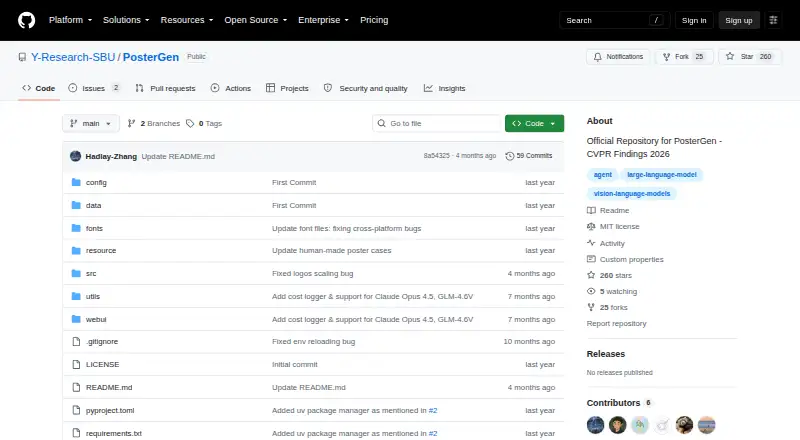
What PosterGen is
PosterGen generates academic conference posters from research paper PDFs using a multi-agent language-model workflow. Its Parser Agent extracts and organizes paper content, while a Curator Agent plans the narrative and visual placement. Layout and Balancer agents calculate spacing, arrange a three-column composition and help prevent overflow; styling applies typography and colors generated from an affiliation logo. Users can adjust layout, typography, colors, visual asset sizing and content optimization through a configuration file. A local web interface accepts a paper PDF and logos, lets users configure models and dimensions, and generates a PNG poster plus an editable PowerPoint file. The project documents Windows, Linux and macOS support, with Python 3.11 and LibreOffice required; the web interface also needs Node.js and configured API keys. Setup instructions show keys for OpenAI, Anthropic and Zhipu, and configurable base URLs for compatible services including Google. Documented poster width-to-height ratios range from 1.4 to 2. PosterGen is free, MIT-licensed software; its license provides the program as-is without warranty.
Good
- Creates both PNG and editable PowerPoint files
- Configuration supports layout, typography and color changes
- Supports Windows, Linux and macOS
- MIT license
Watch out
- Requires Python 3.11 and LibreOffice
- Web interface also requires Node.js and configured API keys
- Requires a research paper PDF and logos
Who it suits
PosterGen is aimed at researchers and other users preparing academic conference posters from papers. It may suit people comfortable configuring API keys and installing its listed requirements.
Verdict
PosterGen turns paper content into a poster workflow with both image and editable slide outputs. Account for the software requirements, API setup and required input files before choosing it.
The facts
Each one read from PosterGen's own pages, with the date it was checked.
Money
- Cost logging
- The output directory includes a JSON log for runtime and API cost.checked 4 Oct 2026
What it does
- Customization
- Users can customize layout, typography, color generation, visual asset sizing, and content optimization through the configuration file.checked 4 Oct 2026
- Dependencies
- The project acknowledges LangGraph, Marker, and python-pptx as underlying open-source projects.checked 4 Oct 2026
- Intended audience
- The README describes conference poster design and identifies the output as professional academic posters.checked 4 Oct 2026
- Intended users
- The README describes the system as generating academic posters and says it follows poster design practices for conferences.checked 4 Oct 2026
- Interface
- A local web interface lets users upload a PDF and logos, configure models and dimensions, then generate and download poster files.checked 4 Oct 2026
- Layout
- Its Layout Agent calculates positioning and spacing, while a Balancer Sub-Agent optimizes column use and prevents overflow.checked 4 Oct 2026
- License
- The repository identifies its license as MIT.checked 4 Oct 2026
- License warranty
- The MIT license states that the software is provided as is without warranty.checked 4 Oct 2026
- Model options
- The documented text and vision model options include GPT-4.1, GPT-4o, GPT-4.1 mini and Claude Sonnet 4.checked 4 Oct 2026
- Model providers
- The README shows API key configuration for OpenAI, Anthropic and Zhipu and configurable base URLs for OpenAI, Anthropic, Google and Zhipu compatible services.checked 4 Oct 2026
- Models and APIs
- The README lists OpenAI, Anthropic, and Zhipu API keys and documents configurable API base URLs, including a Google base URL.checked 4 Oct 2026
- Operating systems
- The README lists Windows, Linux and macOS as supported operating systems and Python 3.11 as a system requirement.checked 4 Oct 2026
- Output
- Generated files include a PNG poster and an editable PowerPoint file.checked 4 Oct 2026
- Outputs
- The system produces PNG poster images and editable PowerPoint files.checked 4 Oct 2026
- Paper parsing
- Its Parser Agent extracts and structures content from a paper PDF.checked 4 Oct 2026
- Poster dimensions
- The documented width-to-height aspect ratio range is 1.4 to 2.checked 4 Oct 2026
- Purpose
- PosterGen generates academic posters from research papers using a multi-agent large language model framework guided by design principles.checked 4 Oct 2026
- Required inputs
- The setup instructions require a research paper PDF, an affiliation logo for color extraction and a conference logo for the poster.checked 4 Oct 2026
- Requirements
- The README specifies Python 3.11 and requires LibreOffice; its web interface also requires Node.js and configured API keys.checked 4 Oct 2026
- Storyboarding
- Its Curator Agent plans content organization and visual placement.checked 4 Oct 2026
- Styling
- Color generation draws on an affiliation logo, and typography features include professional font choices and keyword highlighting.checked 4 Oct 2026
- Workflow
- Its workflow uses parser, curator, layout and styling agents to extract paper content, plan a narrative storyboard, arrange a three-column layout and apply colors and typography.checked 4 Oct 2026
The full review of PosterGen
PosterGen is a self-hosted tool that turns research-paper PDFs into conference posters using a team of AI agents. It suits researchers who want a structured route from paper to both a poster image and an editable PowerPoint, and are comfortable configuring software and model APIs. Its academic focus and editable output are compelling; setup requirements and required logos make it less suitable for anyone seeking a ready-to-use design app.
Overview
PosterGen breaks poster creation into stages: one agent extracts and structures paper content, another plans the narrative and visual placement, and layout and styling agents arrange and dress the result. The documented workflow uses a three-column layout, with a balancing sub-agent working to use columns well and prevent overflow. This division gives the process a clear academic-poster logic rather than treating a paper as raw material for a generic graphic.
The tool produces a PNG poster and an editable PowerPoint file. It draws color choices from an affiliation logo and applies professional typography and keyword highlighting. That combination is useful when a poster must be shared as an image but also revised afterward. The software is MIT-licensed and acknowledges LangGraph, Marker and python-pptx as underlying open-source projects; the license provides the software as-is, without warranty.
Key features
Paper-to-poster workflow
PosterGen parses a research PDF, plans a storyboard, then calculates placement and spacing. The approach is tailored to turning paper content into a conference-poster narrative. It is not simply a blank-canvas design tool: users seeking broad-purpose graphics or a hands-off hosted service may prefer another option.
Configuration and outputs
A local web interface accepts the PDF and logos, lets users configure models and dimensions, and provides generated files for download. A configuration file allows changes to layout, typography, color generation, visual-asset sizing and content optimization. Custom dimensions are supported, within a documented width-to-height ratio range of 1.4 to 2. The output directory also records runtime and API cost in a JSON log, which can help users track their generation runs.
Pricing
PosterGen is free, with a free plan. There is no paid tier described. Free software does not mean a zero-effort setup: users need configured API keys, and model API usage can incur costs. The project logs API cost alongside runtime, a useful consideration for repeated generation.
Platforms
The project supports Windows, Linux and macOS and provides a local web interface; it is also categorized as self-hosted. Setup requires Python 3.11 and LibreOffice. The web interface additionally requires Node.js and configured API keys. Users must supply a research-paper PDF, an affiliation logo for color extraction and a conference logo. These requirements favor users who can manage a local software environment over those who want to start designing immediately in a browser.
Documented API-key providers include OpenAI, Anthropic and Zhipu, and configurable base URLs cover OpenAI-, Anthropic-, Google- and Zhipu-compatible services. Documented text and vision model options include GPT-4.1, GPT-4o, GPT-4.1 mini and Claude Sonnet 4.
Who it's for
PosterGen is best suited to researchers preparing conference posters from existing papers, especially those who value a repeatable workflow and an editable PowerPoint deliverable. It is a weaker fit for users without the required files, API configuration or willingness to install its dependencies, and for anyone seeking a general-purpose poster editor.
Pros and cons
Pros
- Research-focused workflow: Parsing, storyboarding and layout are separated into stages built around turning a paper into a poster narrative.
- Two useful deliverables: PNG and editable PowerPoint outputs support both sharing and later revision.
- Meaningful customization: Configuration covers layout, typography, colors, visual-asset sizing, content optimization and dimensions.
- Free and MIT-licensed: There is no stated purchase price, though API usage may still cost money.
Cons
- Setup takes technical effort: Python 3.11, LibreOffice, Node.js for the interface and configured API keys add friction before the first poster.
- Inputs are specific: Each workflow requires a paper PDF and both affiliation and conference logos.
- API usage is a separate cost consideration: Free software does not remove potential model charges.
- Scope is narrow: Its design workflow targets academic conference posters, not general poster-making needs.
Alternatives
For a broader selection of tools in the category, browse AI Poster Generators.
- Ridvay is a better fit if you want mobile apps alongside web access and a free allowance that includes daily AI designs and images, plus manual designs and templates.
- Bibby AI is worth considering for institutional needs; its Institution plan is custom to volume licensing and includes SSO and SAML, API access, an on-premise option and an SLA.
- Kittl is a web-based alternative with a free tier capped at five projects and a one-time allotment of 100 AI tokens.
- PosterMont offers a free guest quota for poster images and short videos without an account or card; guest images carry a small watermark and are not saved.
- Piktochart may suit teams that want a web-based tool with a free allowance of two downloads, 1 GB storage and 60 AI credits.
- Pixazo AI Research Poster Maker is a browser-based option, though image generation uses a Pixazo Playground account.
- Any2Poster is another free option for Linux, macOS and Windows.
- LightX AI Poster Generator has mobile and web access and a free Starter tier with six daily AI credits.
Verdict
Choose PosterGen if you are preparing a research conference poster and want a paper-centered workflow that delivers both a PNG and editable PowerPoint without a software purchase price. Its main advantage is the combination of academic structure, configurable design and editable output. Look elsewhere if you need an immediate, low-setup design experience or do not want to supply logos, manage dependencies and configure model APIs.
Alternatives to PosterGen
- 1

Poster
Free planAndroidiOSWebAPI8.1From $7 a month - 2
LightX AI Poster Generator
Free planAndroidiOSWebAPI8.0From ₹999 a month - 3
Designkit
Free planAndroidiOSWeb7.8From $15 a month - 4

Piktochart
Free planWeb7.5From $39 a year - 5

Kittl
Free planWeb7.3Free plan - 6

Ridvay
Free planAndroidiOSWebAPI7.3From €5.99 a month