RestoraX
RestoraX is a free, open-source toolkit for restoring old films, home videos, and archival footage with video and audio processing models.
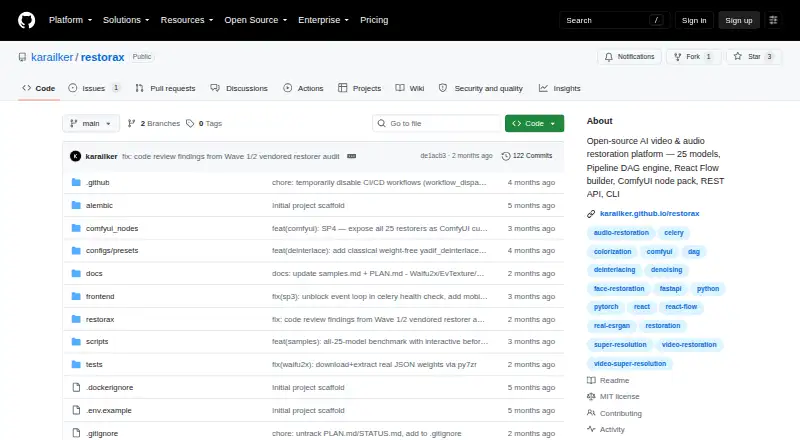
What RestoraX is
RestoraX is a free, open-source toolkit for restoring old films, home videos, and archival footage with video and audio processing models. It describes 25 models covering tasks such as upscaling, colorization, face restoration, frame interpolation, scratch and dust removal, stabilization, and audio restoration. A visual pipeline builder connects processing steps through parallel branches, merge options, retries, and progress tracking. RestoraX provides a web interface, a REST API with WebSocket progress, a command-line interface, and a ComfyUI node pack. It is designed for self-hosting, with Docker Compose setups documented for development and production. Third-party restorers can be added as separate PyPI plugins, and model weights download from HuggingFace Hub on first use. The stated minimum requirements include Python 3.11, 8 GB RAM, 5 GB disk space, and FFmpeg. CPU processing is supported; CUDA 12.1 or later with at least 8 GB of GPU VRAM is recommended. The project is licensed under MIT terms.
Good
- Free, open-source software under the MIT License.
- Provides web, API, command-line, and ComfyUI interfaces.
- Supports CPU processing.
- Plugins can add third-party restorers.
Watch out
- Requires Python 3.11, 8 GB RAM, and FFmpeg.
- Recommended GPU setup requires CUDA 12.1 or later.
- Model weights download on first use.
Who it suits
RestoraX suits people restoring films, home videos, anime, VHS, or newsreel footage who are comfortable with a self-hosted toolkit. Its interfaces and pipeline builder offer different ways to work with restoration steps.
Verdict
RestoraX offers a broad set of restoration tasks and several ways to build and run workflows. Its stated setup requirements and self-hosted deployment make those practical considerations before use.
Plans and prices
From RestoraX's own pricing page, checked 3 Oct 2026.
| Plan | Price | What it gives you |
|---|---|---|
| RestoraX | Free | Open-source MIT software · self-hosted · GPU/CPU processing |
The facts
Each one read from RestoraX's own pages, with the date it was checked.
What it does
- ComfyUI
- The project describes a ComfyUI node pack as part of its platform.checked 3 Oct 2026
- Deployment
- The maker documents Docker Compose setups for development and production and describes the software as self-hostable.checked 3 Oct 2026
- Extensibility
- Third-party restorers can be added through plugins distributed as separate PyPI packages.checked 3 Oct 2026
- Integrations
- The documented stack uses Celery and Redis for background jobs, PostgreSQL or SQLite for data storage, and MinIO in the production Docker setup.checked 3 Oct 2026
- Intended users
- The README names old-film, home-video, archival-footage, anime, VHS, and newsreel restoration as use cases.checked 3 Oct 2026
- Interfaces
- RestoraX provides a React web UI, a FastAPI REST API with WebSocket progress, and a command-line interface.checked 3 Oct 2026
- License
- The repository is released under the MIT License, which grants use, modification, and distribution subject to its terms.checked 3 Oct 2026
- Model weights
- Model weights download automatically from HuggingFace Hub on first use.checked 3 Oct 2026
- Pipeline builder
- Its visual pipeline builder uses a DAG engine with typed ports, parallel branches, merge strategies, retry policies, and per-branch progress.checked 3 Oct 2026
- Purpose
- RestoraX is an open-source AI video and audio restoration toolkit for old films, home videos, and archival footage.checked 3 Oct 2026
- Requirements
- The stated minimums include Python 3.11, 8 GB RAM, 5 GB disk, and FFmpeg; the page says CPU works and recommends CUDA 12.1 or later with 8 GB or more of GPU VRAM.checked 3 Oct 2026
- Restoration models
- The project describes 25 models for super-resolution, colorization, face restoration, frame interpolation, scratch and dust removal, deinterlacing, stabilization, SDR-to-HDR conversion, and audio restoration.checked 3 Oct 2026
- Security and compliance
- The opened maker pages provide an MIT license but do not state a security certification or compliance standard.checked 3 Oct 2026
The full review of RestoraX
Overview
RestoraX is a self-hosted toolkit for repairing video and audio, aimed at people working with aging recordings and archival material. It is best suited to technically comfortable users who want to shape their own restoration workflows. Its breadth is a draw; it is not a plug-and-play desktop enhancer.
Key features
The project describes 25 models for tasks including upscaling, colorization, face restoration, interpolation, scratch and dust removal, deinterlacing, stabilization, SDR-to-HDR conversion, and audio restoration. That range makes RestoraX useful for collections with varied problems, rather than only footage that needs enlargement. Its free plan supports upscaling up to 4x, artifact removal, frame interpolation, and face recovery.
A visual pipeline builder joins processing steps in a directed acyclic graph, with typed ports, parallel branches, merge strategies, retry policies, and progress tracking for each branch. This gives users control over complex, repeatable workflows, but requires more planning than a single-purpose enhancer. Automatic model-weight downloads from HuggingFace Hub reduce one setup chore, while plugins distributed as separate PyPI packages let developers add third-party restorers.
Users can work through a React web interface, a FastAPI REST API with WebSocket progress, or a command-line interface. A ComfyUI node pack offers another option for people already using that environment. The documented stack uses Celery and Redis for background jobs, PostgreSQL or SQLite for data storage, and MinIO in its production Docker setup; that flexibility suits managed deployments better than users seeking a minimal installer.
Pricing
| Plan | Price | Includes |
|---|---|---|
| RestoraX | free | Open-source MIT software, self-hosted, with GPU or CPU processing |
There is no paid tier or free trial. The free plan includes the core restoration capabilities, so the main cost is operating the software yourself rather than a subscription. The MIT license permits use, modification, and distribution subject to its terms.
Platforms
RestoraX supports web, API, Linux, and self-hosted use. Docker Compose setups are documented for development and production. Minimum requirements include Python 3.11, 8 GB of RAM, 5 GB of disk space, and FFmpeg. CPU processing works, but the project recommends CUDA 12.1 or later and at least 8 GB of GPU VRAM; users without suitable hardware should weigh the likely setup and processing demands before choosing it. The maker documents an MIT license, but no security certification or compliance standard.
Who it's for
RestoraX makes the most sense for technically capable users handling old films, home videos, archival footage, anime, VHS, or newsreels who want to combine multiple restoration steps and run them on their own infrastructure. Its range of models and interfaces is less compelling for someone who only needs a quick enhancement, a conventional desktop workflow, or a service that handles deployment for them.
Pros and cons
- Pro: The 25-model range covers video, image, and audio restoration tasks, useful when a collection has more than one kind of damage.
- Pro: The DAG builder and API, CLI, web UI, and ComfyUI options give workflow builders several ways to integrate and monitor processing.
- Pro: The software is free and MIT-licensed, with self-hosted CPU processing available.
- Con: Python, FFmpeg, storage, and memory requirements create a real setup burden compared with a packaged desktop app.
- Con: The recommended GPU setup calls for CUDA 12.1 or later and 8 GB or more of VRAM, which may rule out users without compatible hardware.
Alternatives
For other options, see AI Video Restoration Software. Vapourkit is a free, open-source Linux and Windows app, a better fit for users who want a conventional app on either desktop platform. Aiarty Video Enhancer suits macOS and Windows users who prefer a desktop product and can accept its free version's 120-second video limit, watermarked exports, and lack of batch export, or consider its paid plans.
Klarity is a free local and offline image/video restoration tool for Linux and Windows, better suited to users who prioritize offline desktop use over RestoraX's workflow interfaces. TensorPix offers web, API, and self-hosted access; its free plan has weekly login credits, 1 GB storage, and input capped at 720p, so it may suit users who want that service model and can work within those limits.
HitPaw VikPea is an alternative for users seeking broader device coverage, including mobile platforms. Refocused offers a local Linux, macOS, and Windows workflow with all models and full processing in its free trial, but watermarks output. Cognitech Video Investigator is a paid alternative for users considering a cloud video-investigation product; its listed annual plan is $1,399 a year. Intelion Video Lab is another option for Windows or self-hosted use, with on-premise or secure hybrid-cloud deployment described for its Analytics Bus module.
Verdict
Choose RestoraX if you want a free, self-hosted toolkit with a broad set of restoration models and the flexibility to build multi-step workflows. Its principal advantage is that combination of breadth and control without a software charge. Look elsewhere if you need a turnkey desktop enhancer or do not want to manage the stated software and hardware requirements.
Alternatives to RestoraX
- 1
TensorPix
Free planAndroidiOSWebAPI8.3From $5.50 a month - 2
HitPaw VikPea
AndroidiOSWebAPI7.8From $99.99 a year - 3

Pixop
Free planWebAPILinuxSelf-hosted7.6From $0.02 a month - 4
Phoenix Upscaler
WebAPILinuxWindows7.1$2.99 one-time - 5
Surveillant Forensic Video Enhancement
AndroidiOSWebAPI6.9From $49 a month - 6

Aiarty Video Enhancer
Free planmacOSWindows6.8From $79 a year