Klarity
Klarity is a free desktop tool for restoring images and videos locally and offline.
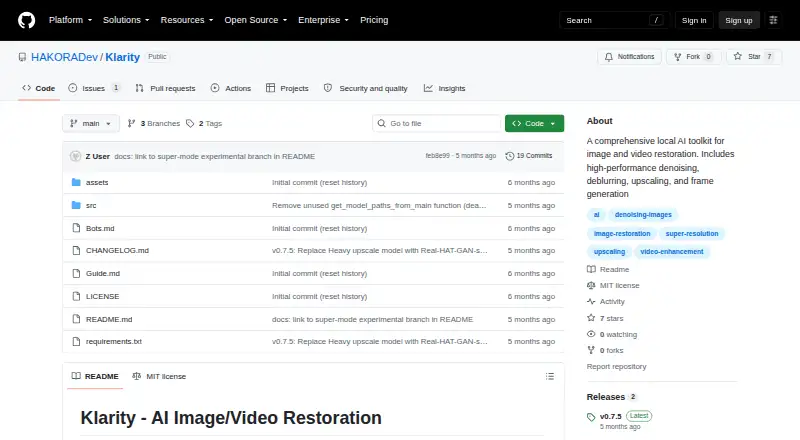
What Klarity is
Klarity is a free desktop tool for restoring images and videos locally and offline. Its modes cover denoising, deblurring, upscaling, cleaning, and full restoration, along with frame generation and related clean-frame and full-frame options. Images can be processed from JPG, JPEG, PNG, BMP, TIFF, TIF, and WebP files; supported video formats include MP4, AVI, MOV, MKV, WebM, FLV, WMV, and M4V. Video processing requires FFmpeg. Klarity offers both a graphical interface and interactive or direct command-line use. Heavy mode downloads about 888 MB of models, while Lite downloads about 204 MB and is described as 20x faster. CPU processing works without a GPU, and the listed minimum requirements are a 2-core CPU, 4 GB RAM, and 2 GB storage. AI models download on first use. The tool uses separate model components for denoising and deblurring, upscaling, and frame generation; those components have separate licenses from Klarity's MIT license. CPU-only desktop binaries are listed for Linux x86_64 and Windows x86_64. Klarity is free at no cost.
Good
- Free local and offline processing.
- Provides graphical and command-line interfaces.
- CPU processing works without a GPU.
- Supports images and videos in listed formats.
- Maximum upscaling is 4x.
Watch out
- Video processing requires FFmpeg.
- AI models download on first use.
- Listed binaries are CPU-only.
Who it suits
Klarity suits creators, editors, and others seeking image or video enhancement without subscription fees. It may also fit users who prefer local processing and can meet the listed desktop requirements.
Verdict
Klarity combines multiple restoration and frame-generation modes with local processing and no subscription fee. Video users need FFmpeg, and model downloads are part of first use.
Plans and prices
From Klarity's own pricing page, checked 2 Oct 2026.
| Plan | Price | What it gives you |
|---|---|---|
| Klarity | Free | Free, local and offline image/video restoration tool |
The facts
Each one read from Klarity's own pages, with the date it was checked.
What it does
- Download availability
- The latest release page lists CPU-only desktop binaries for Linux x86_64 and Windows x86_64.checked 2 Oct 2026
- Integrations
- It uses NAFNet for denoising and deblurring, Real-HAT-GAN or Real-ESRGAN for upscaling, and RIFE for frame generation.checked 2 Oct 2026
- Interface
- The tool provides a graphical interface and command-line modes, including interactive and direct CLI commands.checked 2 Oct 2026
- License
- The repository lists Klarity under the MIT license and gives separate licenses for its model components.checked 2 Oct 2026
- Model modes
- Heavy mode downloads about 888 MB of models for best quality, while Lite downloads about 204 MB and is described as 20x faster.checked 2 Oct 2026
- Offline use
- The maker describes Klarity as local and offline; its release notes say AI models are downloaded on first use.checked 2 Oct 2026
- Processing modes
- It offers denoise, deblur, upscale, clean, full, frame generation, clean-frame generation, and full-frame generation modes.checked 2 Oct 2026
- Purpose
- Klarity is a local, offline AI tool for restoring images and videos through denoising, deblurring, upscaling, and frame generation.checked 2 Oct 2026
- Support and audience
- The README says Klarity is built for creators, editors, and anyone who needs to enhance visual content without subscription fees.checked 2 Oct 2026
- Supported formats
- It supports JPG, JPEG, PNG, BMP, TIFF, TIF, and WebP images, plus MP4, AVI, MOV, MKV, WebM, FLV, WMV, and M4V videos.checked 2 Oct 2026
- System requirements
- The README lists minimum requirements of a 2-core CPU, 4 GB RAM, and 2 GB storage; CPU processing works without a GPU.checked 2 Oct 2026
- Video requirement
- FFmpeg is required for video processing.checked 2 Oct 2026
The full review of Klarity
Overview
Klarity is a desktop tool for restoring images and videos on Linux and Windows, with graphical and command-line interfaces. It suits people who want local processing and a choice of enhancement modes, especially those comfortable managing model downloads and video dependencies.
Its range spans denoising, deblurring, upscaling and frame generation, with CPU processing available even without a GPU. That flexibility is appealing for a free utility, though video work requires FFmpeg and the first run involves downloading models.
Key features
Klarity offers denoise, deblur, upscale and clean modes, as well as full restoration. For video, it adds frame generation, clean-frame generation and full-frame generation. This gives users more control than a single all-purpose enhancement pass, although choosing among modes means some care in matching the treatment to the footage.
Heavy mode downloads about 888 MB of models and is aimed at best quality; Lite downloads about 204 MB and is described as 20x faster. Lite is the more practical starting point when download size or processing speed matters, while Heavy favors quality over those costs. Models download on first use, so offline operation does not mean setup is download-free.
Image support covers JPG, JPEG, PNG, BMP, TIFF, TIF and WebP. Video formats include MP4, AVI, MOV, MKV, WebM, FLV, WMV and M4V, with FFmpeg required for video processing. The tool supports upscaling up to 4x, denoising, deblurring and frame interpolation.
Klarity uses NAFNet for denoising and deblurring, Real-HAT-GAN or Real-ESRGAN for upscaling, and RIFE for frame generation. Its graphical interface is suited to users who prefer visual controls; interactive and direct CLI commands provide an alternative for command-line workflows.
The stated minimum requirements are a 2-core CPU, 4 GB RAM and 2 GB storage. CPU processing works without a GPU, which broadens access to the tool but does not promise fast processing on modest hardware.
Pricing
Klarity costs nothing. The free plan includes the local image and video restoration tool, with no free trial because there is no paid plan to trial. There are no paid tiers or subscription terms to weigh against its feature set.
That makes it an easy choice for users who want restoration without recurring software fees. The trade-off is practical rather than financial: users must accommodate first-use model downloads, and video processing requires FFmpeg.
Platforms
Klarity is desktop software for Linux and Windows. The latest release provides CPU-only binaries for Linux x86_64 and Windows x86_64. A GPU is not required, but the stated minimum still calls for a 2-core CPU, 4 GB RAM and 2 GB storage.
The project is licensed under MIT, with separate licenses for its model components. That distinction matters for anyone evaluating reuse or redistribution: the application license does not replace the terms attached to the models.
Who it's for
Klarity makes sense for creators, editors and other users who want to restore still images or video locally, need both GUI and CLI access, and value a free tool with several distinct processing modes. Its broad format support and CPU option make it useful when a dedicated GPU is unavailable.
It is less suitable for someone seeking a setup-free video workflow, since FFmpeg is required, or for anyone expecting to avoid downloads entirely: the models arrive on first use. Users who need cloud access or a platform beyond Linux and Windows should consider another option.
Pros and cons
- Pros: Free use avoids subscription costs, and the multiple restoration and frame-generation modes provide more than a single enhancement path.
- Pros: CPU processing and desktop binaries for Linux and Windows let users work without a GPU.
- Pros: Broad image and video format support, plus both graphical and command-line interfaces, suit varied workflows.
- Cons: Video processing depends on FFmpeg, adding a setup requirement before footage can be handled.
- Cons: First-use model downloads take about 204 MB in Lite mode or 888 MB in Heavy mode; Heavy prioritizes quality while Lite is described as 20x faster.
- Cons: CPU support improves accessibility but does not guarantee quick processing on the minimum-spec machine.
Alternatives
For a broader comparison, browse AI Video Restoration Software.
Vapourkit is another free Linux and Windows option; choose it if its open-source GPL-3.0 licensing is a better fit.
Aiarty Video Enhancer is worth considering for macOS support or a paid workflow; its free version limits videos to under 120 seconds, adds watermarks and has no batch export.
RestoraX suits readers who want open-source MIT software for self-hosted GPU or CPU processing, with Linux, API and web options.
TensorPix is a web-oriented alternative with a free tier capped at 720p input, 1 GB storage and weekly login credits, among other limits.
HitPaw VikPea is an option for users seeking support across mobile and desktop platforms, with paid licensing available.
Cognitech Video Investigator is a paid alternative with cloud access and a listed annual plan at $1,399 a year.
Intelion Video Lab is another paid option for Windows or self-hosted deployment, with custom pricing.
My Cognitech Cloud is a paid alternative with a listed annual plan at $1,399 a year.
Verdict
Choose Klarity if you want free, local restoration on Linux or Windows and value a broad set of image and video modes, including frame generation. Its strongest case is flexibility without subscription costs; look elsewhere if FFmpeg setup, model downloads or a CPU-based workflow do not suit your needs.
Getting started
- Open the Klarity GitHub repository or release page
- Download the CPU-only binary for Linux x86_64 or Windows x86_64
- Choose Heavy or Lite model mode
- Allow the AI models to download on first use
- Install FFmpeg before processing videos
- Process files through the graphical interface or command line
Limits worth knowing
Lite mode downloads about 204 MB of models, while Heavy downloads about 888 MB. The listed minimum is a 2-core CPU, 4 GB RAM and 2 GB storage; video processing also needs FFmpeg.
Questions
How much does Klarity cost?
Klarity is free, with a listed plan price of no cost.
Which systems can run it?
Klarity supports Linux and Windows desktop use. The latest release lists CPU-only binaries for Linux x86_64 and Windows x86_64.
Does it work offline?
Yes. It is described as local and offline, although models download on first use.
What files can it process?
Images include JPG, JPEG, PNG, BMP, TIFF, TIF and WebP. Videos include MP4, AVI, MOV, MKV, WebM, FLV, WMV and M4V.
Is a GPU required?
No. CPU processing works without a GPU, with a listed minimum of a 2-core CPU, 4 GB RAM and 2 GB storage.
What license does it use?
The repository lists Klarity under the MIT license and gives separate licenses for its model components.
Alternatives to Klarity
- 1
TensorPix
Free planAndroidiOSWebAPI8.3From $5.50 a month - 2
HitPaw VikPea
AndroidiOSWebAPI7.8From $99.99 a year - 3

Pixop
Free planWebAPILinuxSelf-hosted7.6From $0.02 a month - 4
Phoenix Upscaler
WebAPILinuxWindows7.1$2.99 one-time - 5
Surveillant Forensic Video Enhancement
AndroidiOSWebAPI6.9From $49 a month - 6

Aiarty Video Enhancer
Free planmacOSWindows6.8From $79 a year