Resanance
Resanance is free soundboard software for applications that accept audio input.
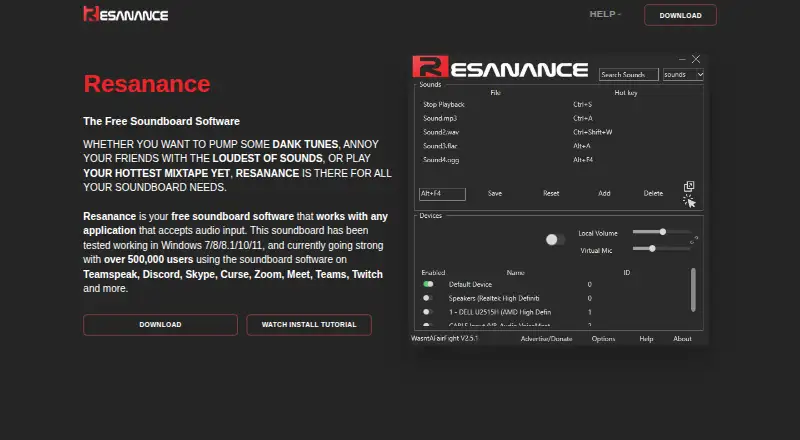
What Resanance is
Resanance is free soundboard software for applications that accept audio input. You can add as many sounds and hotkeys as you need, play audio through multiple devices at once, and adjust local and microphone volume separately. Controls include per-sound and per-button volume, adjustable button size, borders, and button colours. The feature list also includes MIDI soundboard support and text to speech. To find sounds, you can sort by name, search, or trigger a random sound with a hotkey. The site lists TeamSpeak, Discord, Skype, Curse, Zoom, Meet, Teams, and Twitch as compatible app examples. It says the software has been tested on Windows 7, 8, 8.1, 10, and 11, and lists Android, web, and Windows platforms. Help links point to Discord, Reddit, and a YouTube tutorial. Its privacy notice says it may collect IP address, device and usage information, and cookies for operations, security, analytics, and reporting.
Good
- Free plan with unlimited sounds and hotkeys
- Routes audio to multiple devices simultaneously
- Controls local and microphone volume separately
- Includes MIDI soundboard support and text to speech
Watch out
- Privacy notice was last updated February 13, 2021
- Privacy notice says complete transmission or storage security cannot be guaranteed
Who it suits
Resanance suits people who want a free soundboard for audio-input applications, including streamers and users of the named chat and meeting apps. Its multiple-device output and hotkey controls may also suit users who need to manage sound playback from customizable buttons.
Verdict
Resanance combines sound playback, hotkeys, and audio routing in a free soundboard. Review its privacy notice if its stated collection of device, usage, IP, and cookie data matters to you.
Plans and prices
From Resanance's own pricing page, checked 15 Oct 2026.
| Plan | Price | What it gives you |
|---|---|---|
| Resanance | Free | free soundboard · unlimited sounds and hotkeys |
The facts
Each one read from Resanance's own pages, with the date it was checked.
What it does
- Advertising model
- The FAQ says donations and advertising fund servers, licences, certificates, developers and support staff.checked 15 Oct 2026
- Audio routing
- Resanance can play audio to multiple devices simultaneously and control local and microphone volume individually.checked 30 Sep 2026
- Audio setup
- Setup requires selecting CABLE Output as the recording device and configuring microphone listening in Windows.checked 15 Oct 2026
- Button customization
- Buttons can be resized, given borders and recoloured, with individual button volume settings.checked 15 Oct 2026
- Compatibility
- The site says it has been tested on Windows 7, 8, 8.1, 10, and 11.checked 30 Sep 2026
- Developer legal name
- Google Play identifies the developer as WASNTAFAIRFIGHT LTD.checked 15 Oct 2026
- Documentation depth
- The official help content is a troubleshooting FAQ covering audio devices, hotkeys, push-to-talk and memory behavior.checked 15 Oct 2026
- Google Play data safety
- Google Play reports no third-party data sharing, possible collection of device IDs, encryption in transit and no user deletion option.checked 15 Oct 2026
- Installation
- The Windows installer is an MSI inside a ZIP archive and prompts installation of VB-Cable.checked 15 Oct 2026
- Licence
- Wikipedia lists Resanance as proprietary software for Microsoft Windows rather than open source.checked 15 Oct 2026
- Limit: audio problems
- Reddit users report echo, very quiet or missing audio, crashes when adding sounds and hotkeys failing inside games.checked 15 Oct 2026
- Limit: hotkeys
- The FAQ says some keys, including mouse buttons, are unsupported for push-to-talk and recommends restarting as administrator for in-game hotkeys.checked 15 Oct 2026
- Limit: microphone routing
- The FAQ says microphone problems may require installing and configuring Voicemeeter.checked 15 Oct 2026
- Limit: mobile controls
- Chrome-Stats reproduces reviews requesting zoom, sorting and view options and reporting that the app did not work properly.checked 15 Oct 2026
- Limit: mobile interface
- A Google Play reviewer said the mobile app mainly offered QR rescanning and pause or stop controls, with clipped interface elements.checked 15 Oct 2026
- Limit: simultaneous playback
- The FAQ says playback is capped at 15 simultaneous sounds to avoid memory leaks.checked 15 Oct 2026
- MIDI
- The feature list includes MIDI soundboard support.checked 15 Oct 2026
- MIDI and TTS
- The feature list includes MIDI soundboard support and text to speech.checked 30 Sep 2026
- Multiple outputs
- Audio can be played to multiple devices at the same time.checked 15 Oct 2026
- Named integrations
- The maker names TeamSpeak, Discord, Skype, Curse, Zoom, Google Meet, Microsoft Teams and Twitch as compatible applications.checked 15 Oct 2026
- Per-sound volume
- Each sound can have its own volume setting.checked 15 Oct 2026
Where it runs
- Android companion
- The Android app controls Resanance remotely and currently works only with beta 2.6.3-or-later button profiles.checked 15 Oct 2026
The company
- Headquarters
- Google Play lists the developer address as 20-22 Wenlock Road, London N1 7GU, United Kingdom.checked 15 Oct 2026
Money
- Praise: low cost
- A Reddit user described the free soundboard as having very non-intrusive ads while praising its usefulness.checked 15 Oct 2026
The full review of Resanance
Resanance is a free soundboard for sending clips and other audio into applications that accept audio input. It is aimed at streamers, callers, and community hosts who want unlimited sounds, hotkey control, and flexible output routing. The result is a feature-rich no-cost board, with Windows compatibility and data-handling considerations worth weighing before adoption.
Overview
Resanance focuses on getting soundboard audio into communication and streaming software rather than acting as a standalone media player. Named compatible applications include TeamSpeak, Discord, Skype, Curse, Zoom, Meet, Teams, and Twitch. That broad target makes it a practical choice when your setup already depends on software that accepts an audio input feed.
Its strongest proposition is capacity: the free plan allows as many sounds and hotkeys as you want. There is no trial period to manage and no paid tier to unlock the core board, so it suits hobbyists and regular users who would rather configure one lasting setup than work around quotas.
Key features
Audio can be played to multiple devices simultaneously, while local and microphone volume have separate controls. In practice, that lets you keep a sound audible to yourself while deciding independently how it reaches a call or stream. Volume can also be adjusted per sound and per button, which is useful when clips were recorded at different levels or one effect needs to sit behind speech.
The board is customizable without sacrificing quick access. Buttons can be resized, given borders, and assigned different colours. Name sorting and search make a larger library easier to navigate, and a random-sound hotkey provides a fast way to vary playback. MIDI soundboard support and text to speech extend the tool beyond a collection of prerecorded clips, although the available facts do not establish the depth of those two functions.
Hotkey triggering, streaming integrations, and voice effects are included in the plan description. Support is offered through Discord, Reddit, and a YouTube tutorial, giving users community and video-based routes when configuration questions arise.
Pricing
Resanance — free. The plan includes a free soundboard, unlimited sounds and hotkeys, and multiple output devices. There is no free trial because the product is already free, and no seat or usage quota is stated. This is the right fit for individual users who need a permanent soundboard without subscription or licence fees; it offers little reason to seek a cheaper option, since the listed price is zero.
Platforms
Resanance provides desktop and browser apps and is listed for Android, web, and Windows. The site says the software has been tested on Windows 7, 8, 8.1, 10, and 11, which gives Windows users a defined compatibility range. Readers on other platforms should choose it only if the browser or Android offering meets their particular workflow, since the stated Windows testing does not establish equivalent coverage elsewhere.
Who it's for
Choose Resanance if you run calls, streams, or online communities and want a large, hotkey-driven sound library with separate microphone and local-volume control. It is especially suitable when simultaneous output to several devices or per-button volume matters. It is less compelling for someone seeking a simple, minimal clip launcher, or for a user who requires a clearly documented modern operating-system support policy beyond the Windows versions named above.
Pros and cons
Pros
- Unlimited sounds and hotkeys: lets an expanding library grow without a stated cap.
- Multiple-device output: sends audio to more than one device at once, useful for monitoring and broadcasting.
- Independent volume controls: separates local, microphone, sound, and button levels for finer balancing.
- Broad input-app compatibility: named support covers major calling, meeting, and streaming services.
- Free plan: the core offering costs $0.00 USD and has no subscription commitment.
Cons
- Windows support is the clearest testing statement: users on other platforms have less explicit compatibility guidance.
- Privacy considerations: the notice says IP address, device and usage information, and cookies may be collected for operations, security, analytics, and reporting.
- Security is not absolute: technical and organizational safeguards are described, but transmission or storage cannot be guaranteed completely secure.
- Older privacy notice: the published notice was last updated February 13, 2021, so privacy-conscious readers may want to review it carefully.
Alternatives
For a wider platform mix and a freemium model with a 500-plus voice library, basic voice filters, moderation, and word censorship, choose Blerp. If you want a no-account, no-install soundboard with no limits or watermarks, SoundTools Soundboard is the more direct fit. Sound Show suits users who want most features free but can accept limits of 10 tabs and 40 sounds per tab; its Pro plan costs 45.00 EUR once.
EXP Soundboard is a straightforward free option for Windows with MP3/WAV support. Stadium Sound is another free, open-source choice for macOS, web, and Windows. For AI voice cleaning, pick Voicemod AI Voice Cleaner instead. Open-source users can consider Amplitude Soundboard, while LivePlay offers all features without licence fees, subscriptions, or paywalls. Browse the Soundboard Software ranking for the broader category.
Verdict
Resanance is a strong recommendation for streamers and callers who want an unlimited, customizable soundboard with hotkeys, multiple outputs, and detailed volume control at no cost. Look elsewhere if your priority is a no-data-collection posture, a more recently dated privacy statement, or platform support documented beyond its stated Windows testing range.
Alternatives to Resanance
- 1

Blerp
Free planAndroidiOSWebExtension8.1From $4.99 a month - 2

Sound Show
Free planAndroidLinuxmacOSWindows7.0€45 one-time - 3
Voicemod AI Voice Cleaner
Free planAndroidiOSmacOSWindows6.9Free plan - 4

Soundpad
APIWindows6.8 - 5
SoundTools Soundboard
Free planAndroidiOSWebLinux6.7Free plan - 6
Go Button
Free planiOS6.6$99.99 one-time