
EXP Soundboard
EXP Soundboard is a free, open-source soundboard for playing custom audio clips through speakers or virtual audio devices.
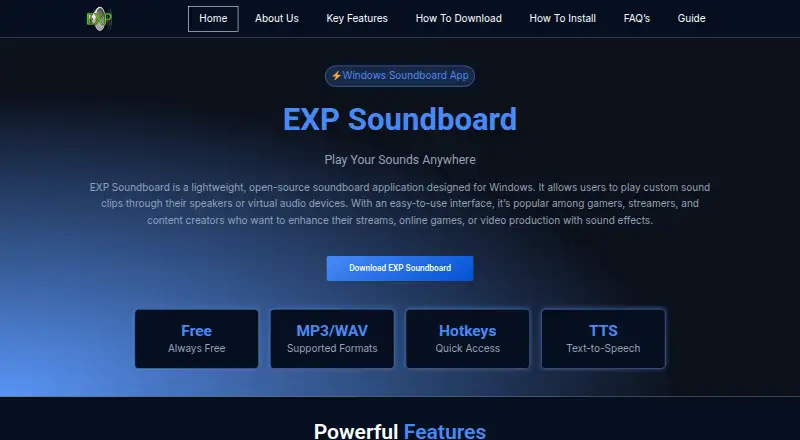
What EXP Soundboard is
EXP Soundboard is a free, open-source soundboard for playing custom audio clips through speakers or virtual audio devices. It supports MP3 and WAV files, hotkeys for quick playback, individual sound volume controls, and configurable output. A text-to-speech feature can play custom messages. Gamers, streamers, and content creators are among its intended users. Audio can optionally be routed to Discord or OBS using Virtual Audio Cable or a similar tool. The software is designed for Windows, with Windows 7, 8, 10, and 11 listed as compatible. Mac and Linux users can run it through a virtual machine or Wine; browser access is offered through OnWorks in a virtual Windows environment. After installation, it works offline, except when used through OnWorks. Listed minimum requirements include Windows 7, a 1 GHz Intel or AMD CPU, 1 GB RAM, 50 MB of free disk space, and Java Runtime Environment 8 or later. The site says the installer may be flagged by antivirus software and advises downloading from trusted sources.
Good
- Free and open-source.
- Supports MP3 and WAV files.
- Hotkeys trigger sounds quickly.
- Individual sound volume and playback output are configurable.
- Works offline after installation.
Watch out
- Designed for Windows; Mac and Linux require a virtual machine or Wine.
- Browser use relies on a virtual Windows environment.
- The installer may be flagged by antivirus software.
- Windows minimum requirements include Java Runtime Environment 8 or later.
Who it suits
EXP Soundboard suits gamers, streamers, and creators who want hotkey playback of custom clips. It may also fit users who need text-to-speech messages or configurable audio output.
Verdict
EXP Soundboard covers core soundboard tasks, including hotkeys, volume adjustment, and text-to-speech. Consider its Windows-focused setup and the installer warning before downloading.
Plans and prices
From EXP Soundboard's own pricing page, checked 8 Oct 2026.
| Plan | Price | What it gives you |
|---|---|---|
| Free | Free | Always free · Windows · MP3/WAV |
The facts
Each one read from EXP Soundboard's own pages, with the date it was checked.
What it does
- Audio controls
- The site says users can adjust volume for individual sounds and configure playback output.checked 8 Oct 2026
- Audio formats
- It supports MP3 and WAV audio files.checked 8 Oct 2026
- Hotkeys
- Users can assign hotkeys to sounds for quick playback.checked 8 Oct 2026
- Integrations
- The site describes routing audio to Discord or OBS through Virtual Audio Cable or similar tools; it says this setup is optional.checked 8 Oct 2026
- Intended users
- The site describes it as useful for gamers, streamers, and content creators.checked 8 Oct 2026
- Offline use
- The FAQ says the application works offline after installation, except when used online through OnWorks.checked 8 Oct 2026
- Online use
- The site describes running EXP Soundboard in a browser through OnWorks using a virtual Windows environment.checked 8 Oct 2026
- Other operating systems
- The site says EXP Soundboard is designed for Windows but can be run on Mac or Linux using a virtual machine or Wine.checked 8 Oct 2026
- Security and trust
- The site says the software is not signed with a commercial certificate and advises downloading it from trusted sources; it also says antivirus software may flag the installer.checked 8 Oct 2026
- Support
- The site invites support questions by email and lists [email protected] as its contact address.checked 8 Oct 2026
- System requirements
- The listed minimum requirements include Windows 7, a 1 GHz Intel or AMD CPU, 1 GB RAM, 50 MB free disk space, and Java Runtime Environment 8 or later.checked 8 Oct 2026
- Text to speech
- It includes a text-to-speech feature for playing custom messages.checked 8 Oct 2026
- What it does
- EXP Soundboard is a lightweight, open-source soundboard for playing custom clips through speakers or virtual audio devices.checked 8 Oct 2026
Where it runs
- Windows support
- The site lists Windows 7, 8, 10, and 11 as compatible operating systems.checked 8 Oct 2026
The full review of EXP Soundboard
EXP Soundboard is a free desktop soundboard for triggering custom audio clips. It is best suited to Windows users who want keyboard-triggered effects for games, streams, or content creation. Its focused playback tools cost nothing, but routing audio into Discord or OBS takes extra setup.
Overview
EXP Soundboard keeps its job narrow: play MP3 or WAV clips through speakers or a virtual audio device, with hotkeys, per-sound volume adjustment, and output configuration. That is a useful combination for quickly cueing effects without paying for a soundboard, while text-to-speech lets users play custom messages alongside recorded clips. It is a playback tool, not a general audio-production suite.
Discord and OBS routing is possible through Virtual Audio Cable or a similar tool, but that extra component makes the setup less direct than simply selecting an in-app integration. The app works offline after installation. For browser access, OnWorks runs it in a virtual Windows environment, which is a separate route rather than native browser playback.
Key features
- Hotkey playback: Assign keys to sounds for quick triggering. This suits stream cues and game sessions where navigating through clips would be disruptive.
- Clip and output controls: MP3 and WAV support, individual volume adjustment, and configurable playback output cover the basics for a small effects library. The format selection is limited to those two types.
- Text-to-speech: Play custom messages as well as audio files, a practical addition for creators who want spoken cues.
- Optional streaming audio routing: With Virtual Audio Cable or a similar tool, audio can be routed to Discord or OBS. That broadens its use for calls and streams, though setup is required outside EXP Soundboard.
- Offline use: The installed application works without an internet connection; the OnWorks browser option is the exception.
Pricing
EXP Soundboard is free. Its Free plan costs nothing and is always free, with Windows, MP3, and WAV specified. There is no paid tier to unlock the core soundboard tools described here, making it a straightforward choice for someone who wants hotkeys and basic playback without a subscription.
Platforms
The desktop app is designed for Windows, with Windows 7, 8, 10, and 11 listed as compatible. Minimum requirements are Windows 7, a 1 GHz Intel or AMD CPU, 1 GB RAM, 50 MB of free disk space, and Java Runtime Environment 8 or later.
Mac and Linux users can run it through a virtual machine or Wine, rather than as a native app. The browser option uses OnWorks’ virtual Windows environment. Although the platform listing includes Linux, macOS, and web, the stated operating-system guidance makes Windows the most direct choice.
The installer is not signed with a commercial certificate, and antivirus software may flag it. The site advises downloading from trusted sources, a sensible precaution for readers who are cautious about installing unsigned software. Support questions can be sent by email to [email protected].
Who it's for
Gamers, streamers, and content creators who need a free way to trigger MP3 or WAV effects, adjust individual sound levels, or play text-to-speech messages are the clearest fit. Windows users in particular get the most direct path. People who need native Mac or Linux support, or want Discord and OBS routing without adding a virtual audio tool, should look elsewhere.
Pros and cons
- Pro: Always-free pricing includes hotkey-triggered playback, so users can cue sounds without a subscription.
- Pro: Per-sound volume and output configuration give users basic control over how clips are played.
- Pro: Offline operation after installation suits use where an internet connection is unavailable.
- Con: Discord and OBS routing relies on Virtual Audio Cable or a similar tool, adding configuration beyond the app.
- Con: Mac and Linux use depends on Wine or a virtual machine, so it is not the natural pick for users seeking native support.
- Con: The unsigned installer may trigger antivirus warnings, which can give cautious users pause.
Alternatives
For a wider comparison, browse Soundboard Software.
- Blerp is worth considering if its free TTS plan, with a 500+ voice library, basic filters, moderation queue, and word censorship, matches your priorities; it also has a free trial.
- SoundTools Soundboard is another free option, with no account, installation, watermarks, or limits.
- Sound Show may suit users who want a free plan with up to 10 tabs and 40 sounds per tab, or a paid Pro plan at €45, paid once.
- Resanance is a free alternative for users who value unlimited sounds and hotkeys across multiple output devices.
- Stadium Sound is another free alternative.
- Voicemod AI Voice Cleaner is a free-plan option focused on AI voice cleaning.
- Amplitude Soundboard is a free and open-source soundboard for Windows, Linux, and macOS.
- LivePlay is a free alternative that offers all features without licence fees, subscriptions, or paywalls.
Verdict
Choose EXP Soundboard if you want a no-cost, Windows-focused soundboard with hotkeys, basic volume and output controls, and text-to-speech that works offline. Its main advantage is a useful core toolset without ongoing cost; its main drawback is the extra routing setup for streams and calls, compounded by the workaround needed on Mac and Linux. For users who want a more direct cross-platform setup, another soundboard is the better fit.
Getting started
- Open the EXP Soundboard website
- Download the Windows application from a trusted source
- Install it on a compatible Windows system with Java Runtime Environment 8 or later
- Add MP3 or WAV sounds
- Assign hotkeys and adjust each sound’s volume
- Configure playback output or optional Virtual Audio Cable routing
Limits worth knowing
The free plan is always free. Listed minimum requirements include Windows 7, a 1 GHz Intel or AMD CPU, 1 GB RAM, 50 MB of free disk space, and Java Runtime Environment 8 or later.
Questions
Is EXP Soundboard free?
Yes. The listed Free plan costs nothing and is always available.
Which platforms are listed?
It is listed for Linux, macOS, web, and Windows. Windows is the designed platform; Mac and Linux use can run through Wine or a virtual machine, and web access uses OnWorks.
Can it work offline?
After installation, the application works offline. Online use through OnWorks is the exception.
Can it send audio to Discord or OBS?
Yes, optionally. Routing uses Virtual Audio Cable or a similar tool.
What audio files does it support?
It supports MP3 and WAV files.
Is it open source?
Yes. EXP Soundboard is described as open-source software.
Alternatives to EXP Soundboard
- 1

Blerp
Free planAndroidiOSWebExtension8.1From $4.99 a month - 2
Resanance
Free planAndroidWebWindows7.0Free plan - 3

Sound Show
Free planAndroidLinuxmacOSWindows7.0€45 one-time - 4
Voicemod AI Voice Cleaner
Free planAndroidiOSmacOSWindows6.9Free plan - 5

Soundpad
APIWindows6.8 - 6
SoundTools Soundboard
Free planAndroidiOSWebLinux6.7Free plan