
LivePlay
LivePlay is an audio playback app for live shows, built for cue management by live sound operators.
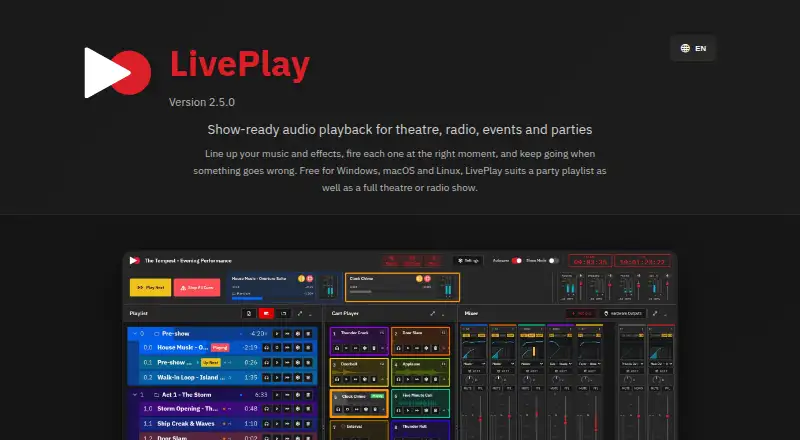
What LivePlay is
LivePlay is an audio playback app for live shows, built for cue management by live sound operators. Playlists and cart buttons organize cue groups and support fades, loops, crossfades, and next-cue actions. Cues can be routed to channels on one or more audio interfaces. For mixing and monitoring, the app includes audio buses, EQ, gate, compressor, auxiliary sends, output meters, loudness targets, and a master limiter.
Control options include mouse, touch, keyboard, MIDI, HTTP, and WebSocket. Media can be added by drag and drop or imported from YouTube audio; LivePlay also provides waveform display and LTC timecode output. A desktop controller can connect over a network to a local or remote audio server. The app runs on Linux, macOS, and Windows as a desktop app, and is released under the AGPL-3.0-only license. LivePlay is free at no cost, with all features and no licence fees, subscriptions, or paywalls. The maker advises using remote control on a trusted network; released installers are unsigned and macOS builds are not notarized.
Good
- Free with all features and no paywalls
- Cue groups support fades, loops, and crossfades
- Routes cues to one or more audio interfaces
- Offers mouse, touch, keyboard, MIDI, and network control
Watch out
- Remote control uses plain HTTP and WebSocket
- Released installers are unsigned
- macOS builds are not notarized
Who it suits
LivePlay suits live sound operators who need to manage playback cues for events. Its network controls and audio routing may also fit setups using one or more audio interfaces.
Verdict
LivePlay combines cue playback, routing, and monitoring tools for live-event audio. Consider its network security and installer-signing limitations when choosing how to deploy it.
Plans and prices
From LivePlay's own pricing page, checked 8 Oct 2026.
| Plan | Price | What it gives you |
|---|---|---|
| Free | Free | All features · no licence fees, subscriptions, or paywalls |
The facts
Each one read from LivePlay's own pages, with the date it was checked.
What it does
- Audio routing
- Cues can be routed to channels on one or more audio interfaces.checked 8 Oct 2026
- Controls
- LivePlay supports mouse, touch, keyboard, MIDI, HTTP, and WebSocket control.checked 8 Oct 2026
- Cue playback
- Playlists and cart buttons support cue groups, fades, loops, crossfades, and next-cue actions.checked 8 Oct 2026
- Installer signing
- The maker states that released installers are unsigned and that macOS builds are not notarized.checked 8 Oct 2026
- Intended users
- The maker describes LivePlay as built for live sound operators and live-event audio playback.checked 8 Oct 2026
- License
- LivePlay is released under the AGPL-3.0-only license.checked 8 Oct 2026
- Media and timecode
- The app supports drag-and-drop and YouTube audio import, waveform display, and LTC timecode output.checked 8 Oct 2026
- Mixing and monitoring
- Features include audio buses, EQ, gate, compressor, auxiliary sends, output meters, loudness targets, and a master limiter.checked 8 Oct 2026
- Network security
- The maker says remote control uses plain HTTP and WebSocket and advises using it on a trusted network.checked 8 Oct 2026
- Purpose
- LivePlay is an audio playback app for live shows, designed for cue management by live sound operators.checked 8 Oct 2026
- Remote operation
- A desktop controller can connect to a local or remote audio server on a network.checked 8 Oct 2026
- Support
- Users can report problems through the project's GitHub issue tracker.checked 8 Oct 2026
Alternatives to LivePlay
- 1

Blerp
Free planAndroidiOSWebExtension8.1From $4.99 a month - 2
Resanance
Free planAndroidWebWindows7.0Free plan - 3

Sound Show
Free planAndroidLinuxmacOSWindows7.0€45 one-time - 4
Voicemod AI Voice Cleaner
Free planAndroidiOSmacOSWindows6.9Free plan - 5

Soundpad
APIWindows6.8 - 6
SoundTools Soundboard
Free planAndroidiOSWebLinux6.7Free plan