
Sound Show
Sound Show is a soundboard and multimedia player for managing audio cues during live performances.
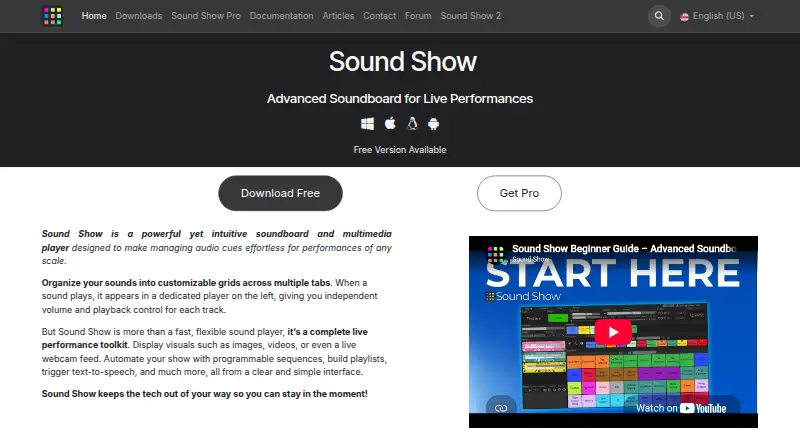
What Sound Show is
Sound Show is a soundboard and multimedia player for managing audio cues during live performances. Tracks can be layered or crossfaded, and each has independent volume and playback controls. The app can also project video, images, text, and webcam feeds on a second display. You can build automated sequences with delays, automatic starts, simultaneous playback, or waits for input. Playlists support autoplay, shuffle, and looping, and can be saved and loaded. Listed sound formats include MP3, WAV, FLAC, MP2, WMA, OGG, and AIFF. The free edition allows up to 10 tabs and 40 sounds per tab, has limited visual customization, locks some modules, and supports up to two audio outputs. Pro costs €45, paid once and adds unlimited tabs and sounds, custom grids, skins and icons, integrations for MIDI, QLC+, OBS, and Android remote control, plus up to eight audio outputs. The Android remote controls the desktop app when both devices share a Wi-Fi network. Listed requirements include Windows 10 21H1 or newer, macOS 11 Big Sur or newer, Linux x86_64, and Android 6.0 or newer.
Good
- Layers or crossfades tracks with independent playback controls.
- Projects several kinds of media on a second display.
- Sequences can include delays and waits for input.
- Playlists support autoplay, shuffle, and looping.
- Pro integrates with MIDI, OBS, QLC+, and Android remote.
Watch out
- Free is limited to 10 tabs and 40 sounds per tab.
- Some modules are locked in the free edition.
- Free supports up to two audio outputs.
- Requires a supported desktop or Android operating system.
Who it suits
Sound Show suits performers who need to organize and automate audio cues, or project media during a live show. The free limits and Pro-only integrations are worth checking against your setup.
Verdict
Sound Show combines cue playback, media projection, and show automation for live performance. Its free limits may be enough for smaller cue sets, while Pro raises those limits and adds integrations.
Plans and prices
From Sound Show's own pricing page, checked 30 Sep 2026.
| Plan | Price | What it gives you |
|---|---|---|
| Free | Free | Most features · Up to 10 tabs and 40 sounds per tab · Limited visual customization · Some modules locked |
| Pro | €45, paid once | Unlimited sounds and tabs · Custom grids, skins and icons · MIDI, QLC+, OBS and Android remote integrations · Up to 8 audio outputs · One-time payment |
The facts
Each one read from Sound Show's own pages, with the date it was checked.
What it does
- Audio formats
- The feature list names MP3, WAV, FLAC, MP2, WMA, OGG and AIFF support for sounds.checked 30 Sep 2026
- Audio outputs
- The feature comparison lists a maximum of two audio outputs in Free and eight in Pro.checked 30 Sep 2026
- Creator
- The maker identifies himself as Laurent Herbin, a software developer and improv enthusiast who created Sound Show for live performances.checked 30 Sep 2026
- Integrations
- Pro includes MIDI, Stream Deck, OBS, QLC+ lighting control and Android remote control integrations.checked 30 Sep 2026
- Media projection
- It can project video, images, text and webcam feeds on a second display.checked 30 Sep 2026
- Playlists
- Playlists support autoplay, shuffle, looping, and saving and loading.checked 30 Sep 2026
- Privacy
- The privacy policy says Sound Show does not store payment card details and does not sell or rent personal data.checked 30 Sep 2026
- Purpose
- Sound Show is a soundboard and multimedia player for managing audio cues in live performances.checked 30 Sep 2026
- Remote control
- The Android remote can control the desktop software when both devices are on the same Wi-Fi network.checked 30 Sep 2026
- Requirements
- The download page specifies Windows 10 21H1 or newer, macOS 11 Big Sur or newer, Linux x86_64, and Android 6.0 or newer.checked 30 Sep 2026
- Show automation
- Users can program sequences with delays, automatic starts, simultaneous playback or waits for input.checked 30 Sep 2026
- Sound playback
- Sounds can be layered or crossfaded, with independent volume and playback control for each track.checked 30 Sep 2026
- Support
- The feature comparison says users can get help or request features through Discord, Facebook or the website contact form.checked 30 Sep 2026
Money
- Free limits
- The free edition is limited to 10 tabs and 40 sounds per tab, with limited visual customization and some modules locked.checked 30 Sep 2026
The company
- Headquarters
- Perwez, Belgiumchecked 28 Sep 2026
Where it runs
- Platforms
- Downloads are listed for Windows, macOS and Linux; Android is labeled an early preview with the free edition only.checked 30 Sep 2026
The full review of Sound Show
Overview
Sound Show is a desktop soundboard and multimedia player for organizing audio cues in live performances. It suits performers who need to coordinate layered sound, projected media, or automated sequences. Its free edition has meaningful capacity limits; Pro removes the sound and tab caps and adds show-control integrations.
Key features
Each sound can be layered or crossfaded, with its own volume and playback controls. That gives performers room to shape overlapping cues without treating the whole board as one audio stream. Sound Show also plays MP3, WAV, FLAC, MP2, WMA, OGG, and AIFF files.
For shows that combine audio with visuals, the software can project video, images, text, and webcam feeds to a second display. Sequences can start automatically, run together, pause for input, or use delays. Playlists add autoplay, shuffle, looping, and save-and-load options, making the software useful for repeatable cue runs as well as spontaneous playback.
Hotkey triggering is supported. Pro adds MIDI, Stream Deck, OBS, QLC+ lighting control, and Android remote integrations. The Android remote controls the desktop software when both devices share a Wi-Fi network. Free is capped at two audio outputs, compared with eight in Pro, which matters for more involved sound routing.
Pricing
Free: free. It includes most features, but limits users to 10 tabs and 40 sounds per tab, restricts visual customization, locks some modules, and allows up to two audio outputs. It is a practical starting point for smaller cue sets, but the caps may get in the way as a show grows.
Pro: €45, paid once, billed as a one-time payment. It provides unlimited sounds and tabs, custom grids, skins and icons, MIDI, QLC+, OBS, and Android remote integrations, plus up to eight audio outputs. For performers who need those integrations, more outputs, or room beyond Free’s caps, Pro is the relevant upgrade; those running smaller boards can stay with Free.
Platforms
Sound Show has a desktop app for Windows, macOS, and Linux, plus Android. The download requirements are Windows 10 21H1 or newer, macOS 11 Big Sur or newer, Linux x86_64, and Android 6.0 or newer. There is no browser app. The Android app serves as a remote for the desktop software over the same Wi-Fi network.
Who it's for
Sound Show is best suited to live performers who need a configurable cue board alongside media projection or automated sequences. Free fits smaller setups and lets users explore the main workflow; Pro is a better match for larger boards, additional audio outputs, and integrated lighting, streaming, or remote control. It is less suited to someone who specifically wants a browser-based soundboard.
Pros and cons
- Pro: Layering, crossfades, and per-track controls give performers independent control over concurrent sounds.
- Pro: Media projection and programmable sequences bring visuals and repeatable timing into the same performance tool.
- Pro: Pro includes integrations for MIDI, Stream Deck, OBS, QLC+, and Android remote control.
- Con: Free stops at 10 tabs, 40 sounds per tab, and two audio outputs, with limited customization and locked modules.
- Con: There is no browser app, and Android remote control depends on both devices being on the same Wi-Fi network.
Alternatives
Soundboard Software is the category directory for comparing soundboard options. Consider SoundTools Soundboard if you want a free option across web and mobile as well as desktop, with no account, install, watermarks, or limits.
AudioPad is another free option for Linux and Windows. Stadium Sound is free and available on macOS, Windows, and the web. Resanance is worth considering for free software with unlimited sounds and hotkeys, and support for multiple output devices.
Blerp may suit users looking for a voice-focused option, with a free tier that includes a voice library, basic filters, moderation, and word censorship. Soundplant is a paid alternative for macOS and Windows; its single-user license costs $69, paid once and lasts forever for the version purchased, with two years of free upgrades.
Soundboard Online is a browser-based alternative with a free plan and no cap on rooms, clips, or sessions. Amplitude Soundboard is a free option for Windows, macOS, and Linux.
Verdict
Choose Sound Show if live performances call for audio cues alongside projected media, automation, and room to grow into show-control integrations. Its strongest case is the combination of cue management and multimedia playback; look elsewhere if you need a browser app or Free’s tab, sound, and output limits are too restrictive.
Getting started
- Open the Sound Show website and choose the download for your platform
- Install it on Windows 10 21H1 or newer, macOS 11 Big Sur or newer, Linux x86_64, or Android 6.0 or newer
- Start with the Free edition or select the one-time Pro plan
- Create tabs and add supported audio files to your soundboards
- Build playlists or automated sequences for your performance
- Use the Android remote when the phone and desktop are on the same Wi-Fi network
Limits worth knowing
Free allows up to 10 tabs and 40 sounds per tab, with limited visual customization, locked modules and a maximum of two audio outputs. Pro removes tab and sound limits and raises the output maximum to eight.
Questions
Is Sound Show free?
Yes. The Free plan costs nothing. Pro costs 45.00 EUR as a one-time payment.
Which platforms are supported?
Sound Show supports Android, Linux, macOS and Windows. The listed requirements include Windows 10 21H1 or newer, macOS 11 Big Sur or newer, Linux x86_64 and Android 6.0 or newer.
What does Pro add?
Pro provides unlimited sounds and tabs, custom grids, skins and icons, up to eight audio outputs, and integrations for MIDI, QLC+, OBS and Android remote control.
Can it control external production tools?
Pro includes MIDI, Stream Deck, OBS, QLC+ lighting control and Android remote control integrations.
Who created Sound Show?
The maker identifies himself as Laurent Herbin, a software developer and improv enthusiast who created it for live performances.
Alternatives to Sound Show
- 1

Blerp
Free planAndroidiOSWebExtension8.1From $4.99 a month - 2
Resanance
Free planAndroidWebWindows7.0Free plan - 3
Voicemod AI Voice Cleaner
Free planAndroidiOSmacOSWindows6.9Free plan - 4

Soundpad
APIWindows6.8 - 5
SoundTools Soundboard
Free planAndroidiOSWebLinux6.7Free plan - 6
Go Button
Free planiOS6.6$99.99 one-time