AudioPad
AudioPad is a desktop soundboard for sending music, memes, sound effects and voice clips through a microphone in voice chat, meetings, streaming software and…
What AudioPad is
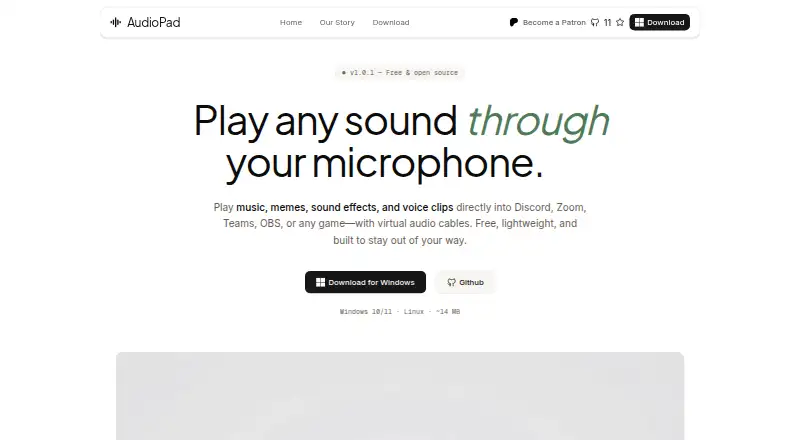
AudioPad is a desktop soundboard for sending music, memes, sound effects and voice clips through a microphone in voice chat, meetings, streaming software and games. It accepts MP3, WAV, OGG, FLAC and M4A files directly, without conversion or upload. Global hotkeys with custom bindings can trigger sounds from anywhere. AudioPad mixes clips with a live microphone, with an option to use sound-only output. The maker lists Discord, Zoom, Microsoft Teams, OBS Studio, Steam and Slack, and says it works with any application that reads a microphone. It is available for Windows 10 and 11 and Linux, with deb, rpm and AppImage packages. The maker says the app runs on the user’s machine without accounts, cloud services, analytics or telemetry; crash reports are sent only if the user opts in. First installation requires admin rights to register a virtual audio device, while everyday use runs as a normal user-space app. The free plan includes unlimited sounds and custom hotkeys. The project’s home page identifies a GNU GPL v3.0 license, while the pricing page labels the free plan MIT License.
Good
- Works with five listed audio formats.
- Global hotkeys can trigger sounds from anywhere.
- Can mix clips with a live microphone.
- Runs locally without accounts or telemetry, according to its maker.
- Free plan includes unlimited sounds.
Watch out
- First installation requires admin rights.
- Listed for Windows and Linux only.
- License labels differ between the home and pricing pages.
Who it suits
AudioPad suits people who want to trigger sound clips in voice chats, meetings, streams or games on Windows or Linux. It is a fit for users who prefer local operation and custom hotkeys.
Verdict
AudioPad pairs local sound playback with hotkeys and microphone mixing, and its free plan has no sound-count limit. Note that initial setup requires admin rights and the project pages give different license labels.
Plans and prices
From AudioPad's own pricing page, checked 3 Oct 2026.
| Plan | Price | What it gives you |
|---|---|---|
| Free Plan | Free | Unlimited sounds · Custom hotkeys · Sub-20ms latency · No ads · No account · $0 forever |
The facts
Each one read from AudioPad's own pages, with the date it was checked.
What it does
- Audio formats
- It accepts MP3, WAV, OGG, FLAC, and M4A files directly without conversion or upload.checked 3 Oct 2026
- Hotkeys
- Global hotkeys can trigger sounds from anywhere, with custom bindings.checked 3 Oct 2026
- Installation
- The maker says the first installation requires admin rights to register a virtual audio device, while day-to-day use runs as a normal user-space app.checked 3 Oct 2026
- Integrations
- The maker lists Discord, Zoom, Microsoft Teams, OBS Studio, Steam, and Slack, and says it works with any application that reads a microphone.checked 3 Oct 2026
- Intended users
- The maker describes AudioPad as a soundboard for people who use voice chat and explains it was created as a free alternative to paid soundboard software.checked 3 Oct 2026
- Latency
- The maker describes playback latency as sub-20ms.checked 3 Oct 2026
- Microphone mixing
- AudioPad mixes sound clips with the user's real microphone, with an option to switch to sound-only output.checked 3 Oct 2026
- Open source
- The home page identifies the project as GNU GPL v3.0 licensed, while the pricing page labels the free plan MIT License.checked 3 Oct 2026
- Privacy
- The maker says AudioPad runs entirely on the user's machine without accounts, cloud services, analytics, or telemetry; crash reports are sent only if the user opts in.checked 3 Oct 2026
- Purpose
- AudioPad plays music, memes, sound effects, and voice clips through your microphone in voice chat, meetings, streaming software, and games.checked 3 Oct 2026
- Size
- The maker describes AudioPad as under 15 MB and using a few MB of RAM at rest.checked 3 Oct 2026
- Support
- The maker invites users to support the project on Patreon and directs press inquiries to GitHub or the project repository.checked 3 Oct 2026
- System requirements
- The app is listed for Windows 10 and 11 and Linux distributions with deb, rpm, and AppImage packages.checked 3 Oct 2026
Alternatives to AudioPad
- 1

Blerp
Free planAndroidiOSWebExtension8.1From $4.99 a month - 2
Resanance
Free planAndroidWebWindows7.0Free plan - 3
Sound Show
Free planAndroidLinuxmacOSWindows7.0€45 one-time - 4
Voicemod AI Voice Cleaner
Free planAndroidiOSmacOSWindows6.9Free plan - 5

Soundpad
APIWindows6.8 - 6
SoundTools Soundboard
Free planAndroidiOSWebLinux6.7Free plan