Receiptly
Receiptly is a receipt scanner and expense tracker for Android and iOS that organizes purchases, tracks spending and warranties, and creates reports.
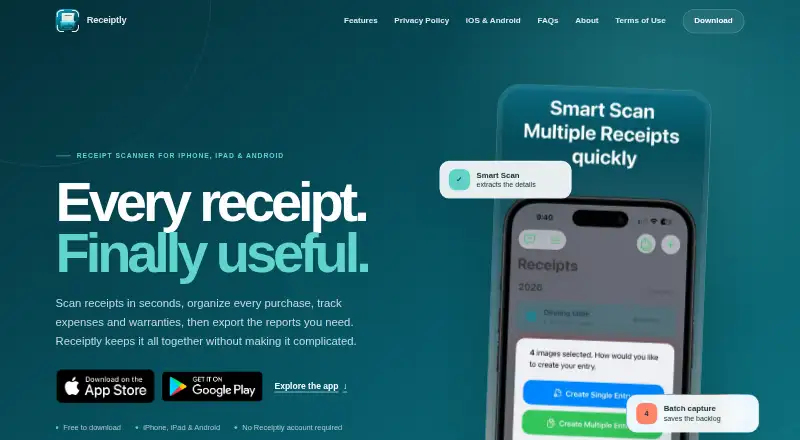
What Receiptly is
Receiptly is a receipt scanner and expense tracker for Android and iOS that organizes purchases, tracks spending and warranties, and creates reports. Its on-device text recognition can capture full receipt line items. Users can also choose optional Smart Scan and create separate receipt entries from multiple images in a batch. Purchases can be searched or organized by merchant, category, tag, or product. The app tracks personal and business expenses, income, credits, and reimbursements, with reports by day, month, category, or custom period. Users can add products to receipts, record warranty dates, and set expiry reminders. Receipt currencies and exchange rates can be saved for reporting values in a home currency. PDF, CSV, and Excel exports, along with full reports, require Pro on iOS or Plus on Android. iPhone and iPad users can import receipts read-only from Gmail and use Apple Shortcuts. Data is stored on the device, with optional iCloud sync on iOS. The free download is free; optional in-app purchases are available.
Good
- On-device text recognition captures full line items.
- Tracks expenses, income, credits, and reimbursements.
- Records warranty dates and expiry reminders.
- Exports PDF, CSV, and Excel with paid tiers.
- Offers read-only Gmail import on iPhone and iPad.
Watch out
- Exports and full reports require Pro or Plus.
- Gmail receipt import is unavailable on Android.
- Android data does not sync with iPhone or iCloud.
- Android receipt library is excluded from device-transfer backups.
Who it suits
Receiptly suits people who want to keep personal or business receipts and spending records on a phone. It may also help users tracking warranties or preparing reports for themselves or others.
Verdict
Receiptly combines receipt capture with expense, warranty, and currency tracking. Check the platform-specific paid features and storage limits, especially if you rely on exports, Gmail import, or moving Android receipt data to another device.
Plans and prices
From Receiptly's own pricing page, checked 7 Oct 2026.
| Plan | Price | What it gives you |
|---|---|---|
| Free download | Free | Free to download; optional in-app purchases |
| Receiptly Plus | — | Android; unlocks Smart Scan, adding receipts, reports, and export; may include a 3-day trial |
| Receiptly Pro | — | iOS; unlocks Smart Scan, exports, full reports, and Gmail import |
The facts
Each one read from Receiptly's own pages, with the date it was checked.
What it does
- Audience
- The maker describes Receiptly as a receipt scanner and expense tracker for iPhone, iPad, and Android, with features for personal and business spending.checked 7 Oct 2026
- Currencies
- Users can choose a receipt currency, save an exchange rate, and report the value later in a home currency.checked 7 Oct 2026
- Expense tracking
- It supports personal and business expenses, income, credits, reimbursements, and reports by day, month, category, or custom period.checked 7 Oct 2026
- Exports
- Receipt and expense exports are available as PDF, CSV, or Excel with Pro on iOS or Plus on Android.checked 7 Oct 2026
- Integrations
- On iPhone and iPad, Receiptly supports read-only Gmail receipt import and Apple Shortcuts; Gmail import is not available on Android.checked 7 Oct 2026
- Intended users
- The app supports organizing both personal and business spending and preparing reports for records or others who help with them.checked 7 Oct 2026
- Organization
- Users can organize and search purchases by merchant, category, tag, or product.checked 7 Oct 2026
- Privacy
- Receiptly says it does not create user accounts or sell receipt content; optional Smart Scan can send a reduced receipt image to Google AI services.checked 7 Oct 2026
- Purpose
- Receiptly scans receipts, organizes purchases, tracks expenses and warranties, and exports reports.checked 7 Oct 2026
- Reports and exports
- Receipt and expense exports include PDF, CSV, and Excel, with exports and full reports requiring Pro on iOS or Plus on Android.checked 7 Oct 2026
- Scanning
- It supports on-device text recognition, optional Smart Scan, and batch creation of separate receipt entries from multiple images.checked 7 Oct 2026
- Security
- The privacy policy says on-device data is protected by the device’s own encryption.checked 7 Oct 2026
- Storage
- Receipt data is stored on the device; optional iCloud sync is available on iOS, while Android does not sync with iPhone or iCloud.checked 7 Oct 2026
- Storage and sync
- Receipt data is stored on the device; optional iCloud sync is available on iOS, while Android does not sync with iCloud or iPhone.checked 7 Oct 2026
- Support
- The maker directs users to contact support by email or through Contact Support in the app.checked 7 Oct 2026
- Warranties
- Users can add products to receipts, record warranty dates, and set expiry reminders.checked 7 Oct 2026
- Warranty tracking
- Users can add products to receipts, record warranty dates, and set expiry reminders.checked 7 Oct 2026
The company
- Headquarters
- Brisbane, Queensland, Australiachecked 28 Sep 2026
- Maker
- The privacy policy identifies Karma Academy Pty Ltd as the provider, and the homepage says Receiptly is made in Brisbane.checked 7 Oct 2026
Where it runs
- Platform limitation
- The Android receipt library stays on that device and is excluded from Android Auto Backup and device-transfer backups.checked 7 Oct 2026
Alternatives to Receiptly
- 1

Veryfi Invoices OCR API
Free planAndroidiOSWebAPI8.2From $500 a month - 2

Receipt Reader AI
Free planAndroidiOSWebAPI8.0From $5.99 a month - 3
OpenReceipts
Free planOpen sourceWebLinuxmacOSSelf-hosted7.6Free plan - 4

OCR Receipt
Free planAPILinuxmacOSWindows7.5$149 one-time - 5

Bonro
Free planAndroidiOSWeb7.3From €59.99 a year - 6
Smart Receipts
Free planAndroidiOSWeb7.3From $99.96 a year