Receipt Vault
Receipt Vault is an offline receipt archive for iPhone and iPad, designed to keep purchase proof organized for reimbursement or tax preparation.
What Receipt Vault is
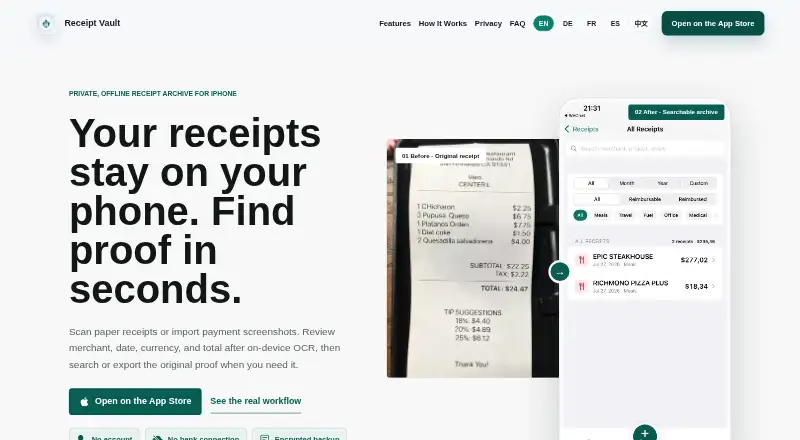
Receipt Vault is an offline receipt archive for iPhone and iPad, designed to keep purchase proof organized for reimbursement or tax preparation. You can scan paper receipts or import receipt images and screenshots from Photos; PDF files cannot be imported directly. On-device OCR extracts merchant, date, tax, and total fields, which you can review and correct. Search works by merchant, item, or OCR text. Records support categories, projects, clients, notes, and reimbursement status. CSV export is included, while Pro adds PDF reports and ZIP packages containing receipt data and images. Receipt images, OCR text, categories, and notes remain stored locally on the iPhone. No account is required, and the archive is not uploaded to the maker’s server. Face ID or Touch ID locking and password-protected encrypted backups are listed security options. The free plan stores the first 30 receipts. Receipt Vault Pro costs $4.99 a month; Apple also lists yearly subscriptions with the local price shown before purchase.
Good
- Offline local receipt storage
- On-device OCR with editable fields
- Search by merchant, item, or OCR text
- Face ID or Touch ID locking
- CSV, PDF, and ZIP export options
Watch out
- Free plan stores only 30 receipts
- PDF receipts cannot be imported directly
- No bank or accounting integrations
- Mac requires macOS 14 and Apple M1 or later
Who it suits
It suits freelancers and small-business owners keeping receipts for reimbursement or tax preparation. People needing accounting software, bank feeds, team approvals, or automatic device syncing should look elsewhere.
Verdict
Receipt Vault focuses on private, local receipt organization with OCR, search, and exports. It is a practical archive for individual records, but it does not replace accounting software or provide cross-device synchronization.
Plans and prices
From Receipt Vault's own pricing page, checked 4 Oct 2026.
| Plan | Price | What it gives you |
|---|---|---|
| Free | Free | First 30 saved receipts |
| Receipt Vault Pro | $4.99 a month | Unlimited receipt storage · PDF reports · ZIP packages with receipt data and images · Apple lists a monthly or yearly subscription; current local price is shown before purchase. |
The facts
Each one read from Receipt Vault's own pages, with the date it was checked.
What it does
- Exports
- The app supports CSV export, while Pro tools can create PDF reports and ZIP packages containing receipt data and images.checked 4 Oct 2026
- Integrations
- The product states that it has no bank connection and does not offer bank feeds or accounting integrations.checked 4 Oct 2026
- Intended users
- The maker describes the app as useful for freelancers and small-business owners organizing records for reimbursement or tax preparation.checked 4 Oct 2026
- OCR
- On-device OCR extracts receipt details, and users can review and correct fields because recognition is not guaranteed to be perfect.checked 4 Oct 2026
- Organization
- Receipt records can include categories, projects, clients, notes, and reimbursement status.checked 4 Oct 2026
- Privacy
- Receipt images, OCR text, categories, and notes are stored locally on iPhone; the app requires no account and does not upload the archive to its server.checked 4 Oct 2026
- Product limits
- Receipt Vault is not accounting software and does not calculate or file taxes, provide team approvals, or automatically sync across devices.checked 4 Oct 2026
- Purpose
- Receipt Vault is an offline receipt archive for scanning or importing receipt images and finding the original proof later.checked 4 Oct 2026
- Search
- Users can search receipts by merchant, item, or OCR text.checked 4 Oct 2026
- Security
- The product lists Face ID or Touch ID locking and password-protected encrypted backups.checked 4 Oct 2026
- Support
- The maker lists [email protected] as its contact email.checked 4 Oct 2026
- Supported imports
- Users can scan paper receipts or import receipt images and screenshots from Photos; PDF receipts are not directly importable.checked 4 Oct 2026
Where it runs
- Platform compatibility
- The App Store lists iPhone and iPad compatibility and says Mac use requires macOS 14 or later and an Apple M1 chip or later, while also marking the app not verified for macOS.checked 4 Oct 2026
Alternatives to Receipt Vault
- 1

Veryfi Invoices OCR API
Free planAndroidiOSWebAPI8.2From $500 a month - 2

Receipt Reader AI
Free planAndroidiOSWebAPI8.0From $5.99 a month - 3
OpenReceipts
Free planOpen sourceWebLinuxmacOSSelf-hosted7.6Free plan - 4

OCR Receipt
Free planAPILinuxmacOSWindows7.5$149 one-time - 5

Bonro
Free planAndroidiOSWeb7.3From €59.99 a year - 6
Smart Receipts
Free planAndroidiOSWeb7.3From $99.96 a year