
Ramp Bill Pay
Ramp Bill Pay is an accounts payable solution for invoice processing, approvals, vendor management, and payments.
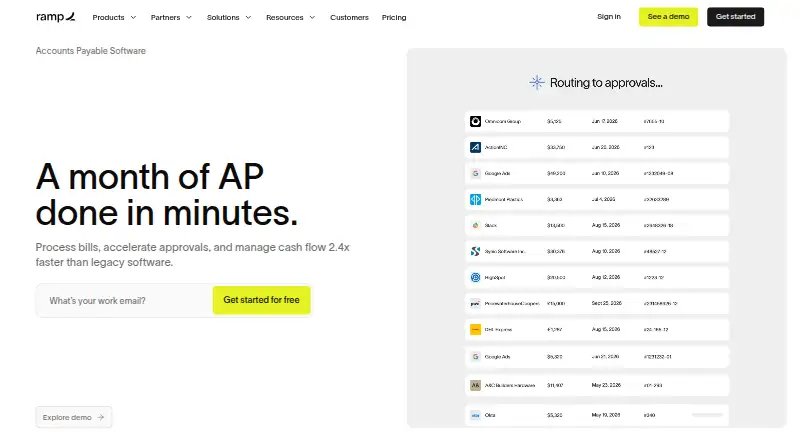
What Ramp Bill Pay is
Ramp Bill Pay is an accounts payable solution for invoice processing, approvals, vendor management, and payments. Ramp says its OCR captures invoice details and line items with 99% accuracy. It compares invoice line items with purchase orders using two-way and three-way matching, then routes bills through configurable approval flows, roles, and permissions. Payment options include card, ACH, check, and wire, including international payments. The Free plan has no monthly software fee, although payment fees vary by method and certain ERP integrations require Ramp Plus. Plus is listed at $15 a month and adds advanced features such as auto-coded line items, AI-driven approval recommendations, automated batch payments, and payment release approvals; annual billing is listed with a 20% saving. Accounting integrations include NetSuite, Sage Intacct, Zoho Books, Xero, QuickBooks, and Microsoft Dynamics 365 Business Central. Ramp says it undergoes annual SOC 2 Type II audits and complies with PCI security standards. It supports SSO for Okta, Google, and Microsoft Azure, and says MFA is available for every user. The service is available on Android, iOS, and web.
Good
- Free plan has no monthly software fee.
- Supports two-way and three-way purchase-order matching.
- Offers card, ACH, check, and wire payments.
- SSO and MFA are supported.
Watch out
- Payment fees vary by method.
- Some ERP integrations require Ramp Plus.
- Ramp does not support Zelle payments.
- Customers cannot print Bill Pay checks themselves.
Who it suits
Ramp Bill Pay suits small and growing businesses, mid-sized companies, and multi-entity organizations that need invoice processing and vendor payments. It may suit teams seeking purchase-order matching and configurable approval workflows.
Verdict
Ramp Bill Pay combines invoice capture, purchase-order checks, approval routing, and payment options. Consider the transaction fees and Plus requirement for certain ERP integrations when choosing a plan.
Plans and prices
From Ramp Bill Pay's own pricing page, checked 2 Oct 2026.
| Plan | Price | What it gives you |
|---|---|---|
| Free | Free | Ramp Bill Pay included with no monthly software fee · payment fees vary by method · certain ERP integrations require Ramp Plus |
| Plus | $15 a month | Advanced AP features include auto-coded line items, AI-driven approval recommendations, automated batch payments and payment release approvals · Save 20% with annual billing |
| Enterprise | Priced on request | Custom pricing · contact sales · Annual billing |
The facts
Each one read from Ramp Bill Pay's own pages, with the date it was checked.
Where it runs
- Approvals
- Ramp automatically routes bills to approvers and supports configurable approval flows, roles, and permissions.checked 2 Oct 2026
The company
- Company location
- Ramp Business Corporation lists its address as 28 West 23rd Street, Floor 2, New York, NY 10010.checked 2 Oct 2026
- Founded
- 2019checked 23 Sep 2026
What it does
- Integrations
- Ramp lists accounting integrations including NetSuite, Sage Intacct, Zoho Books, Xero, QuickBooks, and Microsoft Dynamics 365 Business Central.checked 2 Oct 2026
- Intended users
- Ramp describes Bill Pay as suitable for small businesses, growing companies, mid-sized companies, and multi-entity organizations.checked 2 Oct 2026
- Invoice capture
- Ramp says its OCR captures invoice details and line items with 99% accuracy.checked 2 Oct 2026
- Limits
- Ramp does not support Zelle payments, and Bill Pay check payments are mailed by Ramp rather than printed by the customer.checked 2 Oct 2026
- Login protection
- Ramp supports SSO for Okta, Google, and Microsoft Azure and says MFA is available for every user.checked 2 Oct 2026
- Matching
- Ramp checks invoice line items against purchase orders using two-way and three-way matching.checked 2 Oct 2026
- Payment methods
- Bill Pay supports card, ACH, check, and wire payments, including international payments.checked 2 Oct 2026
- Product
- Ramp Bill Pay is an AI-powered accounts payable solution for invoice processing, approvals, vendor management, and payments.checked 2 Oct 2026
- Security
- Ramp says it undergoes annual SOC 2 Type II audits and complies with PCI security standards.checked 2 Oct 2026
- Support
- Ramp lists 24/7 chat support in its plan comparison; Plus includes 24/7 phone support for travel bookings.checked 2 Oct 2026
The full review of Ramp Bill Pay
Overview
Ramp Bill Pay is an accounts-payable service built for businesses that want invoices, purchase-order checks, approvals, and payments in one workflow. It is best suited to teams that need configurable controls and varied payment methods; the free plan makes it accessible, but payment fees and some ERP integration requirements can change the cost.
Ramp, founded in 2019, supports invoice capture and line-item matching before bills move through multi-stage approvals. It supports card, ACH, check, and wire payments, including international payments. It does not support Zelle, and checks are mailed by Ramp rather than printed by the customer.
Ramp says its OCR captures invoice details and line items with 99% accuracy. That can reduce manual entry, while two-way and three-way purchase-order matching adds a check before payment. Ramp also says it undergoes annual SOC 2 Type II audits and complies with PCI security standards; SSO is available for Okta, Google, and Microsoft Azure, and MFA is available to every user.
For a wider category comparison, see Accounts Payable Automation Software.
Key features
Invoice controls and approvals
Automatic bill routing and configurable workflows, roles, and permissions suit businesses that need approvals to follow internal responsibility rather than a single fixed path. Two-way and three-way matching checks invoice lines against purchase orders, which is useful for teams that want purchasing records to inform payment review.
Plus adds auto-coded line items, AI-driven approval recommendations, automated batch payments, and payment release approvals. Those additions give higher-volume AP teams more automation, but they are not part of the free plan.
Payments and integrations
Card, ACH, check, and wire support—including international payments—gives businesses several ways to pay suppliers. The mailed-check model may not suit customers who need to print checks themselves, and the absence of Zelle rules out that payment route.
Accounting integrations include QuickBooks Online and Desktop, Xero, Sage Intacct, NetSuite, Microsoft Business Central, and Acumatica; Ramp also lists Zoho Books and Microsoft Dynamics 365 Business Central. Certain ERP integrations require Ramp Plus, so businesses should weigh that plan requirement before relying on a particular connection.
Pricing
Ramp uses a freemium model, with a 30-day trial and paid plans from $15/user/mo. Payment fees vary by method, so a free software subscription does not mean every payment is free.
| Plan | Price | What it means |
|---|---|---|
| Free | free | Includes Ramp Bill Pay with no monthly software fee. Payment fees vary by method, and certain ERP integrations require Ramp Plus. It suits businesses wanting core AP workflows without a software subscription, provided its fees and integration limits work for them. |
| Plus | $15 a month | Adds auto-coded line items, AI-driven approval recommendations, automated batch payments, and payment release approvals. Annual billing offers a 20% saving. The listed price is per month; teams should account for per-user pricing when estimating spend. |
| Enterprise | Custom pricing | Annual billing; contact sales. |
The 30-day trial offers a limited period to evaluate the service, but the plan terms do not state which plan it covers or what happens at renewal. Ramp does not publish a free-plan payment quota or seat limit in these plan terms.
Platforms
Ramp Bill Pay supports Android, iOS, and web, making it available across mobile and browser-based workflows.
Who it's for
Ramp describes the product for small, growing, and mid-sized businesses, as well as multi-entity organizations. Its configurable approvals and purchase-order matching make it a stronger fit for teams with defined review controls; the Plus features are more relevant when coding, batch payments, and release approvals are worth paying for. Businesses that need Zelle or customer-printed checks should look elsewhere.
Pros and cons
- Pros: OCR capture, line-item matching, and configurable multi-stage approvals bring several AP controls into one workflow.
- Pros: Card, ACH, check, wire, and international payment support give supplier-payment flexibility.
- Pros: The free plan includes Bill Pay without a monthly software fee, and Plus offers additional automation for teams that need it.
- Cons: Payment fees vary by method, so the free plan is not necessarily cost-free to use.
- Cons: Certain ERP integrations require Plus, making the free tier less suitable for businesses that depend on those connections.
- Cons: Ramp does not support Zelle, and customers cannot print Bill Pay checks themselves.
Alternatives
- Rho is a free-plan alternative with no subscription, per-user, or platform fees; its listed 1% foreign-currency transfer fee matters for international transfers.
- Nanonets Accounts Payable Automation offers a Starter plan for up to three users and a Starter paid-usage plan at $100 a month for 100 credits; it may suit a small team evaluating a usage-based option.
- Settle has a free Launch plan with unlimited seats and transactions, plus international wires at 15.00 USD; its Accelerate plan is $199 a month. Consider it if those seat and transaction terms are a priority.
- BILL Accounts Payable is a paid alternative with a free trial and an Essentials plan at $49 a month, covering both accounts payable and accounts receivable subscriptions.
- Esker Accounts Payable Automation is a paid option with custom pricing available by contacting Esker or requesting a demo.
- Tungsten Power PDF is a paid product; its listed Power PDF Advanced plan is $179 a month.
- Zahara is a paid alternative with a Teams plan at £159 a month for up to 10 users.
- Circulus is a paid AP automation alternative with a listed plan at $481 a month; additional user and per-payment fees may apply.
Verdict
Choose Ramp Bill Pay if your business wants invoice capture, purchase-order matching, configurable approvals, and several supplier payment methods, with a free plan for the core software. Look elsewhere if Zelle, customer-printed checks, or a particular ERP integration without upgrading is essential; variable payment fees also deserve attention before committing.
Getting started
- Visit https://ramp.com/bill-pay.
- Choose the Free plan or review Plus and Enterprise options.
- Use Ramp Bill Pay on Android, iOS, or web.
- Connect an accounting system such as QuickBooks, Xero, NetSuite, or Sage Intacct.
- Set up invoice approvals and select supported payment methods.
Limits worth knowing
The Free plan has no monthly software fee, but payment fees vary by method and certain ERP integrations require Ramp Plus. Plus is listed at $15 a month; annual billing is listed with a 20% saving.
Questions
Is Ramp Bill Pay free?
The Free plan includes Ramp Bill Pay with no monthly software fee. Payment fees vary by method, and some ERP integrations require Ramp Plus.
How much does Plus cost?
Plus is listed at $15 a month. Annual billing is listed with a 20% saving.
Which payment methods does it support?
It supports card, ACH, check, and wire payments, including international payments. Zelle is not supported, and Ramp mails checks rather than letting customers print them.
Which accounting systems can it connect to?
Listed integrations include QuickBooks Online and Desktop, Xero, Sage Intacct, NetSuite, Microsoft Business Central, and Acumatica. Ramp also lists Zoho Books and Microsoft Dynamics 365 Business Central.
Which devices can I use it on?
Ramp Bill Pay is available on Android, iOS, and web.
What security and login protections does Ramp describe?
Ramp says it undergoes annual SOC 2 Type II audits and complies with PCI security standards. It supports SSO for Okta, Google, and Microsoft Azure, and says MFA is available for every user.
Alternatives to Ramp Bill Pay
- 1

BILL Accounts Payable
AndroidiOSWebAPI7.7From $49 a month - 2

Yooz
AndroidiOSWebAPI7.7 - 3
Circulus
AndroidiOSWebAPI7.6From $39.99 a month - 4

Nanonets Accounts Payable Automation
Free planWebAPISelf-hosted7.6$100 usage-based - 5
PairSoft AP Automation
AndroidiOSWebAPI7.6From $10,000 a year - 6

ApprovalMax
AndroidiOSWebAPI7.2