QRcard
QRcard creates a personalized QR code that shares selected contact details as a digital business card.
What QRcard is
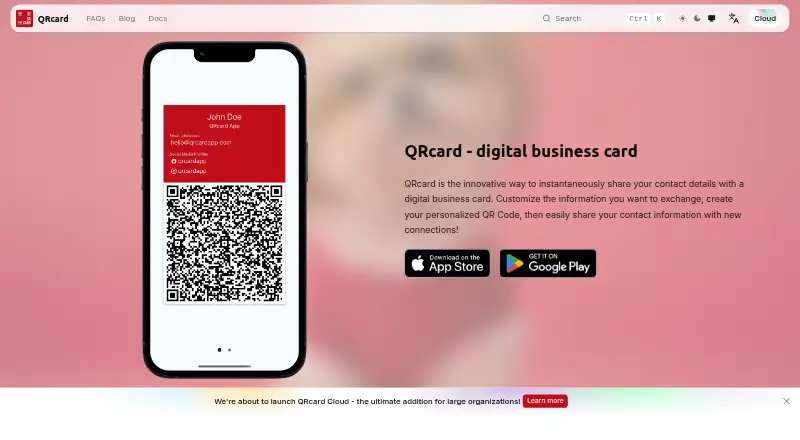
QRcard creates a personalized QR code that shares selected contact details as a digital business card. A card can include a phone number, email, website, address, and social links, with colors and logos available for personalizing its design. The product says cards can be shared without an internet connection. Users can add a QRcard widget to a home or lock screen, make a lock-screen image featuring the code, and create up to six personas for separate contact details. Card data is stored only on the user’s device. The free plan costs nothing and allows up to three contact details; it includes widgets and marks cards “Created with QRcard.” Premium Version costs $6.99, paid once as an In-App Purchase, with unlimited contact details and an optional note. Enterprise Edition costs $9.99, paid once as a Standalone App, is iOS-only, and supports MDM for organizations to pre-fill and update employees’ cards. QRcard is available on iOS, Android, and macOS.
Good
- Cards can be shared without an internet connection
- Up to six personas can separate contact details
- Card data is stored only on the user's device
- Widgets and lock-screen QR images are available
Watch out
- Free plan permits up to three contact details
- Enterprise Edition is iOS-only
- Additional QRcards are a separate In-App Purchase
Who it suits
QRcard suits people who want to share selected contact details through a customizable QR business card. Its enterprise option may suit companies that want to pre-fill and update employees’ cards through iOS MDM.
Verdict
QRcard offers a free starting tier and paid options for expanded contact details and organizational MDM. Compare the contact allowance and platform restrictions with how you plan to use your cards.
Plans and prices
From QRcard's own pricing page, checked 9 Oct 2026.
| Plan | Price | What it gives you |
|---|---|---|
| Free | Free | up to 3 contact details · create widgets · cards contain “Created with QRcard” · iOS & Android |
| Premium Version | $6.99, paid once | unlimited contact details · create widgets · optional “Created with QRcard” note · iOS & Android · additional QRcards are a separate In-App Purchase · In-App Purchase |
| Enterprise Edition | $9.99, paid once | unlimited contact details · create widgets · optional “Created with QRcard” note · iOS only · best MDM support · Standalone App |
The facts
Each one read from QRcard's own pages, with the date it was checked.
What it does
- Audience
- The Enterprise Edition is described as suitable for companies that want to make the app available to employees.checked 9 Oct 2026
- Contact details
- The card can include details such as phone number, email, website, address, and social media links.checked 9 Oct 2026
- Customization
- Users can personalize their card design and choose colors and logos.checked 9 Oct 2026
- Data storage
- The product page says card data is stored only on the user's device.checked 9 Oct 2026
- MDM
- The iOS MDM feature lets organizations pre-fill employees' cards and keep them updated, and the maker says it implements MDM as documented by Apple.checked 9 Oct 2026
- MDM availability
- The maker says MDM is currently available to all companies without additional management costs, while premium and additional-card limits still apply.checked 9 Oct 2026
- MDM support
- The maker directs MDM questions to [email protected].checked 9 Oct 2026
- Mobile analytics
- The privacy policy says the app collects anonymous screen and event usage data, does not collect user input or identifying information, and allows users to opt out in settings.checked 9 Oct 2026
- Multiple cards
- The product page says users can create up to six QRcard personas to separate contact details.checked 9 Oct 2026
- Offline use
- The product page says no internet connection is required to share a card.checked 9 Oct 2026
- Purpose
- QRcard creates a personalized QR code to share selected contact details as a digital business card.checked 9 Oct 2026
- Security
- The privacy policy says the website uses HTTPS and that the maker monitors systems for vulnerabilities and attacks, while stating it cannot guarantee information security.checked 9 Oct 2026
- Widgets
- Users can add a QRcard widget to their home or lock screen and create a lock-screen image with their QR code.checked 9 Oct 2026
The company
- Headquarters
- Untervaz, Switzerlandchecked 28 Sep 2026
Alternatives to QRcard
- 1
Blinq Email Signatures
Free planAndroidiOSWebAPI8.2Free plan - 2
HiHello Email Signature Manager
Free planAndroidiOSWebmacOS8.2From $5 a month - 3
ContactsPlus
Free planAndroidiOSWebAPI8.1From $9.99 a month - 4

Haystack
Free planAndroidiOSWebAPI8.1From $2.50 a year - 5
Cloze
Free planAndroidiOSWebAPI7.8From $17 a month - 6
Memotoo
Free planAndroidiOSWebAPI7.8Free plan