
Playwright
Playwright is a web automation tool for testing, scripting, and AI agents.
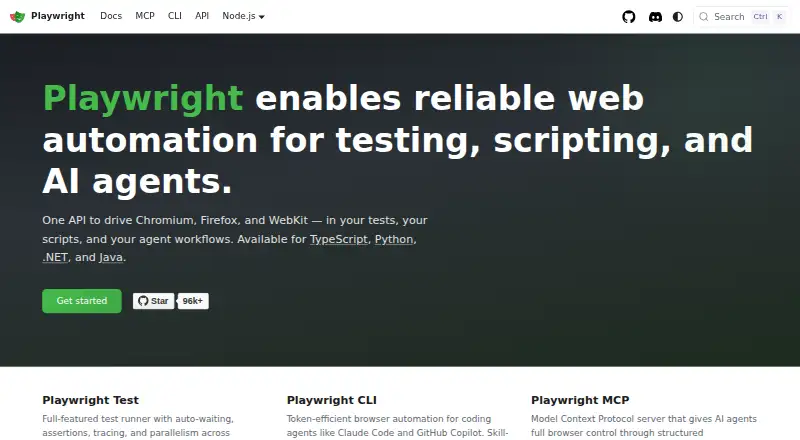
What Playwright is
Playwright is a web automation tool for testing, scripting, and AI agents. One API works with Chromium, Firefox, and WebKit, and developers can use TypeScript, Python, .NET, or Java. Playwright Test provides auto-waiting, assertions, tracing, and parallel execution across browsers. Each test runs in a separate fresh browser context. For test authoring and debugging, the available tools include a test generator, Trace Viewer, and VS Code extension. Playwright also offers a CLI for coding agents and an MCP server for browser control using structured accessibility snapshots; the server is described as compatible with VS Code, Cursor, Claude Desktop, Windsurf, and other MCP clients. It runs on Linux, macOS, and Windows, locally or in CI, in headed or headless mode. Mobile web testing includes emulation for Chrome on Android and Mobile Safari. The free plan is free. Self-hosted runners are supported, and the core package metadata lists the Apache-2.0 license.
Good
- One API supports Chromium, Firefox, and WebKit.
- Available for TypeScript, Python, .NET, and Java.
- Fresh browser context for every test.
- Free plan at no cost.
- Supports self-hosted runners and mobile web testing.
Watch out
- Mobile testing is emulation for Chrome on Android and Mobile Safari.
- CI guidance recommends one worker for stability and reproducibility.
Who it suits
Playwright suits developers building browser tests or automation across several browser engines and programming languages. It also has tools for coding-agent workflows and mobile web emulation.
Verdict
Playwright combines browser automation, test authoring tools, and agent-oriented browser controls in a free offering. Its browser, language, and operating-system support make it suitable for varied web testing workflows.
Plans and prices
From Playwright's own pricing page, checked 2 Oct 2026.
| Plan | Price | What it gives you |
|---|---|---|
| Playwright | Free | Playwright Test · browser automation · Chromium, Firefox and WebKit · TypeScript, Python, .NET and Java |
The facts
Each one read from Playwright's own pages, with the date it was checked.
What it does
- AI agent tools
- Playwright provides a CLI for coding agents and an MCP server for browser control through structured accessibility snapshots.checked 2 Oct 2026
- CI
- The documentation provides sample configurations for common CI providers and recommends one worker in CI for stability and reproducibility.checked 2 Oct 2026
- Integrations
- The MCP server is described as compatible with VS Code, Cursor, Claude Desktop, Windsurf, and any MCP client.checked 2 Oct 2026
- Isolation
- Each test gets a fresh browser context, equivalent to a new browser profile.checked 2 Oct 2026
- Languages
- Playwright is available for TypeScript, Python, .NET, and Java.checked 2 Oct 2026
- License
- The Playwright core package metadata lists the Apache-2.0 license.checked 2 Oct 2026
- Mobile testing
- Playwright supports native mobile emulation for Chrome on Android and Mobile Safari.checked 2 Oct 2026
- Operating systems
- Playwright supports Linux, macOS, and Windows, locally or in CI, in headless or headed mode.checked 2 Oct 2026
- Purpose
- Playwright enables web automation for testing, scripting, and AI agents.checked 2 Oct 2026
- Security reporting
- Microsoft asks researchers to report vulnerabilities through the Microsoft Security Response Center rather than public GitHub issues.checked 2 Oct 2026
- Security response
- The security policy says reporters should receive a response within 24 hours.checked 2 Oct 2026
- Support and community
- The site links to Stack Overflow, Discord, training, and learning resources.checked 2 Oct 2026
- Test runner
- Playwright Test includes auto-waiting, assertions, tracing, and parallelism across browsers.checked 2 Oct 2026
- Test tools
- The site lists a test generator, Trace Viewer, and VS Code extension for running, debugging, and generating tests.checked 2 Oct 2026
Where it runs
- Browser support
- One API drives Chromium, Firefox, and WebKit.checked 2 Oct 2026
The full review of Playwright
Overview
Playwright is a code-first framework for automating browsers in tests, scripts, and AI-agent workflows. It suits developers and teams who want to work across browser engines and programming languages; its chief trade-off is that test authoring is code-based, not a visual workflow.
Its combination of a cross-browser test runner, isolation between tests, and agent-oriented browser controls makes it a strong fit for engineering teams building repeatable web tests. Teams that need no-code authoring should consider a different approach.
Key features
Cross-browser tests with isolation
A single API targets Chromium, Firefox, and WebKit, while Playwright Test adds automatic waiting, assertions, tracing, and parallel execution across browsers. Each test gets a fresh browser context, equivalent to a new profile. Together, these features help teams build repeatable suites without carrying session state from one test into another.
Authoring, debugging, and agent tools
Tests are written as code in TypeScript, Python, .NET, or Java. A test generator, Trace Viewer, and VS Code extension support authoring, running, and debugging. This toolset is useful for developers working in those languages, but it is not a visual test-authoring system.
For AI-agent workflows, Playwright offers a CLI for coding agents and an MCP server that controls browsers through structured accessibility snapshots. The server is compatible with VS Code, Cursor, Claude Desktop, Windsurf, and other MCP clients, giving teams already using those tools a direct route to browser control.
Mobile emulation and CI
Playwright supports native mobile emulation for Chrome on Android and Mobile Safari. It also runs on Linux, macOS, and Windows, locally or in CI, in headed or headless mode. Sample configurations cover common CI providers, and the recommendation to use one worker in CI favors stability and reproducibility over maximum parallel throughput.
Pricing
Playwright is free, with no free trial because there is no paid trial tier to evaluate. The Playwright plan costs nothing and includes Playwright Test, browser automation across Chromium, Firefox, and WebKit, and support for TypeScript, Python, .NET, and Java. It also supports a self-hosted runner, mobile web testing, and visual testing.
There are no paid tiers or plan quotas identified here, so teams can adopt the listed capabilities without a subscription cost. The code-first model remains the main cost in practice: teams need to author and maintain tests in code rather than relying on visual authoring.
Platforms
Playwright supports Linux, macOS, and Windows for local and CI execution, with both headless and headed modes. Its web automation spans Chromium, Firefox, and WebKit, while native mobile emulation covers Chrome on Android and Mobile Safari. The platform list also includes web and self-hosted use, making it suitable for teams running their own infrastructure as well as local workflows.
Who it's for
Playwright is best for developers and test teams who are comfortable writing code and want one framework across browser engines, languages, and operating systems. Its isolation model and CI guidance suit teams prioritizing reliable repeatable runs; its MCP server and CLI also make it relevant to teams incorporating browser control into agent workflows.
It is a weaker fit for teams that require no-code test creation or prefer a managed testing service. The core package uses the Apache-2.0 license. The project directs security reports to the Microsoft Security Response Center rather than public GitHub issues and says reporters should receive a response within 24 hours. Community support includes Stack Overflow, Discord, training, and learning resources.
Pros and cons
- Pros: One API covers Chromium, Firefox, and WebKit, reducing the need to build separate automation around each engine.
- Pros: Fresh browser contexts per test, plus auto-waiting and assertions, support isolated and repeatable test suites.
- Pros: The free plan includes the test runner, four supported languages, self-hosted execution, and mobile web testing.
- Pros: A CLI and MCP server provide options for coding-agent workflows, including integrations with common MCP clients.
- Cons: Tests are authored as code, so teams seeking visual or no-code test creation will need another tool.
- Cons: The CI recommendation of one worker prioritizes stability and reproducibility, which may limit parallel throughput in CI.
Alternatives
WebdriverIO is another free option if Node.js is the framework requirement; its listed plan describes an open-source automation framework requiring Node.js. Nightwatch is worth considering for teams seeking an open-source option whose listed plan says there are no paywalls. Selenium offers free open-source browser automation tools and libraries, and may suit teams looking for a collection of tools and libraries rather than Playwright's integrated test runner.
Cypress may fit teams that want a freemium plan with a defined free allowance: its Starter tier includes 10 users, 500 test results per month, 100 prompt executions per month, and 30-day access to paid features. ACCELQ is an alternative for teams considering a freemium platform with web, mobile, and API automation. Functionize may suit teams looking for an agent-focused free plan, which includes 800,000 credits per month, five parallel runs, and a team workspace. Maestro offers a free local open-source plan with its MCP, Viewer, Studio, and CLI tools for running on users' own devices. BugBug is an option for smaller local testing needs, with a free plan capped at four test suites, one user, one project, and 15 tests.
Browse more options in End-to-End Testing Software, GUI Testing Software, Browser Automation Tools, and Functional Testing Software.
Verdict
Choose Playwright if your team wants a free, code-first framework spanning major browser engines, languages, and operating systems, with both structured test tooling and agent-oriented browser controls. Look elsewhere if visual or no-code test authoring is a requirement.
Alternatives to Playwright
- 1

Cypress
Free planOpen sourceWebAPILinuxmacOS8.4From $67 a month - 2

Katalon Studio
Free planAndroidiOSWebAPI8.4From $1,000 a year - 3

SoapUI
Free planOpen sourceAPILinuxmacOSSelf-hosted8.2From $1,069 a year - 4

Selenium
Free planOpen sourceWebAPIExtensionLinux7.8Free plan - 5

Postman
Free planWebExtensionLinuxmacOS7.6From $9 a month - 6

ReadyAPI
WebAPILinuxmacOS7.6