
Postman
Postman is a platform for designing, testing, distributing, documenting, and monitoring APIs.
What Postman is
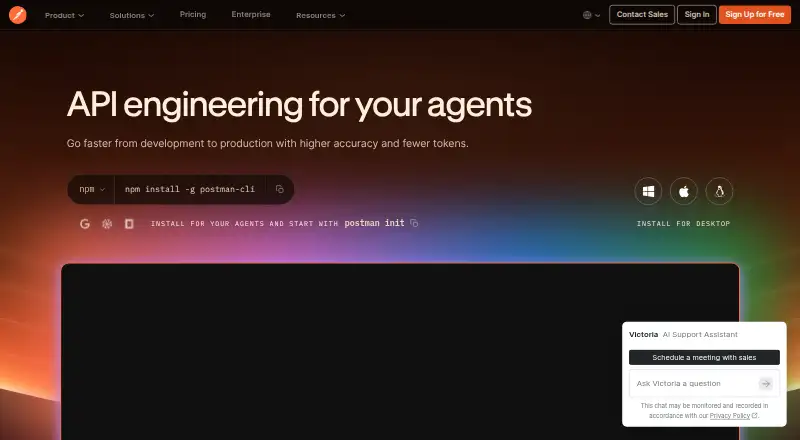
Postman is a platform for designing, testing, distributing, documenting, and monitoring APIs. Its API client supports multiple protocols, built-in authentication, response inspection, variables, environments, and request history. Design tools include specification support, mock servers, definition imports, and integrations. Testing options cover collection runs, automation, integration, performance, regression, and end-to-end testing, along with the Postman CLI. Listed integrations include Jira, Slack, GitHub, GitLab, Microsoft Teams, VS Code, Amazon API Gateway, AWS Secrets Manager, and 1Password Vault. Postman describes local secret protection, cloud secret detection, runtime secret resolution, and connections to secret-management services. It says customer data does not train its models and Enterprise teams control AI access and use. The Free plan includes 50 AI credits and core API tools. Solo costs $9 a month billed annually. Basic and Professional are no longer available to new customers, although existing Professional customers continue on their current plan and pricing.
Good
- API client supports multiple protocols and environments
- Includes mock servers and specification support
- Testing covers performance and end-to-end workflows
- Free plan includes 50 AI credits
- Customer data is not used to train its models
Watch out
- Solo is $9 a month billed annually
- Basic and Professional plans are unavailable to new customers
- Enterprise price is not listed
Who it suits
Postman suits developers and teams that design, test, document, or monitor APIs. Its Free plan includes core API tools, while Enterprise features address advanced collaboration, security, and governance needs.
Verdict
Postman provides API design, client, and testing tools in one platform. Check plan availability carefully: Basic and Professional are closed to new customers, and Enterprise pricing is not listed.
Plans and prices
From Postman's own pricing page, checked 29 Sep 2026.
| Plan | Price | What it gives you |
|---|---|---|
| Free | Free | 50 AI credits · API client and core tools · specs and mock servers · Native Git · Collection Runner and performance testing runs · Manual Flows |
| Solo | $9 a month | 400 AI credits/month · data-driven testing with exports · unlimited private NPM packages and library · custom-branded documentation · unlimited custom domains · expanded API monitoring · billed annually |
| Team | $19 a month | 400 AI credits/user/month · team collaboration · unlimited workspace and collection viewers · basic RBAC · SDK generation and distribution · Simple Security add-on · per user, billed annually |
| Enterprise | Priced on request | 800 pooled AI credits/user/month · API Catalog · unlimited private and Partner workspaces · Private API Network · advanced RBAC and organization controls · governance, audit logs and reporting · private test and Flows runners |
The facts
Each one read from Postman's own pages, with the date it was checked.
What it does
- AI privacy
- Postman states that customer data does not train its models and that Enterprise teams control AI access and usage.checked 29 Sep 2026
- API client
- The API client includes multi-protocol support, built-in authentication, response visualization and inspection, variables, environments, and request history.checked 29 Sep 2026
- API design
- Postman supports API specifications, mock servers, definition import, multiple definition formats, and third-party integrations.checked 29 Sep 2026
- GraphQL support
- Yeschecked 21 Sep 2026
- Integrations
- Listed integrations include Jira, Slack, 1Password Vault, Amazon API Gateway, AWS Secrets Manager, GitHub, GitLab, Microsoft Teams, and VS Code.checked 29 Sep 2026
- Secret protection
- Postman describes local secret protection, cloud secret detection, runtime secret resolution, and integrations with HashiCorp, AWS Secrets Manager, Azure Key Vault, and 1Password.checked 29 Sep 2026
- Security and compliance
- Postman lists SOC 2 Type II, PCI DSS, HIPAA, GDPR, CCPA/CPRA, CSA STAR, TX-RAMP, ISO 27001, and ISO 42001 among its compliance credentials.checked 29 Sep 2026
- Support
- Premium Support is an Enterprise-only add-on with contractual SLAs, 24/7 global coverage, a priority queue, and premium phone, screen-sharing, and chat channels.checked 29 Sep 2026
- Testing
- Postman offers collection runs, automated testing, Postman CLI, integration testing, performance testing, regression testing, and end-to-end testing.checked 29 Sep 2026
- What it does
- Postman is a unified platform for designing, testing, distributing, documenting, and monitoring APIs.checked 29 Sep 2026
The company
- Company history
- Postman says the product began as a side project to simplify API testing and that it is headquartered in San Francisco, with Bangalore identified as the place where the company was founded.checked 29 Sep 2026
- Founded
- 2014checked 23 Sep 2026
- Headquarters
- San Francisco, California, United Stateschecked 23 Sep 2026
Money
- Enterprise trial
- The pricing FAQ says teams can trial Enterprise features to evaluate advanced collaboration, security, and governance before upgrading.checked 29 Sep 2026
- Free plan
- Yeschecked 21 Sep 2026
- Plan availability
- Basic and Professional plans are no longer available to new customers; existing Professional customers continue on their current plan and pricing.checked 29 Sep 2026
Where it runs
- Platforms
- Postman offers a web version and desktop downloads for Windows, macOS, and Linux, plus a VS Code extension and browser extensions for Chrome, Safari, Edge, and Firefox.checked 29 Sep 2026
The full review of Postman
Postman is a platform for building, testing, and managing APIs, suited to developers and teams that want these workflows together. Its breadth is a strength, but the right plan depends on whether you need solo work, collaboration, or enterprise controls.
Overview
Postman covers much of the API lifecycle, from design and testing to distribution, documentation, and monitoring. The client supports multiple protocols, including GraphQL and SOAP, with built-in authentication, response inspection, variables, environments, and request history. That makes it useful both for occasional requests and for repeatable team workflows.
The company was founded in 2014. It identifies Bangalore as its founding location and is headquartered in San Francisco.
Key features
One place for client work, design, and testing
Postman combines request tools with API specifications, mock servers, and definition imports in multiple formats. Collection runs and automated testing extend that workflow into integration, performance, regression, and end-to-end testing. The CLI, scheduled runs, CI/CD integration, and contract testing give teams options for fitting API checks into delivery processes. This range is valuable when a team wants to keep design and tests close to its client work; it may be more platform than needed for someone who only wants a lightweight request tool.
Integrations and safeguards
Integrations include Jira, Slack, GitHub, GitLab, Microsoft Teams, VS Code, Amazon API Gateway, AWS Secrets Manager, and 1Password Vault. Postman describes local secret protection, cloud secret detection, and runtime secret resolution, with integrations for HashiCorp, AWS Secrets Manager, Azure Key Vault, and 1Password. Its compliance credentials include SOC 2 Type II, PCI DSS, HIPAA, GDPR, CCPA/CPRA, CSA STAR, TX-RAMP, ISO 27001, and ISO 42001. Postman says customer data is not used to train its AI models; Enterprise teams control AI access and usage.
Pricing
Postman has a free plan and paid plans, with Basic and Professional no longer open to new customers. Existing Professional customers keep their current plan and pricing.
- Free — free. Includes 50 AI credits, the API client and core tools, specs and mock servers, Native Git, Collection Runner and performance testing runs, and Manual Flows. It is a substantial starting point, but the 50-credit allowance and lack of paid-plan additions make it better for individual or limited use than expanding teams.
- Solo — $9 a month, billed annually. Includes 400 AI credits/month, data-driven testing with exports, unlimited private NPM packages and library, custom-branded documentation, unlimited custom domains, and expanded API monitoring. It fits an individual needing those publishing, testing, and monitoring additions, but it does not include the team collaboration features named for Team.
- Team — $19 a month, billed per user and annually. Adds 400 AI credits/user/month, team collaboration, unlimited workspace and collection viewers, basic RBAC, SDK generation and distribution, and the Simple Security add-on. Per-user billing makes the cost rise with seats, but this is the clearer fit for teams that need shared workspaces and basic access controls.
- Enterprise — custom pricing. Includes an API Catalog, Private API Network, Advanced RBAC and organization controls, governance, audit logs and reporting, and private test and Flows runners. Teams can trial Enterprise features before upgrading. Premium Support is an Enterprise-only add-on, with contractual SLAs, 24/7 global coverage, a priority queue, and premium phone, screen-sharing, and chat channels.
Platforms
Postman is available as an extension and on Linux, macOS, Windows, and the web. The mix gives developers desktop options alongside browser access.
Who it's for
Postman is a strong fit for developers and API teams that need a client alongside design, testing, monitoring, and collaboration tools. Solo is the practical paid step for an individual who needs its added testing, publishing, or monitoring allowances; Team suits groups that need shared workspaces and basic RBAC. Enterprise is aimed at organizations that need governance, audit capabilities, private runners, or contractual support. A user seeking only a simple API client may be better served by a narrower alternative.
Pros and cons
- Pro: The client, design tools, mock servers, and varied test workflows sit in one platform, reducing the need to separate those API tasks.
- Pro: Free includes Native Git, mock servers, collection runs, and performance testing runs, giving individuals meaningful tools before paying.
- Pro: Enterprise includes advanced access controls, governance, audit logs, and private runners for organizations with stronger operational requirements.
- Con: Free includes just 50 AI credits, while Solo and Team each specify 400 credits on their respective monthly basis.
- Con: Team's annual per-user billing can become a material commitment as seats grow.
- Con: Basic and Professional are closed to new customers, limiting the plan choices for newcomers who might have wanted those tiers.
Alternatives
For a broader comparison, browse API clients, API Testing Tools, API Design Tools, API Monitoring Tools, API Marketplace Software, and API Governance Software.
- Apidog is worth considering if its free plan for four users or its listed $12.00 USD monthly Basic plan better fits your team and budget.
- SoapUI is a free alternative centered on REST, SOAP, and GraphQL API testing, mocking, and command-line automation.
- Insomnia may suit a small team that can work within Essentials' three-user Git Sync limit and 1,000 monthly mock-server requests.
- Bruno is an option for those who prefer an open-source plan with two workspaces and five OpenAPI syncs per month.
- Testfully offers a free Developer Edition with one offline and one cloud workspace and invitations for up to five users per workspace.
- Hoppscotch is a free alternative for REST, GraphQL, and realtime API testing with a personal workspace.
- OpenReq is a free and open-source option with self-hosted web and desktop applications.
- Altair GraphQL Client is a focused option for GraphQL queries, with a Basic plan supporting up to two team members and 20 queries.
Verdict
Choose Postman if you want a broad API workspace that brings client work, design, testing, and team workflows together. Its free plan makes it accessible, and its higher tiers address collaboration and governance; look elsewhere if you need a simpler tool or a plan with a better fit for your seat count and budget.
Getting started
- Visit the Postman website.
- Choose among the Free, Solo, Team, or Enterprise plan options.
- Use the Free plan's API client and core tools, or select a paid plan for its listed additions.
- Access Postman through the web, an extension, Linux, macOS, or Windows.
Limits worth knowing
The Free plan includes 50 AI credits. Solo is $9 a month billed annually and includes 400 AI credits per month; Team is $19 per user per month billed annually and includes 400 AI credits per user per month.
Questions
Is there a free plan or trial?
Yes. The Free plan includes 50 AI credits and core tools, and a free trial is available. Teams can trial Enterprise features to evaluate advanced collaboration, security, and governance before upgrading.
Which platforms does Postman support?
Postman is available as an extension and on Linux, macOS, web, and Windows.
Does Postman support GraphQL and SOAP?
Yes. GraphQL and SOAP support are listed.
What integrations are available?
Listed integrations include Jira, Slack, 1Password Vault, Amazon API Gateway, AWS Secrets Manager, GitHub, GitLab, Microsoft Teams, and VS Code.
Who makes Postman?
Postman is made by Postman, founded in 2014 and headquartered in San Francisco, California.
Alternatives to Postman
- 1

Boomi
WebAPILinuxSelf-hosted7.6$99 usage-based - 2

Zuplo
Free planWebAPILinuxSelf-hosted7.6From $25 a month - 3

DigitalAPI
WebAPISelf-hosted7.1From $2,500 a month - 4
API.market
Free planWebAPISelf-hosted7.0From $599 a month - 5

APILayer Marketplace
Free planWebAPI6.7From $19.99 a month - 6
Datovu
Free planWebAPI6.7From $29 a month