
PlaybookUX
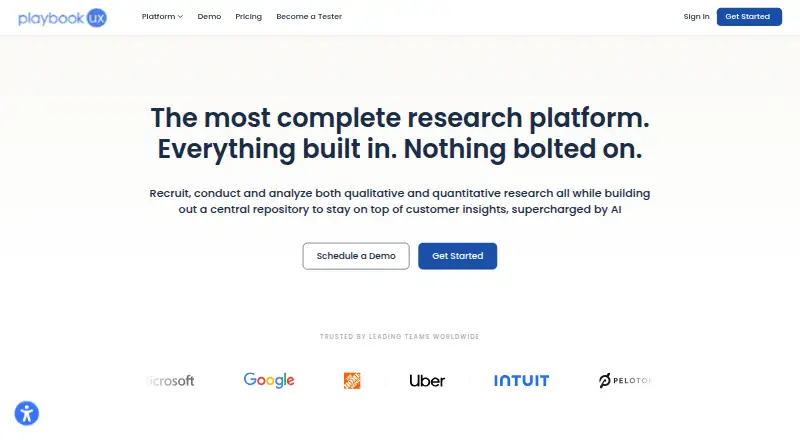
PlaybookUX is a research platform that brings participant recruitment, study sessions, and analysis into one workspace.
What PlaybookUX is
PlaybookUX is a research platform that brings participant recruitment, study sessions, and analysis into one workspace. Researchers can run moderated interviews, unmoderated tests, card sorting, tree testing, surveys, five-second tests, first-click tests, and preference tests. They can recruit from the platform’s global panel of more than 7 million vetted consumer and professional participants or invite their own participants. Study analysis can draw on transcripts, notes, tags, video clips, highlight reels, heat maps, and task success analytics. Listed AI tools include follow-up questions, summaries, sentiment analysis, pattern detection, screener and script generation, and AI personas. Its Figma integration imports prototypes and supports goal completion metrics, misclick tracking, and heat and click map overlays. The API and MCP layer can connect data with other tools, AI tools, data warehouses, and CRMs, and automate project creation. PlaybookUX supports web, Android, iOS, macOS, and Windows, including native Android and iOS app studies. A free Grow trial is available without a credit card.
Good
- Covers moderated interviews, unmoderated tests, surveys, and several testing methods.
- Panel includes more than 7 million vetted consumer and professional participants.
- Analysis includes transcripts, video clips, heat maps, and task success analytics.
- Figma integration supports completion metrics and misclick tracking.
- API and MCP layer can connect data and automate project creation.
- Team seats are not limited, and workspaces support collaboration.
Watch out
- Self-serve allows 50 sessions annually.
- Panel use is limited to 50 sessions per year without enterprise.
Who it suits
PlaybookUX suits research teams that need recruitment, multiple study formats, and analysis in one platform. It also fits teams working with Figma prototypes or native Android and iOS apps and collaborating across workspaces without seat limits.
Verdict
Choose PlaybookUX if you want participant recruitment, varied research methods, and analysis tools in a single platform. Look elsewhere if the 50-session self-serve allowance or the $5,400 / year Scale starting price does not suit your needs.
Plans and prices
From PlaybookUX's own pricing page, checked 11 Oct 2026.
| Plan | Price | What it gives you |
|---|---|---|
| Self-serve | Free | 50 sessions annually · Pay-per-use panel credits · 24-hour chat support |
| Scale | $5,400 a year | Optional expansion of Self-serve access · $5,400 / year |
| Pro | $8,800 a year | Optional expansion of Self-serve access · $8,800 / year |
| Enterprise | Priced on request | Unlimited seats · Custom contracts and terms · Dedicated customer success manager · Custom volume pricing |
The facts
Each one read from PlaybookUX's own pages, with the date it was checked.
What it does
- AI tools
- Listed AI tools include follow-up questions, summaries, sentiment analysis, pattern detection, screener and script generation, and AI personas.checked 11 Oct 2026
- Analysis
- Researchers can use transcripts, notes, tags, video clips, highlight reels, heat maps, and task success analytics to analyze studies.checked 11 Oct 2026
- API and integrations
- The API and MCP layer can connect PlaybookUX data with other tools, AI tools, data warehouses, and CRMs, and can automate project creation.checked 11 Oct 2026
- Data protection
- The security page states that data in transit uses TLS and data at rest is encrypted with AES-256, and that customers can permanently delete their data.checked 11 Oct 2026
- Figma
- The Figma integration imports prototypes and supports goal completion metrics, misclick tracking, and heat map and click map overlays.checked 11 Oct 2026
- Mobile research
- PlaybookUX supports testing native Android and iOS apps, with participants switching between the PlaybookUX app and the app being tested on iOS.checked 11 Oct 2026
- Participant panel
- PlaybookUX says its global panel has more than 7 million vetted consumer and professional participants, and users can also bring their own participants.checked 11 Oct 2026
- Pricing limit
- Customers can run 50 sessions per year with the PlaybookUX participant panel without an enterprise plan.checked 11 Oct 2026
- Purpose
- PlaybookUX is an all-in-one platform for recruiting participants, conducting qualitative and quantitative research, and analyzing and organizing findings.checked 11 Oct 2026
- Research methods
- The platform offers unmoderated testing, moderated interviews, card sorting, tree testing, surveys, five-second testing, first-click testing, and preference testing.checked 11 Oct 2026
- Security certifications
- The security page states that PlaybookUX is ISO 27001 and ISO 27701 certified and has SOC 2 Type II certification.checked 11 Oct 2026
- Support
- All customers have access to chat support, while enterprise customers are assigned a dedicated customer success manager.checked 11 Oct 2026
The company
- Team collaboration
- PlaybookUX says it does not limit team seats, and its workspaces support collaboration on projects and reports.checked 11 Oct 2026
Money
- Trial
- The pricing page says sign-up includes a free trial of the Grow plan with no credit card required; it does not state the trial duration.checked 11 Oct 2026
The full review of PlaybookUX
Overview
PlaybookUX combines participant recruitment, research sessions, and analysis for teams doing qualitative and quantitative work. It suits organizations that need varied research methods and shared workflows; the breadth is useful, but the $5,400 / year Scale starting price is hard to justify for occasional studies.
Key features
Methods span moderated interviews, unmoderated tests, card sorting, tree testing, surveys, five-second tests, first-click tests, and preference tests. That range can keep different kinds of studies in one platform. PlaybookUX says its global panel has more than 7 million vetted consumer and professional participants, and teams can also bring their own. The panel allowance is 50 sessions per year outside an enterprise plan, so teams expecting frequent panel recruitment should plan around that cap.
Researchers can organize findings with transcripts, notes, tags, video clips, highlight reels, heat maps, and task success analytics. AI tools include follow-up questions, summaries, sentiment analysis, pattern detection, screener and script generation, and AI personas. Together, these tools cover study preparation and analysis, though teams with narrow research needs may not get enough from the breadth to warrant the cost.
The Figma integration imports prototypes and supports goal completion metrics, misclick tracking, and heat map and click map overlays. Native Android and iOS app testing is supported; on iOS, participants switch between the PlaybookUX app and the app under test. An API and MCP layer can connect data to other tools, AI tools, data warehouses, and CRMs, and automate project creation. These options suit teams with established design and data workflows, but are less compelling if those connections are not part of daily research.
PlaybookUX does not limit team seats, and workspaces support collaboration on projects and reports. All customers receive chat support; enterprise customers also get a dedicated customer success manager. The company states that it holds ISO 27001 and ISO 27701 certifications and SOC 2 Type II certification, uses TLS in transit and AES-256 encryption at rest, and lets customers permanently delete data.
Pricing
Self-serve is free, with 50 sessions annually, pay-per-use panel credits, and 24-hour chat support. It gives teams a way to start without a subscription, but the annual session cap and paid panel credits matter for sustained recruitment.
Scale costs $5,400 / year, billed annually, and Pro costs $8,800 / year, billed annually. Both offer optional expansion of Self-serve access. Enterprise has custom volume pricing, unlimited seats, custom contracts and terms, and a dedicated customer success manager. For teams choosing between the paid plans, the stated plan details do not distinguish their feature sets; the clear step up at Enterprise is custom terms and support, while it is the plan for teams that need more than the 50-session panel allowance.
Platforms
PlaybookUX supports Android, iOS, macOS, web, and Windows. Its native mobile research support is particularly relevant to teams evaluating mobile apps, while the listed platform range gives teams multiple ways to access the service.
Who it's for
PlaybookUX is best suited to research teams running a steady mix of studies, recruiting participants, and sharing analysis across colleagues. Unlimited seats and broad methods make it a stronger fit for collaborative programs than for solo users or teams with infrequent research. The annual starting price and panel cap make it a weaker choice for tight budgets or high-volume panel recruitment without Enterprise.
Pros and cons
- Broad research coverage: Moderated and unmoderated studies, surveys, sorting, and testing methods support varied research in one platform.
- Flexible participant sourcing: A panel of more than 7 million vetted participants is available, and teams can bring their own; panel use is capped at 50 sessions annually without Enterprise.
- Collaboration without seat limits: Workspaces support shared projects and reports without restricting team seats.
- High entry price: Scale starts at $5,400 / year, a substantial commitment for occasional or small-scale research.
Alternatives
For a broader category comparison, see UX Research Software, Usability Testing Software, and AI User Research Tools.
- Userfeel may suit a solo researcher seeking a free entry point: its Free plan offers 3 credits per month, one admin, and bring-your-own tester support.
- QuestionPunk is worth considering for a free, response-capped option; its Basic plan includes 20 responses per month, AI interviews and follow-ups, templates, and report export.
- Trymata may fit teams that prefer buying test credits as needed rather than taking a subscription; its PayGO plan has no subscription requirement and stores results for up to six months.
- UXArmy offers a smaller free allowance: one full seat and 15 monthly credits, with no recordings or participant panel.
- Lyssna is an option for quick studies, with unlimited quick studies, three seats, and 15 self-recruited test and survey responses on its Free plan.
- Maze is another freemium research option.
- UXtweak may work for researchers who want access to its research tools on a free plan, limited to one active study, 15 responses per month, and 14 days of results access.
- HeyMarvin is another freemium option.
Verdict
Choose PlaybookUX if your team runs varied research, needs recruitment and analysis tools together, and values unlimited seats. Look elsewhere if the 50-session annual panel allowance or $5,400 / year Scale price makes the platform too restrictive or costly for your research volume.
Getting started
- Open the PlaybookUX website.
- Sign up for the free Grow trial without a credit card, or choose Self-serve.
- Use the web platform or the listed Android, iOS, macOS, and Windows platforms.
- Recruit from the panel or bring your own participants.
- Choose a study method and analyze findings with the available research tools.
Limits worth knowing
Self-serve includes 50 sessions annually. Customers can run 50 sessions per year with the PlaybookUX participant panel without an enterprise plan.
Questions
Is there a free plan?
Yes. Self-serve costs nothing and includes 50 sessions annually, pay-per-use panel credits, and 24-hour chat support.
What does Scale cost?
Scale costs $5,400 a year, billed at $5,400 / year.
Which platforms does PlaybookUX support?
The listed platforms are Android, iOS, macOS, web, and Windows. It also supports native Android and iOS app research.
Can it connect with other tools?
Yes. The API and MCP layer can connect PlaybookUX data with other tools, AI tools, data warehouses, and CRMs, and automate project creation.
What security certifications and protections are listed?
PlaybookUX states that it is ISO 27001 and ISO 27701 certified and has SOC 2 Type II certification. It states that data in transit uses TLS, data at rest is encrypted with AES-256, and customers can permanently delete their data.
Alternatives to PlaybookUX
- 1

Userfeel
Free planAndroidiOSWebmacOS8.3From $3,000 a year - 2

Maze
Free planAndroidiOSWebAPI8.1From $99 a month - 3

Ballpark
AndroidiOSWebAPI7.7From $125 a month - 4

UXArmy
Free planAndroidiOSWeb7.6From $29 a month - 5

Lyssna
Free planAndroidiOSWeb7.5From $166 a month - 6
QuestionPunk
Free planAndroidiOSWebAPI7.4From $29 a month