
Platematics
Platematics is web-based menu engineering software that helps restaurants assess the performance and profitability of menu items.
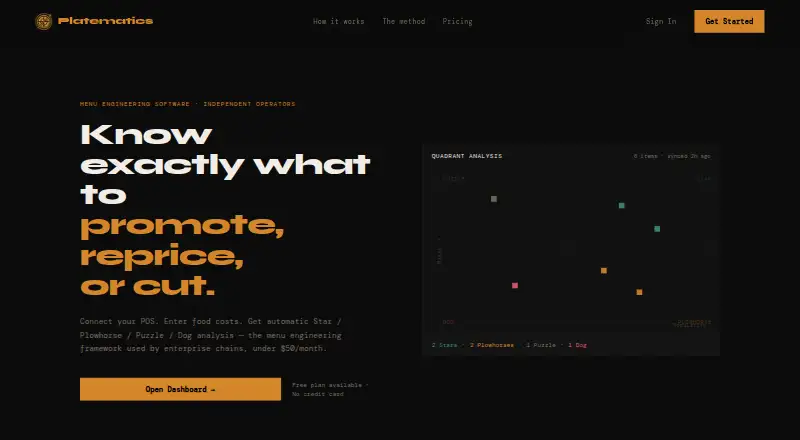
What Platematics is
Platematics is web-based menu engineering software that helps restaurants assess the performance and profitability of menu items. It categorizes items as Stars, Plowhorses, Puzzles, or Dogs, using contribution margin and popularity compared with the restaurant’s menu average. POS sales data can sync nightly from Square, Toast, and Clover. Users can also upload supplier invoices for OCR line-item reading and mapping to menu items. The free Starter plan provides monthly quadrant analysis for up to 50 items, manual food-cost entry, snapshot history, and PDF exports. Pro costs $49.00 per month and adds weekly analysis, email alerts, unlimited items, invoice scanning, price simulation, AI ordering suggestions, an AP payables dashboard, and advanced reporting. The simulator previews how a price change could affect margin. AI ordering combines par levels with POS sales velocity to prepare a reorder list for approval. The Annual plan costs $490.00 per year and adds multi-location dashboards, cross-location reports, an accountant referral portal, and priority support. Pro signup offers a 14-day trial.
Good
- Free Starter plan supports up to 50 menu items.
- Syncs sales data from Square, Toast, and Clover.
- Pro includes invoice OCR and price simulation.
- Annual plan adds cross-location comparison reports.
Watch out
- Starter analysis is monthly.
- Starter is limited to 50 menu items.
- Pro costs $49.00 per month.
- Annual plan costs $490.00 per year.
Who it suits
Platematics is suited to restaurant operators who want menu-item analysis tied to margins and sales. Its multi-location tools are relevant to businesses comparing locations.
Verdict
Platematics offers a free entry point for basic menu analysis and adds deeper reporting and workflow tools on paid plans. Pro’s trial may help restaurants assess its paid features before choosing a plan.
Plans and prices
From Platematics's own pricing page, checked 30 Sep 2026.
| Plan | Price | What it gives you |
|---|---|---|
| Starter | Free | Monthly quadrant analysis · Up to 50 menu items · Manual food cost entry · Dashboard + snapshot history · PDF exports · free forever |
| Pro | $49 a month | Weekly analysis + email alerts · Unlimited menu items · Invoice scanning (OCR) · Price simulator · AI ordering suggestions · AP payables dashboard · Advanced reporting · per month |
| Annual | $490 a year | Everything in Pro · Multi-location dashboard · Cross-location comparison reports · Accountant referral portal · Priority support · per year |
The facts
Each one read from Platematics's own pages, with the date it was checked.
What it does
- AI ordering
- The platform combines par levels and POS sales velocity to produce a reorder list for approval.checked 30 Sep 2026
- Analysis method
- It plots each item by contribution margin and popularity relative to the restaurant's own menu average.checked 30 Sep 2026
- Data cadence
- POS sales data syncs nightly, and the Starter plan provides monthly quadrant analysis.checked 30 Sep 2026
- Getting started
- The site says setup takes under an hour and describes POS connection as a two-minute OAuth flow.checked 30 Sep 2026
- Invoice scanning
- Supplier invoices can be uploaded for OCR line-item reading and mapping to the menu.checked 30 Sep 2026
- Item limit
- Starter supports up to 50 menu items, while Pro lists unlimited menu items.checked 30 Sep 2026
- Multi-location
- The Annual plan includes a multi-location dashboard and cross-location comparison reports.checked 30 Sep 2026
- Purpose
- Platematics provides menu engineering software that analyzes restaurant menu items as Stars, Plowhorses, Puzzles, or Dogs.checked 30 Sep 2026
- Support
- The Annual plan includes priority support.checked 30 Sep 2026
Where it runs
- POS integrations
- The site lists Square, Toast, and Clover for nightly sales data syncing.checked 30 Sep 2026
Money
- Price simulator
- The Pro plan includes a slider to preview the margin impact of a price change.checked 30 Sep 2026
- Trial
- The Pro plan signup button offers a 14-day trial.checked 30 Sep 2026
The full review of Platematics
Platematics is a web-based menu-analysis tool for restaurant operators who want to connect sales, food costs and menu decisions. Its clearest strength is linking item performance to margin; the free plan is constrained by a 50-item ceiling and monthly analysis.
Overview
Platematics classifies menu items as Stars, Plowhorses, Puzzles or Dogs by comparing each item’s contribution margin and popularity with the restaurant’s own menu averages. That makes the analysis specific to a restaurant’s menu rather than a generic ranking, and can help operators decide which dishes merit attention. It is a focused menu-engineering product, not a replacement for a POS or accounting system.
Key features
Square, Toast and Clover sales data syncs nightly, giving the analysis a recurring sales feed. Starter turns that data into monthly quadrant analysis; Pro raises the cadence to weekly analysis and adds email alerts, a better fit for operators making menu changes more often.
Starter supports manual food-cost entry, while Pro adds supplier-invoice uploads with OCR line-item reading and mapping to menu items. Pro also includes a price simulator for previewing how a price change affects margin, advanced reporting and an AP payables dashboard. Together, these tools extend the product beyond classifying dishes into cost and pricing decisions, but the deeper workflow is behind the paid plan.
Pro’s AI ordering suggestions combine par levels with POS sales velocity to create a reorder list for approval. That offers a practical purchasing prompt without claiming to automate final orders. The site describes setup as taking under an hour and POS connection as a two-minute OAuth flow.
Pricing
Starter — free (billed free forever) includes monthly quadrant analysis, up to 50 menu items, manual food-cost entry, a dashboard with snapshot history and PDF exports. It is a sensible starting point for a small menu or an operator who can work with monthly reviews. The item cap and slower cadence make it less suitable for larger menus or frequent decisions.
Pro — $49 a month (billed per month) includes weekly analysis and email alerts, unlimited menu items, invoice scanning, the price simulator, AI ordering suggestions, an AP payables dashboard and advanced reporting. It suits restaurants that need more frequent analysis or want invoice and ordering workflows; the Pro signup offers a 14-day trial.
Annual — $490 a year (billed per year) includes everything in Pro, plus a multi-location dashboard, cross-location comparison reports, an accountant referral portal and priority support. It is aimed at operators managing multiple locations who need to compare them. Its annual billing is a larger commitment than Pro’s monthly term.
Platforms
Platematics is web-based. Its listed POS connections are Square, Toast and Clover, with nightly sales syncing.
Who it's for
Platematics is best suited to restaurant owners and managers who want menu decisions grounded in contribution margin and popularity, and who can use a supported POS connection. Starter makes sense for smaller menus and occasional review; Pro better suits operators who need weekly signals, unlimited items or deeper cost and ordering tools. Multi-location operators have a clearer case for Annual. It is less compelling for someone seeking a broad restaurant-management system or analysis more often than Starter provides without upgrading.
Pros and cons
- Useful menu-level comparison: Items are assessed against the restaurant’s own menu average for both margin and popularity.
- Accessible entry plan: Starter is free forever and includes food-cost entry, snapshot history and PDF exports.
- Paid workflow depth: Pro combines invoice OCR, price simulation and reorder suggestions with weekly analysis.
- Free-plan limits: Starter caps menus at 50 items and provides analysis monthly, limiting its usefulness for larger or fast-moving menus.
- Paid features require a step up: Unlimited items, invoice scanning and the more frequent analysis are all on Pro or above.
Alternatives
Restaurant Menu Engineering Software is the broader category directory for comparing menu-engineering tools. Consider Plattr if you want a freemium option spanning Android, iOS, web and API. MenuGenie offers a free web plan with uploads from photos, PDFs or text, a menu health score and three recommendations; its Pro plan is a one-time purchase, which may appeal if that score-and-recommendation format is a better fit. DishMath is a paid web/API option with a free trial; its Group plan covers 2–10 locations, roll-ups, per-GM SMS routing and quarterly analyst review, which may suit multi-site groups wanting those services. Menu Engineering System is a paid web alternative with lifetime Launch Access pricing. MenuSense is another freemium web option. Culvana is a paid web alternative priced at $199 a month per location, with one plan and no per-seat fees. Menu Engineering Studio is a paid web alternative without a free trial. tSpoonLab is a paid option available on web, iOS and Android.
Verdict
Choose Platematics if you want restaurant-specific menu analysis tied to POS sales, with a free way to start and paid tools for costs, pricing and ordering. Its main limitation is that the free plan is both capped and monthly; restaurants needing broader coverage or more timely analysis should consider Pro, while those seeking a different platform or multi-site workflow should compare alternatives.
Alternatives to Platematics
- 1

SpotOn Restaurant
Free planAndroidiOSWebAPI8.2From $50 a month - 2
Avero
Free planAndroidiOSWebAPI7.9From $300 a year - 3

ConectaMenu
Free planAndroidiOSWeb7.9Free plan - 4

Plattr
Free planAndroidiOSWebAPI7.9From €59 a month - 5
Toast
Free planAndroidiOSWebAPI7.6From $69 a month - 6

tSpoonLab
AndroidiOSWebAPI7.6From €95 a month