
Pixum
Pixum lets customers use their own pictures to create photo books and other photo products.
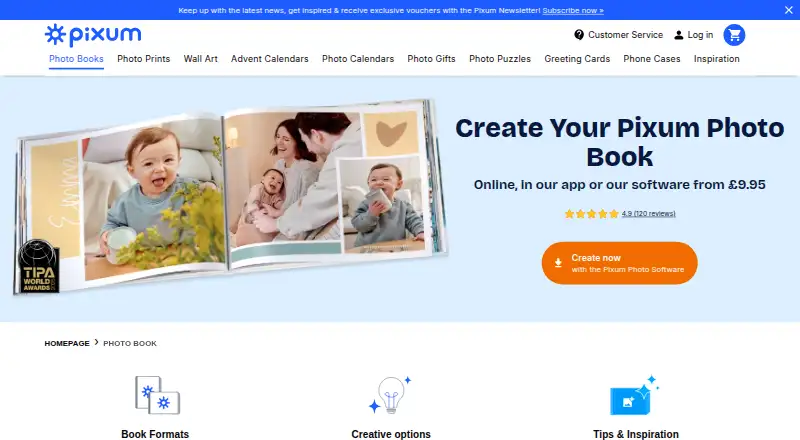
What Pixum is
Pixum lets customers use their own pictures to create photo books and other photo products. Books can be designed online, in the Pixum app, or with Pixum Photo World software. Formats include landscape, portrait, and square, with hardcover, softcover, and booklet choices. In the app, MagicBooks can arrange selected photos automatically, and users can adjust its suggestions. The app also supports drag-and-drop layouts, text, clipart, background colours, and stickers. Photo World includes templates, maps, GPS routes, QR-linked video, and photo editing tools. Page limits vary by book: classic binding supports up to 202 pages, layflat up to 130, and the small square book up to 74. Pixum says the inside pages of all its photo books are FSC-certified. Orders must use the software version for the delivery country, and billing and shipping addresses must be in the same country.
Good
- Create books online, in the app, or with desktop software.
- MagicBooks automatically arranges selected photos.
- Book formats include landscape, portrait, and square.
- Photo World offers maps, GPS routes, and QR-linked video.
- Inside pages of all photo books are FSC-certified.
Watch out
- Billing and shipping addresses must be in the same country.
- Orders must use software for the delivery country.
- Page limits vary by format and binding.
Who it suits
Pixum suits people making photo books for personal occasions such as travel, weddings, babies, or family memories. It offers online, app, and desktop design options for people who want different ways to arrange their pictures.
Verdict
Pixum offers several ways to design a photo book, from automatic photo arrangement to detailed desktop editing tools. Check the country-specific ordering rules and format page limits before choosing a book.
Plans and prices
From Pixum's own pricing page, checked 30 Sep 2026.
| Plan | Price | What it gives you |
|---|---|---|
| Pixum Photo Book small (square, 15×15 cm) — booklet, premium paper matt | £9.95, paid once | Small square format · booklet · premium matt paper · 26 pages; £1.40 for 4 extra pages |
| Pixum Photo Book small (landscape, 19×15 cm) — hardcover, premium paper matt | £22.95, paid once | Small landscape format · hardcover · premium matt paper · 26 pages; £2.10 for 4 extra pages |
| Pixum Photo Book large (landscape, 28×21 cm) — hardcover, premium paper matt | £34.95, paid once | Large landscape format · hardcover · premium matt paper · 26 pages; £2.90 for 4 extra pages |
| Pixum Photo Book XL (square, 30×30 cm) — hardcover, premium paper matt | £49.95, paid once | XL square format · hardcover · premium matt paper · 26 pages; £4.50 for 4 extra pages |
| Pixum Photo Book XXL (landscape, 38×29 cm) — hardcover, premium paper matt | £69.95, paid once | XXL landscape format · hardcover · premium matt paper · 26 pages; £5.70 for 4 extra pages |
The facts
Each one read from Pixum's own pages, with the date it was checked.
Where it runs
- App features
- The app can automatically fill a photo book with selected photos through MagicBooks, with suggestions users can customise.checked 30 Sep 2026
- App personalisation
- The app supports drag-and-drop layouts, text, clipart, background colours, and stickers.checked 30 Sep 2026
- Platforms
- Photo World software supports Windows 8, 10, and 11, Mac OS X 10.10 or later, and Linux kernel 4.4.0 or later; the site also offers an app and online editor.checked 30 Sep 2026
What it does
- Book features
- Formats include landscape, portrait, and square, with hardcover, softcover, and booklet options.checked 30 Sep 2026
- Creative tools
- Photo World software offers templates, layouts, maps, GPS routes, video links via QR codes, and photo editing tools.checked 30 Sep 2026
- Data controller
- The privacy statement identifies Diginet GmbH & Co. KG as the Pixum brand owner and GDPR data controller.checked 30 Sep 2026
- Design options
- Photo books can be created online, in the Pixum app, or with Pixum Photo World software.checked 30 Sep 2026
- Intended customers
- Pixum presents its photo products for personal occasions including travel, weddings, babies, and family memories.checked 30 Sep 2026
- Ordering limits
- Orders must use the software version for the delivery country, and the billing and shipping addresses must be in the same country.checked 30 Sep 2026
- Page limits
- The FAQ states classic bookbinding supports up to 202 pages, layflat binding up to 130 pages, and the small square photo book up to 74 pages.checked 30 Sep 2026
- Paper sourcing
- Pixum says the inside pages of all its photo books are FSC-certified.checked 30 Sep 2026
- Security and privacy
- Pixum says uploaded image data is kept in a private online gallery for 28 days, saved projects for up to 36 months, and production data for up to 12 weeks after delivery before deletion.checked 30 Sep 2026
- Support
- Customer support is available by email at [email protected], Monday to Friday, 8:00 AM to 6:00 PM.checked 30 Sep 2026
- What it does
- Pixum lets customers personalise photo books and other photo products with their own pictures.checked 30 Sep 2026
The company
- Founded
- 2000checked 23 Sep 2026
- Headquarters
- Cologne, Germanychecked 23 Sep 2026
The full review of Pixum
Overview
Pixum turns personal photographs into printed photo books and other keepsakes, with creation tools for web, mobile and desktop. It suits people who want to shape a book themselves or start with an automated layout and refine it. Its strongest case is the range of ways to design; the main caveat is that ordering rules and page limits depend on the product and delivery country.
Key features
Manual design or a head start
Pixum Photo World desktop software is the most feature-rich route: it includes templates, layouts, maps, GPS routes, video links through QR codes and photo-editing tools. That breadth will appeal to users who want to arrange a travel or event book with more than basic image placement. In the app, MagicBooks builds a proposed book from selected photos, and users can adjust the suggestions. Drag-and-drop layouts, text, clipart, background colours and stickers offer further customisation. The automatic start is useful for getting a first draft quickly, but those who want detailed controls are better served by Photo World.
Books come in landscape, portrait and square formats, with booklet, softcover and hardcover options. Pixum supports print ordering as well as PDF export, giving customers a digital output in addition to a physical book. Page ceilings vary: classic binding supports up to 202 pages, layflat binding up to 130, and the small square book up to 74. A long album therefore needs a format and binding that can accommodate it.
Pixum says inside pages across its photo books use FSC-certified paper. Uploaded images remain in a private online gallery for 28 days; saved projects can remain for up to 36 months, and production data is deleted within 12 weeks after delivery. Diginet GmbH & Co. KG is identified as the brand owner and GDPR data controller. Email support is available Monday to Friday, 8:00 AM to 6:00 PM at [email protected].
Pricing
Pixum is freemium, with photo books priced as one-time purchases rather than recurring subscriptions. The listed prices cover 26 pages; extra pages are charged in four-page increments, so the final cost rises with longer books.
- Small square, 15×15 cm booklet, premium matt paper: £9.95 per once. The lowest-priced listed book, for a compact keepsake; it allows up to 74 pages.
- Small landscape, 19×15 cm hardcover, premium matt paper: £22.95 per once. A small hardback option; four extra pages cost £2.10.
- Large landscape, 28×21 cm hardcover, premium matt paper: £34.95 per once. A larger standard-format book; four extra pages cost £2.90.
- XL square, 30×30 cm hardcover, premium matt paper: £49.95 per once. A larger square presentation, with four extra pages at £4.50.
- XXL landscape, 38×29 cm hardcover, premium matt paper: £69.95 per once. The largest listed format, with four extra pages at £5.70.
The cheaper booklet gives up the hardcover format, while larger sizes cost more both at the base price and for added pages. These are product prices, not a free software tier that includes a printed book; choose by the physical format and page count you need.
Platforms
Pixum supports Android, iOS, Linux, macOS, web and Windows. The web editor, mobile app and desktop software give users different ways to create a book, though Photo World’s additional layout and editing tools make desktop the better fit for more involved designs.
Who it's for
Check the page ceiling before committing to a format, particularly for a large collection of photos. Orders must use the software version for the delivery country, and billing and shipping addresses must be in that same country; that makes it a less convenient choice for cross-border gifting.
Pros and cons
- Several creation routes: Web, app and desktop support different working styles, while Photo World adds maps, GPS routes and QR-linked video features.
- Automatic first draft with room to edit: MagicBooks arranges selected photos, and app layouts and decorative tools let users customise the result.
- Clear low-cost entry point: The small square booklet starts at £9.95 per once, though extra pages and format upgrades raise the price.
- Product-dependent page limits: The 202-page classic-binding maximum does not apply to every format; layflat and small square books have lower ceilings.
- Country-specific ordering constraint: The software version and matching billing and shipping country requirements can complicate orders for recipients abroad.
Alternatives
For a broader comparison, browse Photo Book Software, Photo Calendar Software or Photo Printing Software.
- CEWE is worth comparing if a small square photo book is the priority: its listed price is £8.99 per once for 26–202 pages, below Pixum’s £9.95 booklet price.
- Hofmann is another paid photo-book option, with a listed 13 × 10 cm hard-cover landscape album priced at €13.99, paid once.
- Saal Digital may suit users looking beyond printed books: its free plan includes 10 GB storage, a 12% commission on download revenue and no commission on photo products.
- Blurb BookWright is an alternative for desktop book design, with templates, layout suggestions and offline editing; its software price is custom pricing.
- Journi offers free Journi Print and Journi Blog apps for users considering a different photo-product workflow.
- Mixbook is an iOS and web alternative; its listed softcover book costs $14.99, paid once, while Mixbook+ is a US-only iOS subscription at $9.99 a month.
- Popsa is another freemium photo-printing option for web, iOS and Android.
- AlbumForge may appeal to users who want offline desktop album creation: its free DISCOVERED plan allows 40 photos per album, five templates and standard PDF export without a watermark.
Verdict
Choose Pixum for a personal photo book when you want flexible design options, a useful automatic starting point and a choice of print sizes. Its desktop tools and PDF export broaden its appeal, but page caps and country-matched ordering rules deserve attention before you begin. Look elsewhere if your preferred book format, longer page count or delivery arrangements do not fit those constraints.
Getting started
- Open https://www.pixum.co.uk/photo-book or use the Pixum app or Photo World software.
- Choose the software version for the country where the order will be delivered.
- Select a book format and binding, then add your photos and customise the layout.
- Use MagicBooks for suggested automatic photo placement, or add layout elements yourself.
- Place a print order or export the project as a PDF.
- Keep billing and shipping addresses in the same country.
Limits worth knowing
The listed £9.95 small square booklet price covers 26 pages, with £1.40 charged for each additional 4 pages. Page ceilings depend on the book: small square books allow up to 74 pages, layflat binding up to 130, and classic binding up to 202.
Questions
Does Pixum have a free plan?
Yes.
How much do the listed UK photo books cost?
Each listed price covers 26 pages.
Which platforms can I use to make a book?
Pixum supports web, Android, iOS, Linux, macOS, and Windows. Books can be made online, in the Pixum app, or with Pixum Photo World software.
Can Pixum export a photo book as a PDF?
Yes. PDF export is available, alongside print ordering.
How many pages can a book have?
Classic binding supports up to 202 pages, layflat binding up to 130, and the small square photo book up to 74.
What personalisation tools are available?
The app supports drag-and-drop layouts, text, clipart, background colours, and stickers. Photo World offers templates, maps, GPS routes, QR-linked video, and photo-editing tools.
Alternatives to Pixum
- 1
Saal Digital
Free planAndroidiOSWebmacOS8.2From $5.99 a month - 2

Popsa
AndroidiOSWeb7.4$0.44 one-time - 3

Hofmann
AndroidiOSWebmacOS7.0€13.99 one-time - 4

Photobox
AndroidiOSWebmacOS6.9£0.17 one-time - 5
PhotoCal
Free planiOSmacOS6.9Free plan - 6

PhotobookShop Calendars
AndroidiOSWebmacOS6.8$19.95 one-time