
Journi
Journi turns photos into Photo Books, Calendars and Prints with an AI designer that arranges selected images into a story-led layout.
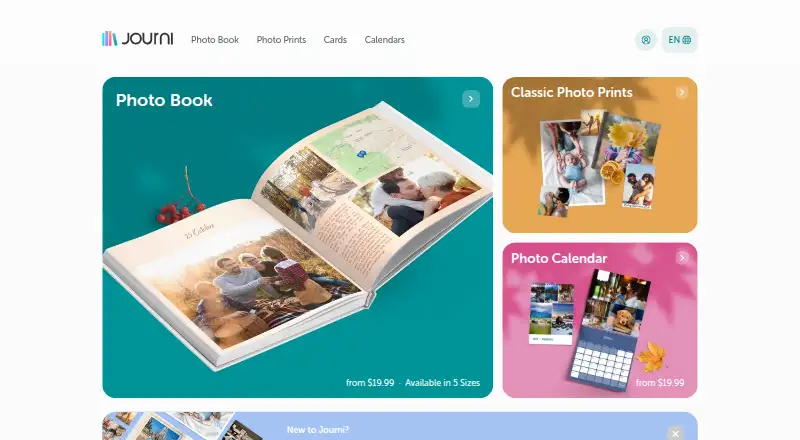
What Journi is
Journi turns photos into Photo Books, Calendars and Prints with an AI designer that arranges selected images into a story-led layout. Its AI can organize up to 1,200 photos into a timeline. Photo Books can include text, captions, fonts, themes, colors and maps. Journi Blog records experiences as timelines and maps, and those journals can become Photo Books. Journals may be private, restricted or public, and can be shared with collaborators. Journi supports photo access from Google Photos and backups to Google Drive and Dropbox, but images in shared Google Photos albums must be downloaded to the device library first. It describes normal use as no more than 10 GB of uploaded data or 5,000 images per month. Premium Layflat books are limited to 103 pages and are unavailable in Australia, New Zealand and Canada. The service is available on Android, iOS, macOS and the web.
Good
- AI arranges up to 1,200 photos into a timeline
- Photo Books support text, themes, colors and maps
- Journals can be shared with collaborators
- Apps are available on mobile, macOS and web
Watch out
- Shared Google Photos albums require downloading images first
- Normal usage is limited to 10 GB or 5,000 images monthly
- Premium Layflat books are limited to 103 pages
- Premium Layflat is unavailable in Australia, New Zealand and Canada
Who it suits
Journi suits people making travel journals, family memory books, personal diaries or printed keepsakes. It also fits users who want to share journals or turn them into printed books.
Verdict
Journi combines photo organization, journal sharing and print ordering, with free apps and one-time print purchases from $19.99. Check the Google Photos, usage and Layflat restrictions if they apply to your plans.
Plans and prices
From Journi's own pricing page, checked 1 Oct 2026.
| Plan | Price | What it gives you |
|---|---|---|
| Journi app | Free | Journi Print and Journi Blog apps |
| Photo Book | $19.99, paid once | 5 sizes · 25–300 pages · softcover, hardcover, premium layflat |
| Photo Calendar | $19.99, paid once | Portrait $19.99 · Landscape $21.99 · Square $24.99 |
The facts
Each one read from Journi's own pages, with the date it was checked.
What it does
- AI layout
- Its AI instantly organizes selected photos into a story-driven layout in seconds.checked 1 Oct 2026
- Audience
- Journi is designed for travel journals, family memories, personal diaries and printed keepsakes.checked 1 Oct 2026
- Customization
- Users can add text, captions, fonts, themes, colors and maps to Photo Books.checked 1 Oct 2026
- Fair-use limit
- Journi describes normal usage as no more than 10 GB of uploaded data or 5,000 images per month.checked 1 Oct 2026
- Integrations
- Journi supports photo access from Google Photos and backups to Google Drive and Dropbox.checked 1 Oct 2026
- Journaling
- Journi Blog records experiences as timelines and maps and can turn them into Photo Books.checked 1 Oct 2026
- Layflat limit
- Premium Layflat books are limited to 103 pages and are unavailable in Australia, New Zealand and Canada.checked 1 Oct 2026
- Photo capacity
- Journi says its AI can organize up to 1,200 photos into a timeline.checked 1 Oct 2026
- Privacy compliance
- Journi states that it has processor agreements under GDPR Articles 28 and 44 and provides GDPR data-subject rights.checked 1 Oct 2026
- Purpose
- Journi turns photos into Photo Books, Calendars and Prints using an AI designer.checked 1 Oct 2026
- Sharing
- Journi supports private, restricted or public journals and shared journals with collaborators.checked 1 Oct 2026
- Support
- Journi provides a searchable help center with articles, FAQs and request submission.checked 1 Oct 2026
- Sustainability
- Journi says it uses FSC-certified materials and plants a tree for every order.checked 1 Oct 2026
Where it runs
- Google Photos limit
- Google Photos shared albums cannot be accessed directly by Journi; photos must be downloaded to the device library.checked 1 Oct 2026
- Platforms
- Journi apps are available through Apple App Store and Google Play for iOS and Android, with browser-based web access.checked 1 Oct 2026
The full review of Journi
Journi pairs photo-book creation with travel and personal journaling, making it a strong fit for people who want their memories arranged as stories and maps as well as printed. Its free apps make it easy to start; the key cautions are the monthly upload guideline, the Google Photos shared-album workaround and regional limits on premium Layflat books.
Overview
Journi is a freemium service for organizing photos, keeping journals and ordering printed keepsakes. The connection between those jobs is its main appeal: experiences recorded in Journi Blog as timelines and maps can become Photo Books, while an AI designer arranges selected images into a story-driven layout. That makes Journi especially coherent for trips, family memories and personal diaries rather than for someone seeking only a general-purpose photo editor.
Journals can be private, restricted or public, and users can share them with collaborators. Journi can access photos from Google Photos and back up to Google Drive and Dropbox. However, it cannot access Google Photos shared albums directly; those pictures must first be downloaded to the device library, an inconvenient step for people whose selections live in shared albums.
Key features
Photo layouts and customization
Journi says its AI can organize up to 1,200 photos into a timeline and create a story-led layout in seconds. That capacity gives a large trip or event archive a useful starting structure, but the speed of the first layout does not mean every book is finished without editing. Users can add text and captions, and adjust fonts, themes, colors and maps to make a keepsake more personal.
Photo Books are offered in five sizes and can run from 25 to 300 pages under the plan details. The service also gives a maximum of 349 pages elsewhere in its product limits; because those figures differ, buyers planning a particularly long book should confirm the applicable cap before ordering.
Journaling, sharing and printing
Journi Blog turns experiences into timelines and maps that can later feed into a printed Photo Book. Private, restricted and public journal settings make it suitable for keeping a personal diary or sharing selected memories, while collaborator access supports a shared record. The same workflow is less convenient when the source images are in a Google Photos shared album, since they need to be copied into the device library first.
Journi also makes Photo Calendars and Prints. It says it uses FSC-certified materials and plants a tree for every order, a considered production policy for buyers who value sustainability. Its searchable help center includes articles, FAQs and a way to submit requests.
Limits and privacy
Journi describes normal usage as no more than 10 GB of uploaded data or 5,000 images per month. That is a practical boundary to consider when uploading a large archive or adding photos regularly; the monthly allowance is not a reason to assume unlimited bulk use. Premium Layflat books are capped at 103 pages and are unavailable in Australia, New Zealand and Canada, so they are not an option for every location or long-book project.
Journi states that it has processor agreements under GDPR Articles 28 and 44 and provides GDPR data-subject rights. That offers a defined privacy framework for users handling personal photos and journal entries.
Pricing
The Journi app plan is free at no cost and includes the Journi Print and Journi Blog apps. It suits people who want to start organizing memories and journaling without a subscription, while the monthly normal-usage limit and the shared-album download step matter for heavier or Google Photos-centered workflows.
Print purchases are one-time rather than recurring. Photo Books start at $19.99, paid once and include five sizes, 25–300 pages, and softcover, hardcover or premium Layflat options. Photo Calendars start at $19.99, paid once for Portrait; Landscape costs $21.99, paid once and Square costs $24.99, paid once. These are clearer fits for buyers who want a finished printed product without paying for an ongoing plan. Prints are also available to order, though no price is given for them.
The Photo Book starting price is not the cost of every format: the final choice of size, page count and binding matters, and premium Layflat is subject to its 103-page and regional restrictions. The free apps are the lower-cost way to use the journaling and layout workflow, while the one-time product prices apply when ordering print items.
Platforms
Journi supports Android, iOS, macOS and web. Mobile access suits capturing and organizing photos on a phone, while web and macOS support give users additional ways to work with their memories. It also supports photo access from Google Photos and backup to Google Drive and Dropbox, with the shared-album limitation applying to Google Photos.
Who it's for
Journi is a good choice for travelers who want a trip documented as a timeline or map and then turned into a book, and for families or diarists who want private or collaborative journals alongside printed keepsakes. It also suits occasional print buyers who prefer one-time purchases over a paid recurring plan. It is a weaker fit for people who depend on Google Photos shared albums, regularly upload beyond Journi's stated normal-usage threshold, need premium Layflat in Australia, New Zealand or Canada, or need a Layflat book beyond 103 pages.
Pros and cons
- Pros: AI can arrange up to 1,200 photos into a timeline, giving large collections an immediate story structure.
- Pros: Journals, maps, collaborators and print ordering connect digital memory-keeping with finished Photo Books.
- Pros: Free apps and one-time print purchases let users avoid a recurring plan.
- Pros: Google Drive and Dropbox backups, plus stated GDPR provisions, support a broader storage and privacy workflow.
- Cons: Shared Google Photos album images must be downloaded to the device library before Journi can use them.
- Cons: The stated normal-usage guideline of 10 GB or 5,000 images per month can constrain frequent bulk uploads.
- Cons: Premium Layflat has a 103-page cap and is unavailable in Australia, New Zealand and Canada.
Alternatives
Browse Photo Book Software if you want to compare more book-design options, or Photo Printing Software if print ordering is the priority.
Saal Digital is worth comparing if Windows support matters: it spans Android, iOS, macOS, web and Windows, and its free tier includes 10 GB storage with 12% commission on download revenue and 0% commission on photo products.
AlbumForge may suit Linux users who want offline album creation: its free DISCOVERED plan allows 40 photos per album, five templates and standard PDF export. Pixum is an option for buyers seeking a small square booklet, with a 15×15 cm, 26-page option priced at £9.95, paid once and extra pages at £1.40 for each four.
Hofmann offers a small landscape hard-cover album at €13.99, paid once, with 24–120 pages and extra pages at €0.87 each; shipping is excluded. Popsa may be preferable when individual photo prints are the goal: Square Photo Prints cost $0.44, paid once and Regular Photo Prints $0.59, paid once, with a minimum of 30 and maximum of 500 prints.
MILK Books is another book-focused option, with a Classic Photo Book at €37, paid once for 24–200 pages, three landscape sizes and two coated papers. Albelli is a paid alternative across Android, iOS, macOS, web and Windows, though no specific product detail is needed to distinguish it here.
Verdict
Choose Journi if you want one place to turn travel, family or diary photos into a journal and a printed keepsake, with a free app workflow and one-time product purchases. Its story-focused layouts and journal-to-book connection are the strongest reasons to choose it. Look elsewhere if shared Google Photos albums are central to your process, your uploads regularly exceed the stated normal-usage limits, or you need premium Layflat where it is unavailable or beyond its page cap.
Getting started
- Open Journi on the web or install its Android, iOS, or macOS app
- Choose photos from the device library or Google Photos
- Let the AI arrange images into a timeline or story layout
- Customize the project with text, captions, fonts, themes, colors, or maps
- Create a private, restricted, public, or shared journal
- Order a Photo Book, Calendar, or Print
Limits worth knowing
Journi describes normal usage as no more than 10 GB of uploaded data or 5,000 images per month. Photo Books list 25–300 pages, with a 349-page maximum book length; Premium Layflat books are limited to 103 pages and have regional availability restrictions.
Questions
Is Journi free?
Journi Print and Journi Blog apps are free.
What platforms does Journi support?
Journi is available on Android, iOS, macOS, and the web.
Can Journi use Google Photos?
Yes, Journi supports photo access from Google Photos. Shared Google Photos albums must be downloaded to the device library first.
Can Journi journals be shared?
Yes. Journals can be private, restricted, or public, and shared journals can include collaborators.
What Photo Book formats are available?
Journi lists five sizes, 25–300 pages, and softcover, hardcover, or premium layflat options. The maximum listed book length is 349 pages.
Alternatives to Journi
- 1
Saal Digital
Free planAndroidiOSWebmacOS8.2From $5.99 a month - 2

Blurb BookWright
Free planiOSWebAPImacOS8.1Free plan - 3
Zno
Free planAndroidiOSWebmacOS7.6Free plan - 4

Popsa
AndroidiOSWeb7.4$0.44 one-time - 5
Boots Photo
Free planAndroidiOSWebLinux7.3Free plan - 6
PrestoPhoto
Free planiOSWebExtensionmacOS7.1$14.99 one-time