AlbumForge
AlbumForge is desktop software for creating photo albums as PDFs for printing.
What AlbumForge is
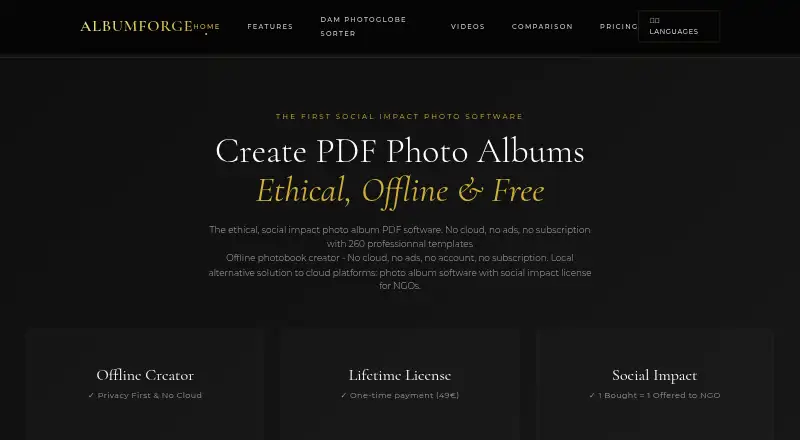
AlbumForge is desktop software for creating photo albums as PDFs for printing. The maker describes album creation as a three-click process and says the software works locally and offline, keeping photos on the user’s computer rather than sending data to its servers. It can process 1,500 photos in five minutes, according to the maker. AlbumForge reads GPS details from photo EXIF metadata and can show locations on an interactive map; map tiles may require a temporary internet connection, and OpenStreetMap is the stated map source. The user guide also lists HTML website, JPEG, and PNG exports. Its free DISCOVERED plan supports 40 photos per album, five templates, standard PDF export, and offline use without a watermark. Paid licenses begin with BASIC at €29 as a single payment; PROSOLIDARY costs €49 as a single payment for life, while FAMILY & EDUCATION costs €89 as a single payment for life and includes five licenses. A 30-day full-access trial is available without a credit card. AlbumForge runs on Linux, macOS, and Windows, and the maker describes it as designed for families, seniors, and teachers.
Good
- Works locally and offline, keeping photos on the computer.
- Exports albums as PDF, HTML, JPEG, and PNG.
- Reads photo GPS metadata and maps locations.
- Free plan includes 40 photos per album and five templates.
- 30-day full-access trial requires no credit card.
Watch out
- No web app is listed.
- No mobile app is listed.
- Free plan is limited to 40 photos per album.
- Map tiles may require a temporary internet connection.
Who it suits
AlbumForge is aimed at families, seniors, and teachers who want to make printable photo albums on a desktop computer. Its offline workflow and local photo storage may suit people who prefer to keep album work on their computer.
Verdict
AlbumForge focuses on desktop album creation, with offline use, several export formats, and GPS mapping. Review the photo and template limits of each plan to find a fit for the albums you want to make.
Plans and prices
From AlbumForge's own pricing page, checked 15 Oct 2026.
| Plan | Price | What it gives you |
|---|---|---|
| DISCOVERED | Free | 40 photos per album · 5 layouts · standard PDF export · offline · no watermark |
| BASIC | €29, paid once | 200 photos per album · 20 layouts · high-quality PDF · geographic mapping · 1 year updates · personal/commercial use · lifetime |
| PRO SOLIDAIRE | €49, paid once | Unlimited photos · 100+ layouts · professional export · advanced mapping and animations · full customization · lifetime updates · priority support · 50 languages · lifetime |
| PROSOLIDARY | $49, paid once | Unlimited photos · 100+ templates · professional export · advanced mapping and animations · lifetime updates · priority support · Single payment for life |
| FAMILY & EDUCATION | €89, paid once | 5 licenses · all Pro features · priority support and training · additional-license discount · lifetime |
The facts
Each one read from AlbumForge's own pages, with the date it was checked.
What it does
- API
- A public AlbumForge FAQ REST API exposes 1,083 entries in French and English through category endpoints such as /api/faq_privacy and /api/faq_formats.checked 15 Oct 2026
- API license
- The FAQ API dataset and API documentation state a CC0-1.0 public-domain license.checked 15 Oct 2026
- Audience
- The homepage describes the product as designed for families, seniors, and teachers.checked 4 Oct 2026
- Automatic layouts
- Its automatic-album engine groups images using EXIF dates, locations, orientation and scene similarity, then chooses layouts.checked 15 Oct 2026
- Cataloged inception
- Wikidata records AlbumForge’s inception year as 2024.checked 15 Oct 2026
- Documentation
- The help center covers installation, first-project workflow, keyboard shortcuts, DPI, supported formats, geolocation, troubleshooting and FAQs.checked 15 Oct 2026
- Export formats
- The guide lists PDF, HTML website, slideshow and JPEG exports, with PNG/JPEG high-resolution export also advertised.checked 15 Oct 2026
- Exports
- The user guide describes PDF, HTML website, JPEG, and PNG exports.checked 4 Oct 2026
- Geographic storytelling
- AlbumForge reads GPS EXIF data and displays photo locations on interactive maps with animated navigation.checked 15 Oct 2026
- Independent distribution
- SourceForge lists AlbumForge as freeware for Windows and records its last update as August 13, 2025.checked 15 Oct 2026
- Independent feature praise
- SaaS Browser highlights HD image export, lifetime licensing, offline operation, geotagging, privacy protection and multilingual support.checked 15 Oct 2026
- Independent feature summary
- SourceForge describes offline 600-DPI PDF export, MP4 export, geographic fly animations, 100-plus templates and 50-plus languages.checked 15 Oct 2026
- Independent product category
- SaaS Browser categorizes AlbumForge as local photo-album software for NGOs and schools and says the owner verified the profile.checked 15 Oct 2026
- Installer security
- The Windows installer is described as an approximately 35 MB Inno Setup executable signed by AWANNABY through SSL.com.checked 15 Oct 2026
- Languages
- The interface is advertised in more than 50 languages, including right-to-left writing and special-character support.checked 15 Oct 2026
- License terms
- The EULA grants a perpetual license for one computer, allows personal and commercial use, and promises lifetime updates for the lifetime edition.checked 15 Oct 2026
- Limit: manual layout workload
- The manual-generation guide warns that selecting many layouts can consume excessive RAM/CPU and may cause very long processing or crashes.checked 15 Oct 2026
- Limit: output size
- The help guide cautions that 600-DPI exports can exceed 100 MB and that PDF files may become very large.checked 15 Oct 2026
- Limit: printing
- AlbumForge generates files but does not provide an integrated printing service; users must print through another provider.checked 15 Oct 2026
- Manual generation
- The manual generator applies selected layouts sequentially to photos in gallery order without intelligent grouping.checked 15 Oct 2026
- Map data
- The maker says map tiles may require a temporary internet connection and identifies OpenStreetMap as its map source.checked 4 Oct 2026
- Map integration
- The privacy statement identifies OpenStreetMap for map tiles and says a temporary connection may be needed to load tiles.checked 15 Oct 2026
The company
- Maker architecture
- AWANNABY’s case study says the AlbumForge web presence uses static HTML and Python automation, with 2,000-plus pages across 42-plus languages.checked 15 Oct 2026
- Maker legal identity
- The EULA identifies the maker as AlbumForge (Awannaby), with a registered address in Tournan-en-Brie, France.checked 15 Oct 2026
The full review of AlbumForge
Overview
AlbumForge is desktop software for arranging photos into albums and exporting them for print or digital sharing. It is best suited to families, seniors, and teachers who want a local workflow; its privacy-minded offline operation is compelling, but the free tier is too limited for a full album of typical size.
Key features
Automatic layouts and a workflow the maker describes as three clicks aim to keep album creation straightforward. The maker also says AlbumForge can process 1,500 photos in five minutes, a useful capacity signal for people sorting large libraries, though album limits vary by plan. Exports include PDF, HTML website, JPEG, and PNG, so an album can be prepared for printing elsewhere or shared digitally. There is no print ordering, which means the finished physical book is up to the user to arrange.
AlbumForge can read GPS coordinates from photo EXIF metadata and display them on an interactive map, adding useful location context to travel and family albums. Map tiles may need a temporary internet connection and use OpenStreetMap. Album creation otherwise works locally and offline; the maker says photos stay on the computer and no data is sent to its servers.
Pricing
A 30-day full-access trial requires no credit card. The free plan is a useful way to try the workflow, but its 40-photo album cap and five templates make it a poor fit for larger projects.
| Plan | Price | What it includes | Best fit |
|---|---|---|---|
| DISCOVERED | free | 40 photos per album, 5 templates, standard PDF export, offline use, no watermark | Small albums and evaluating the software |
| BASIC | $29, paid once | 200 photos per album, 20 templates, high quality PDF export, geographical mapping, 1 year of updates | Occasional albums that exceed the free cap |
| PROSOLIDARY | $49, paid once | Unlimited photos, 100+ templates, professional export, advanced mapping and animations, lifetime updates, priority support | Frequent or larger album projects |
| FAMILY & EDUCATION | $89, paid once | 5 licenses, includes PRO offer, priority support and training | Households or educational use needing multiple seats |
The one-time BASIC purchase includes only a year of updates, while PROSOLIDARY and FAMILY & EDUCATION include lifetime updates. Paid versions receive email support within 48 hours; the Family version has priority support within 24 hours. The pricing page says each purchased license funds a free license for a family in need.
Platforms
AlbumForge is a desktop app for Linux, macOS, and Windows. It has no web or mobile app, so it suits people who prefer to build albums on a computer rather than work from a phone or browser.
Who it's for
Choose AlbumForge if you want to create print-ready PDFs on a computer, keep photos local, and value offline use. BASIC is a reasonable step up for albums of up to 200 photos; PROSOLIDARY suits larger projects or users who need its broader template and export options. Look elsewhere if you want a service that takes orders for printed books or a mobile-first workflow.
Pros and cons
- Pros: Local, offline album creation keeps photos on the computer; export choices cover print PDFs, web pages, and image files; paid licenses are one-time purchases.
- Cons: The free plan stops at 40 photos per album and five templates; printing must be arranged separately; map tiles may briefly require internet access.
Alternatives
Photo Book Software is a broader category to compare if you are still deciding what kind of album tool you need.
- Saal Digital is worth considering if you want Android or iOS access alongside desktop and web, plus 10 GB of free storage and photo-product sales with 0% commission.
- Blurb BookWright is another desktop book-design option, with templates, layout suggestions, and offline editing.
- Journi is an alternative with Android, iOS, and web availability.
- Pixum is an alternative with Linux, desktop, web, and mobile availability.
- Hofmann is an alternative with desktop, web, and mobile availability.
- ifolor is an alternative with desktop, web, and mobile availability.
- Popsa is an alternative for readers considering photo-print products, with Android, iOS, and web availability.
- MILK Books is an alternative with desktop, web, and mobile availability.
Verdict
AlbumForge is a strong fit for families, seniors, and teachers who want desktop album-making with local, offline photo handling and flexible exports. Its clearest advantages are privacy-conscious operation and one-time licenses; choose another service if you want to order prints directly, need mobile access, or expect the free plan to handle a substantial album.
Getting started
- Open the AlbumForge website
- Download the desktop version for Linux, macOS, or Windows
- Start the 30-day full-access trial without a credit card
- Create an album using the desktop workflow
- Choose a plan if you need higher photo limits or additional templates
Limits worth knowing
The DISCOVERED free plan allows 40 photos per album and five templates with standard PDF export. BASIC allows 200 photos per album, while PROSOLIDARY removes the photo limit; the trial lasts 30 days.
Questions
Is AlbumForge free?
Yes. The DISCOVERED plan costs nothing and includes 40 photos per album, five templates, standard PDF export, offline use, and no watermark.
What platforms does AlbumForge support?
It is available as a desktop app for Linux, macOS, and Windows.
Does AlbumForge offer a trial?
A 30-day full-access trial is available without requiring a credit card.
What exports are available?
The user guide lists PDF, HTML website, JPEG, and PNG exports.
How much do paid plans cost?
BASIC is listed at 29.00 USD as a single payment, PROSOLIDARY at 49.00 USD as a lifetime single payment, and FAMILY & EDUCATION at 89.00 USD as a lifetime single payment.
Are photos uploaded to AlbumForge servers?
The maker says the software sends no data to its servers and keeps photos on the user’s computer.
Alternatives to AlbumForge
- 1
Saal Digital
Free planAndroidiOSWebmacOS8.2From $5.99 a month - 2

Blurb BookWright
Free planiOSWebAPImacOS8.1Free plan - 3
PastBook
Free planAndroidiOSWeb7.9Free plan - 4

Journi
Free planAndroidiOSWebmacOS7.4$19.99 one-time - 5

Popsa
AndroidiOSWeb7.4$0.44 one-time - 6

My Social Book
AndroidiOSWeb7.2