
Blurb BookWright
Blurb BookWright is desktop software for creating custom books, including photo books, paperbacks, hardcovers, magazines, notebooks, and wall art.
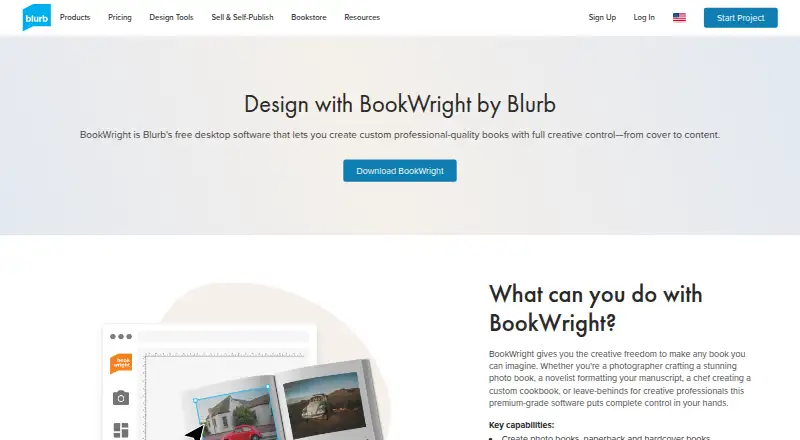
What Blurb BookWright is
Blurb BookWright is desktop software for creating custom books, including photo books, paperbacks, hardcovers, magazines, notebooks, and wall art. Its design tools include customizable templates, freestyle grids, typography and cover controls, bleed lines, and trim guides. Users can scale, crop, enhance, and auto-retouch images, while Text Flow fits text to frames and imports Rich Text Format files. Photo Manager can bring in images from Adobe Lightroom, SmugMug, and Dropbox. The desktop app supports offline work, but publishing requires an internet connection, and a free Blurb account is needed to access its features and publishing options. Finished projects can be printed on demand, ordered in bulk, or purchased as PDFs. BookWright itself is free; users pay for a book when sending it to print. Listed requirements include Windows 7, 8, or 10, or macOS 10.13 or later, with 2GB RAM and 500MB storage. Books can be up to 440 pages.
Good
- Desktop editing works offline.
- Supports photo imports from Lightroom, SmugMug, and Dropbox.
- Offers templates, typography, and cover design tools.
- Projects can be printed or purchased as PDFs.
- Books can be up to 440 pages.
Watch out
- Publishing requires an internet connection.
- A free Blurb account is required.
- Users pay for books when sending them to print.
Who it suits
BookWright suits people designing custom books, photo books, magazines, notebooks, or wall art on a desktop. It is a fit for users who want to edit offline and choose print or PDF output.
Verdict
BookWright provides book layout, image editing, and print or PDF output in a free desktop app. Plan for an account and an internet connection when publishing; printed books have a cost.
Plans and prices
From Blurb BookWright's own pricing page, checked 20 Sep 2026.
| Plan | Price | What it gives you |
|---|---|---|
| BookWright software | — | Desktop book-design application · Templates and layout suggestions · Offline editing |
| Softcover photo book | $12 a month | 20 pages |
| ImageWrap Hardcover photo book | $32 a month | 20 pages |
| Linen Hardcover with Dust Jacket photo book | $32 a month | 20 pages |
| Layflat photo book | $60 a month | Layflat photo book printing |
| BookWright | Free | Free desktop book-design software · Windows and macOS · publishing requires internet |
| Paperback book, Economy Color, 5×8 in | $3.99, paid once | 24-page paperback · 70# white uncoated paper · additional pages US $0.06 |
| Paperback book, Standard B&W, 5×8 in | $4.99, paid once | 50# white uncoated text paper · additional pages US $0.04 |
| Premium Magazine | $7, paid once | 8.5×11 in · premium paper |
The facts
Each one read from Blurb BookWright's own pages, with the date it was checked.
What it does
- Account requirement
- Users sign up for a free Blurb account to access BookWright features and publishing options.checked 28 Sep 2026
- Adobe integrations
- Blurb offers companion integrations for Adobe InDesign, Lightroom Classic and Photoshop, plus a PDF uploader.checked 14 Oct 2026
- API documentation
- RPI Print provides REST API documentation, a free sandbox and onboarding guidance; custom integrations can receive dedicated account management.checked 14 Oct 2026
- API pricing
- The self-service API has no setup fees, monthly fees or minimum order volume; custom API pricing depends on requirements and volume.checked 14 Oct 2026
- Auto image adjustment
- Auto Image Adjust can brighten, sharpen, correct color and skin tones, remove red-eye, reduce noise and improve print fidelity.checked 14 Oct 2026
- Custom API
- The Custom API supports photo books, hardcover and paperback books, notebooks, journals and magazines with global shipping and bespoke workflows.checked 14 Oct 2026
- Design tools
- Features include freestyle grids, typography and cover design tools, bleed lines, trim guides, and customizable templates.checked 28 Sep 2026
- Desktop requirements
- The page lists Windows 7, Windows 8, or Windows 10 and macOS 10.13 or later, with 2GB RAM and 500MB storage required.checked 28 Sep 2026
- Image editing
- It includes image scaling, cropping, enhancement, and auto-retouching powered by Perfectly Clear by EyeQ.checked 28 Sep 2026
- Image limits
- BookWright accepts JPG, JPEG and PNG images up to 75 megapixels and recommends 250–300 DPI at placed size for books.checked 14 Oct 2026
- Image tools
- Built-in image handling includes scaling, cropping, enhancement and auto-retouching powered by Perfectly Clear by EyeQ.checked 14 Oct 2026
- Independent test criticism
- Tom’s Guide reported clunky design software, limited layout decoration, dull color reproduction, dark blacks, ink transfer and a cracking hardcover.checked 14 Oct 2026
- Independent test praise
- TechRadar praised BookWright’s precise element control, linked text boxes, 188 layouts and strong print accuracy.checked 14 Oct 2026
- Installation
- Windows uses a 64-bit installer, while Mac installation uses a downloaded DMG dragged into Applications.checked 14 Oct 2026
- Integrations
- BookWright supports importing photos from Adobe Lightroom, SmugMug, and Dropbox through Photo Manager.checked 28 Sep 2026
- Layout controls
- BookWright provides freestyle grids, typography controls, bleed lines, trim guides, page numbers, background colors and cover-design tools.checked 14 Oct 2026
- License
- Blurb grants a royalty-free, nonexclusive, nontransferable internal-use copyright license for BookWright and retains proprietary rights in the software.checked 14 Oct 2026
The company
- Company
- Blurb says it is based in San Francisco, with offices in London.checked 28 Sep 2026
- Company founding
- Blurb says Eileen Gittins founded the company in 2005.checked 14 Oct 2026
- Company headquarters
- Blurb identifies San Francisco as its base and says it has an office in London.checked 14 Oct 2026
- Company legal name
- Crunchbase lists the legal name as Blurb, Inc.checked 14 Oct 2026
- Company scale
- LinkedIn says Blurb has more than 2 million customers, over 4 million book titles and nearly 18 million units shipped to almost 100 countries.checked 14 Oct 2026
Money
- Cost limit
- BookWright is free to use, and users pay for a book when they send it to print.checked 28 Sep 2026
- Free plan
- Yeschecked 20 Sep 2026
The full review of Blurb BookWright
Overview
Blurb BookWright is a desktop tool for laying out books and photo-led projects, best suited to people who want to prepare a custom title for print without buying design software. Its strongest case is the direct path from layout to physical copies or PDF; the trade-off is that printing is a separate cost and publishing requires an account and internet access.
Key features
BookWright covers photo books, paperbacks, hardcovers, magazines, notebooks, and wall art. Templates, layout suggestions, freestyle grids, and automatic layouts give users several ways to get a project started, while typography and cover tools allow more control. Bleed lines and trim guides are useful for preparing pages for physical production, and the 440-page maximum accommodates substantial books but rules out longer projects.
Image tools include scaling, cropping, enhancement, and auto-retouching powered by Perfectly Clear by EyeQ. Text Flow automatically fits text into frames and accepts Rich Text Format imports, a practical combination for projects that mix photography with longer copy. Photo Manager imports images from Adobe Lightroom, SmugMug, and Dropbox.
The desktop app supports offline editing, so work can continue without a connection; publishing requires internet access. Finished work can be ordered on demand, printed in bulk, or purchased as a PDF. A free Blurb account is required to access the software and publishing options.
Pricing
BookWright software is free to use, with no trial period to manage. You pay for a book when you send it to print, so the software suits occasional projects as well as users who want to prepare a design before deciding whether to order copies. The free software plan does not remove the cost of printed books.
- BookWright: free. Includes the desktop software, with payment for books when printed.
- Softcover photo book: $12 a month for 20 pages.
- ImageWrap Hardcover photo book: $32 a month for 20 pages.
- Linen Hardcover with Dust Jacket photo book: $32 a month for 20 pages.
- Layflat photo book: $60 a month for layflat printing.
These printed-book options are priced by format, and the photo-book plans with a stated page count cover 20 pages. The software plan itself has no recurring charge; the listed print prices are separate purchase choices for readers selecting a physical book.
Platforms
BookWright is a desktop application for Windows and macOS, rather than a web app. Its desktop requirements are Windows 7, Windows 8, or Windows 10, or macOS 10.13 or later, with 2GB RAM and 500MB storage. Offline editing is supported, but an internet connection is needed to publish.
Who it's for
BookWright is a sensible fit for individuals making photo books or other custom books who value print-oriented layout tools and the choice of print, bulk ordering, or PDF output. Its text-flow and RTF support also help with more text-heavy work. It is less suitable for anyone who needs a browser-based editor, wants publishing without an account or internet connection, or needs a book longer than 440 pages.
Pros and cons
- Pro: Free desktop software keeps design costs out of a project; the expense begins when a user orders a printed book.
- Pro: Offline editing, text flow, image adjustments, and print guides cover much of the preparation work in one application.
- Pro: Print-on-demand, bulk orders, and PDF purchase give users different ways to finish a project.
- Con: Publishing depends on an internet connection and a free Blurb account, despite offline editing support.
- Con: The 440-page cap makes it a poor fit for unusually long books.
- Con: The web platform is not an option; users need a compatible Windows or Mac desktop.
Alternatives
For broader desktop-publishing options, browse Desktop Publishing Software; for photo-focused projects, compare Photo Book Software. Readers focused on page composition can also explore Book Layout Software, while Photo Printing Software and Print-on-Demand Platforms serve adjacent needs.
Choose VivaDesigner if you want a freemium publishing application with a full-feature trial that continues as a limited free edition, or PublishMedia if opening and viewing Publisher and Office files is the priority; its free starter does not allow editing or export. Affinity is a free alternative that combines vector design, pixel photo editing, page layout, and export tools for individuals. Mac users considering another publishing app can compare iStudio Publisher; Megal Publisher is a web-based option. QuarkXPress, Lacuna, and PageStream are also alternatives.
Verdict
Choose Blurb BookWright if you want free desktop software for building a custom book and a clear route to print or PDF, especially for photo books and mixed image-and-text projects. Look elsewhere if you need a web editor, cannot rely on an internet connection when publishing, or need to exceed its 440-page limit.
Getting started
- Visit the BookWright website.
- Sign up for a free Blurb account.
- Install the desktop software on Windows 7, 8, or 10, or macOS 10.13 or later.
- Design a project with templates, layout tools, and image imports if needed.
- Connect to the internet to publish, then choose print-on-demand, bulk ordering, or PDF purchase.
Limits worth knowing
BookWright software is free, but users pay for a book when they send it to print. Publishing requires an internet connection, and the maximum book page count is 440.
Questions
Is BookWright free?
Yes. The desktop software is free, and users pay for books when they send them to print.
What can I create with BookWright?
It supports photo books, paperbacks, hardcovers, magazines, notebooks, and wall art.
Can I work offline?
The desktop software supports offline work, but publishing requires an internet connection.
Which platforms does BookWright support?
It is desktop software for Windows 7, 8, or 10 and macOS 10.13 or later.
Can I import images from other services?
Photo Manager supports imports from Adobe Lightroom, SmugMug, and Dropbox.
What prices are listed for the photo book plans?
A 20-page softcover photo book is listed at $12.00 USD. A 20-page ImageWrap hardcover and a 20-page linen hardcover with dust jacket are each listed at $32.00 USD; a layflat photo book is listed at $60.00 USD.
Alternatives to Blurb BookWright
- 1

Printful
Free planAndroidiOSWebAPI8.8From $24.99 a month - 2

Fourthwall
Free planAndroidiOSWebAPI8.8From $15 a month - 3

Shirtigo Cockpit
Free planWebAPIExtension8.1From €12 a month - 4

Printify
Free planAPI7.8From $299 a year - 5

Merchize
Free planWebAPI7.8Free plan - 6

Inkthreadable
Free planWebAPI7.7£25 one-time