
PhotobookShop Calendars
PhotobookShop Calendars are personalised printed calendars for family scheduling, school-term planning, office use, or gifts.
What PhotobookShop Calendars is
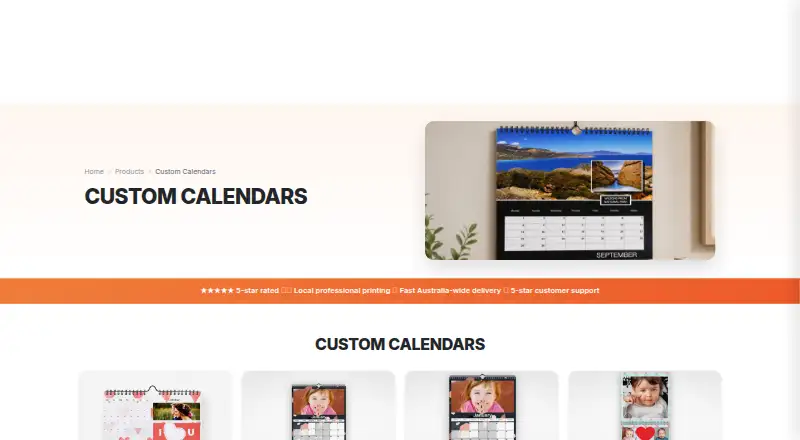
PhotobookShop Calendars are personalised printed calendars for family scheduling, school-term planning, office use, or gifts. The editor lets users upload photos, choose layouts and backgrounds, add text, and mark birthdays, anniversaries, and other dates. Calendars can start in any month. Options include desk formats, A4 and A3 wall calendars, and double calendars that show two months at once. Design is available through an online designer for computers and tablets, a downloadable desktop designer that supports offline work, and mobile apps. Photos can be uploaded from phone storage, Facebook, Instagram, Google Photos, or Dropbox. The maker says calendars are printed in Melbourne on 170gsm regular silk paper, with 250gsm premium silk available as an option. Printing takes about 5 to 7 business days, followed by another 3 to 7 business days in transit across Australia. Special dates from a previous-year project do not transfer automatically and need to be added again.
Good
- Calendars can begin in any month.
- Supports photos, custom text, and special dates.
- Photos can come from several services or phone storage.
- Online, offline desktop, and mobile design options are available.
- Offers desk, wall, and double calendar formats.
Watch out
- Special dates from an earlier-year project do not transfer automatically.
- Shipping is extra.
- Printing and delivery take multiple business days.
Who it suits
It suits people making photo calendars for household or school dates, office use, or personalised gifts. The range of design options may also suit users who want to create calendars on a computer, tablet, or phone.
Verdict
PhotobookShop offers several calendar formats and ways to personalise dates, layouts, and photos. Remember to re-enter special dates from a prior-year project, and account for shipping separately from the listed one-time prices.
Plans and prices
From PhotobookShop Calendars's own pricing page, checked 30 Sep 2026.
| Plan | Price | What it gives you |
|---|---|---|
| Desk 21x10cm calendar | $19.95, paid once | 12 pages included · extra page $ 0.00 · shipping: $ 0.00 pickup, $ 6.95 standard, $ 12.95 tracking, $ 18.95 express · One-time product price; shipping extra |
| A4 Landscape or Portrait calendar | $24.95, paid once | 12 pages included · extra page $ 0.00 · shipping: $ 0.00 pickup, $ 6.95 standard, $ 12.95 tracking, $ 18.95 express · One-time product price; shipping extra |
| Desk 21x21cm calendar | $24.95, paid once | 12 pages included · extra page $ 0.00 · shipping: $ 0.00 pickup, $ 6.95 standard, $ 12.95 tracking, $ 18.95 express · One-time product price; shipping extra |
| A4 Double calendar | $29.95, paid once | 24 pages included · extra page $ 0.00 · shipping: $ 0.00 pickup, $ 6.95 standard, $ 12.95 tracking, $ 18.95 express · One-time product price; shipping extra |
| A3 Portrait calendar | $34.95, paid once | 12 pages included · extra page $ 0.00 · shipping: $ 0.00 pickup, $ 9.95 standard, $ 15.95 tracking, $ 21.95 express · One-time product price; shipping extra |
| 30x30 Double calendar | $39.95, paid once | 24 pages included · extra page $ 0.00 · shipping: $ 0.00 pickup, $ 9.95 standard, $ 15.95 tracking, $ 21.95 express · One-time product price; shipping extra |
The facts
Each one read from PhotobookShop Calendars's own pages, with the date it was checked.
The company
- Company history
- The maker says founder Peter Thomas began developing the business after ordering an unsatisfactory online photobook in 2009.checked 30 Sep 2026
- Founded
- 2009checked 28 Sep 2026
- Headquarters
- Reservoir, Victoria, Australiachecked 28 Sep 2026
What it does
- Delivery
- The maker says calendar printing takes about 5 to 7 business days and delivery takes a further 3 to 7 business days in transit across Australia.checked 30 Sep 2026
- Flexible start
- Calendars can start on any month of the year rather than only January.checked 30 Sep 2026
- Formats
- The maker describes wall calendars in A4 and A3 sizes, desk calendars at 21x21cm, and double calendars that show two months at once.checked 30 Sep 2026
- Holiday dates
- The calendar page says public holidays are available for Australian states, New Zealand, the USA, Canada and European countries, and Australian and New Zealand school terms are based on published public school dates.checked 30 Sep 2026
- Integrations
- The mobile app page says users can upload photos from Facebook, Instagram, Google Photos or Dropbox, as well as phone storage.checked 30 Sep 2026
- Notable limit
- The calendar product FAQ says special dates from a previous-year calendar project do not transfer automatically and must be added again.checked 30 Sep 2026
- Personalisation
- The calendar editor supports uploading photos, choosing layouts and backgrounds, adding text and marking birthdays, anniversaries and other special dates.checked 30 Sep 2026
- Print and materials
- PhotobookShop says calendars are printed at its Melbourne facility on 170gsm regular silk or optional 250gsm premium silk paper.checked 30 Sep 2026
- Product
- PhotobookShop sells personalised photo calendars in desk, medium, large and double formats for home, office or gifting.checked 30 Sep 2026
- Security and compliance
- The calendar product page states that its 170gsm regular silk paper is FSC certified and acid free.checked 30 Sep 2026
- Support
- PhotobookShop offers phone support Monday to Friday 9am–6pm and Saturday 10am–3pm, online chat, and email support with a stated target response within 24 hours.checked 30 Sep 2026
- Who it is for
- The maker presents the calendars for personal family scheduling, school-term planning, office use and personalised gifts.checked 30 Sep 2026
Where it runs
- Design platforms
- The maker offers an online designer for computers and tablets and a downloadable desktop designer that supports offline work.checked 30 Sep 2026
- Mobile apps
- The maker says its app is available from the App Store and Google Play.checked 30 Sep 2026
The full review of PhotobookShop Calendars
PhotobookShop Calendars turns personal photos and marked dates into printed desk and wall calendars. It suits households, schools, and offices that want a physical calendar tailored to their schedule or a photo-led gift. Its range of formats and flexible start months are useful; remember that special dates must be re-entered each year and shipping adds to the one-time price.
Overview
The editor combines photo uploads with layouts, backgrounds, text, and marked birthdays, anniversaries, and other events. That makes it more than a photo-print order: users can shape the calendar around family occasions or school-term planning. Calendars can begin in any month, which is helpful for non-January schedules and gifts timed to a particular occasion.
Available date information includes public holidays for Australia, New Zealand, the USA, Canada, and European countries, plus Australian and New Zealand school terms based on published public-school dates. The key recurring chore is that special dates from a previous-year project do not transfer automatically. Anyone ordering a new edition will need to add those dates again.
Key features
- Multiple formats: Choices include desk calendars, A4 and A3 wall calendars, and double calendars that show two months at once. The double format is a practical fit when a single monthly view is too limited.
- Photo and date customisation: Upload photos, choose layouts and backgrounds, add text, and mark personal events. The mobile app accepts photos from Facebook, Instagram, Google Photos, Dropbox, or phone storage, giving users several ways to gather images.
- Design across devices: An online designer works on computers and tablets, while a downloadable desktop designer supports offline work. Mobile apps are offered for Android and iOS.
- Printed locally: PhotobookShop says calendars are printed at its Melbourne facility on 170gsm regular silk paper, with optional 250gsm premium silk. The regular paper is FSC certified and acid free. Printing takes about 5 to 7 business days, followed by a further 3 to 7 business days in transit across Australia.
Phone support runs Monday to Friday, 9am–6pm, and Saturday, 10am–3pm; online chat and email support are also offered, with an email response target within 24 hours. These support channels are useful if an order or design question arises, though they do not remove the need to check dates before each new annual project.
Pricing
PhotobookShop is a paid, one-time purchase rather than a subscription, with no free plan. Each option includes 12 pages unless noted; extra pages cost $ 0.00. Shipping is charged separately, so the product price is not the full delivered cost.
- Desk 21x10cm calendar: $19.95, paid once. The lowest-cost format is suited to a small desk display. Shipping is $ 0.00 pickup, $ 6.95 standard, $ 12.95 tracking, or $ 18.95 express.
- Desk 21x21cm calendar: $24.95, paid once. Its square format costs more than the smaller desk option; it includes 12 pages. Shipping is $ 0.00 pickup, $ 6.95 standard, $ 12.95 tracking, or $ 18.95 express.
- A4 Landscape or Portrait calendar: $24.95, paid once. This is the wall-calendar choice at the same product price as the larger desk calendar, with 12 pages. Shipping is $ 0.00 pickup, $ 6.95 standard, $ 12.95 tracking, or $ 18.95 express.
- A4 Double calendar: $29.95, paid once. It includes 24 pages and displays two months at once, making it the more useful choice for readers who value a broader date view. Shipping is $ 0.00 pickup, $ 6.95 standard, $ 12.95 tracking, or $ 18.95 express.
- A3 Portrait calendar: $34.95, paid once. The larger wall format includes 12 pages. Shipping is $ 0.00 pickup, $ 9.95 standard, $ 15.95 tracking, or $ 21.95 express.
- 30x30 Double calendar: $39.95, paid once. This is the highest-priced option and combines a larger square format with 24 pages and a two-month view. Shipping is $ 0.00 pickup, $ 9.95 standard, $ 15.95 tracking, or $ 21.95 express.
Platforms
PhotobookShop supports Android, iOS, macOS, web, and Windows. The online designer covers computer and tablet use, and the downloadable desktop designer is the option for offline work. Mobile apps suit photo selection and calendar creation on phones; the desktop and web routes offer alternatives for users who prefer a larger screen.
Who it's for
This is a good fit for families coordinating birthdays and other occasions, households or schools planning around term dates, and offices that want a printed calendar with custom imagery. Its choice of desk, wall, and two-month formats also makes it a flexible personalised gift. It is less suitable for anyone who wants a digital-only calendar or expects saved special dates to roll forward without maintenance.
Pros and cons
- Pro: Any-month starts and a range of sizes accommodate schedules beyond the standard January-to-December wall calendar.
- Pro: Photo sources span social, cloud, and phone storage, reducing friction when pictures are kept in different places.
- Pro: Offline desktop design and mobile apps give users distinct ways to build a project.
- Con: Special dates do not carry over from last year's project, so annual reorders require date re-entry.
- Con: Shipping is extra, and delivery follows a stated 5-to-7-business-day print period plus 3-to-7 business days in transit across Australia; plan ahead for gifts or events.
Alternatives
For a wider comparison, browse Photo Calendar Software. Lulu Calendar Creator is a better fit for anyone who wants to create calendar projects online for free and pay only when purchasing printed copies; it is web-based. Choose WTPBiz Photo Calendar Designer if you want a paid, web-based alternative.
posterXXL is another paid option across Android, iOS, macOS, web, and Windows, with one-time print and photo-book products. Saal Digital is worth considering for its free plan and broad platform coverage; its free tier includes 10 GB storage, a 12% commission on download revenue, and 0% commission on photo products. MYPOSTER Photo Calendars is a paid calendar alternative for web, iOS, and Android.
Pixum offers a freemium option across Android, iOS, Linux, macOS, web, and Windows, including a small square photo book at £9.95, paid once. CreatePhotoCalendars.com is a paid, web-based alternative. For Apple-only users, Motif Photo Calendars offers a freemium calendar app for iOS and macOS, with a $29.99, paid once base price for a 12-month calendar.
Verdict
PhotobookShop Calendars is best for people who want a printed, personalised calendar with a format and start month suited to their household, school, office, or gift. Its broad design options, photo sources, and two-month formats are the strongest reasons to choose it. Look elsewhere if you need a free creation tier or automatic carryover of special dates between years.