Lulu Calendar Creator
Lulu Calendar Creator is a web tool for designing custom art, photo or memory calendars for printing.
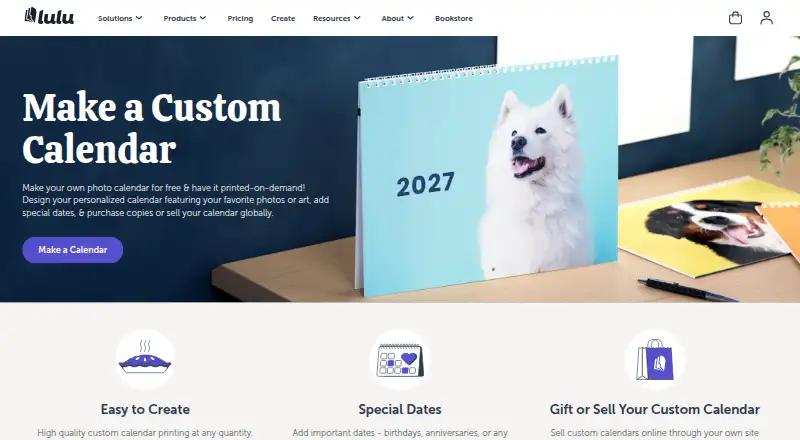
What Lulu Calendar Creator is
Lulu Calendar Creator is a web tool for designing custom art, photo or memory calendars for printing. Making a calendar project online is free; users pay when ordering printed copies. A calendar can be created in the tool or supplied as a print-ready PDF. Dates can span 12 months, 18 months or a custom range, and users can add national or custom events or import events from an ICS file. The creator accepts images for covers and individual months and offers four themes. Printed calendars are US Letter landscape, 11 × 8.5 inches, with wire-O binding along the 11-inch edge. Lulu also provides 12- and 18-month template bundles for Adobe InDesign and Photoshop, a creation guide and PDF export settings. Calendars can be printed for personal use, sold through the Lulu Bookstore or connected to an ecommerce store through Lulu Direct. Listed selling options include Shopify, Wix, WooCommerce and Lulu’s Printing API. Lulu recommends sRGB images at 300 dpi. It says its printer network generally takes 3–5 business days to produce an order, with the cart showing an estimate specific to that order.
Good
- Free to create calendar projects online
- Create in the tool or upload a print-ready PDF
- Add custom dates or import an ICS file
- Offers 12- and 18-month calendar formats
- Supports sales through Lulu and ecommerce options
Watch out
- Printed copies must be purchased
- Printed format is US Letter landscape with wire-O binding
- Lulu recommends sRGB images at 300 dpi
Who it suits
Lulu Calendar Creator suits people making custom calendars for personal use or sale. It may also suit creators who want to connect calendar sales to an ecommerce site.
Verdict
Lulu Calendar Creator combines date and image customization with options to order printed calendars or sell them. Consider its fixed print format and image recommendations when preparing a project.
Plans and prices
From Lulu Calendar Creator's own pricing page, checked 20 Sep 2026.
| Plan | Price | What it gives you |
|---|---|---|
| Free to use | Free | Create calendar projects online · Pay when purchasing printed copies |
The facts
Each one read from Lulu Calendar Creator's own pages, with the date it was checked.
What it does
- Calendar length
- Calendars can cover 12 or 18 months, or a custom period set with start and end month and year.checked 30 Sep 2026
- Create or upload
- Users can create a calendar with Lulu’s tool or upload a print-ready PDF they designed themselves.checked 30 Sep 2026
- Image requirements
- Lulu recommends sRGB images at 300 dpi for calendar printing.checked 30 Sep 2026
- Images and themes
- The creation tool accepts images for the covers and each month and offers four calendar themes.checked 30 Sep 2026
- Integrations
- Lulu lists Shopify, Wix, WooCommerce, and its Printing API as ways to sell calendars through a creator’s own site.checked 30 Sep 2026
- Personalized dates
- The creator supports national events, custom events, and importing events from an ICS file; Lulu recommends iCalendar, Google Calendar, or Microsoft Outlook.checked 30 Sep 2026
- Print format
- Lulu calendars are US Letter landscape, 11 × 8.5 inches, with wire-O binding along the 11-inch edge.checked 30 Sep 2026
- Production time
- Lulu says printers in its global network generally take 3–5 business days to produce an order, with the cart showing an order-specific estimate.checked 30 Sep 2026
- Purpose
- Lulu’s Calendar Creator lets people design custom art, photo, or memory calendars for printing.checked 30 Sep 2026
- Sales options
- Creators can print calendars for personal use, sell through the Lulu Bookstore, or connect a calendar to an ecommerce store with Lulu Direct.checked 30 Sep 2026
- Security
- Lulu states that it is SOC 2 Type II compliant and that uploaded files are securely maintained on its servers.checked 30 Sep 2026
- Support
- Lulu’s help article directs users with further questions to submit a support ticket.checked 30 Sep 2026
- Template downloads
- Lulu offers 12- or 18-month calendar template bundles for Adobe InDesign and Photoshop, along with a creation guide and PDF export settings.checked 30 Sep 2026
The company
- Company
- Lulu says it launched as an online self-publishing platform in 2002 and is based in the Research Triangle, North Carolina.checked 30 Sep 2026
- Founded
- 2002checked 23 Sep 2026
- Headquarters
- Durham, North Carolina, United Stateschecked 23 Sep 2026
Money
- Free plan
- Yeschecked 20 Sep 2026
- Free to use
- Lulu says making a print-on-demand calendar on its platform is free.checked 30 Sep 2026
The full review of Lulu Calendar Creator
Overview
Lulu Calendar Creator is a web-based tool for designing wall calendars for print, either in its editor or from a finished PDF. It is best suited to people making personal photo or memory calendars and creators who want to sell printed calendars through Lulu or a connected store. Its flexible date setup and sales routes stand out, but every project must fit one landscape print size.
Key features
Projects can run for 12 or 18 months, or cover a custom span set by start and end month and year. Users can add images to the cover and each month, choose from four themes, and include national events, custom events, or events imported from an ICS file. Lulu recommends iCalendar, Google Calendar, or Microsoft Outlook for importing dates. This range works well for commemorative calendars and schedules that do not match a standard year; four themes leave less room for visual variety.
Those who prefer their own design workflow can upload a print-ready PDF. Lulu also offers 12- and 18-month templates for Adobe InDesign and Photoshop, plus a creation guide and PDF export settings. Lulu recommends sRGB images at 300 dpi, so image preparation matters if the printed calendar is to look sharp.
The print specification is fixed at US Letter landscape, 11 × 8.5 inches, with wire-O binding along the 11-inch edge. That is a clear constraint for anyone planning a different size or orientation. Calendars can be ordered for personal use, sold through the Lulu Bookstore, or connected to an ecommerce store using Lulu Direct. Lulu identifies Shopify, Wix, WooCommerce, and its Printing API as routes for selling through a creator’s own site. Printers in its global network generally take 3–5 business days to produce an order; the cart provides an order-specific estimate.
Pricing
Free to use: free. Creating calendar projects online costs nothing; payment is due when ordering printed copies. This makes the tool a low-commitment option for designing before deciding how many copies to buy, and bulk ordering is supported. The free plan covers project creation, not the printed calendars themselves.
Platforms
Lulu Calendar Creator runs on the web. Lulu states that it is SOC 2 Type II compliant and that uploaded files are securely maintained on its servers. For questions, users can submit a support ticket.
Who it's for
Choose Lulu for a personal photo calendar, a memory-focused gift, or a calendar project intended for sale through Lulu or an ecommerce store. It is also a good fit for designers who already work in InDesign or Photoshop and can supply a print-ready PDF. It is a poor match when the project requires a size or orientation beyond US Letter landscape.
Pros and cons
- Pros: Free online creation lets users prepare a project before paying for copies.
- Pros: Custom date spans, imported events, and image placement support calendars tailored to specific people or occasions.
- Pros: PDF upload and design templates accommodate users who want to work outside the editor.
- Pros: Lulu Bookstore and Lulu Direct provide options for selling calendars, including through named ecommerce integrations.
- Cons: The single 11 × 8.5-inch landscape format rules out other physical sizes and orientations.
- Cons: Four themes offer a relatively narrow starting point for those who want varied built-in designs.
- Cons: Printed copies cost extra, so free project creation does not make a finished calendar free.
Alternatives
PhotobookShop Calendars is a paid alternative for readers who want calendar software across web, desktop, and mobile platforms; its Desk 21x10cm calendar costs $19.95, paid once, with shipping extra. WTPBiz Photo Calendar Designer is another paid web option. posterXXL is a paid alternative available on web, desktop, and mobile. Saal Digital has a free plan and runs on web, desktop, and mobile. MYPOSTER Photo Calendars is a paid option for web and mobile. Pixum offers a free plan and supports web, desktop, and mobile. CreatePhotoCalendars.com is a paid web alternative. Motif Photo Calendars has a free plan and runs on iOS and macOS.
For broader browsing, see Photo Calendar Software or Print-on-Demand Platforms.
Verdict
Lulu Calendar Creator is a strong choice for people who want free online calendar design, flexible dates, and a path from personal printing to selling copies. Its fixed landscape format is the chief reason to look elsewhere: if the calendar needs another size or orientation, Lulu is not the right fit.
Alternatives to Lulu Calendar Creator
- 1

Printful
Free planAndroidiOSWebAPI8.8From $24.99 a month - 2

Fourthwall
Free planAndroidiOSWebAPI8.8From $15 a month - 3

Blurb BookWright
Free planiOSWebAPImacOS8.2Free plan - 4

Shirtigo Cockpit
Free planWebAPIExtension8.1From €12 a month - 5

Printify
Free planAPI7.8From $299 a year - 6

Merchize
Free planWebAPI7.8Free plan