
PicWish Old Photo Restoration
PicWish Old Photo Restoration is an online tool for restoring, enhancing, and enlarging vintage images.
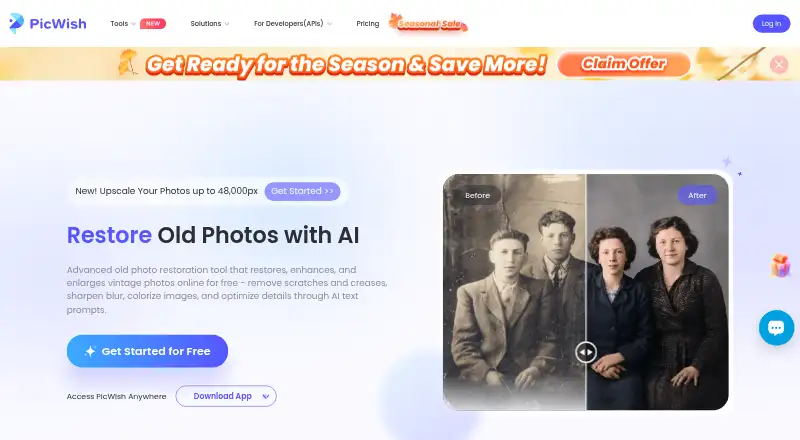
What PicWish Old Photo Restoration is
PicWish Old Photo Restoration is an online tool for restoring, enhancing, and enlarging vintage images. It can remove scratches and creases, sharpen blur, and colorize photos, with Mild, Moderate, and Severe damage settings. After restoration, users can request detail adjustments with text prompts. The face enhancement feature is described as unblurring faces and restoring facial details, while upscaling can enlarge images 2x or 4x and address noise, blur, and ghosting. The page offers a few free uses and says users can earn credits for restoration and high-quality downloads. PicWish also offers an image enhancer API for bulk processing and integration into applications; restoration is listed at 2 credits for light work, 15 for other cases, and 20 for Ultra HD. The Free Plan costs nothing and includes previews for most features, access to free tools, and limited non-HD downloads per day. PicWish says uploaded images are encrypted, used for requested processing, and deleted one hour after the user last edits or closes the processing page. It is available on Android, API, iOS, macOS, web, and Windows.
Good
- Offers three damage-severity settings.
- Can remove scratches, sharpen blur, and colorize photos.
- Upscaling options include 2x and 4x.
- Uploaded images are deleted one hour after editing or closing.
- Free plan includes previews and limited non-HD downloads.
Watch out
- Free plan limits non-HD downloads per day.
- Pro plan price and billing interval are not displayed.
- The page provides only a few free uses.
Who it suits
It suits people restoring damaged or blurred vintage photos, including users who want face enhancement or image enlargement. The API may suit developers or organizations processing images in bulk.
Verdict
PicWish combines restoration tools with face enhancement, upscaling, and text-prompt adjustments. Its free use and download limits, as well as the unspecified Pro price, are relevant when choosing a plan.
Plans and prices
From PicWish Old Photo Restoration's own pricing page, checked 30 Sep 2026.
| Plan | Price | What it gives you |
|---|---|---|
| Free Plan | Free | Free previews for most features · access to free tools · limited non-HD downloads per day |
| Free | Free | Limited core features · limited AI trials · no credits · no batch processing |
| API 500 credits | $9.95 a month | 500 API credits/mo · monthly |
| API 1,000 credits | $14.95 a month | 1,000 API credits/mo · monthly |
| API 5,000 credits | $44.95 a month | 5,000 API credits/mo · monthly |
| API 10,000 credits | $84.95 a month | 10,000 API credits/mo · monthly |
| API 10,000 credits pay-as-you-go | $89.95, paid once | 10,000 API credits · one-time payment; credits permanently valid |
| API 30,000 credits pay-as-you-go | $259.95, paid once | 30,000 API credits · one-time payment; credits permanently valid |
| API 50,000 credits pay-as-you-go | $419.95, paid once | 50,000 API credits · one-time payment; credits permanently valid |
| API 80,000 credits pay-as-you-go | $649.95, paid once | 80,000 API credits · one-time payment; credits permanently valid |
| Pay as you go | — | The pricing page identifies this as a plan type but does not list its limits. · The page does not display a price or billing interval. |
| Pro | — | 350 credits/mo · 50 free core-feature images/day · subscription benefits on web and mobile · annually |
| Pro plan | — | Daily HD downloads for most online features · extra credits · The page does not display a price or billing interval. |
The facts
Each one read from PicWish Old Photo Restoration's own pages, with the date it was checked.
What it does
- API authentication
- API calls require an API key in the X-API-KEY request header.checked 21 Oct 2026
- API availability
- PicWish exposes HTTP image-editing APIs for websites, apps, platforms, and automated workflows, including restoration and other image operations.checked 21 Oct 2026
- API copyright
- PicWish states that API customers retain ownership and copyright of images processed through the API.checked 21 Oct 2026
- API input limits
- The restoration API accepts JPG, JPEG, and PNG uploads below 20 MB and up to 2048 by 2048 pixels.checked 21 Oct 2026
- API integration
- PicWish offers an image enhancer API for automatically processing images in bulk and integrating the technology into applications.checked 30 Sep 2026
- API processing modes
- The restoration API supports synchronous responses and asynchronous task polling.checked 21 Oct 2026
- API rate limit
- The default API limit is two requests per second, with higher concurrency available by contacting support.checked 21 Oct 2026
- API result expiry
- Returned restoration image URLs remain valid for one hour, so clients must download them promptly.checked 21 Oct 2026
- Colorization
- The service adds natural-looking color to black-and-white photographs using AI.checked 21 Oct 2026
- Damage modes
- The restoration workflow offers Mild, Moderate, and Severe damage settings.checked 21 Oct 2026
- Face enhancement
- PicWish says its face-enhancement function can unblur faces and restore facial details in old photos.checked 21 Oct 2026
- Image retention
- The app privacy policy says uploaded images are SSL/TLS encrypted, used only for requested processing, and automatically deleted from the server one hour after the user last edited or closed the processing page.checked 30 Sep 2026
- Limit: Advanced editing depth
- TechJury says PicWish handles basic touch-ups but is not a substitute for Photoshop-level advanced editing.checked 21 Oct 2026
- Limit: Mobile-desktop separation
- TechJury reports that mobile and Windows/Mac products use separate membership systems and do not synchronize.checked 21 Oct 2026
- Limit: Output quality
- A Trustpilot reviewer says the app did not produce the expected results and requested a subscription refund.checked 21 Oct 2026
- Limit: Paid access and coins
- Chrome-Stats summarizes complaints about paywalls, coin requirements, misleading free trials, and edits that sometimes do not match requests.checked 21 Oct 2026
Money
- API usage cost
- The API credits guide says old-photo restoration costs 2 credits for light restoration, 15 credits for other cases, and 20 credits for Ultra HD restoration.checked 30 Sep 2026
- Free usage
- PicWish provides a limited number of free restoration uses and allows users to earn credits for restoration and high-quality downloads.checked 21 Oct 2026
- Free use limit
- The old-photo restoration page provides a few free uses and says users can earn credits for restoring photos and downloading high-quality results.checked 30 Sep 2026
The company
- Company address
- The payment terms list Unit 1003, 10/F, Tower One, Lippo Centre, 89 Queensway, Hong Kong.checked 21 Oct 2026
- Company legal contracting name
- Its payment terms refer to PicWish Corporation and affiliated companies as the contracting entities.checked 21 Oct 2026
- Company origin
- PicWish says it was created in 2021 to simplify image processing with AI.checked 21 Oct 2026
- Company size
- PicWish reports more than 200 employees across six offices worldwide.checked 21 Oct 2026
- Founded
- 2021checked 28 Sep 2026
The full review of PicWish Old Photo Restoration
PicWish Old Photo Restoration is an AI tool for repairing and enlarging vintage photos. It suits people who want several restoration controls in one workflow, though limited free downloads and custom-priced paid plans make costs harder to predict.
Overview
PicWish combines repair for scratches, creases, blur, and fading with colorization, face enhancement, and image enlargement. Users can select a damage level, then refine the result with text prompts. It is offered across Android, iOS, macOS, Windows, web, and API.
Its breadth is useful when an old photo needs more than scratch removal: the same tool can address facial detail and output size. The trade-off is that free access is constrained, and recurring or credit costs may matter for anyone processing many images.
Compare more options in AI Image Restoration Software.
Key features
- Damage repair: Mild, Moderate, and Severe settings let users choose how much restoration to apply. The tool targets scratches, creases, blur, and fading, making it a broad option for visibly damaged prints.
- Prompt editing: After restoration, users can describe further adjustments in text for one-click detail optimization. This offers another way to refine a result without limiting the workflow to preset repair controls.
- Face enhancement: PicWish says it automatically unblurs faces and restores facial details, a useful focus for portraits where general sharpening may not be enough.
- Upscaling: Images can be enlarged 2x or 4x while addressing noise, blur, and ghosting. That helps when a repaired image also needs a larger output, though the free plan limits high-quality downloads.
- API: An image enhancer API supports automated bulk processing and integration into applications. Restoration costs 2 credits for light cases, 15 credits for other cases, and 20 credits for Ultra HD restoration, so heavier work can consume credits quickly.
- Privacy and support: PicWish says it is ISO/IEC 27001 and ISO/IEC 27701 certified, GDPR compliant, and encrypts data during processing. Its privacy policy says uploaded images are SSL/TLS encrypted, used only for requested processing, and automatically deleted one hour after the user last edits or closes the processing page. Live chat and ticket support are available.
Pricing
PicWish uses a freemium model. The Free Plan costs nothing and offers previews for most features, access to free tools, and limited non-HD downloads per day. The restoration page also provides a few free uses and says users can earn credits for restoring photos and downloading high-quality results. This is suitable for occasional jobs, but the daily download cap makes it a poor fit for regular high-resolution work.
The Pro plan has custom pricing and includes daily HD downloads for most online features plus extra credits. It is the more relevant option for frequent users, but the value is difficult to assess without a stated price or billing interval.
Pay as you go is also offered with custom pricing; its limits are not defined. That may suit users who prefer not to commit to a recurring plan, but there is no basis to compare its cost with Pro. API users should account for the stated per-restoration credit costs.
Platforms
PicWish is available on Android, iOS, macOS, Windows, and the web, with API access for integration. This range suits users who want a browser-based option, a device app, or automated processing in an application.
Who it's for
PicWish is a sensible choice for people restoring a mix of damaged portraits and other vintage photos who value damage-level controls, face repair, and upscaling together. Its free tier can serve occasional experiments, while API access supports bulk workflows. Look elsewhere if you need predictable paid pricing or frequent HD downloads without a capped free allowance.
Pros and cons
- Pro: Repair, colorization, face enhancement, and 2x or 4x enlargement cover several common restoration needs in one tool.
- Pro: Three damage levels and follow-up text prompts provide both preset and user-directed adjustment.
- Pro: API access includes bulk processing, with published credit costs for restoration tiers.
- Con: Free use is limited to a few restoration uses and limited non-HD downloads per day, restricting repeat high-quality work.
- Con: Pro and pay-as-you-go pricing are custom, so buyers cannot readily compare their costs or assess the best plan.
Alternatives
- ImageColorizer is worth considering for users who want a stated entry price: its free tier includes 50 credits per month, single processing, AI features, and ads, while Starter costs $6.90 a month billed monthly.
- insMind AI Photo Restoration may suit users seeking a paid-focused alternative with free old-photo restoration; it supports Android, iOS, and web, while its Pro plans use monthly, yearly, or one-time billing options.
- VanceAI Photo Restorer is an alternative for users who want API access across web, macOS, Windows, and Linux, with a Starter plan at $15 a month billed at $15/mo for 260 credits per month.
- Pinin may fit someone who needs only a single free restoration: its free tier includes one image restoration at maximum quality, but has low queue priority and no commercial usage rights.
- Cutout.Pro is another freemium option available across a broad set of platforms, with a subscription offering 80 credits per month at $5 a month billed monthly.
- Media.io AI Photo Restorer is an alternative with a free trial rather than a free plan; its trial includes 3 daily check-in credits and 720p exports.
- Nero AI Photo Restoration offers a free trial of 10 credits for new users, rather than a free plan.
- LetsEnhance is another option for users considering an API-focused alternative.
Verdict
Choose PicWish if you want a single restoration workflow that combines damage repair with face enhancement, prompt adjustments, and enlargement, and your usage fits its free limits or a custom-priced plan. Its main advantage is that range of tools; its main drawback is the lack of predictable paid pricing. Readers who need clear costs before committing should compare alternatives with stated plan prices.
Getting started
- Open the PicWish restoration website
- Choose web, Android, iOS, macOS, or Windows
- Upload a vintage photograph
- Select Mild, Moderate, or Severe damage
- Apply restoration and optional text-prompt adjustments
- Download the result or use API credits for automated processing
Limits worth knowing
The free plan costs nothing and provides previews, free tools, and limited non-HD downloads per day. The restoration page provides only a few free uses; API work uses credits, including 2, 15, or 20 credits depending on restoration type.
Questions
Is PicWish Old Photo Restoration free?
Yes. The Free Plan costs nothing and includes previews, free tools, and limited non-HD downloads per day. The restoration page also provides a few free uses.
Which platforms are supported?
PicWish lists Android, API, iOS, macOS, web, and Windows.
Can it repair faces and scratches?
Yes. Listed capabilities include scratch repair, blur repair, fading repair, and face restoration.
How does API pricing work?
The API guide lists 2 credits for light restoration, 15 credits for other cases, and 20 credits for Ultra HD restoration.
How are uploaded images handled?
PicWish says uploads are SSL/TLS encrypted, used only for requested processing, and automatically deleted one hour after the user last edits or closes the processing page.
Alternatives to PicWish Old Photo Restoration
- 1

Pixelcut
Free planAndroidiOSWebAPI8.3From $8 a month - 2
Cutout.Pro
Free planAndroidiOSWebAPI8.2From $5 a month - 3

ImageColorizer
Free planAndroidiOSWebmacOS8.2From $19.99 a year - 4
Sogni
Free planAndroidiOSWebAPI8.2From $20 a month - 5

DaVinci AI Photo Restoration
AndroidiOSWeb7.7From $39.99 a month - 6
Hotpot AI Photo Restorer
Free planWebAPISelf-hosted7.6$12 one-time