PickPDF
PickPDF is a PDF editor for the web, Windows, macOS, Linux, and Chrome extension.
What PickPDF is
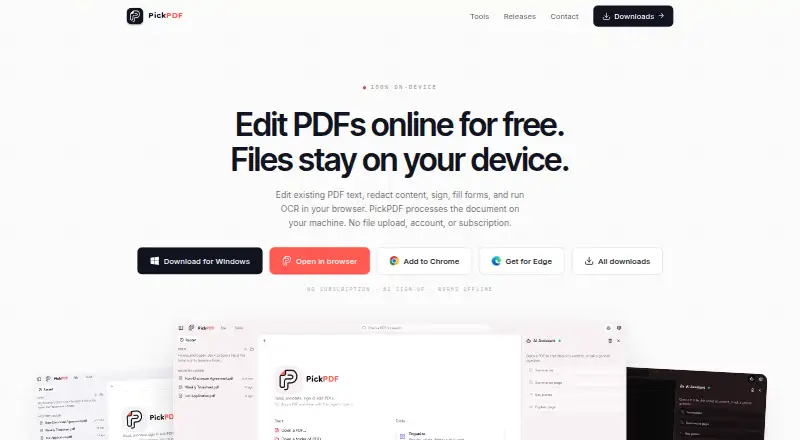
PickPDF is a PDF editor for the web, Windows, macOS, Linux, and Chrome extension. It can edit existing PDF text and objects, add annotations, run OCR, convert PDFs, and create forms. Page tools support merging, splitting, extracting, reordering, rotating, duplicating, and deleting pages. Users can fill forms or create them, and add drawn, typed, or uploaded signature appearances. The maker says redaction removes the covered content and flattens the redaction when saved. Core PDF operations run on the user’s device, and the maker says its servers do not receive uploaded PDFs. An optional assistant can use a built-in Gemma model or connect to Ollama, LM Studio, or an OpenAI-compatible endpoint; when a remote endpoint is selected, chosen text context is sent there. The privacy policy says the app has no advertising and does not track activity across other apps or websites. The free browser editor costs nothing and requires no account or subscription.
Good
- Edits PDF text, objects, and annotations.
- Includes OCR, conversion, and form creation.
- Core PDF operations run on the user’s device.
- Free browser editor costs nothing.
Watch out
- Remote AI endpoints receive selected text context.
- Local processing does not protect shared devices or files.
Who it suits
PickPDF suits people who need to edit PDF content, manage pages, work with forms, or use OCR. Its local processing may appeal to users who prefer PDF operations to run on their device, while remote AI use sends selected text context to that endpoint.
Verdict
PickPDF combines PDF editing, page management, OCR, forms, and optional AI tools. The free browser editor has no account or subscription requirement, but remote AI use sends selected text to the chosen endpoint.
Plans and prices
From PickPDF's own pricing page, checked 11 Oct 2026.
| Plan | Price | What it gives you |
|---|---|---|
| Free browser editor | Free | No account or subscription · browser editor |
| Personal Pro | — | One named person · personal and non-transferable · install on your own devices · Perpetual license |
| Team | Priced on request | Per seat · centrally managed · invoice or PO billing · priority support and signed DPA · Annual renewal |
The facts
Each one read from PickPDF's own pages, with the date it was checked.
What it does
- AI data flow
- When a user chooses a remote AI endpoint, the selected text context is sent to that endpoint.checked 11 Oct 2026
- AI integrations
- The assistant can use a built-in Gemma model or connect to Ollama, LM Studio, or an OpenAI-compatible endpoint.checked 11 Oct 2026
- Annotation tools
- Yeschecked 20 Sep 2026
- Form creation
- Yeschecked 20 Sep 2026
- Forms and signatures
- PickPDF can fill or create forms and add drawn, typed, or uploaded signature appearances.checked 11 Oct 2026
- Local processing
- Core PDF operations run on the user’s device, and the maker says its servers do not receive uploaded PDFs.checked 11 Oct 2026
- OCR
- OCR runs locally and adds an invisible searchable text layer to scans.checked 11 Oct 2026
- Page tools
- PickPDF can merge, split, extract, reorder, rotate, duplicate, and delete pages.checked 11 Oct 2026
- PDF conversion
- Yeschecked 20 Sep 2026
- PDF editing
- PickPDF edits existing PDF text objects in place and supports annotations and object edits.checked 11 Oct 2026
- PDF protection
- Standard PDF protection uses AES-256 encryption, and the security page distinguishes visible signature appearances from P12 or PFX certificate signatures.checked 11 Oct 2026
- Privacy policy
- The privacy policy says PickPDF does not include advertising or use the application to track activity across other apps or websites.checked 11 Oct 2026
- Redaction
- The maker says redaction removes covered content and flattens redactions on save.checked 11 Oct 2026
- Security limits
- The maker says local processing does not secure an unlocked device, shared browser profile, destination folder, or file shared through another service.checked 11 Oct 2026
- Text editing
- Yeschecked 20 Sep 2026
Money
- Free plan
- Yeschecked 20 Sep 2026
Where it runs
- Supported platforms
- The maker lists a browser editor, Windows, macOS, Linux, and Chrome and Edge extensions.checked 11 Oct 2026
The company
- Team deployment
- The Team license lists seat assignment and reassignment from one console, silent MSI or MSIX rollout, and on-prem rights.checked 11 Oct 2026
Alternatives to PickPDF
- 1

Smallpdf
Free planAndroidiOSWebWindows8.9From $10 a month - 2

LightPDF
Free planAndroidiOSWebAPI8.8From $15.99 a year - 3
PDF2Go
Free planAndroidiOSWebAPI8.7$6.42 usage-based - 4
Foxit PDF Editor
AndroidiOSWebmacOS8.6 - 5
WPS PDF Editor
Free planAndroidiOSWebExtension8.5From $3 a year - 6

PDF Candy
Free planAndroidiOSWebLinux8.5From $4 a year