PDF Postman
PDF Postman is a Windows Outlook add-in that turns email messages and attachments into password-protected PDFs for sending.
What PDF Postman is
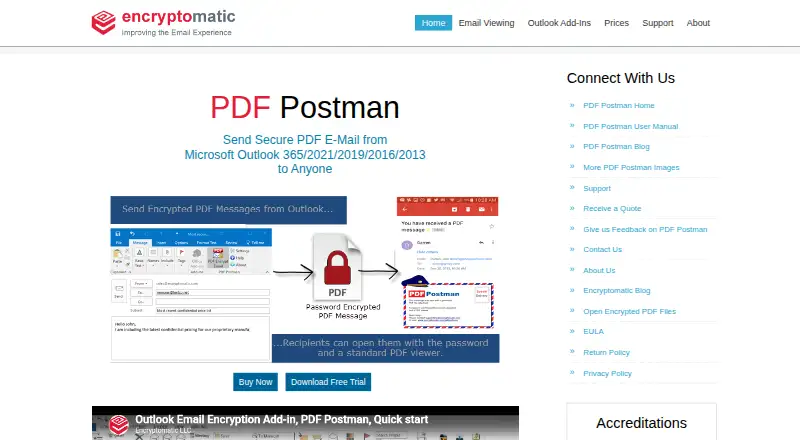
PDF Postman is a Windows Outlook add-in that turns email messages and attachments into password-protected PDFs for sending. It encrypts content with AES-128 or AES-256, and recipients can open the resulting files with a PDF viewer and password, without registering or installing special software. Messages in HTML, rich-text or text format can become formatted PDFs. You can include encrypted attachments in the PDF, protect attachments without the message, or create PDFs from attached files. The download page lists Outlook Desktop 365, 2021, 2019, 2016 and 2013 on 32-bit or 64-bit Windows. Requirements are Windows 11 or 10, .NET Framework 4.8 or later, 4 GB RAM and 2 GB of disk space. After the 15-day trial, free mode allows up to five encrypted PDF messages per month. Enterprise deployment via MSI and a centralized password database are listed. The maker says email stays on the user's PC rather than being sent to the cloud.
Good
- AES-128 or AES-256 encryption
- Recipients need only a PDF viewer and password
- Free mode allows five encrypted PDFs monthly
- MSI deployment and centralized password database
Watch out
- Windows and specified Outlook versions required
- Free mode limited to five encrypted PDFs monthly
- System requirements include 4 GB RAM and 2 GB disk space
Who it suits
PDF Postman may suit Windows Outlook users who need password-protected email PDFs, including small office or home office users and corporate professionals. Its enterprise deployment and centralized password database may also fit organizations with IT departments.
Verdict
PDF Postman combines Outlook integration with encrypted PDFs for messages and attachments. The trial lasts 15 days, after which free mode has a five-message monthly limit; paid plans are listed from $79.99.
Plans and prices
From PDF Postman's own pricing page, checked 7 Oct 2026.
| Plan | Price | What it gives you |
|---|---|---|
| 1 License | $69.99, paid once | 1 license · Perpetual license; includes 1 year of maintenance/upgrades |
| 5 Licenses | $349.95, paid once | 5 licenses · Perpetual licenses; includes 1 year of maintenance/upgrades |
| 10 Licenses | $589.90, paid once | 10 licenses · Perpetual licenses; includes 1 year of maintenance/upgrades |
| 25 Licenses | $1,249.75, paid once | 25 licenses · Perpetual licenses; includes 1 year of maintenance/upgrades |
| 50 Licenses | $2,199.50, paid once | 50 licenses · Perpetual licenses; includes 1 year of maintenance/upgrades |
| 75 Licenses | $3,149.25, paid once | 75 licenses · Perpetual licenses; includes 1 year of maintenance/upgrades |
| 100 Licenses | $3,999, paid once | 100 licenses · Perpetual licenses; includes 1 year of maintenance/upgrades |
| Unlimited Site License | Priced on request | Unlimited site license · Request a quote |
The facts
Each one read from PDF Postman's own pages, with the date it was checked.
What it does
- Admin access controls
- Yeschecked 20 Sep 2026
- Attachments
- Users can encrypt attachments inside the PDF, protect attachments without the message, or create PDFs from attached files.checked 7 Oct 2026
- Encryption
- It protects messages and attachments with AES-128 or AES-256 bit encryption.checked 7 Oct 2026
- Enterprise deployment
- The feature list says enterprise deployment is available through an MSI file and users can work from a centralized password database.checked 7 Oct 2026
- Export status
- The download page says PDF Postman is approved for export by the U.S. Department of Commerce as a mass-market encryption product.checked 7 Oct 2026
- Formatting
- It converts HTML, rich-text, or text email messages into formatted encrypted PDFs.checked 7 Oct 2026
- Intended users
- The maker describes PDF Postman as suitable for small office or home office users and corporate professionals, including those with experienced IT departments.checked 7 Oct 2026
- Local processing
- The maker says its Windows desktop products do not send email information to the cloud and emails remain on the user's PC.checked 7 Oct 2026
- Outlook compatibility
- The download page lists Microsoft Outlook Desktop 365, 2021, 2019, 2016, and 2013 on 32-bit or 64-bit Windows.checked 7 Oct 2026
- Outlook integration
- Yeschecked 20 Sep 2026
- Purpose
- PDF Postman is an Outlook add-in that converts email messages and attachments into password-protected PDF files for sending securely.checked 7 Oct 2026
- Recipient access
- Recipients can open encrypted PDF files using a PDF viewer and password, without special software or registration.checked 7 Oct 2026
- Recipient verification
- passwordchecked 20 Sep 2026
- Secure delivery
- attachmentchecked 20 Sep 2026
- Support
- The maker provides an online support ticket link and lists support by Encryptomatic LLC.checked 7 Oct 2026
The company
- Founded
- 2005checked 28 Sep 2026
- Headquarters
- Fargo, North Dakota, United Stateschecked 28 Sep 2026
Money
- Free mode
- After the 15-day trial, the software reverts to a free mode that allows up to 5 encrypted PDF messages per month.checked 7 Oct 2026
- Free plan
- Yeschecked 20 Sep 2026
Where it runs
- Windows requirements
- The download page specifies Windows 11 or 10, .NET Framework 4.8 or later, 4 GB RAM, and 2 GB of disk space.checked 7 Oct 2026
Alternatives to PDF Postman
- 1
SecureMyEmail
Free planAndroidiOSWebmacOS8.2From $29.99 a year - 2

Virtru Email Encryption
AndroidiOSWebAPI7.7From $119 a month - 3
Lockbin
Free planWebLinuxmacOSWindows7.5From $10 a month - 4
Send It Secure
Free planiOSWebAPIExtension7.5From $15 a month - 5
Virtru Data Security Platform
AndroidiOSWebAPI7.5From $119 a month - 6
gpg4o
Free planWindows7.0From €5,195 a year