PDF Editor Offline
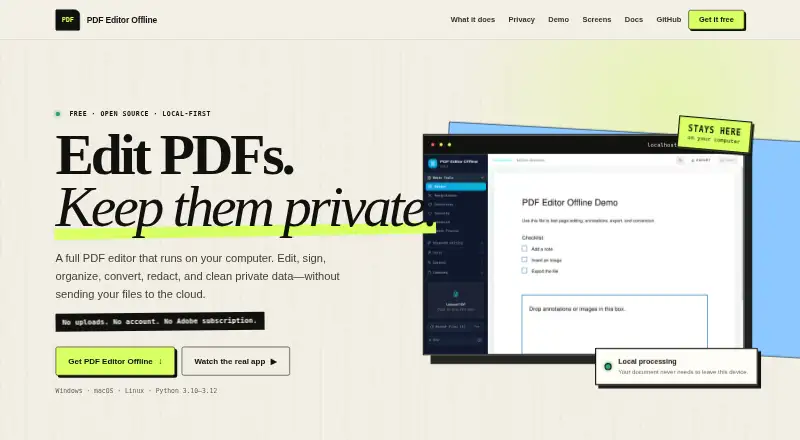
PDF Editor Offline is a free, MIT-licensed PDF application for editing, signing, organizing, converting, redacting, and cleaning private data.
What PDF Editor Offline is
PDF Editor Offline is a free, MIT-licensed PDF application for editing, signing, organizing, converting, redacting, and cleaning private data. It supports text editing, annotations, OCR, PDF conversion, forms, and typed, drawn, image, or certificate-backed signatures. Annotation tools include text, images, drawings, highlights, comments, stamps, watermarks, and attachments. Page controls merge, split, reorder, rotate, crop, duplicate, compress, number, and remove blank pages. Conversion covers PDF, Word, PowerPoint, Excel, images, Markdown, text, EPUB, SVG, and PDF/A. Privacy tools inspect and remove metadata, attachments, links, annotations, form data, and other hidden details. Redaction permanently removes sensitive text, creates a separate copy, and verifies the result. A CLI, Python API, FastAPI automation, and Docker API mode are included. Desktop and source modes process files on-device without accounts or cloud conversion. Windows, macOS, Linux, API, and self-hosted use are listed.
Good
- Free MIT-licensed software
- Includes OCR and PDF conversion
- Supports forms and multiple signature types
- Redaction verifies remaining content
- Offers CLI, Python, and FastAPI automation
Watch out
- Desktop downloads are unsigned technical previews
- No free trial is listed
- Self-hosted privacy depends on the selected host
Who it suits
It suits people needing broad PDF editing and privacy-cleanup tools without a subscription. Developers and administrators can use its CLI, APIs, or self-hosted modes.
Verdict
PDF Editor Offline combines document editing, conversion, signing, and privacy controls in one free project. Its unsigned preview downloads and self-hosting considerations matter when choosing how to deploy it.
Plans and prices
From PDF Editor Offline's own pricing page, checked 11 Oct 2026.
| Plan | Price | What it gives you |
|---|---|---|
| PDF Editor Offline | Free | Free · open source · no subscription |
The facts
Each one read from PDF Editor Offline's own pages, with the date it was checked.
What it does
- Annotations
- It can add text, images, drawings, highlights, comments, stamps, watermarks, and attachments to PDFs.checked 11 Oct 2026
- Annotation tools
- Yeschecked 20 Sep 2026
- Automation
- The project includes a CLI, Python API, and FastAPI automation, and documents a Docker API mode.checked 11 Oct 2026
- Conversions
- It converts among PDF, Word, PowerPoint, Excel, images, Markdown, text, EPUB, SVG, and PDF/A.checked 11 Oct 2026
- Download limitation
- The site identifies current desktop downloads as an unsigned technical preview that Windows or macOS may warn about or block.checked 11 Oct 2026
- Forms and signatures
- It supports standard forms and typed, drawn, image, or certificate-backed signatures.checked 11 Oct 2026
- License
- The project is free and MIT licensed, with no subscription.checked 11 Oct 2026
- Local processing
- The site says desktop and source modes process files on the device without an account, document telemetry, hidden upload, or cloud conversion service.checked 11 Oct 2026
- OCR
- Yeschecked 20 Sep 2026
- Operating systems
- Desktop downloads are listed for Windows 10/11 x64, macOS 11 or later on Apple Silicon or Intel, and Ubuntu 22.04/24.04 as AppImage or DEB.checked 11 Oct 2026
- Page tools
- Page tools include merging, splitting, reordering, rotating, cropping, duplicating, compressing, numbering, and removing blank pages.checked 11 Oct 2026
- PDF conversion
- Yeschecked 20 Sep 2026
- Privacy cleanup
- It can inspect and remove metadata, attachments, links, annotations, form data, and other hidden details.checked 11 Oct 2026
- Purpose
- PDF Editor Offline is a computer-based PDF editor for editing, signing, organizing, converting, redacting, and cleaning private data.checked 11 Oct 2026
- Redaction
- Its redaction workflow permanently removes sensitive text, exports a separate copy, and verifies what remains.checked 11 Oct 2026
- Self-hosting boundary
- In self-hosted and Docker modes, files are processed on the host selected by the user, which becomes the privacy boundary.checked 11 Oct 2026
- Text editing
- Yeschecked 20 Sep 2026
Money
- Free plan
- Yeschecked 20 Sep 2026
Where it runs
- Supported platforms
- Windows,macOS,Linux,API,self-hostedchecked 20 Sep 2026
Alternatives to PDF Editor Offline
- 1

Smallpdf
Free planAndroidiOSWebWindows8.9From $10 a month - 2

LightPDF
Free planAndroidiOSWebAPI8.8From $15.99 a year - 3
PDF2Go
Free planAndroidiOSWebAPI8.7$6.42 usage-based - 4
Foxit PDF Editor
AndroidiOSWebmacOS8.6 - 5
WPS PDF Editor
Free planAndroidiOSWebExtension8.5From $3 a year - 6

PDF Candy
Free planAndroidiOSWebLinux8.5From $4 a year