
ParcelTracking
ParcelTracking brings parcel tracking from more than 3,000 carriers into one timeline.
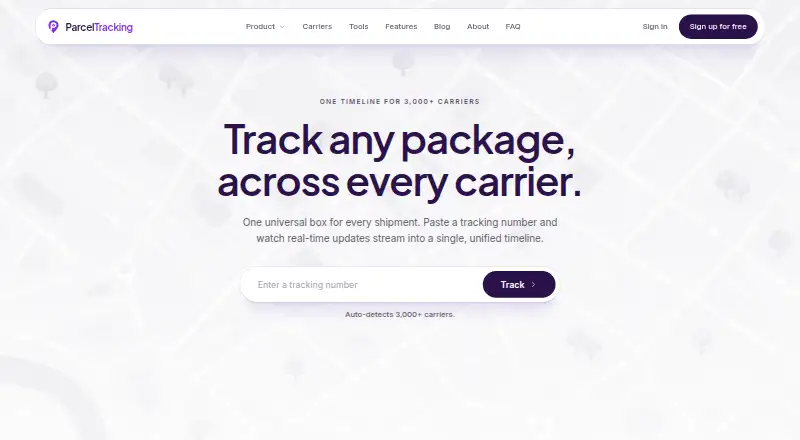
What ParcelTracking is
ParcelTracking brings parcel tracking from more than 3,000 carriers into one timeline. It says it can identify a carrier from a tracking number, display scans as they arrive, and provide live position updates. Delivery estimates use carrier history, transit patterns, and recent scans to show an arrival window and confidence score. Users can opt into email or push alerts for events such as out-for-delivery, near arrival, or delays. The dashboard offers shipment search, parcel renaming, a delivery calendar, carrier-mix analytics, and alerts. Gmail and Outlook connections can locate shipping emails; detections await review before selected parcels are imported. The service describes inbox access as read-only and says scanning stops when disconnected. A Chrome side panel tracks parcels and carries them into the dashboard after sign-in. Shopify tools support branded store tracking and importing fulfilled orders. Developers can use a tracking API with signed webhooks or an embeddable widget. Personal tracking is free forever and requires no card. It is available on web, Android, iOS, as an extension, and through an API.
Good
- Tracks parcels across 3,000+ carriers.
- Free personal tracking requires no card.
- Email and push delivery alerts.
- Gmail and Outlook imports await review.
- API and embeddable widget available.
Watch out
- Inbox connections require review before import.
- Chrome side-panel parcels enter the dashboard after sign-in.
- Privacy page is labeled a placeholder pending legal review.
Who it suits
ParcelTracking suits people or teams tracking deliveries across carriers, as well as operators, support teams, and developers. Store users can bring fulfilled Shopify orders into the parcel list.
Verdict
ParcelTracking brings tracking, delivery alerts, and shipment organization together, with free personal use and tools for stores and developers. Review the inbox permissions and privacy-page status if connecting an email account.
Plans and prices
From ParcelTracking's own pricing page, checked 4 Oct 2026.
| Plan | Price | What it gives you |
|---|---|---|
| Free personal tracking | Free | Personal tracking · no card needed |
The facts
Each one read from ParcelTracking's own pages, with the date it was checked.
What it does
- API and widget
- The FAQ says a tracking API with signed webhooks and an embeddable tracking widget are available.checked 4 Oct 2026
- Carrier detection
- The service says it automatically detects the carrier from a tracking number.checked 4 Oct 2026
- Dashboard
- The dashboard includes shipment search, parcel renaming, a delivery calendar, carrier-mix analytics, and alerts.checked 4 Oct 2026
- Delivery estimates
- The features page says estimates use carrier history, transit patterns, and recent scans, with an arrival window and confidence score.checked 4 Oct 2026
- Inbox permissions
- The Gmail and Outlook sync page describes inbox access as read-only, says scanning stops when disconnected, and says detections await user review before import.checked 4 Oct 2026
- Integrations
- Users can connect Gmail or Outlook to find shipping emails, review detected parcels, and import selected shipments.checked 4 Oct 2026
- Live tracking
- It presents carrier scans in a continuous timeline and offers live position updates as new scans arrive.checked 4 Oct 2026
- Notifications
- Users can opt into email or push alerts for events such as out-for-delivery, near arrival, or delays.checked 4 Oct 2026
- Privacy
- The privacy page says public lookups do not require an account and personal data is not sold, but labels that page a placeholder pending legal review.checked 4 Oct 2026
- Purpose
- ParcelTracking combines package tracking across 3,000+ carriers into a unified timeline.checked 4 Oct 2026
- Shopify
- The product navigation lists a Shopify app for branded store tracking; the dashboard page says fulfilled Shopify orders can be brought into its parcel list.checked 4 Oct 2026
- Support scope
- The maker describes the product as serving consumers, operators, support teams, and developers.checked 4 Oct 2026
Where it runs
- Browser extension
- A Chrome side panel lets users track parcels from the browser and carries tracked parcels into the dashboard after sign-in.checked 4 Oct 2026
Money
- Free access
- The maker says personal tracking is free forever and requires no card.checked 4 Oct 2026
The full review of ParcelTracking
ParcelTracking brings shipments from more than 3,000 carriers into one timeline, with tools for personal tracking as well as store and developer workflows. It suits people who want delivery updates across carriers, and teams that need branded tracking or API access. Its strongest case is broad tracking and useful delivery alerts; inbox syncing deserves a close privacy check because the privacy page is marked as a placeholder pending legal review.
Overview
ParcelTracking aims to replace carrier-by-carrier checks with one shipment view. It detects carriers from tracking numbers, combines scans in a continuous timeline, and surfaces new position updates as they arrive. That breadth is useful for households juggling deliveries and for support or operations teams handling parcels across carriers, though the product’s personal and business-facing tools serve different needs.
Key features
Delivery estimates draw on carrier history, transit patterns, and recent scans, and include an arrival window with a confidence score. That gives users more context than a bare tracking status, while the confidence score helps frame the estimate as an estimate rather than a promise.
Email and push alerts can flag events such as out-for-delivery, near arrival, and delays. The dashboard adds shipment search, parcel renaming, a delivery calendar, carrier-mix analytics, and alerts, making it more useful for organizing a steady stream of deliveries than for simply checking one tracking number.
Gmail and Outlook connections scan shipping emails, show detected parcels for review, and import only selected shipments. The sync page describes access as read-only and says scanning stops when disconnected. Those controls are reassuring, but they do not remove the need to assess inbox access carefully; the privacy page says personal data is not sold and public lookups need no account, while also identifying itself as a placeholder pending legal review.
A Chrome side panel provides browser-based tracking and moves tracked parcels into the dashboard after sign-in. Shopify orders marked fulfilled can be brought into the parcel list, and the product also offers a Shopify app for branded store tracking. Developers can use a tracking API with signed webhooks and an embeddable tracking widget.
Pricing
Free personal tracking costs nothing, requires no card, and is described as free forever. That makes it a straightforward fit for personal use without a recurring charge. The stated plan includes personal tracking; branded tracking pages, shipment notifications, a custom tracking domain, and API access are identified as product capabilities, but their plan eligibility and any limits are not established here. Businesses should confirm those terms before relying on them.
No paid plan price or trial term is given. The free offer is compelling for individuals, but teams evaluating ParcelTracking for customer-facing tracking or developer use should weigh the uncertain plan boundaries against their shipment needs.
Platforms
ParcelTracking supports Android, iOS, web, a browser extension, and an API. That mix covers phone-based personal tracking, browser workflows, and software integrations without requiring a single device type.
Who it's for
Choose ParcelTracking if you want one place to follow deliveries across many carriers, particularly if a delivery calendar, alerts, and shipment organization matter. Stores and developers may also find a fit in its Shopify connection, branded tracking option, API, and widget, but should first establish which capabilities are included in their plan. Readers uncomfortable granting inbox access can skip email syncing and use other tracking routes.
Pros and cons
- Pros: Tracking across 3,000+ carriers and automatic carrier detection reduce the need to identify each courier manually.
- Pros: Arrival windows with confidence scores, event alerts, and a delivery calendar add practical context beyond scan history.
- Pros: Personal tracking is free forever with no card required, while the API, widget, and Shopify tools extend the product beyond consumer use.
- Cons: The privacy page is explicitly a placeholder pending legal review, a meaningful concern for anyone considering inbox connections.
- Cons: Paid-plan prices and the limits or eligibility for business features are unclear, so stores and developers cannot judge their likely costs from the free personal plan alone.
Alternatives
Order Tracking Software is a useful category starting point for comparing tools. Consider 17TRACK Business if a stated free allowance of 50 shipments per month and tracking-page customization matter. TrackingMore is an API-and-web option with a free Basic plan described as including API and webhook access, though its stated monthly credits are 0. Choose Route Track if its consumer-funded pricing and no-monthly-fee approach suit your needs. Track123 offers a free plan with 50 shipments per month, 1,700+ carriers, and bulk import. Sendcloud may suit a small parcel volume: its free plan covers up to 20 parcels per month without a subscription fee or courier contract. CWILL Post-Purchase has paid order-tracking plans starting at $11 a month for 200 credits. TrackLogy offers a free-forever plan capped at 20 shipments per month. AfterShip Tracking is another web-based option.
Verdict
ParcelTracking is a strong fit for people who want free, cross-carrier personal tracking, organized timelines, and timely delivery alerts. Its broader store and developer tools could make it useful beyond personal parcels, but unclear plan boundaries and a privacy page still pending legal review are sound reasons to compare alternatives before connecting an inbox or building a business workflow around it.
Getting started
- Open https://parceltracking.com/
- Choose web, Android, iOS, extension, or API access
- Start personal tracking on the free plan without a card
- Add tracking numbers for automatic carrier detection
- Optionally connect Gmail or Outlook and review detected parcels
- Install the Chrome side panel and sign in to sync tracked parcels
- Connect Shopify or use the API and widget for store tracking
Questions
Is ParcelTracking free?
Personal tracking is free forever and requires no card. The listed free personal plan costs nothing.
Which platforms are supported?
ParcelTracking is available on web, Android, iOS, as an extension, and through an API.
Can it read shipping emails?
Gmail and Outlook connections use read-only inbox access. Detected parcels await review before import, and scanning stops when disconnected.
Does it offer branded tracking?
Yes. It lists branded tracking pages, custom tracking domains, a Shopify app, and an embeddable tracking widget.
What developer tools are available?
The service offers API access, signed webhooks, and an embeddable tracking widget.
Alternatives to ParcelTracking
- 1
17TRACK Business
Free planAndroidiOSWebAPI8.1From $9 a month - 2

AfterShip Tracking
Free planAndroidiOSWebAPI8.0From $29 a month - 3

TrackingMore
Free planWebAPI7.5From $9 a month - 4
Route Track
Free planAndroidiOSWebAPI7.3Free plan - 5

Sendcloud
Free planWebAPI6.9From €280.10 a month - 6

CWILL Post-Purchase
Free planWebAPI6.7$11 usage-based