Paperweight
Paperweight is a desktop app for mapping accounts, mailing lists, and personal data found in an inbox, then helping users clean up and prepare privacy reques…
What Paperweight is
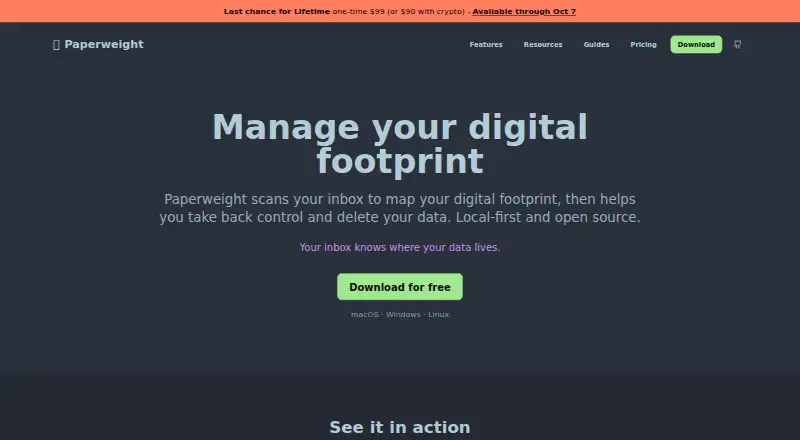
Paperweight is a desktop app for mapping accounts, mailing lists, and personal data found in an inbox, then helping users clean up and prepare privacy requests. It builds a company inventory from messages such as receipts, sign-up confirmations, password resets, and security alerts. It can identify mailing lists for unsubscribe requests and find details such as phone numbers, addresses, payment cards, and national identifiers in older messages. Paperweight supports Gmail, Outlook, Apple/iCloud, standard IMAP, and Proton Mail through Proton Bridge. Email analysis and database storage happen on the user's computer; the maker says its servers do not receive email content or credentials. The app is published under the MIT license. Its free plan supports one email account with full-history sync, inventory and overview tools, and local curation. Paid plans add options including cleanup actions, multiple accounts, and privacy requests. Paperweight prepares deletion requests for user review rather than sending them automatically, and it focuses on relationships found in the inbox rather than data-broker records.
Good
- Supports Gmail, Outlook, Apple/iCloud, Proton Mail, and IMAP.
- Processes and stores email data locally.
- MIT-licensed source can be inspected or built.
- Free plan includes full-history sync for one account.
Watch out
- Does not remove records from data brokers.
- Deletion requests require user review and are not sent automatically.
- Automatic cleanup rules are not available.
- Free plan supports one email account.
Who it suits
Paperweight suits people who want to review account relationships, mailing lists, and personal details in their email and manage cleanup from a desktop. Its free plan is limited to one email account; multiple accounts and cleanup actions are available in paid plans.
Verdict
Paperweight brings inbox-based account discovery, mailing-list cleanup, and personal-data review into one desktop app. Its local processing and free one-account plan may suit users starting with a single inbox, while data-broker removal is outside its scope.
Plans and prices
From Paperweight's own pricing page, checked 15 Oct 2026.
| Plan | Price | What it gives you |
|---|---|---|
| Free | Free | 1 email account · full-history sync · account/company inventory · mailing-list overview · breach/risk overview · personal-data overview · local curation · GitHub community support · free forever |
| Cleanup Pass | $25, paid once | Everything in Free · unsubscribe/trash/spam · bulk cleanup · privacy requests and follow-ups · multiple accounts · MCP access · GitHub community support · no renewal · one payment for 30 days |
| Paperweight Pro crypto | $55 a year | Same Pro access · BTC, ETH, XMR or ZEC · manually verified payment · no recurring subscription · manual renewal |
| Paperweight Pro | $60 a year | Everything in Free · unsubscribe/trash/spam · bulk cleanup · privacy requests and follow-ups · multiple accounts · MCP access · email support · billed yearly |
| Lifetime | $99, paid once | Permanent full Pro access · crypto price $90 · Permanent full Pro access; offer available through October 7, 2026 |
The facts
Each one read from Paperweight's own pages, with the date it was checked.
What it does
- Account discovery
- It reconstructs forgotten services and company relationships from sign-up messages, receipts, password resets and security alerts.checked 15 Oct 2026
- AI-access limit
- The changelog warns that external model providers can read data sent to them and recommends local models such as Ollama.checked 15 Oct 2026
- API availability
- The maker says the MCP integration uses no Paperweight services or hosted APIs; no public REST API or SDK is documented on the cited pages.checked 15 Oct 2026
- Breach information
- Paperweight provides breach and risk overviews for companies discovered in the mailbox.checked 15 Oct 2026
- Data collection
- The desktop app states that it collects no analytics or usage data and stores connected-mail data only locally.checked 15 Oct 2026
- Deletion requests
- Paperweight prepares access or deletion requests for user review and does not send deletion requests automatically.checked 7 Oct 2026
- Discovery limit
- Companies that never emailed the user or whose messages were deleted cannot be discovered from the inbox.checked 15 Oct 2026
- Documentation depth
- The repository README documents providers, OAuth scopes, development setup, releases and contribution rules, while the site publishes detailed changelog entries.checked 15 Oct 2026
- Email cleanup
- Paid features can unsubscribe, trash or mark messages as spam and perform bulk cleanup actions.checked 15 Oct 2026
- Email providers
- Supported connections include Gmail, Microsoft, Apple, Proton Mail through Proton Bridge and standard IMAP accounts.checked 15 Oct 2026
- GDPR automation caution
- On Product Hunt, the maker recommends manually reviewing GDPR requests rather than sending them automatically in bulk.checked 15 Oct 2026
- Install formats
- Downloads are offered as Windows installer, macOS DMG, Linux AppImage and Linux deb package.checked 15 Oct 2026
- Known feature limits
- The maker's comparison guide says Paperweight lacks AI inbox prioritization, daily rollups or digests, mobile apps, browser extensions and cross-device synchronization.checked 15 Oct 2026
- Latest release
- The site lists version 1.0.0 as the latest downloadable release, while its changelog records v0.7.1 on September 22, 2026.checked 15 Oct 2026
- Limit: download reliability
- A Product Hunt commenter said none of three website download buttons worked and the maker directed them to GitHub Releases instead.checked 15 Oct 2026
- Limit: incomplete automation
- FunBlocks notes that Paperweight cannot automate deletion for every service because some providers use difficult off-boarding processes.checked 15 Oct 2026
- Limit: large-mailbox progress
- A Reddit tester reported synchronization appearing stuck at 1% for a 300,000-message inbox and progressing slowly on a 65,000-message inbox, although the smaller test eventually completed.checked 15 Oct 2026
- Limit: pricing clarity
- A Reddit commenter called the free claim misleading because an earlier offer limited free scanning and placed unlimited history and multi-account support behind a paid licence.checked 15 Oct 2026
- Limit: scan duration
- FunBlocks warns that setup and initial scanning can take substantial time for large or decades-old mailboxes.checked 15 Oct 2026
- Local processing
- The maker says analysis, email storage and account data processing stay on the user's device without Paperweight servers.checked 15 Oct 2026
- MCP data scope
- The changelog says the agent can access sender/recipient, subject, previews, and app classifications, but not full email bodies or raw headers; known personal data is masked by default.checked 7 Oct 2026
- MCP integration
- Version 0.7.0 added a local stdio MCP server; AI access is off by default and can be read-only or read/write.checked 15 Oct 2026
The company
- Company developer
- The legal and privacy pages identify the developer as westech and provide [email protected] as the contact address.checked 15 Oct 2026
- Company launch date
- Product Hunt records Paperweight as launched in 2026.checked 15 Oct 2026
The full review of Paperweight
Paperweight is a desktop privacy and inbox-auditing app for people who want a clear inventory of companies, newsletters, and sensitive information buried in old mail. It is strongest for privacy-conscious users who prefer local, open-source software and are willing to review actions before they happen. Its broad inbox analysis is valuable, but the lack of automatic rules and data-broker coverage limits its reach.
Overview
Paperweight reconstructs company relationships from sign-up confirmations, receipts, password resets, and security alerts, turning scattered messages into an account and company inventory. It also finds mailing lists and personal details in historical messages, including email addresses, phone numbers, postal addresses, payment cards, IBANs, and national identifiers. That makes it a records-review tool as much as an unsubscribe utility.
Processing and database storage remain on the computer. The maker says its servers do not receive email content or credentials; connections to providers use HTTPS/TLS, and OAuth tokens are encrypted in macOS Keychain or Windows Credential Manager. The MIT license permits inspection and building of the code, an important advantage when software handles private correspondence. Paperweight concentrates on first-party relationships discovered in the inbox, however, and does not remove records held by data brokers.
Key features
Account discovery
The inventory is built from evidence across an inbox rather than from a manually maintained list. This helps users see dormant services and forgotten accounts, although the result depends on what remains in the connected mail history.
Mailing-list cleanup
Mailing lists are grouped for review, with unsubscribe requests supported through one-click headers, email triggers, or sender links. Paperweight prepares actions rather than silently applying them, so it favors deliberate cleanup over unattended maintenance. There are no automatic cleanup rules.
Personal-data review and requests
Detected data categories cover common contact and financial identifiers as well as national identifiers. The app prepares access or deletion requests for approval and does not send them automatically, giving the user control but adding a confirmation step. Requests remain focused on companies represented in the inbox, not broker databases.
Providers, privacy, and MCP
Gmail, Outlook, Apple/iCloud, standard IMAP accounts, and Proton Mail through Proton Bridge are supported. Pro adds MCP through a local stdio server that is disabled by default and can be set to read-only or read-and-write. The agent can access sender and recipient fields, subjects, previews, and app classifications, while full bodies and raw headers are excluded and known personal data is masked by default. That is useful for local automation, but read-and-write mode deserves careful configuration.
Pricing
Free — free, billed Free forever. This includes one email account with full-history sync, the account and company inventory, mailing-list, breach and risk, and personal-data and privacy overviews, plus local curation and community support on GitHub. There is no payment requirement or free trial. The one-account ceiling makes it a sensible starting point for a primary inbox, not a household or multi-inbox solution.
Paperweight Pro — $60 a year, billed yearly through Polar (equivalent to $5 per month). Crypto costs $55 for one year with manual renewal. Pro adds cleanup actions, privacy requests and follow-ups, multiple accounts, MCP access, and email support. It is the practical choice for users who need to act across several inboxes; the annual renewal and paid-only action features are the trade-offs.
Lifetime — $99, paid once. This provides permanent full Pro access and is offered through October 7, 2026; the crypto price is $90. It suits committed users who prefer a single payment, provided the offer is still available when they buy.
Cleanup Pass — $2,530, paid once. There is no subscription or renewal. It includes Free features plus unsubscribe, trash, mark-as-spam, bulk cleanup, privacy requests and follow-ups, multiple accounts, and MCP access, with GitHub community support. Its unusually high one-time price makes sense only for buyers specifically seeking a comprehensive cleanup package without recurring billing.
Platforms
Paperweight runs on Linux, macOS, and Windows. Provider support covers Gmail, Outlook, Apple/iCloud, Proton Mail via Proton Bridge, and standard IMAP accounts.
Who it's for
Choose Paperweight if you want a local account map, privacy-data inventory, and reviewed unsubscribe or deletion workflows in one desktop application. It is particularly well matched to technical users who value MIT-licensed code and local storage. It is a poor fit if you need automatic rules, unattended deletion, or removal from data-broker systems.
Pros and cons
Pros
- Local-first privacy model: email analysis and storage stay on the computer, with no server receiving mail content or credentials.
- Unusually broad discovery: account relationships, mailing lists, risk indicators, and numerous personal-data types are reviewed together.
- Controlled privacy actions: requests are prepared for approval rather than sent automatically.
- Open source and cross-platform: MIT licensing and Linux, macOS, and Windows support widen transparency and device coverage.
Cons
- No automatic cleanup rules: recurring newsletter management still requires user decisions.
- Limited removal scope: inbox-discovered first-party relationships do not cover data brokers.
- Free plan is single-account: multiple inboxes require Pro or Cleanup Pass.
- Cleanup Pass is expensive: its 2530.00 USD one-time price is difficult to justify for ordinary newsletter cleanup.
Alternatives
For a broader category view, see Email Cleanup Software.
Clean Email is the better pick for mobile and web access, a free trial, and paid multi-account cleanup, though its free account is limited to 1,000 messages and omits advanced controls.
Gmail Bulk Unsubscribe & Cleanup Tool suits users wanting a free, MIT-licensed option across desktop, web, or self-hosting, with an optional 8.00 USD one-time setup service.
InboxSweeper is a free, open-source alternative requiring no account or subscription.
Cleanfox is a free Android, iOS, and web choice for inbox cleaning and newsletter unsubscribing.
Unroll.Me is free on Android, iOS, and web, but requires access to commercial emails and uses commercial-email data for measurement products.
Gmail Unsubscriber is a free open-source option for Gmail cleanup.
GMClean is a free, MIT-licensed, self-hosted web option.
Leave Me Alone offers a free four-account tier with unlimited unsubscribes and privacy-oriented controls.
Verdict
Paperweight is a strong choice for one or more inboxes when local processing, open-source transparency, and a detailed account-and-personal-data inventory matter more than automation. Start with Free for a single account, move to Pro for multi-account actions and MCP, or choose Lifetime for a one-off Pro purchase. Look elsewhere for automatic cleanup, a lower-cost bulk-cleaning workflow, or data-broker removal.
Alternatives to Paperweight
- 1

Clean Email
Free planAndroidiOSWebmacOS8.0From $29.99 a year - 2
Gmail Bulk Unsubscribe & Cleanup Tool
Free planOpen sourceWebLinuxmacOSSelf-hosted8.0$8 one-time - 3
Gmail Unsubscriber
Free planOpen sourceAndroidiOSWeb7.7Free plan - 4
InboxSweeper
Free planOpen sourceWebLinuxmacOSSelf-hosted7.4Free plan - 5
Cleanfox
Free planAndroidiOSWeb7.3Free plan - 6
Smart Delete for Gmail
Free planWebExtension7.3$1 one-time