Leave Me Alone
Leave Me Alone brings subscription emails from connected accounts together and lets users unsubscribe from unwanted mailing lists.
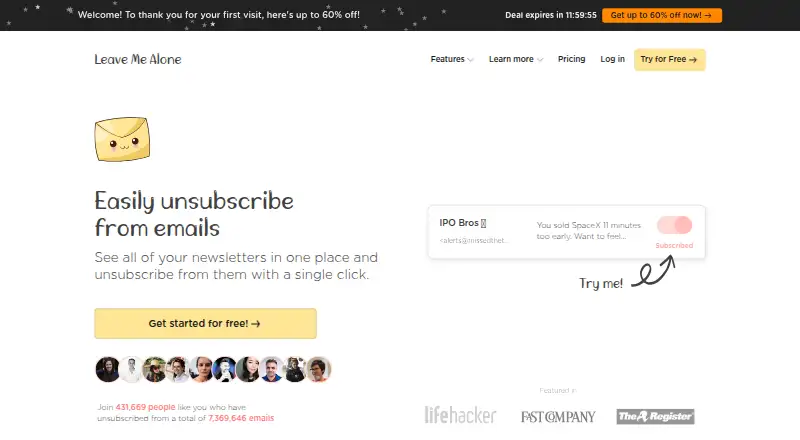
What Leave Me Alone is
Leave Me Alone brings subscription emails from connected accounts together and lets users unsubscribe from unwanted mailing lists. It follows unsubscribe links to carry out requests rather than only filtering messages. Rollups combine selected newsletters into email digests delivered on a schedule chosen by the user. Screener holds messages from new senders until approval, either in the browser or through a daily digest email. Spam Blocker learns from unwanted inbox messages and blocks similar senders automatically. Supported accounts include Google and Microsoft accounts, Fastmail, Yahoo Mail, iCloud, AOL, Mail.com, and other IMAP-compatible mailboxes. Its Android app can show mailing lists, unsubscribe, and connect more accounts; the site says an iOS app is coming soon. The homepage offers unsubscribing from 10 emails free without a credit card. Listed options include two plans at no cost and a Seven Day Pass at $19, paid once, billed $19 for 7 days. The maker says the service stores subscription-email metadata. Rollups fetch, encrypt, and store selected email content, while Spam Blocker reads some content for classification and classifier training. Paid plans recheck connected addresses against Have I Been Pwned weekly.
Good
- Unsubscribes through mailing-list links
- Rollups deliver selected newsletters on a chosen schedule
- Supports Google, Microsoft, and IMAP-compatible accounts
- Free homepage offer covers 10 unsubscribes
Watch out
- Android app is listed; iOS app is coming soon
- Spam Blocker reads some email content
- Rollups store selected email content
Who it suits
Leave Me Alone suits people who want to review subscriptions across connected email accounts and unsubscribe from mailing lists. Its tools may also suit users who want to screen new senders or receive selected newsletters as digests.
Verdict
Leave Me Alone offers unsubscribe management alongside screening, blocking, and scheduled newsletter digests. Consider its email-content handling and the listed platform availability before connecting accounts.
Plans and prices
From Leave Me Alone's own pricing page, checked 8 Oct 2026.
| Plan | Price | What it gives you |
|---|---|---|
| Casual Emailer | Free | 4 email accounts · Unlimited unsubscribes · Private Emails · Screener · Spam Blocker · Do-not-disturb mode · Priority senders · Rollups · $0/month, billed yearly; billed yearly at $0/year |
| Inbox Zero Hero | Free | Unlimited email accounts · Unlimited unsubscribes · Private Emails · Screener · Spam Blocker · Do-not-disturb mode · Priority senders · Rollups · $0/month, billed yearly; billed yearly at $0/year |
| Seven Day Pass | $19, paid once | 2 email accounts · Unlimited unsubscribes for 7 days · Private Emails · Screener · Spam Blocker · Do-not-disturb mode · Priority senders · Rollups · $19 for 7 days |
The facts
Each one read from Leave Me Alone's own pages, with the date it was checked.
What it does
- Breach Detection
- Breach Detection checks connected email addresses against Have I Been Pwned and rechecks weekly on paid plans.checked 8 Oct 2026
- Data handling
- The maker says it stores subscription-email metadata; Rollups fetch, encrypt, and store selected email content, while Spam Blocker reads some email content for classification and classifier training.checked 8 Oct 2026
- Email providers
- Supported accounts include Google and Microsoft accounts, plus Fastmail, Yahoo Mail, iCloud, AOL, and other IMAP mailboxes.checked 8 Oct 2026
- Google security
- The maker says it is a Google Verified Application and undergoes yearly security audits to retain access to restricted scopes.checked 8 Oct 2026
- Purpose
- Leave Me Alone shows subscription emails in one place and lets users unsubscribe from unwanted mailing lists.checked 8 Oct 2026
- Real unsubscribes
- The service follows unsubscribe links to unsubscribe users rather than only filtering messages.checked 8 Oct 2026
- Rollups
- Rollups combine selected newsletters into email digests delivered on a user’s schedule.checked 8 Oct 2026
- Screener
- The Screener holds messages from new senders until the user approves them, with review in the browser or by daily digest email.checked 8 Oct 2026
- Spam Blocker
- The Spam Blocker learns from unwanted emails in the user’s inbox and blocks similar senders automatically.checked 8 Oct 2026
- Support
- The help center provides product guides and lists [email protected] for further help.checked 8 Oct 2026
Money
- Free use
- The homepage offers unsubscribing from 10 emails for free with no credit card required.checked 8 Oct 2026
The company
- Makers
- The about page identifies Danielle and James as independent founders building the product without funding or outside support.checked 8 Oct 2026
Where it runs
- Mobile app
- The Android app can show mailing lists from connected accounts, unsubscribe, and connect additional email accounts; the page says an iOS app is coming soon.checked 8 Oct 2026
Alternatives to Leave Me Alone
- 1

Clean Email
Free planAndroidiOSWebmacOS8.0From $29.99 a year - 2
Gmail Bulk Unsubscribe & Cleanup Tool
Free planOpen sourceWebLinuxmacOSSelf-hosted8.0$8 one-time - 3
Paperweight
Free planOpen sourceLinuxmacOSWindows7.8From $55 a year - 4
Gmail Unsubscriber
Free planOpen sourceAndroidiOSWeb7.7Free plan - 5
InboxSweeper
Free planOpen sourceWebLinuxmacOSSelf-hosted7.4Free plan - 6
Cleanfox
Free planAndroidiOSWeb7.3Free plan