Cleanfox
Cleanfox is a free service for clearing unwanted email and unsubscribing from newsletters.
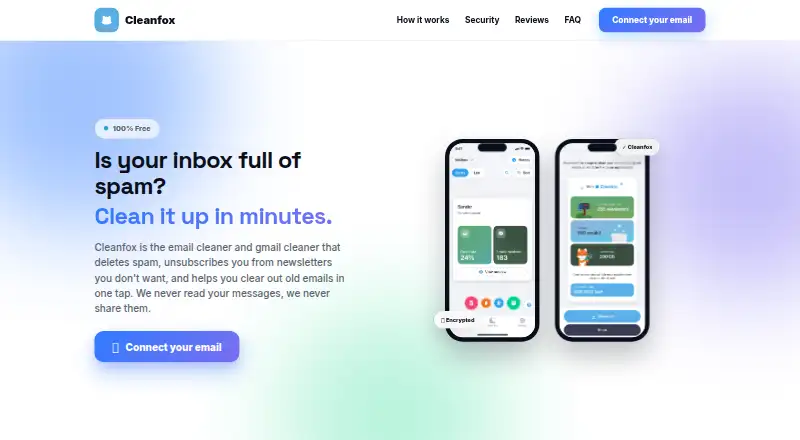
What Cleanfox is
Cleanfox is a free service for clearing unwanted email and unsubscribing from newsletters. It identifies recurring senders and lets users review what to keep before choosing an action: delete all messages from a newsletter, remove received messages while remaining subscribed, or leave the newsletter as it is. Supported mail includes Gmail, Yahoo Mail, Microsoft mail such as Hotmail and Outlook, Orange, SFR, Free, La Poste, Noos, Numericable, GMX, BBOX, Bouygtel, Apple and iCloud, along with most other providers. Newsletters can be sorted in card or list views, with bulk actions in the list view. Users can add another mailbox in settings and sort multiple mailboxes at once; automatic cleanup rules are also available. An initial scan averages 30 minutes to three hours. Deleted messages move to the mailbox trash and can be restored until the provider empties it, typically after five to 30 days. Cleanfox says it anonymises newsletter and commercial-transaction data for market statistics and does not target users with advertising. Attachment downloading and deletion is marked as coming soon.
Good
- Lets users review recurring senders before cleaning.
- Supports bulk actions in list view.
- Multiple mailboxes can be sorted together.
- Automatic cleanup rules are available.
Watch out
- Initial mailbox scan averages 30 minutes to 3 hours.
- Deleted email recovery ends when the provider empties trash.
- Attachment handling is marked as coming soon.
Who it suits
Cleanfox suits people who want to sort newsletters, clear old email and manage several mailboxes from one service.
Verdict
Cleanfox offers several ways to remove unwanted messages while keeping or leaving a newsletter. Allow time for the initial scan, and remember that deleted mail is recoverable only while it remains in trash.
Plans and prices
From Cleanfox's own pricing page, checked 14 Oct 2026.
| Plan | Price | What it gives you |
|---|---|---|
| Free | Free | no ads · no restrictions · unlimited use |
The facts
Each one read from Cleanfox's own pages, with the date it was checked.
What it does
- Account deletion
- Deleting a mailbox from settings deletes the Cleanfox account and associated data, but can cancel a cleanup that has not yet completed.checked 14 Oct 2026
- Attachment feature
- The how-it-works page describes downloading and deleting attachments as a feature marked “Soon.”checked 1 Oct 2026
- Bulk deletion
- The service can delete thousands of old messages in one action and move them to the mailbox trash folder.checked 14 Oct 2026
- Business model
- Foxintelligence/NielsenIQ says it funds the free service by selling anonymized and aggregated statistics derived from transactional emails.checked 14 Oct 2026
- Cleaning actions
- Users can delete all emails from a newsletter, delete received emails while remaining subscribed, or keep the newsletter.checked 1 Oct 2026
- Connection method
- Cleanfox uses IMAP plus provider-generated application passwords, and OAuth2 where supported.checked 14 Oct 2026
- Data processing
- Cleanfox says newsletter and commercial-transaction data is anonymised to produce market statistics and that users are not targeted by advertising.checked 1 Oct 2026
- Data retention
- The privacy notice says email content is generally retained only for the account lifetime plus a system-improvement period, while logs are kept no longer than six months to one year.checked 14 Oct 2026
- Deletion recovery
- Deleted emails are moved to the mailbox trash and can be restored until the provider empties it, typically after 5 to 30 days.checked 1 Oct 2026
- Funding
- Crunchbase lists Cleanfox as a private seed-stage Paris company funded by IronCapital.checked 14 Oct 2026
- Initial scan time
- The first mailbox scan can take about 30 minutes to three hours.checked 14 Oct 2026
- Limit: delayed or incomplete cleanup
- An Apple reviewer said a planned cleanup of tens of thousands of messages had not changed the inbox after several days and criticized canned support replies.checked 14 Oct 2026
- Limit: email retention workflow
- An Apple reviewer wanted the ability to unsubscribe while preserving existing messages, because current delete choices could remove important receipts.checked 14 Oct 2026
- Limit: missing selection controls
- An Apple reviewer reported that the newsletter list lacked a select-all control, making bulk selection slower.checked 14 Oct 2026
- Limit: reliability
- Trustpilot summaries mention cases where messages remained in the mailbox or no deletions appeared after refreshing.checked 14 Oct 2026
- Multiple mailboxes
- Users can add multiple mailboxes and process them in a combined list.checked 14 Oct 2026
- Newsletter actions
- For each detected newsletter, users can keep it, delete old messages while staying subscribed, or unsubscribe and delete old messages.checked 14 Oct 2026
- Notable launch
- A company press release dated September 13, 2016 announced Cleanfox as a free web platform for one-click newsletter deletion and unsubscribing.checked 14 Oct 2026
Where it runs
- Android reach
- Google Play lists more than 10 million downloads.checked 14 Oct 2026
- iOS requirement
- The App Store listing requires iOS 15.6 or later and iPadOS 15.6 or later.checked 14 Oct 2026
The company
- Company profile
- LinkedIn lists Cleanfox App as a privately held consumer-services company founded in 2016 with 11–50 employees and headquarters in Paris.checked 14 Oct 2026
- Headquarters
- Bezons, Francechecked 28 Sep 2026
- Owner and developer
- The current service and app pages identify NielsenIQ as developer or publisher, while older legal material names Foxintelligence.checked 14 Oct 2026
Money
- Free provider limitation
- Free.fr mailboxes are currently unavailable because Free blocks third-party access.checked 14 Oct 2026
The full review of Cleanfox
Overview
Cleanfox is a free service for clearing newsletter clutter and old email across multiple mailboxes. It suits people who want control over whether to unsubscribe, delete messages, or keep a sender’s mail. The trade-off is patience: an initial scan averages 30 minutes to three hours.
Its three cleanup choices make it more useful than a tool that only unsubscribes: you can remove a newsletter and its messages, delete received messages while staying subscribed, or leave the sender untouched. That flexibility is valuable when a sender’s mail is mostly clutter but the subscription still matters.
Key features
Cleanfox identifies recurring senders and lets you review them before cleaning. Card and list views accommodate either a sender-by-sender review or faster sorting; the list view supports bulk actions. You can add another mailbox through settings and sort several mailboxes at once, which helps people managing more than one inbox.
Cleanfox supports Gmail, Yahoo, Microsoft mail including Hotmail and Outlook, Orange, SFR, Free, La Poste, Noos, Numericable, GMX, BBOX, Bouygtel, Apple and iCloud, as well as most other email providers. Automatic cleanup rules can help reduce repeat work. Attachment downloading and deletion are described as coming soon, so Cleanfox is not a current solution for reclaiming space by targeting large attachments.
Cleanfox says it does not read or sell emails, uses end-to-end encryption, complies with GDPR and offers one-tap disconnection. It also says it anonymises newsletter and commercial-transaction data to produce market statistics and does not target users with advertising. Its privacy notice allows processing of commercial emails and production of deidentified or aggregated reports, and says human access is restricted except under stated conditions. Users should weigh those practices against their own comfort with email processing.
Deleted messages go to the mailbox trash, where they can be restored until the provider empties it—typically after 5 to 30 days. This offers a recovery window, not permanent protection against deletion. For technical problems or feature suggestions, Cleanfox directs users to [email protected].
Pricing
Cleanfox has one stated plan: Free at no cost, billed 100% Free. It includes email inbox cleaning and newsletter unsubscribe, with no credit card required. That makes it an easy fit for anyone who wants those core tools without a subscription; there is no paid tier described for users who need more advanced cleanup.
Platforms
Cleanfox is available on Android, iOS and the web, giving users a choice of mobile or browser access.
Who it's for
Choose Cleanfox if you want to review recurring senders, decide individually what to keep, and clean multiple supported mailboxes without paying. Look elsewhere if you need attachment cleanup now or need the first scan to finish quickly.
Pros and cons
- Pros: Three actions per newsletter let you unsubscribe, clear messages while staying subscribed, or keep the sender.
- Pros: Multiple mailboxes, bulk actions in list view and automatic cleanup rules support broader or repeat inbox maintenance.
- Pros: The free plan covers inbox cleaning and unsubscribing without requiring a credit card.
- Cons: The initial scan averages 30 minutes to three hours, a substantial wait for an urgent cleanup.
- Cons: Attachment downloading and deletion are not ready, limiting its usefulness for attachment-focused cleanup.
- Cons: Deleted messages are recoverable only until the mail provider empties the trash, typically after 5 to 30 days.
Alternatives
Email Cleanup Software is a broader category guide for comparing cleanup options.
Consider Clean Email if you want a service with a free account capped at 1,000 cleaned messages and are willing to consider paid plans; its free account excludes Screener, Sender and Mailing List Settings, and Auto Clean. Gmail Bulk Unsubscribe & Cleanup Tool is a free, MIT-licensed option for users comfortable with a self-hosted tool or desktop platforms; its separate 1-on-1 Setup Service costs $8, paid once.
InboxSweeper may suit users seeking a free, open-source option that requires no account or subscription. Paperweight is another choice for users who prefer MIT-licensed software whose code can be inspected or built.
Unroll.Me is free and available on Android, iOS and web, but requires access to commercial emails and uses commercial-email data for measurement products. Gmail Unsubscriber is a free, open-source option for users who prefer a project published under the MIT License.
Leave Me Alone offers a free yearly Casual Emailer plan with four email accounts, unlimited unsubscribes, Private Emails, Screener, Spam Blocker and Do-not-disturb features. Trimbox may suit someone who only needs to try a small amount of unsubscribing for free: its free plan covers the first 10 unsubscribes.
Verdict
Cleanfox is a strong fit for people who want free, flexible newsletter cleanup across several mailboxes, especially when they want to delete messages without necessarily unsubscribing. Its main reasons to look elsewhere are the lengthy first scan and the absence of attachment cleanup today.
Getting started
- Open the Cleanfox website or install it on Android or iOS
- Connect a supported mailbox
- Wait for the initial mailbox scan
- Review newsletters in card or list view
- Choose whether to delete, unsubscribe, or keep each newsletter
- Add another mailbox from settings if needed
- Apply cleanup actions or automatic rules
Limits worth knowing
The free plan provides email inbox cleaning and newsletter unsubscribe at no cost. Attachment downloading and deletion is identified as a future feature, and the initial scan averages 30 minutes to 3 hours.
Questions
Is Cleanfox free?
Yes. The Free plan costs nothing, is billed 100% Free, and requires no credit card.
Which mail providers does it support?
It lists Gmail, Yahoo, Microsoft Hotmail and Outlook, Orange, SFR, Free, La Poste, Noos, Numericable, GMX, BBOX, Bouygtel, Apple, and iCloud, plus most other providers.
Can I manage more than one mailbox?
Yes. Another mailbox can be added from settings, allowing several mailboxes to be sorted together.
Can deleted messages be restored?
Deleted messages move to the mailbox trash and can be restored until the provider empties it, typically after 5 to 30 days.
Does Cleanfox process email data?
Cleanfox says newsletter and commercial-transaction data is anonymised for market statistics. Its privacy notice also describes deidentified or aggregated reports and limits human access except under stated conditions.
Alternatives to Cleanfox
- 1

Clean Email
Free planAndroidiOSWebmacOS8.0From $29.99 a year - 2
Gmail Bulk Unsubscribe & Cleanup Tool
Free planOpen sourceWebLinuxmacOSSelf-hosted8.0$8 one-time - 3
Paperweight
Free planOpen sourceLinuxmacOSWindows7.8From $55 a year - 4
Gmail Unsubscriber
Free planOpen sourceAndroidiOSWeb7.7Free plan - 5
InboxSweeper
Free planOpen sourceWebLinuxmacOSSelf-hosted7.4Free plan - 6
Smart Delete for Gmail
Free planWebExtension7.3$1 one-time