Clean Email
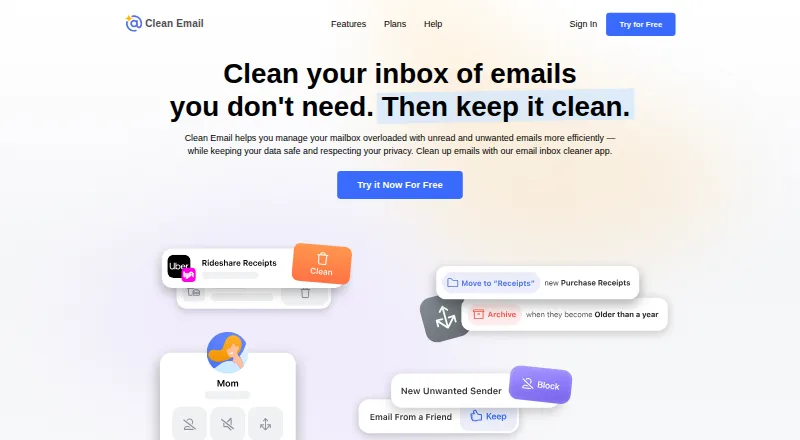
Clean Email helps organize an inbox by grouping messages so users can manage, archive or remove many at once.
What Clean Email is
Clean Email helps organize an inbox by grouping messages so users can manage, archive or remove many at once. Its Unsubscriber lists subscriptions and newsletters for bulk unsubscribing. Auto Clean rules can move, star, mark, delete or archive mail using criteria such as sender, domain, status and age. Screener holds messages from unknown senders for review, where users can allow or block them. Clean Email supports Gmail, Yahoo, AOL, iCloud, Outlook and other IMAP-based mailboxes. It connects directly to the mailbox and can be used alongside an existing email app; apps are listed for Android, iOS, macOS and the web. The service says its index stores message details such as sender, subject, dates and folders, but not message bodies or attachments by default. It says the index is deleted after 45 days without a login or when an account is removed. Its free account can clean up to 1,000 messages, but excludes Screener, Sender and Mailing List Settings, and Auto Clean. Premium plans cover one, five or ten accounts, but their prices are not listed here.
Good
- Bulk cleanup and unsubscribe tools
- Automatic rules use sender and age criteria
- Supports other IMAP-based mailboxes
- Index excludes message bodies by default
Watch out
- Free account limited to 1,000 messages
- Free excludes Screener and Auto Clean
- Premium plan prices are not listed
Who it suits
Clean Email may suit people who want to sort bulk messages, manage subscriptions and set automatic cleanup rules while keeping their existing email app. The free account may work for limited cleanup, while its listed Premium plans cover multiple account counts.
Verdict
Clean Email focuses on bulk inbox organization, subscription management and rules that act automatically. Check which features are excluded from the free account and note that listed Premium prices are unavailable.
Plans and prices
From Clean Email's own pricing page, checked 28 Sep 2026.
| Plan | Price | What it gives you |
|---|---|---|
| Free account | Free | clean up to 1,000 email messages · no Screener, Sender and Mailing List Settings, or Auto Clean |
| 1 account | $9.99 a month | all features · unlimited email cleaning · one account · monthly |
| 1 account | $29.99 a year | all features · unlimited email cleaning · one account · annually |
| Premium — 1 account, monthly | — | 1 account · unlimited email cleaning · all features · Monthly |
| Premium — 1 account, yearly | — | 1 account · unlimited email cleaning · all features · Yearly |
| Premium — 5 accounts, monthly | — | 5 accounts · unlimited email cleaning · all features · Monthly |
| Premium — 5 accounts, yearly | — | 5 accounts · unlimited email cleaning · all features · Yearly |
| Premium — 10 accounts, monthly | — | 10 accounts · unlimited email cleaning · all features · Monthly |
| Premium — 10 accounts, yearly | — | 10 accounts · unlimited email cleaning · all features · Yearly |
The facts
Each one read from Clean Email's own pages, with the date it was checked.
What it does
- Action history
- Action History records actions Clean Email has performed on the account and replaces earlier digest features.checked 14 Oct 2026
- API and extensibility
- The help documentation describes Clean Email communicating with providers through their APIs or IMAP, but does not present a public Clean Email API, SDK or developer portal.checked 14 Oct 2026
- Auto Clean
- Auto Clean rules use sender, recipient, domain, text, folder, read status, age and size criteria to automate actions such as trash, archive, move, label and spam marking.checked 14 Oct 2026
- Automation
- Auto Clean rules can automatically move, star, mark, delete, or archive messages based on criteria such as sender, domain, status, and age.checked 28 Sep 2026
- Bulk cleaning
- Users can apply actions to entire message groups instead of selecting messages individually.checked 14 Oct 2026
- Cleaning Suggestions
- Cleaning Suggestions learn from mailbox behavior and community patterns to recommend cleanup actions.checked 14 Oct 2026
- Compose and reply
- The product supports composing, sending, replying to and forwarding email from within Clean Email.checked 14 Oct 2026
- Connection method
- Gmail, Yahoo, Hotmail, Outlook and Office 365 can connect without entering a password, while other IMAP providers may require credentials or an app-specific password.checked 14 Oct 2026
- Data handling
- The service says its index stores message metadata such as sender, recipient, subject, dates, size, folders, and attachment information, but not message bodies or attachments by default.checked 28 Sep 2026
- Data retention
- Clean Email says it automatically deletes the mailbox index if the user does not log in for 45 days, and also deletes it when the account is removed.checked 28 Sep 2026
- Documentation
- The help center contains guides for setup, Smart Folders, search, Auto Clean, Sender Settings, Screener, Unsubscriber, Privacy Monitor, account management and troubleshooting.checked 14 Oct 2026
- Email client compatibility
- Clean Email connects to the mailbox directly and can be used alongside the user's existing email app.checked 28 Sep 2026
- Email providers
- Clean Email supports Gmail, Yahoo, AOL, iCloud, Outlook, and other email providers that use IMAP.checked 28 Sep 2026
- Inbox cleanup
- Clean Email groups messages so users can organize, archive, or remove large numbers of emails at once.checked 28 Sep 2026
- License
- Clean Email is offered as a paid proprietary service rather than open-source software, with subscription access and Clean Email, LLC copyright notices.checked 14 Oct 2026
- Limit: accidental filtering
- Trustpilot reviewers report that blocking or automation sometimes delayed legitimate mail or deleted messages they intended to keep.checked 14 Oct 2026
- Limit: mobile reliability
- Google Play reviewers report freezing, crashes, confusing account switching and subscription-count inconsistencies.checked 14 Oct 2026
- Limit: paid feature gate
- Reviewers complain that the free account is limited to 1,000 cleaned messages and that important automation features require payment.checked 14 Oct 2026
The company
- Company headquarters
- The official site states that Clean Email is headquartered in Los Angeles, California.checked 14 Oct 2026
- Company legal name
- The service identifies its operator as Clean Email, LLC.checked 14 Oct 2026
- Company origin
- Clean Email says it was founded in Ukraine in 2014 and later based in the United States.checked 14 Oct 2026
- Founded
- 2014checked 23 Sep 2026
- Headquarters
- Los Angeles, California, USAchecked 23 Sep 2026
Money
- Limit: support and billing
- A Capterra reviewer reported poor support and an unwanted auto-renewal charge with no refund after cancellation.checked 14 Oct 2026
The full review of Clean Email
Clean Email is an inbox-management service for people who want to clear clutter while keeping their current email app. It is best for users with crowded mailboxes, recurring newsletters, or repetitive cleanup tasks; the trade-off is that the free account omits several of its central controls.
Overview
Rather than replacing an email client, Clean Email connects directly to a mailbox and works alongside the app a user already prefers. It supports Gmail, Yahoo Mail, Hotmail, Outlook, Office 365, Fastmail, AOL, iCloud, and other IMAP-based mailboxes. Founded in 2014, the company is headquartered in Los Angeles.
The service is built around reducing inbox noise through bulk organization, subscription management, and rules. That combination is useful when the problem is recurring volume rather than a need for a new place to read and send email.
Key features
Bulk cleanup and subscriptions
Clean Email groups messages so users can organize, archive, or delete large batches together. This makes accumulated email more manageable by group, though the free account caps cleanup at 1,000 messages. The Unsubscriber lists newsletters and subscriptions and supports unsubscribing from multiple senders in bulk, a practical way to tackle recurring mail in batches.
Rules and sender screening
Auto Clean can move, star, mark, delete, or archive messages automatically using criteria such as sender, domain, status, and age. These controls suit people who want routine sorting to continue without repeated manual cleanup. Screener holds messages from unknown senders for review, so users can allow or block them rather than letting unfamiliar mail flow straight into the inbox.
Privacy and support
Clean Email says its mailbox index contains message metadata—including sender, recipient, subject, dates, size, folders, and attachment information—but not message bodies or attachments by default. It says the index is automatically deleted after 45 days without a login and when an account is removed. The service also says it undergoes annual external security assessments and verification by email providers. Privacy Monitor checks an email address regularly against known breaches and security incidents. Help pages direct users with questions to contact Clean Email for assistance.
Pricing
Clean Email is freemium, with a free plan and a 14-day trial. The Free account costs nothing and allows cleanup of up to 1,000 email messages. It excludes Screener, Sender and Mailing List Settings, and Auto Clean, so it is a limited way to try bulk cleanup rather than a full preview of the automation and filtering toolkit.
Premium plans include unlimited email cleaning and all features. Options cover 1, 5, or 10 accounts, billed monthly or yearly; each is custom pricing. A single-account plan is the straightforward fit for one mailbox owner, while the multi-account tiers suit people managing several accounts. The plan choices establish account counts and billing periods, but do not give a basis for comparing monthly against yearly cost.
Education and nonprofit discounts are offered, and organizations can request special bulk pricing by quote. That may suit institutions or larger groups, though it requires a quote rather than a fixed published rate.
Platforms
Clean Email provides apps for iPhone and iPad, macOS, and Android, as well as a web app. Because it connects to the mailbox directly, it can be used alongside an existing email client rather than forcing a switch.
Who it's for
Clean Email is a strong fit for people whose inboxes are weighed down by old messages, repeated newsletters, or predictable categories that can be handled with rules. Its broad provider support and multiple account tiers also make it relevant to users who manage more than one mailbox. It is less compelling for someone who only needs occasional cleanup and can stay within the 1,000-message free cap, or for anyone seeking the excluded free-plan controls without upgrading.
Pros and cons
- Pro: Bulk organization, archiving, and deletion address large accumulations without requiring one-by-one handling.
- Pro: Auto Clean and Screener cover both repeatable sorting and review of unknown senders, but require Premium.
- Pro: Support for major providers and other IMAP mailboxes lets users keep their existing email app.
- Pro: The service describes a metadata-only index by default and a 45-day inactivity deletion policy.
- Con: The free account stops at 1,000 cleaned messages and excludes several defining features.
- Con: Premium rates are custom pricing, making it difficult to weigh the monthly and yearly options on cost alone.
Alternatives
For a broader comparison, browse Email Cleanup Software.
- Gmail Bulk Unsubscribe & Cleanup Tool is worth considering if a free, MIT-licensed option across web, desktop, and self-hosted platforms suits the need; it also offers a one-time 8.00 USD setup service.
- InboxSweeper is a free, open-source option for users who prefer no account or subscription and want web, desktop, or Linux platform choices.
- Cleanfox is a free alternative for inbox cleanup and newsletter unsubscribe on Android, iOS, or web.
- Unroll.Me is free on Android, iOS, and web, but requires access to commercial emails and uses commercial-email data for measurement products.
- Unsubscribe for Gmail is another freemium option, with Android, iOS, web, and extension platforms.
- ClearInbox offers a free account to connect a mailbox and supports web and self-hosted use.
- GoodByEmail is a freemium option for Windows and macOS.
- Paperweight is a freemium option for Windows, macOS, and Linux.
Verdict
Choose Clean Email if you want bulk inbox cleanup plus subscription controls and automatic rules without abandoning your existing email app. Its strongest case is the breadth of cleanup and automation across common providers; its main drawback is that the free tier removes key controls and Premium uses custom pricing. Readers who only need basic cleanup may prefer a free alternative, while users who need those full controls should compare the Premium quote with their account needs.
Getting started
- Visit https://clean.email/.
- Choose the free account or review the 14-day trial and Premium options.
- Connect a supported mailbox, such as Gmail, Outlook, or another IMAP-based account.
- Use the web app or an app for Android, iOS, or macOS.
- Group messages to organize them, manage subscriptions, or set Auto Clean rules if included in your plan.
Limits worth knowing
The free account can clean up to 1,000 email messages and excludes Screener, Sender and Mailing List Settings, and Auto Clean. Premium plans include unlimited email cleaning and all features; the listed Premium options cover one, five, or ten accounts.
Questions
Is Clean Email free?
Yes. The free account can clean up to 1,000 email messages.
How much does Clean Email cost?
Prices for the listed Premium plans are not provided.
Which email providers does it support?
It supports Gmail, Yahoo Mail, Hotmail, Outlook, Office 365, Fastmail, AOL, iCloud, and other IMAP-based mailboxes.
Which platforms can I use it on?
Clean Email links to apps for Android, iOS, and macOS, plus a web app.
Can Clean Email work with my current email app?
Yes. It connects directly to the mailbox and can be used alongside an existing email app.
What does a Premium plan include?
The listed Premium plans include unlimited email cleaning and all features, with options for one, five, or ten accounts. Plans are offered monthly and yearly.
Alternatives to Clean Email
- 1
Gmail Bulk Unsubscribe & Cleanup Tool
Free planOpen sourceWebLinuxmacOSSelf-hosted8.0$8 one-time - 2
Paperweight
Free planOpen sourceLinuxmacOSWindows7.8From $55 a year - 3
Gmail Unsubscriber
Free planOpen sourceAndroidiOSWeb7.7Free plan - 4
InboxSweeper
Free planOpen sourceWebLinuxmacOSSelf-hosted7.4Free plan - 5
Cleanfox
Free planAndroidiOSWeb7.3Free plan - 6
Smart Delete for Gmail
Free planWebExtension7.3$1 one-time