
Panda3DS
Panda3DS is a free, open-source emulator for Nintendo 3DS games on computers and portable devices.
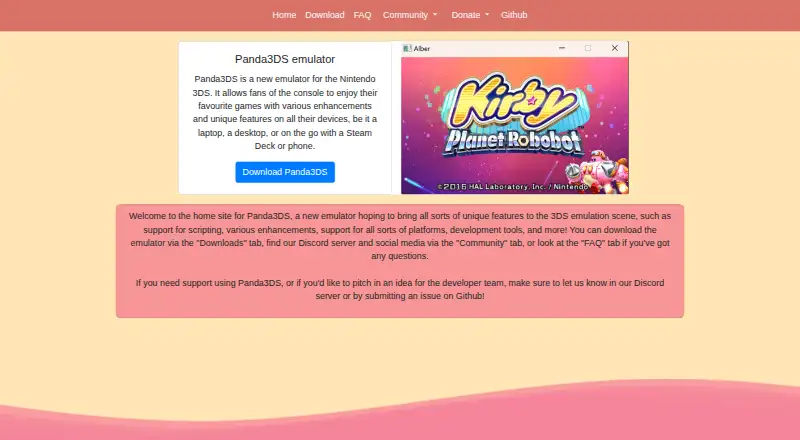
What Panda3DS is
Panda3DS is a free, open-source emulator for Nintendo 3DS games on computers and portable devices. It supports Windows, macOS, Linux, and Android, with downloads for Android arm64 and an AUR package for Arch Linux. Features include Lua scripting, cheats, controller input, support for some system apps, and work-in-progress amiibo support. The project offers automatically updated nightly builds and manually updated stable builds released every few weeks. On desktop, the SDL version has no GUI, while the experimental Qt version provides a user interface. Panda3DS remains in early development: many games boot, but many do not, and graphics, audio, and usability features can be incomplete. Android is also early in development, so compatibility and performance may differ from desktop. Audio support is experimental, and the configuration menu is still being developed; users change settings by editing config.toml in a text editor. The emulator is licensed under GPLv3.
Good
- Free and open source under GPLv3
- Supports Windows, macOS, Linux, and Android
- Includes Lua scripting and cheat support
- Offers stable and nightly build channels
Watch out
- Early development means many games do not boot
- Android compatibility and performance may differ
- Settings require editing config.toml
- Audio support is experimental
Who it suits
Panda3DS suits Nintendo 3DS fans who want to play games on laptops, desktops, Steam Decks, or phones. It may also interest users comfortable with early-development software and manual configuration.
Verdict
Panda3DS provides a free way to emulate Nintendo 3DS games across desktop systems and Android. Its early-development status, experimental audio, and manual settings changes are important considerations.
Plans and prices
From Panda3DS's own pricing page, checked 30 Sep 2026.
| Plan | Price | What it gives you |
|---|---|---|
| Panda3DS | Free | official builds are not private or sponsor-limited |
The facts
Each one read from Panda3DS's own pages, with the date it was checked.
What it does
- Additional features
- The project lists Discord bot support, support for some system apps, cheats, controller input and work-in-progress amiibo support.checked 30 Sep 2026
- Audio
- Audio support is described as new and experimental; the LLE backend is accurate to the console but slow and off by default, while HLE audio is being implemented.checked 30 Sep 2026
- Build channels
- The website provides automatically updated nightly builds and manually updated stable builds released every few weeks.checked 30 Sep 2026
- Builds
- Panda3DS offers nightly builds that update automatically and may contain newer, less-tested features, plus stable builds updated manually every few weeks.checked 30 Sep 2026
- Compatibility
- The emulator is a work in progress, not all games have been tested, and the compatibility list may not always be up to date.checked 30 Sep 2026
- Compatibility status
- The emulator is still in early development; many games boot, many do not, and graphics, audio and quality-of-life features can be incomplete.checked 30 Sep 2026
- Desktop frontends
- PC builds include a minimal SDL frontend without a GUI and an experimental Qt 6 frontend with a user interface.checked 30 Sep 2026
- Features
- The site lists scripting, enhancements, support for multiple platforms, and development tools among its features.checked 30 Sep 2026
- Implementation
- Panda3DS is an HLE, red-panda-themed Nintendo 3DS emulator written in C++.checked 30 Sep 2026
- Libretro integration
- The v0.9 release notes announce an official Libretro core.checked 30 Sep 2026
- License
- The emulator is licensed under GPLv3, while the website is under the MIT License.checked 30 Sep 2026
- Licensing
- The emulator is licensed under GPLv3 and the website is licensed under MIT.checked 30 Sep 2026
- Product
- Panda3DS is an emulator for the Nintendo 3DS.checked 30 Sep 2026
- Purpose
- It lets fans play Nintendo 3DS games with enhancements and other features on computers and portable devices.checked 30 Sep 2026
- Scripting
- The project supports Lua scripting.checked 30 Sep 2026
- Settings
- The FAQ says the configuration menu is still being developed and settings must be changed by editing config.toml with a text editor.checked 30 Sep 2026
- Support
- Users can ask for support or submit ideas through the Discord server, or submit an issue on GitHub.checked 30 Sep 2026
- Supported downloads
- Nightly downloads are provided for Windows, macOS, Linux and Android arm64, with an AUR package for Arch Linux.checked 30 Sep 2026
- Target users
- It is intended for fans of the Nintendo 3DS who want to play games on laptops, desktops, Steam Decks or phones.checked 30 Sep 2026
- What it does
- Panda3DS is an emulator for the Nintendo 3DS.checked 30 Sep 2026
Where it runs
- Android status
- The FAQ says the Android version is early in development, so compatibility and performance may differ from desktop.checked 30 Sep 2026
- Platforms
- Nightly downloads are listed for Windows, macOS, Linux, and Android; Linux downloads are AppImages and the Android build is for arm64.checked 30 Sep 2026
The full review of Panda3DS
Panda3DS is a Nintendo 3DS emulator for Windows, macOS, Linux and Android. It best suits fans who want to explore an actively developing emulator and are comfortable with manual configuration. Its open-source, free builds make it easy to try, but unfinished compatibility and experimental audio make it a risky pick for playing a particular game reliably.
Overview
Written in C++ and using high-level emulation, Panda3DS aims to let Nintendo 3DS fans play on computers and portable devices, including phones and Steam Decks. It is still a work in progress: many games boot, many do not, and graphics or quality-of-life features may be incomplete. The compatibility list may also lag behind the project, so it is not a dependable choice when a specific game must work.
The emulator is open source under GPLv3. Its official builds are free and are not limited to private use or sponsors.
Key features
Lua scripting, cheats, controller input and support for some system apps give technically curious players ways to customize their setup. Amiibo support remains in progress, and the project also includes Discord bot support and development tools. An official Libretro core was announced with v0.9, which may interest users already working with Libretro software.
Builds come in two channels. Nightly builds update automatically and can deliver newer features sooner, but those changes may be less tested. Stable builds are updated manually every few weeks, a better fit for users who prefer a less frequent update cadence.
On desktop, the SDL frontend has no graphical interface; the experimental Qt frontend does. Configuration remains a significant hurdle either way: the settings menu is still being developed, so users must edit config.toml in a text editor. Audio is another weak spot. The accurate LLE backend is slow and off by default, while HLE audio is still being implemented. These trade-offs suit people willing to adjust settings and tolerate incomplete features better than casual players.
Pricing
Panda3DS costs free. The free plan covers the official builds and carries no private-use or sponsor restriction. There is no paid tier or free trial to weigh against it; the main cost is the time and patience that early development can demand.
Platforms
Panda3DS supports Windows, macOS, Linux and Android. Nightly downloads are available for Windows, macOS, Linux and Android arm64, with an AUR package for Arch Linux. The Android version is early in development, so its compatibility and performance may differ from desktop. Desktop users can choose SDL without a GUI or the experimental Qt interface.
Who it's for
Panda3DS is a sensible choice for Nintendo 3DS fans who want a free, open-source project to explore, especially those interested in scripting, cheats or development tools. It is less suitable for anyone expecting a polished setup process, reliable compatibility across a game library, or consistent Android performance. Those priorities make its unfinished settings menu, experimental audio and uneven game support hard to overlook.
Pros and cons
- Pro: Free official builds without private-use or sponsor limits let anyone try the emulator.
- Pro: Lua scripting, cheats and controller input offer useful customization for technically inclined players.
- Con: Many games do not boot, and the compatibility list may not reflect the latest state.
- Con: Editing a configuration file is required because the settings menu is still under development.
- Con: Audio support is experimental; the accurate backend is slow and disabled by default.
- Con: Android remains early in development, with performance and compatibility that can differ from desktop.
Alternatives
Nintendo 3DS Emulators and Game Console Emulators are useful starting points for comparing options. For another free, open-source 3DS emulator with Android, iOS, Linux, macOS and Windows support, consider Azahar. AzaharPlus is a free GPL-2.0 3DS emulator fork for Android, Linux and Windows. Citra MMJ is another open-source 3DS emulator for Linux, macOS and Windows, though its repository has no releases. Virtual Jaguar is a free open-source emulator core that requires a Libretro frontend such as RetroArch. 3Beans, Manic EMU, LunaDS and Borked3DS are additional alternatives to compare.
Verdict
Choose Panda3DS if you want a free, open-source 3DS emulator across desktop systems and Android and are willing to work around an evolving project. Its scripting and customization options are appealing, but uncertain game compatibility, manual configuration and experimental audio are strong reasons to look elsewhere when reliable play matters more than experimentation.
Getting started
- Open the Panda3DS website
- Choose a nightly build or a stable build
- Download the package for Windows, macOS, Linux, or Android arm64
- Use the SDL desktop frontend or try the experimental Qt frontend
- Edit config.toml with a text editor to change settings
- Ask for support on Discord or submit an issue on GitHub
Limits worth knowing
Panda3DS is still in early development, and compatibility, graphics, audio, and quality-of-life features can be incomplete. Nightly builds may include less-tested changes; Android compatibility and performance may differ from desktop, and the LLE audio backend is slow and off by default.
Questions
How much does Panda3DS cost?
Panda3DS is free, with an official plan listed as free.
Which systems can run Panda3DS?
Supported platforms are Windows, macOS, Linux, and Android. Nightly downloads include Android arm64, and an AUR package is provided for Arch Linux.
Is Panda3DS open source?
Yes. The emulator is open source and licensed under GPLv3; the website uses the MIT License.
What is the difference between nightly and stable builds?
Nightly builds update automatically and may contain newer, less-tested features. Stable builds are updated manually every few weeks.
Does Panda3DS support cheats and controllers?
The project lists cheat support and controller input, along with Lua scripting and some system-app support.
Can users get help with the emulator?
Users can ask for support or submit ideas through the Discord server, or file an issue on GitHub.
Alternatives to Panda3DS
- 1

PPSSPP
Free planOpen sourceAndroidiOSAPILinux8.6$4.99 one-time - 2
RetroArch
Free planAndroidiOSWebLinux7.7Free plan - 3
Vita3K
Free planOpen sourceAndroidLinuxmacOSWindows7.7Free plan - 4
BlastEm
Free planOpen sourceWebLinuxmacOSSelf-hosted7.6Free plan - 5
Snes9x
Free planAndroidWebLinuxmacOS7.6Free plan - 6
ares
Free planOpen sourceLinuxmacOSSelf-hostedWindows7.5Free plan