
PPSSPP
PPSSPP is an emulator for running games and other software made for Sony's PlayStation Portable.
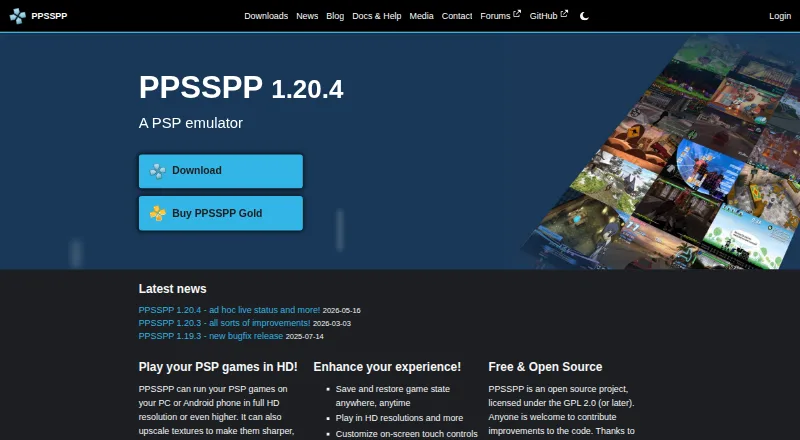
What PPSSPP is
PPSSPP is an emulator for running games and other software made for Sony's PlayStation Portable. It is available on Android, iOS, Linux, macOS, and Windows, and has a free plan. Games can run at full HD resolution or higher, with texture upscaling and post-processing shaders available. Gameplay options include save states and a turbo button. Players can customize on-screen touch controls or use an external controller or keyboard, and can continue games with save data transferred from a real PSP. PPSSPP supports PSP ad hoc and infrastructure multiplayer, including ad hoc play through relay servers, and supports RetroAchievements when users sign in to an account. It runs PSP games only: PS1 games and UMD Video discs are not supported. Users must provide their own PSP game files. The project is open source under GPL 2.0 or later, and its official site provides documentation, troubleshooting guides, FAQs, and community forums.
Good
- Free and available across five platforms.
- Can upscale textures and apply post-processing shaders.
- Supports save states and turbo.
- Works with transferred PSP save data.
- Open source under GPL 2.0 or later.
Watch out
- Does not run PS1 games or UMD Video discs.
- Users must provide their own PSP game files.
- Gold is unavailable for Linux and Steam Deck.
Who it suits
PPSSPP suits people who want to run PSP software on Android, iOS, Linux, macOS, or Windows. It also fits players who want enhanced graphics, customizable controls, or PSP multiplayer options.
Verdict
PPSSPP is a focused PSP emulator with graphics enhancements, multiple control options, and multiplayer support. Its scope is limited to PSP software, and users need to supply game files.
Plans and prices
From PPSSPP's own pricing page, checked 29 Sep 2026.
| Plan | Price | What it gives you |
|---|---|---|
| PPSSPP | Free | Free PSP emulator · Available across supported platforms |
| PPSSPP Free | Free | PSP emulation · user-supplied game files |
| PPSSPP Gold for Android | $4.99, paid once | Supporter purchase · same emulator functionality |
| PPSSPP Gold for Windows/macOS | Priced on request | Six contribution levels · permanent Windows/macOS Gold rights · future Gold downloads |
The facts
Each one read from PPSSPP's own pages, with the date it was checked.
What it does
- API protocol
- The underlying sceIoDevctl protocol is documented in the source repository for integrations from other languages.checked 14 Oct 2026
- Architecture
- The emulator is written in C++ and uses JIT recompilers to translate PSP instructions into x86, ARM and RISC-V code.checked 14 Oct 2026
- Compatibility limit
- PPSSPP runs PSP games; it does not run PS1 games or UMD Video discs.checked 29 Sep 2026
- Controls
- Windows builds include XInput and DirectInput support, while Android supports many Bluetooth controllers.checked 14 Oct 2026
- Documentation
- The official documentation covers getting started, settings, multiplayer, development, troubleshooting, FAQ and reference topics.checked 14 Oct 2026
- File formats
- Games can be loaded from ISO, CSO and, from version 1.17, CHD images.checked 14 Oct 2026
- Game files
- Users must provide their own PSP game files because PPSSPP does not have the right to distribute them with the app.checked 29 Sep 2026
- Gameplay features
- The emulator supports save states, a turbo button, enhanced high-resolution graphics, and texture upscaling.checked 29 Sep 2026
- Gold availability
- Gold is offered for Android, Windows, macOS and iOS but not Linux or Steam Deck.checked 14 Oct 2026
- Gold limit
- PPSSPP Gold is available for Android, Windows, macOS, and iOS, but not currently for Linux or Steam Deck.checked 29 Sep 2026
- Graphics
- It can run PSP games at full HD resolution or higher, upscale textures, and apply post-processing shaders.checked 29 Sep 2026
- Graphics enhancement
- Graphics settings include Vulkan, OpenGL and Direct3D backends, higher render resolutions and texture scaling.checked 14 Oct 2026
- Install options
- Downloads include Windows installer and portable ZIP, macOS DMG, Linux Flatpak/AppImage, Android APK, iOS App Store and VR APK builds.checked 14 Oct 2026
- Integration
- PPSSPP supports RetroAchievements, which requires users to sign into a RetroAchievements account in the emulator.checked 29 Sep 2026
- License
- PPSSPP is open source under GPL version 2 or any later version.checked 14 Oct 2026
- Limit: crashes and instability
- Aggregated Google Play review data lists crashes during loading or gameplay as a recurring complaint.checked 14 Oct 2026
Where it runs
- BIOS requirement
- A PSP BIOS file is unnecessary because PPSSPP simulates the BIOS and internal operating system.checked 14 Oct 2026
- iOS limitation
- App Store iOS builds cannot use JIT, although the project says modern iOS hardware can usually reach full speed without it.checked 14 Oct 2026
- iOS missing features
- The iOS build documentation lists camera and microphone input as missing features.checked 14 Oct 2026
The company
- Company founding
- The company registration date shown by the Swedish business directory is 11 October 2012.checked 14 Oct 2026
- Company legal name
- The Swedish legal entity is Millionth Line AB, organization number 556906-5153.checked 14 Oct 2026
- Company location and size
- Millionth Line AB is registered in Stockholm and reported one employee.checked 14 Oct 2026
- Founded
- 2012checked 23 Sep 2026
- Game ownership requirement
- The project does not distribute games; users must supply their own ISO or CSO files.checked 14 Oct 2026
The full review of PPSSPP
Overview
PPSSPP brings software made for Sony’s PSP to Android, iOS, Linux, macOS, and Windows. It is a strong fit for players who want to revisit PSP games with flexible controls and upgraded graphics; its clear boundary is that it only handles PSP software, and players must supply their own game files.
The open-source project, founded in 2012 and licensed under GPL 2.0 or later, does not run PS1 games or UMD Video discs. That focused scope makes it a sensible pick for PSP libraries, but not a general-purpose console emulator.
Browse PSP Emulators, Game Console Emulators, or Emulator Software for other options.
Key features
PPSSPP can render games at full HD resolution or higher, upscale textures, and apply post-processing shaders. Those enhancements can make older PSP visuals more adaptable to modern displays, though the software remains tied to PSP titles. Save states and a turbo button add practical flexibility for players who want control over their progress and pace.
Players can customize touch controls or connect an external controller or keyboard, so the same emulator can suit mobile play and input setups beyond a touchscreen. Save data transferred from a real PSP lets players continue a game from an existing save rather than starting over.
Multiplayer includes PSP ad hoc and infrastructure modes, with ad hoc play also supported through relay servers. RetroAchievements integration adds another option for users who sign in to their account from within the emulator.
Compatibility reports are collected only if users enable them manually, and are anonymous without personal data collection or storage. The privacy policy says purchase data is handled by Fastspring and does not guarantee absolute security of personal information.
Pricing
The free PPSSPP plan costs nothing and provides the PSP emulator across supported platforms. There is no free trial because the core plan is free, and no free-plan quota or seat cap is stated.
PPSSPP Gold for Windows/macOS uses custom pricing: users choose a contribution level, and every price option includes permanent download rights for Gold on Windows and macOS. Gold is also available for Android and iOS, but not currently for Linux or Steam Deck. This is a contribution-oriented option rather than a necessary step to get the emulator; the free plan is the straightforward choice for players who want PPSSPP without paying.
Platforms
PPSSPP runs on Android, iOS, Linux, macOS, and Windows. Gold is offered on Android, Windows, macOS, and iOS, leaving Linux and Steam Deck users without that option. Its supported console system is the Sony PSP.
Who it's for
Choose PPSSPP if your library is specifically PSP software and you value graphics enhancement, flexible input, save-state convenience, or PSP multiplayer support. It is also a practical fit for someone bringing save data over from a real PSP. Look elsewhere if you need PS1 or UMD Video support, or if you expect an emulator to include game files: PPSSPP requires users to provide their own.
Official documentation, FAQs, troubleshooting guides, and community forums give users several ways to find help. The project’s open-source license may also matter to readers who prefer software developed under an open license.
Pros and cons
- Pros: Free access across five operating systems makes the core emulator broadly usable without a paid plan.
- Pros: High-resolution rendering, texture upscaling, and shaders offer meaningful visual options for PSP games.
- Pros: Touch, controller, and keyboard support, plus save transfers, accommodate different devices and existing play progress.
- Pros: Ad hoc and infrastructure multiplayer, including relay-server ad hoc play, extend use beyond solo play.
- Cons: PSP-only compatibility excludes PS1 games and UMD Video discs.
- Cons: Users must source their own PSP game files, so the app is not a ready-made game library.
- Cons: Gold is unavailable for Linux and Steam Deck.
Alternatives
JPCSP is another free PSP emulator for Linux, macOS, and Windows; choose it if you want a desktop PSP option without a paid plan.
Manic EMU is a free option for Android, iOS, Linux, macOS, Windows, and the web if broader platform coverage is the priority.
N-EMU is an Android and iOS freemium alternative whose free plan has no in-app ads and whose emulation features do not depend on support; its own source is offered under GPL 3.0 or later.
GamePod Emu is a free-plan option for Android and iOS covering 12 consoles; it requires users’ own ROM backups, with ads and in-app purchases on Google Play.
ScePSX is a free alternative for Android, Linux, macOS, and Windows.
PSP Emulator Web is a free web and self-hosted alternative.
PSPE4ALL is a free Windows alternative.
PSP.js is a free web alternative.
Verdict
PPSSPP is an easy recommendation for players focused on PSP games who want visual enhancements, adaptable controls, and multiplayer support at no cost. Its main trade-off is its narrow compatibility and the need to bring your own game files; choose another tool if either limitation conflicts with what you want to play.
Getting started
- Visit the official PPSSPP website.
- Choose a supported platform: Android, iOS, Linux, macOS, or Windows.
- Install PPSSPP and provide your own PSP game files.
- Customize touch controls or connect a controller or keyboard.
- Optionally sign into RetroAchievements in the emulator.
Limits worth knowing
The free plan is a PSP emulator and does not run PS1 games or UMD Video discs. Users must supply their own PSP game files; Gold is not currently available for Linux or Steam Deck.
Questions
Is PPSSPP free?
Yes. The PPSSPP plan is free at no cost.
Which platforms does PPSSPP support?
It is available for Android, iOS, Linux, macOS, and Windows.
Is PPSSPP open source?
Yes. It is licensed under GPL 2.0 or later.
Can PPSSPP run PS1 games or UMD Video discs?
No. It runs PSP games and does not support PS1 games or UMD Video discs.
Does PPSSPP include game files?
No. Users must provide their own PSP game files.
Where is PPSSPP Gold available?
Gold is available for Android, Windows, macOS, and iOS, but not currently for Linux or Steam Deck.
Alternatives to PPSSPP
- 1
Vita3K
Free planOpen sourceAndroidLinuxmacOSWindows7.7Free plan - 2

QEMU
Free planOpen sourceAPILinuxmacOSSelf-hosted7.6Free plan - 3
Snes9x
Free planAndroidWebLinuxmacOS7.6Free plan - 4

DOSBox-X
Free planOpen sourceLinuxmacOSSelf-hostedWindows7.4Free plan - 5

Genymotion Desktop
Free planLinuxmacOSWindows7.4From $49 a year - 6
Azahar
Free planAndroidiOSLinuxmacOS7.3Free plan