N-EMU
N-EMU is an emulator for handheld and console game systems on Android and iOS.
What N-EMU is
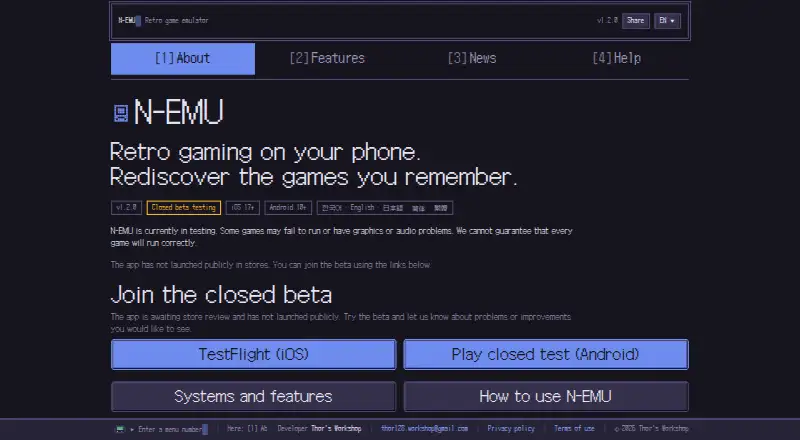
N-EMU is an emulator for handheld and console game systems on Android and iOS. It runs game files supplied by the user and supports 11 systems, including Game Boy, Game Boy Advance, Super Nintendo, Nintendo DS, NES, Mega Drive, Master System, Game Gear, PC Engine, WonderSwan and PSP. The app is in closed beta, supports iOS 17+ and Android 10+, and has not launched publicly in app stores. Players can use 10 manual save-state slots plus an autosave slot, rewind about 15 seconds on supported systems, and choose among five speed settings from 0.25× to 3×. Rewind is not supported for Nintendo DS or PSP. Manual Google Drive backup covers in-game saves and save states, not game files. N-EMU requires no account; its developer says it has no usage-record server, analytics tool or advertising SDK. Users must import game files they have the right to use. The free plan has no in-app ads, and emulator features do not depend on support.
Good
- Supports 11 handheld and console systems.
- Provides 10 manual save slots and an autosave slot.
- Offers five speed settings from 0.25× to 3×.
- Requires no account or sign-up.
- Free plan has no in-app ads.
Watch out
- Closed beta; not publicly launched in app stores.
- Requires users to import game files.
- Rewind is unavailable for Nintendo DS and PSP.
- DS wireless communication and multiplayer are unsupported.
Who it suits
It suits Android and iOS users who want to emulate supported systems using game files they have the right to use. The closed beta and unsupported systems or features may not suit those seeking a publicly launched app or those systems.
Verdict
N-EMU includes save-state, rewind and speed controls across its supported systems, without requiring an account. It remains in closed beta, and users need to supply game files they have the right to use.
Plans and prices
From N-EMU's own pricing page, checked 15 Oct 2026.
| Plan | Price | What it gives you |
|---|---|---|
| Free | Free | 11 supported systems · no included games · no in-app ads |
| Become a Supporter | $2.99, paid once | Support purchase; app remains free to use |
| One-time supporter purchase | — | three additional home-screen icons · no compatibility or emulator-feature changes · one-time Google Play purchase |
The facts
Each one read from N-EMU's own pages, with the date it was checked.
What it does
- Accounts
- N-EMU requires no account or sign-up.checked 30 Sep 2026
- Analytics and advertising
- The app has no analytics tool or advertising SDK, and the privacy policy says diagnostics leave the device only when users export and share them.checked 15 Oct 2026
- API and SDKs
- The official features, help and terms pages describe the mobile app and emulator cores but do not document a public API or SDK.checked 15 Oct 2026
- Audio options
- Audio latency can be adjusted when sound stutters or arrives late.checked 15 Oct 2026
- Availability
- N-EMU is in closed beta, supports iOS 17+ and Android 10+, and has not launched publicly in app stores.checked 30 Sep 2026
- Cloud backup
- Google Drive backup transfers in-game saves and save states only, runs manually, and never uploads game files.checked 30 Sep 2026
- Compatibility warning
- The maker warns that some games may fail to run or have graphics or audio problems during testing.checked 15 Oct 2026
- Controllers
- Up to four controllers can be connected and assigned to players, subject to the game and system's simultaneous-player limit.checked 30 Sep 2026
- Controls
- Touch buttons can be moved and resized, while controllers and keyboards can be mapped for games and menus.checked 15 Oct 2026
- Drive limitation
- Google Drive backups never upload game files and do not synchronize automatically.checked 15 Oct 2026
- Game files
- N-EMU includes and downloads no games, so users must import files they have the right to use.checked 30 Sep 2026
- Game library
- Games from different systems can be kept in one library and found by system or name.checked 15 Oct 2026
- Game organization
- The library supports favorites, collections, tags, custom names and user-selected cover images.checked 15 Oct 2026
- Google Drive integration
- Users can manually back up and download in-game saves and save states through their own Google Drive account.checked 15 Oct 2026
- Known unsupported features
- Mega-CD, 32X, PC Engine CD-ROM², Neo Geo Pocket, Nintendo DSi, DS wireless communication and DS multiplayer are unsupported.checked 15 Oct 2026
- Licence
- N-EMU's own source is offered under GNU General Public License version 3 or later; bundled emulator cores retain their own licences.checked 15 Oct 2026
- Limitations
- Mega-CD, 32X, PC Engine CD-ROM², Neo Geo Pocket, Nintendo DSi, DS wireless communication and DS multiplayer are unsupported.checked 30 Sep 2026
Where it runs
- AppBrain availability
- AppBrain lists N-EMU as free, with 1+ Google Play downloads and no ads.checked 15 Oct 2026
- AppBrain complaints signal
- AppBrain reports that there are not enough comments to show example user comments and that the app is not ranked.checked 15 Oct 2026
- App Store privacy disclosure
- Apple's listing says the developer indicated that the app collects no data, while noting that Apple has not verified the disclosure.checked 15 Oct 2026
- App Store purchase
- The App Store lists N-EMU as free with an in-app purchase named Become a Supporter priced at $2.99.checked 15 Oct 2026
- App Store size and languages
- The iOS app is listed at 70.7 MB and supports English, Japanese, Korean, Simplified Chinese and Traditional Chinese.checked 15 Oct 2026
The company
- Company headquarters
- No headquarters location is stated on the official site or the App Store listing.checked 15 Oct 2026
- Founded year
- No founding year is stated on the official site or the App Store listing.checked 15 Oct 2026
The full review of N-EMU
N-EMU brings a mix of classic handheld and console systems to iOS and Android. It is best for players who already have game files they have the right to use and want save, rewind and speed controls in one app. The free plan includes the emulation features, though access is limited by closed beta availability.
Overview
N-EMU supports 11 systems, from Game Boy, Game Boy Advance, Nintendo DS, Super Nintendo and NES to Mega Drive, Master System, Game Gear, PC Engine, WonderSwan and PSP. That breadth suits a library spread across several older platforms, but it does not make N-EMU a place to obtain games: the app neither includes nor downloads them. Users must import files they have the right to use.
The app is in closed beta and has not launched publicly in app stores. It requires iOS 17 or later or Android 10 or later, so readers who need a public store release should look elsewhere. N-EMU requires no account or sign-up, which keeps access simple once a user can join the beta.
Key features
Save and playback controls
Ten manual save-state slots and one autosave slot give players several return points beyond a game's own save system. Rewind covers about 15 seconds, a useful cushion for retrying a recent mistake, but it does not work with Nintendo DS or PSP. Five speed settings span 0.25× to 3×, allowing slow play or acceleration, though not continuous speed adjustment.
Backup and privacy
Manual Google Drive backup transfers in-game saves and save states, not game files. That distinction matters for players moving progress between devices: their game files still need to be managed separately. N-EMU has no usage-record server, analytics tool or advertising SDK, and its developer cannot see a user's library, play time or save data. This is a strong fit for privacy-conscious players who prefer not to create an account, but backup requires a deliberate manual step.
Controllers, cheats and compatibility
Up to four controllers can be connected and assigned to players, subject to the simultaneous-player limit of the game and system. That makes external controllers an option for supported multiplayer, not a promise that every game can use four players. Cheat support is included. The graphics backend is OpenGL.
Some system and communication features are outside the app's support: Mega-CD, 32X, PC Engine CD-ROM², Neo Geo Pocket and Nintendo DSi are unsupported, as are Nintendo DS wireless communication and multiplayer. Players whose library depends on those systems or DS connectivity should choose an emulator that supports them.
Pricing
| Plan | Price | What it includes |
|---|---|---|
| Free | free | No in-app ads; emulation features do not depend on support. |
| One-time supporter purchase | Custom pricing | A one-time Google Play purchase adds three home-screen icons; it does not change compatibility or emulator features. |
The free plan is the practical choice for anyone who wants N-EMU's emulator features: paying does not unlock compatibility or additional emulation capabilities. The supporter purchase is only for Android users who want the extra icons and wish to support development. The app is developed by one person, so support replies may take a while.
Platforms
N-EMU supports iOS 17+ and Android 10+. Its closed beta status and absence from public app stores are more consequential than the operating-system coverage: prospective users need beta access rather than a standard public download. iOS and Android users below the required versions are not supported.
Who it's for
N-EMU makes sense for iOS or Android players with lawful game files across several supported systems, especially those who value multiple save states, short rewind, speed controls and a no-account, no-analytics approach. It is less suitable for people seeking an emulator available to everyone through app stores, users who want games bundled with the app, or players who need unsupported systems, DS multiplayer or wireless communication.
Pros and cons
- Pros: Eleven systems in one app make it useful for mixed handheld and console libraries.
- Pros: Ten manual save-state slots, autosave, rewind and five speed settings provide meaningful control over play.
- Pros: The free plan has no in-app ads, and emulation features are not tied to supporting the developer.
- Pros: No account, analytics tool or advertising SDK; the developer cannot see library, play-time or save data.
- Cons: Closed beta access and no public app-store launch make it hard to recommend to anyone who needs a standard public download.
- Cons: Users must supply their own game files, and Google Drive backup does not transfer them.
- Cons: Rewind excludes DS and PSP, while several systems and DS connectivity features are unsupported.
- Cons: Development by one person means support replies may be slow.
Alternatives
For a PSP-focused shortlist, see PSP Emulators. Choose PPSSPP instead if you want a free PSP emulator across Android, iOS, Linux, macOS and Windows rather than N-EMU's 11-system coverage; its Windows/macOS Gold option has custom pricing. JPCSP is a free PSP emulator for Linux, macOS and Windows, a better fit for desktop users than N-EMU's mobile-only platform support.
Manic EMU is another free option available on Android, iOS, Linux, macOS, web and Windows. Choose GamePod Emu if its 12-console free tier suits you; it supports iPhone, iPad and Android, but the free plan includes ads and Google Play in-app purchases. ScePSX is a free alternative for Android, Linux, macOS and Windows.
PSP Emulator Web is a free web and self-hosted option. PSPE4ALL is a free Windows alternative, while PSP.js is a free web option.
Verdict
N-EMU is a sensible choice for mobile players with their own lawful game files who want broad system coverage, practical playback controls and a privacy-conscious app without an account. Its free emulation features are the main reason to choose it; closed beta access, unsupported systems and the need to manage game files yourself are the main reasons to look elsewhere.
Alternatives to N-EMU
- 1

PPSSPP
Free planOpen sourceAndroidiOSAPILinux8.6$4.99 one-time - 2
GamePod Emu
Free planAndroidiOS6.9Free plan - 3
Manic EMU
AndroidiOSWebLinux6.5 - 4
JPCSP
Free planLinuxmacOSWindows6.0Free plan - 5
PSP Emulator Web
WebSelf-hosted5.6 - 6
PSP.js
Web5.4