
Oura
Oura is a free, open-source desktop browser for Apple Silicon Macs running macOS 13 or later.
What Oura is
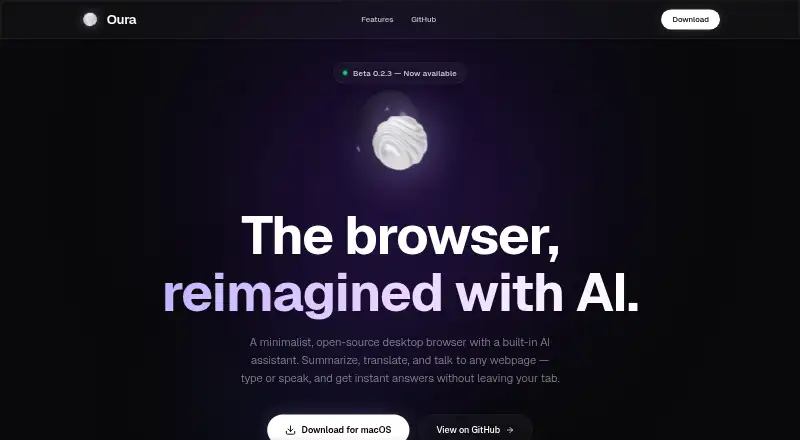
Oura is a free, open-source desktop browser for Apple Silicon Macs running macOS 13 or later. Its built-in AI assistant works with webpages, letting users analyze, summarize, and translate their contents or ask questions about them. Users can switch between Gemini models in settings, and AI Live Mode supports real-time voice conversations with spoken responses.
For browsing, Oura offers a command palette, smart tabs, bookmarks, download tracking, history search, picture-in-picture, and per-domain zoom settings that persist. Users can manage camera, microphone, location, and notification access separately for each site. The project describes Oura as having no telemetry, and its GitHub README says data stays local in SQLite. Oura is released under the MIT License. Its stated focus is keyboard-first browsing with AI available without leaving the current tab. The project lists Buy Me a Coffee and Pix as ways to support its development.
Good
- Free plan is listed as free forever
- AI can analyze, summarize, and translate webpages
- AI Live Mode supports voice conversations
- Per-site permissions for camera, microphone, location, and notifications
- Data stays local in SQLite, according to the README
Watch out
- Requires an Apple Silicon Mac
- Requires macOS 13 or later
- No AI research mode or browser agent
Who it suits
Oura suits Mac users who want a keyboard-first browser with AI tools available on the current webpage. It is specifically for Apple Silicon Macs running macOS 13 or later.
Verdict
Oura combines everyday browser tools with webpage-focused AI, voice mode, and per-site permissions. Its platform support is limited to Apple Silicon Macs running macOS 13 or later.
Plans and prices
From Oura's own pricing page, checked 7 Oct 2026.
| Plan | Price | What it gives you |
|---|---|---|
| Free | Free | macOS 13+ · Apple Silicon · Free forever |
The facts
Each one read from Oura's own pages, with the date it was checked.
What it does
- AI assistant
- The assistant can analyze, summarize, and translate webpages, and answer questions about their content.checked 7 Oct 2026
- AI models
- The site says users can switch between Gemini models in settings.checked 7 Oct 2026
- Audience
- The site describes Oura as a keyboard-first browser for people who want to browse and use AI without leaving the current tab.checked 7 Oct 2026
- Integration
- The GitHub README lists Gemini as the AI assistant technology.checked 7 Oct 2026
- License
- Oura is released under the MIT License.checked 7 Oct 2026
- Privacy
- The site describes Oura as having no telemetry; its GitHub README says data stays local in SQLite.checked 7 Oct 2026
- Product
- Oura is a minimalist, open-source desktop browser with a built-in AI assistant.checked 7 Oct 2026
- Site permissions
- Users can manage camera, microphone, location, and notification access per site.checked 7 Oct 2026
- Support
- The GitHub README lists Buy Me a Coffee and Pix as ways to support the project.checked 7 Oct 2026
- Voice
- AI Live Mode supports real-time voice conversations and responds with natural audio.checked 7 Oct 2026
Where it runs
- Browser tools
- Features include a command palette, smart tabs, bookmarks, download tracking, history search, picture-in-picture, and persistent per-domain zoom.checked 7 Oct 2026
- Platform requirement
- The download is for Apple Silicon Macs running macOS 13 or later.checked 7 Oct 2026
Alternatives to Oura
- 1

Genspark AI Browser
Free planAndroidiOSWebExtension8.1From $19.99 a month - 2
BrowserOS
Free planOpen sourceAPIExtensionLinuxmacOS7.6Free plan - 3

Aside
Free planAPImacOSWindows7.5From $200 a year - 4

Dia
Free planmacOS7.3From $20 a month - 5

Comet
Free planAndroidiOSmacOSWindows7.0Free plan - 6
Oh My Browser
Free planOpen sourceAPIExtension7.0Free plan