OpenTakeoff
OpenTakeoff is a construction takeoff engine for measuring quantities from building plans.
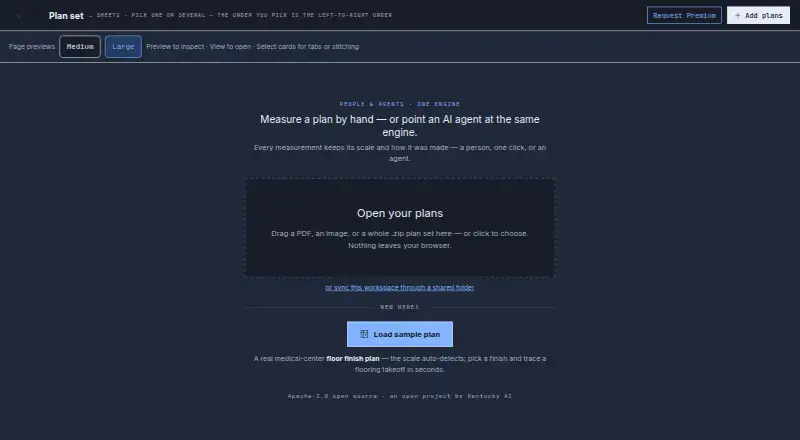
What OpenTakeoff is
OpenTakeoff is a construction takeoff engine for measuring quantities from building plans. Its browser canvas is for people, while an MCP server connects it to AI agents. The browser app opens PDF plan sets, images, and ZIP plan sets, processing them locally without an account or plan upload. It reports square feet, square yards, linear feet, and each, along with waste-adjusted order quantities, supporting-materials lists, and roll-goods cuts. Exports include CSV, Excel, and marked PDF files. The MCP server runs through `npx -y opentakeoff-mcp` and supports Claude Code, Claude Desktop, Cursor, and other stdio MCP clients. Agent measurements remain pending proposals until approved in the browser canvas. In the default browser workspace, plans, measurements, annotations, materials, and project settings are processed on-device and stored in browser storage. Optional connections include Google Drive, Microsoft 365 cloud storage, configured AI providers, and a scanned-schedule service that can send a selected image to Google Gemini. One-Click Area is temporarily gated while its flood engine is re-validated; the default MCP build does not register room-detection verbs.
Good
- Opens PDF, image, and ZIP plan sets locally.
- No account or plan upload required.
- Exports CSV, Excel, and marked PDFs.
- Agent measurements require human approval.
Watch out
- One-Click Area is temporarily gated.
- Default MCP build omits room-detection verbs.
- Optional scanned-schedule service can send an image to Google Gemini.
- No security certification or compliance standard is stated.
Who it suits
OpenTakeoff suits construction professionals and developers measuring building plans, including those who want AI-agent proposals reviewed in a browser canvas. Its privacy policy says the service is not intended for children under 13.
Verdict
OpenTakeoff combines browser-based plan measurement with agent-proposed measurements that require human approval. The gated area feature and optional cloud integrations are worth noting before choosing a workflow.
Plans and prices
From OpenTakeoff's own pricing page, checked 14 Oct 2026.
| Plan | Price | What it gives you |
|---|---|---|
| Free | Free | Browser takeoff app · MCP server · reports, Excel and marked sets · roll goods, waste and buy lists · source Apache-2.0 · forever |
| Premium | Priced on request | Walls, tile layout and 3D · shower and tub builder · patterned roll layouts · decisions, alternates and addenda · estimates, proposals and RFIs · mobile and tablet · computer vision in the lab · by request |
The facts
Each one read from OpenTakeoff's own pages, with the date it was checked.
What it does
- Agent integration
- The MCP server runs through `npx -y opentakeoff-mcp` and supports Claude Code, Claude Desktop, Cursor and other stdio MCP clients.checked 30 Sep 2026
- Agent review
- Agent measurements remain pending proposals until a person approves them in the browser canvas.checked 30 Sep 2026
- Area measurement
- The engine measures areas in square feet or square yards for floors, ceilings and walls.checked 14 Oct 2026
- Cloud integrations
- Documentation describes optional Google Drive and Microsoft 365 connections that use the user's sign-in and permissions to synchronize project files.checked 14 Oct 2026
- Count measurement
- Count tools record fixtures, devices and doors as eaches.checked 14 Oct 2026
- Data sharing
- Connected AI providers can receive the tool results, images, quantities and project information requested by the user's MCP client.checked 14 Oct 2026
- Default feature limit
- One-Click Area is temporarily gated while its flood engine is re-validated; the default MCP build does not register its room-detection verbs.checked 30 Sep 2026
- Developer runtime
- The agent guide requires Node 20 or newer and provides an npx configuration without cloning or building.checked 14 Oct 2026
- Docker deployment
- The MCP README documents Docker image creation, interactive execution and read-only plan-volume mounts.checked 14 Oct 2026
- Documentation depth
- The repository provides separate user and agent manuals, an MCP reference, changelog, feature map, wiki and contributor guidance.checked 14 Oct 2026
- Exports
- The app exports CSV, Excel and marked PDF files.checked 30 Sep 2026
- Human review workflow
- Agent-created shapes remain pending and dashed until a person reviews and accepts them.checked 14 Oct 2026
- Independent popularity on OpenArena
- OpenArena recorded 124 GitHub stars and 47 forks for the project snapshot shown on October 14, 2026.checked 14 Oct 2026
- Independent ranking on OpenArena
- OpenArena ranked OpenTakeoff first among 35 projects in its Tool category.checked 14 Oct 2026
- Intended users
- The privacy policy says the service is intended for construction professionals and developers, not children under 13.checked 30 Sep 2026
- License in current repository
- The current GitHub README identifies the software as AGPL-3.0-only, while noting earlier commits were Apache-2.0.checked 14 Oct 2026
- Limit: computer vision
- Advanced computer-vision models are identified as still being in the lab.checked 14 Oct 2026
- Limit: One-Click Area
- The repository says One-Click Area and its related MCP verbs are temporarily gated while the flood engine is revalidated.checked 14 Oct 2026
The company
- Company founding
- LinkedIn lists Kentucky AI as founded in 2026.checked 14 Oct 2026
- Company headquarters
- LinkedIn lists Shelbyville, Kentucky as Kentucky AI's headquarters.checked 14 Oct 2026
- Company ownership
- LinkedIn classifies Kentucky AI as privately held and in software development.checked 14 Oct 2026
- Company size
- LinkedIn lists Kentucky AI as having 2–10 employees.checked 14 Oct 2026
- Google Drive team mode
- The user guide describes a Google Drive Projects root where PDFs and hidden OpenTakeoff sidecar files live in project folders.checked 14 Oct 2026
- Headquarters
- Shelbyville, Kentucky, United Stateschecked 28 Sep 2026
The full review of OpenTakeoff
OpenTakeoff is a construction takeoff tool for measuring quantities from building plans, built for construction professionals and developers. It is best for people who want a free, local-first workflow or agent-assisted measurement proposals. Its broad exports and open-source model are appealing, but people must approve agent work and one area-measurement feature is temporarily gated.
Overview
The browser app opens PDF and image plans, as well as ZIP plan sets, without an account or plan upload. By default, it processes and stores plans, measurements, annotations, materials, and project settings on the device in browser storage. That makes it a sensible option for users who prefer local handling, but optional Google Drive, Microsoft 365, configured AI-provider, and scanned-schedule integrations change the data flow. The scanned-schedule service can send a selected image to Google Gemini.
OpenTakeoff measures in two dimensions and reports square feet, square yards, linear feet, and each. Waste-adjusted order quantities, supporting-material lists, and roll-goods cuts extend its usefulness beyond basic drawing measurements. Exports include CSV, Excel, JSON, PDF, and DXF, with marked PDFs among the outputs.
Key features
The browser canvas supports working directly with plans, while the MCP server connects to Claude Code, Claude Desktop, Cursor, and other stdio MCP clients. It runs through npx -y opentakeoff-mcp, giving developers a way to bring AI agents into a takeoff workflow. The important safeguard is also a limit: agent measurements remain proposals until a person approves them in the browser canvas, so this is not a hands-off automation tool.
One-Click Area is temporarily gated while its flood engine is re-validated. The default MCP build also does not register room-detection verbs. Those constraints matter to users who want direct area automation or agent-led room detection; the core plan-measurement and export workflow remains the stronger fit.
Drawing OCR is supported. The project is Apache-2.0 licensed, and users can fork it to run their own instance on their own URL. The privacy policy cautions that no storage or transmission method is risk-free and does not state a security certification or compliance standard, so organizations with formal assurance requirements should assess that fit before adopting it.
Pricing
OpenTakeoff has one plan: Free — free. It is open-source under Apache-2.0 and requires no account. There is no free trial because the product is free. That removes a subscription commitment and account setup, while the trade-off is that there are no paid tiers described for expanded capabilities or support.
Platforms
OpenTakeoff is available on the web and supports API, Linux, macOS, Windows, and self-hosted use. Its browser workspace suits people who want to start with plan files locally; self-hosting and the API broaden the options for developers who want to run or integrate the project themselves.
Who it's for
This is a good match for construction professionals who need 2D quantities, material calculations, and portable exports without paying for a plan. Developers and AI users may value the MCP server and the ability to self-host or fork the Apache-2.0 project. It is a weaker choice for teams that require fully automated agent measurements, built-in room-detection verbs in the default MCP build, or a stated security certification.
Pros and cons
- Pros: The free, no-account browser workflow processes plans locally, which avoids requiring plan uploads for ordinary use.
- Pros: Quantity calculations, material outputs, roll-goods cuts, and CSV, Excel, JSON, PDF, and DXF exports support work beyond simple area measurement.
- Pros: MCP support and self-hosting give developers options for agent-assisted workflows and deployment on their own URL.
- Cons: Agent measurements require human approval, limiting the appeal for users seeking end-to-end automation.
- Cons: One-Click Area is temporarily gated, and room-detection verbs are absent from the default MCP build.
- Cons: Optional cloud and AI integrations can move selected data beyond the local browser workspace, and no security certification or compliance standard is stated.
Alternatives
Construction Takeoff Software is the broader category directory for comparing takeoff tools.
Choose TakeCost if a monthly allowance of one new takeoff file with full area, length, and count tools suits your workflow and you want a free trial. Its free plan also includes unlimited proposals and revisions.
usBIM.platform may suit teams seeking a broader cloud application set, with a free basic configuration that includes 10 GB of cloud storage; subscriptions add applications.
Bidwright is another free option across desktop and self-hosted platforms, with AI disabled in its single-user desktop app until you add your own key.
Consider Vertigraph Products if you want a cloud takeoff plan with a free tier capped at two projects per month, two users, 1 GB of storage, and three saves per page, or a Pro plan priced at $16.66 a month.
MeasureSquare offers a paid mobile retail plan at $54 a month for one user, aimed at in-store sales and on-site consultations.
STACK is worth considering when a free plan capped at one active project per month, 300 plan pages, 50 measurements per project, and one viewer seat fits the work.
eTakeoff is a Windows alternative with a free viewer and paid Advanced and Premier plans.
The EDGE is another option for readers who want a paid product and prefer to request a demo.
Verdict
OpenTakeoff is a strong choice for construction professionals and developers who want free plan measurement, local browser processing, varied exports, or a self-hostable MCP workflow. Its combination of material-oriented outputs and agent proposals is useful without requiring an account. Look elsewhere if you need automatic agent approval, room detection in the default MCP build, or an ungated One-Click Area workflow.
Alternatives to OpenTakeoff
- 1
STACK
Free planAndroidiOSWebAPI8.2From $49 a month - 2

MeasureSquare
Free planAndroidiOSWebAPI8.1From $540 a year - 3
Autodesk Forma Takeoff
AndroidiOSWebAPI7.7From $108 a month - 4

Vertigraph Products
Free planWebAPImacOSWindows7.7From $150 a year - 5

Bidwright
Free planOpen sourceWebAPILinuxmacOS7.6Free plan - 6
Easy Takeoffs
AndroidiOSWebLinux7.6From $399 a year