
OpenHands
OpenHands is an open-source platform for building and running AI coding agents.
What OpenHands is
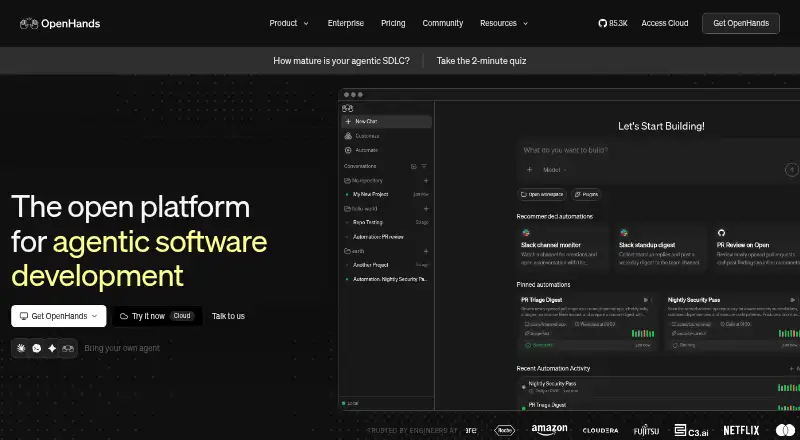
OpenHands is an open-source platform for building and running AI coding agents. It offers a terminal or CLI, a collaborative web interface, and an SDK for creating agents and coordinating workflows programmatically. Automations can start agents from GitHub, Slack, Jira, Linear, schedules, and supported integrations. Listed workflows include pull request reviews, issue triage, incident investigation, and proposed fixes submitted as pull requests. OpenHands supports Claude Code, Codex, Gemini CLI, OpenHands, other agent stacks, closed models, and open weights. It can run locally, in the cloud, or in an organization’s VPC; enterprise deployments can be self-hosted on Kubernetes. Enterprise controls include isolated container runtimes, prompt-injection detection that can halt activity, controls for secrets and tools, audit logs, and governance features such as RBAC and budgeting. The Open Source plan lists one user and unlimited daily conversations; Individual lists one user and 10 daily conversations, while Enterprise lists unlimited users and conversations. An early-preview Agent Canvas desktop app is available for macOS, Windows, and Linux. Canvas itself does not provide isolation, and its agents can access commands, files, and connected tools in their execution environment.
Good
- Free Open Source plan with unlimited daily conversations
- CLI, collaborative web GUI, and SDK
- Automations can start from GitHub, Slack, Jira, and Linear
- Runs locally, in cloud, or an organization’s VPC
- Enterprise plan includes governance controls and audit logs
Watch out
- Open Source and Individual plans list one user each
- Individual plan allows 10 daily conversations
- Agent Canvas is an early preview
- Canvas itself does not provide isolation
Who it suits
OpenHands suits individuals and organizations that want coding agents for engineering workflows, with options to use a CLI, web interface, or SDK. Teams needing enterprise governance or self-hosting can consider its enterprise deployment and controls.
Verdict
OpenHands combines coding agents, workflow automations, and several ways to interact with or orchestrate agents. Its plan limits and the execution-environment caveat for Agent Canvas are worth reviewing before choosing a setup.
Plans and prices
From OpenHands's own pricing page, checked 11 Oct 2026.
| Plan | Price | What it gives you |
|---|---|---|
| Individual | Free | SaaS · 1 user · 10 daily conversations · BYOK or OpenHands models at cost |
| Open Source | Free | Runs locally · 1 user · Unlimited daily conversations · Community support |
| Enterprise | Priced on request | SaaS or self-hosted · Unlimited users · Unlimited daily conversations · SAML/SSO · Priority support · Custom pricing |
The facts
Each one read from OpenHands's own pages, with the date it was checked.
What it does
- Agent interfaces
- The product includes terminal/CLI, a collaborative web GUI, and an SDK for creating agents and orchestrating workflows programmatically.checked 11 Oct 2026
- Automations
- Automations can trigger agents from GitHub, Slack, Jira, Linear, schedules, and supported integrations to carry out engineering workflows.checked 11 Oct 2026
- Chat assistance
- Yeschecked 20 Sep 2026
- Codebase indexing
- Yeschecked 20 Sep 2026
- Coding agent
- Yeschecked 20 Sep 2026
- Deployment
- OpenHands can run locally, in the cloud, or in an organization’s VPC; the enterprise page describes self-hosting on Kubernetes.checked 11 Oct 2026
- Desktop availability
- Agent Canvas has an early preview desktop app for macOS, Windows, and Linux.checked 11 Oct 2026
- Enterprise governance
- The enterprise control plane includes RBAC, guardrails, reporting, observability, budgeting, and an LLM gateway.checked 11 Oct 2026
- Integrations
- The enterprise page lists GitHub, GitLab, Slack, Jira, and Linear integrations out of the box.checked 11 Oct 2026
- Local runtime caveat
- The Agent Canvas documentation warns that agents can run commands and access files and connected tools in their execution environment, and says Canvas itself does not provide isolation.checked 11 Oct 2026
- Models and agents
- OpenHands says it supports Claude Code, Codex, Gemini CLI, OpenHands, and other agent stacks, as well as closed models and open weights.checked 11 Oct 2026
- Pull requests
- OpenHands describes workflows that review pull requests, triage issues, investigate incidents, and open pull requests with proposed fixes.checked 11 Oct 2026
- Security controls
- Enterprise features include isolated container runtimes, prompt-injection detection with automatic halt, access controls for secrets and tools, and audit logs.checked 11 Oct 2026
- Support
- The Enterprise plan includes priority support and a shared Slack channel, and the enterprise page says contracts include direct access to the research team.checked 11 Oct 2026
- Terminal access
- Yeschecked 20 Sep 2026
- What it does
- OpenHands is an open-source platform for building and running AI coding agents, with interfaces, automations, and controls for individual and organizational use.checked 11 Oct 2026
The company
- Founded
- 2024checked 28 Sep 2026
Money
- Free plan
- Yeschecked 20 Sep 2026
- Plan limits
- The pricing comparison lists one user and unlimited daily conversations for Open Source, one user and 10 daily conversations for Individual, and unlimited users and conversations for Enterprise.checked 11 Oct 2026
The full review of OpenHands
Overview
OpenHands is an open-source platform for creating and operating AI coding agents through a terminal, collaborative web interface, or programmable SDK. It fits developers who need more than code completion and organizations that want agents connected to engineering operations. The platform’s flexibility is substantial, but choosing a safe execution environment is essential, particularly with Agent Canvas.
Key features
Core capabilities cover chat assistance, codebase indexing, terminal access, and coding-agent operation. Individuals can work interactively from the CLI or web GUI, while the SDK supports custom agents and programmatic workflow orchestration. That makes OpenHands a stronger choice for teams building repeatable agent processes than for users seeking only an editor-side autocomplete tool.
Automations can launch agents from GitHub, Slack, Jira, Linear, schedules, and supported integrations. OpenHands describes practical engineering jobs such as pull-request review, issue triage, incident investigation, and opening pull requests with proposed fixes. These triggers can reduce repetitive coordination work, although teams still need processes for reviewing agent output before changes reach production.
The platform accommodates Claude Code, Codex, Gemini CLI, OpenHands, and other agent stacks, with both closed models and open weights. Agents can run locally, in the cloud, or inside an organization’s VPC. Enterprise self-hosting on Kubernetes is available for organizations that need infrastructure control rather than a purely hosted setup.
Enterprise deployments add isolated container runtimes, prompt-injection detection that can halt execution, controls over secrets and tools, and audit logs. The control plane adds RBAC, guardrails, reporting, observability, budgeting, and an LLM gateway. GitHub, GitLab, Slack, Jira, and Linear integrations are provided out of the box, while priority support, a shared Slack channel, and direct research-team access are included with Enterprise contracts.
Agent Canvas has an early-preview desktop app for macOS, Windows, and Linux. Its documentation warns that agents may execute commands and access files or connected tools in their environment, and that Canvas itself does not provide isolation. Users should therefore supply appropriate sandboxing and permissions rather than treating the desktop interface as a security boundary.
Pricing
OpenHands uses a freemium structure, but the published plan entries do not show prices, so each is effectively custom pricing.
| Plan | Allowance | Best fit |
|---|---|---|
| Open Source | 1 user; unlimited daily conversations | Individuals or projects that want the broadest conversation allowance and can operate with the open-source offering. |
| Individual | 1 user; 10 daily conversations | A single developer with moderate, bounded usage; the daily cap can interrupt intensive agent work. |
| Enterprise | Unlimited users; unlimited daily conversations | Organizations that need team scale, governance, security controls, integrations, and support. |
The cheaper single-user options give up organizational scale, and Individual also imposes a 10-conversation daily limit. Enterprise is the only plan sized for unlimited users and conversations, with enterprise governance and support features suited to managed rollouts.
Platforms
OpenHands supports Android, iOS, Linux, macOS, Windows, web, API access, and self-hosted deployment. This range lets teams combine local or VPC execution with web collaboration and programmatic control. Agent Canvas’s desktop preview covers macOS, Windows, and Linux, but its lack of built-in isolation makes deployment discipline more important than platform choice.
Who it's for
OpenHands is a good match for developers who want terminal-based agents, indexed codebase work, and the ability to switch among agent stacks. It is especially compelling for engineering teams automating work around repositories, tickets, incidents, and pull requests, and for organizations that require VPC or self-hosted operation with formal controls.
It is less suitable for someone who wants a narrowly focused coding assistant with a predictable editor workflow, or for a user unwilling to manage permissions and sandboxing around agent execution. Individual users should also consider whether ten conversations per day is enough for their working style.
Pros and cons
- Pro: Terminal, web GUI, and SDK interfaces support both interactive development and custom orchestration.
- Pro: GitHub, Slack, Jira, Linear, and scheduled triggers connect agents to recurring engineering work.
- Pro: Local, cloud, VPC, and Kubernetes self-hosting options provide deployment choice.
- Pro: Enterprise adds runtime isolation, prompt-injection halts, RBAC, audit logs, budgeting, and observability.
- Con: Individual is limited to 10 daily conversations, which can constrain frequent agent use.
- Con: Agent Canvas does not isolate commands, files, or connected tools, so users must provide their own execution safeguards.
- Con: The breadth of agents, integrations, and deployment modes may be excessive for simple code-completion needs.
Alternatives
GitHub Copilot is the better pick for a conventional coding-assistant experience across editor, web, desktop, and mobile contexts, with a free plan and trial. Choose Kilo Code when open-source VS Code, JetBrains, and CLI extensions are the priority and usage-based billing is acceptable.
Replit suits users who want an integrated app-building workspace with free daily usage, while GitHub Codespaces is preferable when cloud development environments with metered compute are the main requirement. Claude Code is an alternative for users specifically seeking Anthropic’s agent, and Cursor fits developers who want an editor-centered workflow with Composer and agent requests.
Devin is worth considering for a managed autonomous-agent product with member-based plans. Kiro is another option for users who want a plan built around credits, open-weight models, and Claude Sonnet 4.5.
For broader discovery, browse AI Code Generators and AI Coding Assistants.
Verdict
Choose OpenHands if you need an extensible coding-agent platform that can automate repository work, run across local or organizational infrastructure, and scale to governed enterprise use. Its main advantage is the combination of interfaces, integrations, agent compatibility, and deployment control. Look elsewhere if you want a simple editor assistant, cannot accommodate the Individual plan’s daily cap, or need Agent Canvas to provide isolation without additional security measures.
Alternatives to OpenHands
- 1
Dify
Free planOpen sourceWebAPIExtensionLinux8.4From $590 a year - 2

Replit
Free planAndroidiOSWebLinux8.4From $18 a month - 3
Cursor
Free planiOSWebAPILinux8.3From $8 a month - 4

Bolt.new
Free planAndroidiOSWeb7.6From $25 a month - 5
Flowise
Free planWebAPILinuxmacOS7.2From $35 a month - 6

LlamaIndex
Free planWebAPILinuxSelf-hosted7.1From $50 a month