OpenFilz
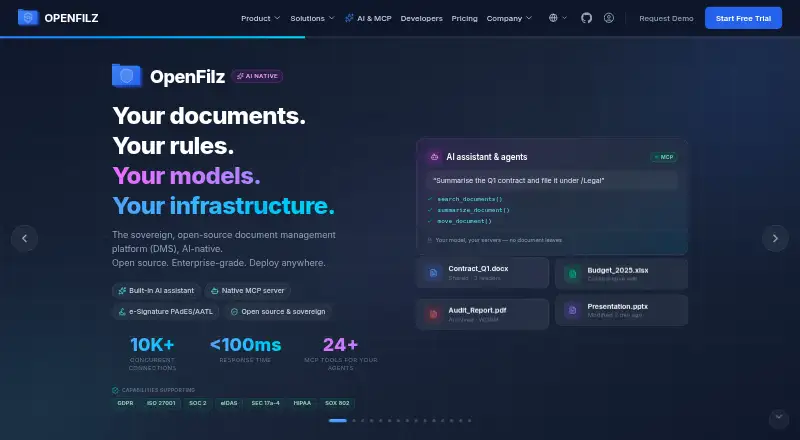
OpenFilz is an open-source document management platform for storing, organizing, finding, and working with documents.
What OpenFilz is
OpenFilz is an open-source document management platform for storing, organizing, finding, and working with documents. It offers virtual folders, metadata, version history, full-text search, and filters. Its AI assistant can answer questions based on users’ files and help locate, summarize, file, or rename documents; it supports local models as well as commercial model APIs. Teams can edit Word, Excel, and PowerPoint documents in a browser using OnlyOffice, and merge, split, rotate, or rearrange PDFs. Workflows cover approvals, tasks, due dates, and reminders. E-signatures support multi-signer envelopes, templates, one-time codes, and PAdES seals, without a per-signature fee. OpenFilz can be deployed on-premises, in private or public clouds, or in an air-gapped environment. The free Community edition is self-hosted. Enterprise is listed at €12 a month, billed €12 /user/month; it adds secure sharing, migration connectors, trusted e-signatures, OCR, and support. Records archive is an add-on.
Good
- AI assistant works with users’ files.
- Browser-based Word, Excel, and PowerPoint editing.
- PDF merge, split, rotate, and reorder tools.
- E-signatures have no per-signature fee.
- Supports on-premises and air-gapped deployment.
Watch out
- Community edition is self-hosted.
- Records archive is an add-on.
- Enterprise is listed at €12 a month.
Who it suits
OpenFilz suits teams that need document organization, browser-based Office editing, PDF tools, workflows, or signatures in one platform. Its range of deployment options may suit organizations that want to run document management in their own environment.
Verdict
OpenFilz combines document management with editing, workflow, PDF, and signature tools. The free Community edition is self-hosted, while Enterprise is listed at €12 a month and includes additional capabilities.
Plans and prices
From OpenFilz's own pricing page, checked 3 Oct 2026.
| Plan | Price | What it gives you |
|---|---|---|
| Community | Free | Free, open source · AGPL-3.0 · self-hosted · full DMS, APIs, search, Office editing, e-signature, PDF tools, AI, workflows |
| Enterprise | €12 a month | Per user · secure sharing · migration connectors · trusted e-sign · OCR · support and SLA · records archive is an add-on · €12 /user/month |
The facts
Each one read from OpenFilz's own pages, with the date it was checked.
What it does
- AI
- Its assistant answers questions using users’ files and can find, summarize, file, and rename documents; local models and commercial model APIs are supported.checked 3 Oct 2026
- Deployment
- OpenFilz can run on-premises, in private or public clouds, or in an air-gapped environment; Docker Compose and Kubernetes are mentioned.checked 3 Oct 2026
- Document management
- It provides virtual folders, metadata, versioning, full-text search, filters, and document organization.checked 3 Oct 2026
- Electronic signatures
- The e-signature feature supports multi-signer envelopes, templates, one-time codes, PAdES seals, and has no per-signature fee.checked 3 Oct 2026
- Enterprise limits
- The site says Enterprise adds secure sharing, advanced RBAC, support and SLA, backup and disaster recovery, OCR, and scoped agent access; records archive is an add-on.checked 3 Oct 2026
- Integrations
- The product lists REST, GraphQL, MCP, TUS uploads, webhooks, and migration connectors for SMB, SharePoint, OneDrive, Drive, Box, Dropbox, and CMIS.checked 3 Oct 2026
- Office and PDF
- Users can collaboratively edit Word, Excel, and PowerPoint in the browser through OnlyOffice and merge, split, rotate, or reorganize PDFs.checked 3 Oct 2026
- Product
- OpenFilz describes itself as a sovereign, open-source, AI-native document management platform.checked 3 Oct 2026
- SDKs
- Official SDKs include Java, Python, TypeScript, and C# among five listed SDKs.checked 3 Oct 2026
- Security
- The site lists OIDC/JWT authentication, audit trails, WORM mode, customer keys, encrypted backups, and antivirus scanning as security capabilities.checked 3 Oct 2026
- Storage and identity
- Its architecture page lists local filesystem, Amazon S3, and MinIO storage, plus OIDC-compatible identity providers and native Keycloak support.checked 3 Oct 2026
- Workflows
- Document workflows support approval statuses, tasks, due dates, and reminders, with additional notifications and comments in Enterprise.checked 3 Oct 2026
The company
- Company history
- The About page says the project was founded in 2023 and its Community Edition was publicly released in 2024 under AGPL-3.0.checked 3 Oct 2026
- Founded
- 2023checked 28 Sep 2026
The full review of OpenFilz
OpenFilz is a document management platform that adds browser-based office editing, PDF tools, workflows, e-signatures and AI assistance. It is best suited to teams that want to control their hosting environment and can operate a self-hosted system. Its broad free edition is a strong starting point, while organizations needing managed enterprise capabilities should weigh the per-user charge.
Overview
OpenFilz brings document organization, collaboration and workflow into one platform. Virtual folders, metadata, versioning, full-text search and filters make it useful as a working document repository rather than just a place to store files. Its AI assistant can answer questions using users’ documents and find, summarize, file or rename them, with support for local models as well as commercial model APIs.
Deployment flexibility is a meaningful advantage for organizations with specific infrastructure requirements: OpenFilz can run on-premises, in private or public clouds, or in air-gapped environments, using Docker Compose or Kubernetes. Community is self-hosted, however, so the zero-price option suits teams able to take responsibility for deployment and operation.
Key features
Editing, PDFs and signatures
Teams can collaboratively edit Word, Excel and PowerPoint files in a browser through OnlyOffice. Built-in PDF tools merge, split, rotate and reorganize documents. These capabilities keep common document work close to the repository, though they make OpenFilz most compelling for organizations seeking an integrated system rather than a specialized editor.
E-signatures support multi-signer envelopes, templates, one-time codes and PAdES seals, with no per-signature fee. That can make signature volume easier to budget than a per-signature model. Workflows cover approval statuses, tasks, due dates and reminders; Enterprise adds notifications and comments.
Integration, security and storage
REST, GraphQL, MCP, TUS uploads and webhooks provide several ways to connect systems. Migration connectors cover SMB, SharePoint, OneDrive, Drive, Box, Dropbox and CMIS, while official SDKs include Java, Python, TypeScript and C#. The breadth should appeal to teams integrating OpenFilz into existing document flows.
Security capabilities include OIDC/JWT authentication, audit trails, WORM mode, customer keys, encrypted backups and antivirus scanning. Storage options include local filesystem, Amazon S3 and MinIO; identity can use OIDC-compatible providers, with native Keycloak support. These choices support controlled deployments, but the Community self-hosting model also leaves infrastructure operation with the customer.
Pricing
Community — free. This free, open-source AGPL-3.0 edition is self-hosted and includes the full document management system, APIs, search, Office editing, e-signature, PDF tools, AI and workflows. It is unusually capable for a free plan and suits teams prepared to run their own deployment. Its key trade-off is that Enterprise capabilities such as secure sharing, advanced role-based access control, support and SLA, backup and disaster recovery, OCR, and scoped agent access are not included.
Enterprise — €12 a month (billed €12 /user/month). It adds secure sharing, migration connectors, trusted e-signature, OCR, support and SLA; records archive is an add-on. The per-user rate makes the plan’s cost scale with the team, so it fits organizations that need its administration and support features. Community remains the more suitable choice where self-hosting is acceptable and those additions are not required.
OpenFilz also offers a 15-day trial.
Platforms
OpenFilz supports Android, iOS, Linux, Windows, web, API and self-hosted deployments. The combination of mobile access and self-hosting supports teams with mixed device and infrastructure needs.
Who it's for
OpenFilz is a strong fit for teams consolidating document storage, office collaboration, approvals, signatures and AI assistance, particularly when hosting control or air-gapped deployment matters. Community is a practical option for organizations with the capacity to manage their own installation. Teams that need Enterprise-grade sharing, access controls, support or disaster recovery should budget for Enterprise; those seeking only one narrow document task may find the integrated scope unnecessary.
Pros and cons
- Pro: Community includes a broad set of core tools, including Office editing, workflows, AI and signatures, at no cost.
- Pro: On-premises, cloud and air-gapped deployment options give infrastructure-conscious teams meaningful control.
- Pro: Multi-signer e-signatures have no per-signature fee, which avoids tying signature use to a separate per-signature charge.
- Con: Community is self-hosted, so teams must be ready to manage their own deployment.
- Con: Secure sharing, advanced RBAC, support and SLA, backup and disaster recovery, and OCR require Enterprise; records archive costs extra.
Alternatives
For a broad category comparison, browse Cloud Document Management Software.
- LogicalDOC is another freemium, open-source document management option with a free Community plan, basic access control, advanced search, web UI and SOAP and REST APIs. Consider it when those listed capabilities are the closer fit.
- DocuWare offers cloud plans for 4 users with 20 GB storage and 15 users with 50 GB storage. Choose it when those stated seat and storage packages suit your team.
- Foxit DMS is included with Foxit PDF Editor and eSign subscriptions, with volume pricing and custom solutions available. It is a relevant alternative for teams already considering those Foxit subscriptions.
- Box has an Individual plan with 10 GB storage, a 250 MB file upload limit, one file version and five signature requests per month. Its Personal Pro plan is also available; consider Box when those individual-use terms align with your needs.
- Hyland AP Automation is an alternative for enterprise accounts-payable automation.
- M-Files is a paid option with a free trial and an Essentials plan at $65 a month, billed monthly per seat. Consider it if its native Microsoft 365 experiences and built-in features are a better match.
- FileHold offers a paid, monthly per-user subscription with a quote required. It is worth considering when a quoted subscription is the preferred procurement route.
- Generis CARA is a paid alternative with a Core plan at £65 a month, billed £65 per user/month, and AWS multi-tenant hosting. Consider it when that hosting arrangement fits.
Verdict
OpenFilz is an excellent candidate for teams that want document management, editing, workflows, signatures and AI under infrastructure they control. Its broad self-hosted Community edition is the main reason to choose it; the need to operate that deployment, and the Enterprise charge for advanced controls and support, are the main reasons to look elsewhere.
Getting started
- Open the OpenFilz website
- Choose Community or Enterprise
- Deploy on-premises, in a private or public cloud, or air-gapped
- Use Docker Compose or Kubernetes for deployment
- Connect storage such as local filesystem, Amazon S3 or MinIO
- Configure an OIDC-compatible identity provider or native Keycloak
Limits worth knowing
Community provides the listed full DMS, APIs, search, Office editing, e-signature, PDF tools, AI and workflows but is self-hosted. Enterprise is billed per user at €12 a month, while records archive is an add-on.
Questions
Is there a free plan?
Yes. Community costs nothing, is open source under AGPL-3.0 and is self-hosted.
What does Enterprise cost?
Enterprise is listed at €12 a month, billed at €12 per user per month.
Which platforms are supported?
OpenFilz lists Android, iOS, Linux, Windows, web, API and self-hosted platforms.
Where can OpenFilz run?
It can run on-premises, in private or public clouds, or in an air-gapped environment using Docker Compose or Kubernetes.
Does it support electronic signatures?
Yes. Signatures include multi-signer envelopes, templates, one-time codes and PAdES seals, with no per-signature fee.
What does Enterprise add?
Enterprise adds secure sharing, advanced RBAC, migration connectors, trusted e-sign, OCR, support and SLA. Records archive is an add-on.
Alternatives to OpenFilz
- 1
Box
Free planAndroidiOSWebAPI8.3From $5 a month - 2

DocuWare
AndroidiOSWebAPI7.9From £1,060 a month - 3

LogicalDOC
Free planAndroidiOSWebAPI7.1Free plan - 4

M-Files
AndroidiOSWebAPI7.1From $65 a month - 5

Hyland OnBase
AndroidiOSWebAPI7.0 - 6

Laserfiche
AndroidiOSWebAPI6.9From $500 a year