OnePoint Benefits Enrollment
OnePoint Benefits Enrollment gives eligible employees an online process to research, compare, and enroll in benefits without paper forms.
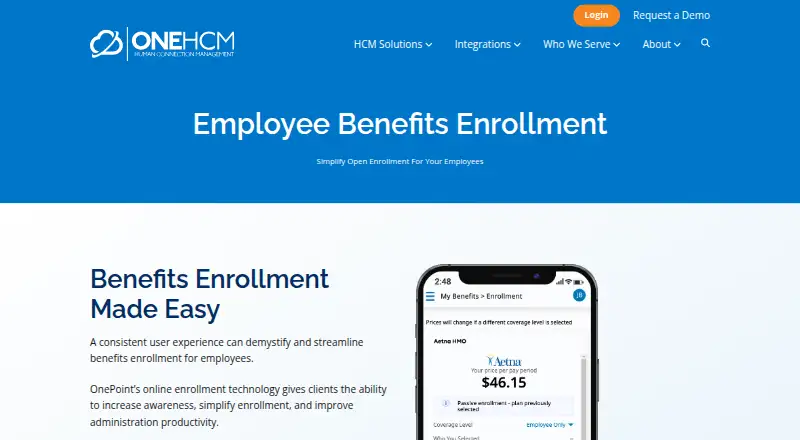
What OnePoint Benefits Enrollment is
OnePoint Benefits Enrollment gives eligible employees an online process to research, compare, and enroll in benefits without paper forms. Its self-service portal guides enrollment step by step, shows progress, supports e-signatures, and sends alerts when enrollment is complete and approved by HR. Employees can access enrollment information 24/7 from desktop or mobile devices; mobile access is through a browser. Employers can configure the system for any benefit plan electronically, while eligibility profiles and rules determine available plans and required fields. OnePoint says the benefits administration solution can submit enrollment data to carriers and send premium and cost information to payroll. Administration features include carrier and 401(k) data feeds, real-time eligibility tracking, COBRA administration, FSA timelines and tools, and alerts for incomplete packets. Reporting covers enrollment, costs, premium reconciliation, and configured benefits and ACA needs. Pricing is on request; per-employee-per-month pricing is mentioned without a specific amount.
Good
- Step-by-step enrollment includes progress tracking and e-signatures.
- Employees can access enrollment information 24/7.
- Eligibility rules determine plans and required fields.
- Reporting includes enrollment, costs, and premium reconciliation.
Watch out
- Pricing is on request.
- No specific price is listed.
- Mobile access is through a browser.
Who it suits
It suits businesses and nonprofit organizations that want electronic benefits enrollment and employee self-service. OnePoint says its configured HCM solutions serve organizations from growing businesses to enterprise-level employers.
Verdict
OnePoint combines employee enrollment tools with eligibility, carrier, payroll, and reporting features. Ask the company for pricing and a demo to assess a configured solution.
Plans and prices
From OnePoint Benefits Enrollment's own pricing page, checked 4 Oct 2026.
| Plan | Price | What it gives you |
|---|---|---|
| OnePoint Benefits Enrollment | Priced on request | Custom configured for your organization; per-employee-per-month pricing is mentioned for OnePoint HCM without a specific amount |
The facts
Each one read from OnePoint Benefits Enrollment's own pages, with the date it was checked.
What it does
- Access
- Employees can enroll from a desktop or mobile device and access plan details, rates, and comparison tools 24/7.checked 4 Oct 2026
- Administration features
- The benefits administration page lists automated carrier and 401(k) data feeds, real-time eligibility tracking, COBRA administration, FSA timelines and tools, and alerts for incomplete enrollment packets.checked 4 Oct 2026
- Carrier connections
- OnePoint can communicate benefits data to carriers for medical, dental, disability, and life insurance, as well as 401(k) plans and HSA, FSA, HRA, and PRA accounts.checked 4 Oct 2026
- Contact
- The company invites customers to request a demo or call 866.938.5835 for information about its solutions.checked 3 Oct 2026
- Eligibility rules
- Profiles and rules determine which plans employees are eligible to see, and the system identifies required fields before enrollment can be completed.checked 4 Oct 2026
- Integrations
- The integration directory says systems not listed may be connected if they have an API or secure file feed.checked 3 Oct 2026
- Intended customers
- OnePoint says its configured HCM solutions serve organizations ranging from growing businesses to enterprise-level employers.checked 3 Oct 2026
- Pricing
- OnePoint describes its HCM pricing as per-employee-per-month, but the opened product and pricing-related pages provide no specific amount.checked 4 Oct 2026
- Purpose
- The product provides online benefits enrollment so employees can research, compare, and enroll in benefit plans.checked 4 Oct 2026
- Reporting
- The benefits administration page lists enrollment and cost reporting, premium reconciliation, and configurable reporting for benefits and ACA needs.checked 4 Oct 2026
- Security controls
- The company privacy policy says it uses HTTPS and CAPTCHA to secure personal information from unauthorized access, use, or disclosure.checked 3 Oct 2026
- Security statement
- The maker’s privacy policy says it uses HTTPS and CAPTCHA to help secure personal information from unauthorized access, use, or disclosure.checked 4 Oct 2026
- Self-service
- The employee self-service portal includes step-by-step enrollment, a progress status bar, e-signature, and automatic alerts.checked 3 Oct 2026
- Self-service enrollment
- The self-service portal guides employees through enrollment with a step-by-step process and status bar.checked 4 Oct 2026
- Signatures and alerts
- Electronic signatures and notifications indicate when enrollment is complete and approved by HR.checked 4 Oct 2026
- Support
- OnePoint describes a dedicated service representative and provides a support phone number, 866-938-5835.checked 4 Oct 2026
- Who it serves
- The maker describes its HCM platform as serving businesses and nonprofit organizations of all sizes.checked 4 Oct 2026
Where it runs
- Cloud platform
- OnePoint describes its HCM platform as cloud-based and accessible from any device, with no software installation or manual updates required.checked 3 Oct 2026
The company
- Headquarters
- Selma, California, United Stateschecked 28 Sep 2026
Money
- Plan flexibility
- The enrollment system can be configured to handle any benefit plan electronically.checked 3 Oct 2026
- Plan support
- The maker says the system can be configured to handle any benefit plan electronically.checked 4 Oct 2026
The full review of OnePoint Benefits Enrollment
OnePoint Benefits Enrollment is a configurable, paper-free way for employees to compare and enroll in benefits. It is best suited to employers that want guided self-service tied to eligibility, payroll, and carrier processes. Its breadth is useful, but the organization will need to assess the configuration and custom pricing before committing.
Overview
Employees can access enrollment information around the clock from a desktop or mobile device. The system supports all enrollment events and decision support, which can help employees make choices across different enrollment windows. Its mobile access is browser-based rather than a separate app experience.
The platform can be configured for any benefit plan electronically. That adaptability is attractive to employers with varied plan designs, but it also makes implementation and plan configuration important parts of the buying decision. Eligibility profiles and rules determine which plans employees may select and what fields they must complete.
Key features
Guided self-service
A step-by-step portal, progress bar, e-signature, and automatic alerts help employees see what remains to be done. Notifications can flag completion and HR approval, while alerts for incomplete packets give administrators a way to follow up. This is a practical alternative to paper-based enrollment, though employees still need clear plan information and setup from their employer.
Administration and connections
OnePoint supports real-time eligibility tracking, COBRA administration, FSA timelines and tools, and automated carrier and 401(k) data feeds. It can submit enrollment data to carriers and send premium and cost data to payroll; HRIS and payroll synchronization are supported. These connections can reduce duplicate handling, but the value depends on the employer's configuration and the systems involved. Integrations not in the directory may be possible through an API or secure file feed.
Reporting covers enrollment and costs, premium reconciliation, and configured benefits and ACA needs. That gives administrators operational and cost information in one benefits workflow. The company describes its HCM platform as cloud-based, requiring no local installation or manual updates, and says it pairs the technology with dedicated support. Its privacy policy describes HTTPS and CAPTCHA as controls to help protect personal information.
Pricing
OnePoint Benefits Enrollment has custom pricing. OnePoint describes HCM pricing as per employee per month, but provides no specific amount for this product. There are no published plan tiers or seat limits to compare, so employers should request a demo and a quote based on their workforce, plan configuration, and required connections. The company invites inquiries at 866.938.5835.
Platforms
The product is available on web, Android, and iOS. Employees can enroll from desktop or mobile, with mobile access through a browser. The cloud-based HCM platform is designed for access from any device without software installation.
Who it's for
OnePoint is aimed at businesses and nonprofit organizations of varying sizes, from growing employers to enterprise-level organizations. It is a stronger fit for teams that need eligibility rules, carrier and payroll data flows, and benefits reporting alongside employee enrollment. Organizations seeking a simple, self-serve tool with a publicly stated price may prefer to compare lower-commitment options first.
Pros and cons
- Pros: Configurable support for benefit plans and all enrollment events suits employers with varied plan designs.
- Pros: Eligibility rules, guided employee steps, and completion alerts help coordinate enrollment between employees and HR.
- Pros: Carrier, 401(k), HRIS, and payroll connections plus cost and reconciliation reporting support broader benefits administration.
- Cons: Custom pricing makes budgeting and comparison difficult without a quote.
- Cons: Mobile enrollment is browser-based, which may not suit employers specifically seeking a native app experience.
- Cons: The breadth of configuration and integrations means buyers should confirm how their own plans and systems will be handled.
Alternatives
Benefits Enrollment Software is a useful starting point for comparing options across the category. Choose BenManage if a no-cost web platform is the priority: its free plan is free and offers benefits administration lifecycle services à la carte. Consider Empower Health and Welfare Benefits Administration for a paid Android, iOS, and web option; pricing requires contacting a representative. Empyrean Benefits Platform is another paid option across Android, iOS, and web.
Benefitplace is worth comparing if API access matters; its paid Eligibility & Enrollment plan has no stated price and invites demo requests. Navia Benefits Administration is a paid Android, iOS, and web alternative with quote-based pricing through a benefits expert. PrismHR HCM Benefits Enrollment emphasizes customizable options that scale as needs change, with paid pricing not stated. bswift offers paid Android, API, iOS, and web access; its Unlimited plan is aimed at complex employers and channel partners with a customizable implementation path. Darwin is another paid option for Android, iOS, and web.
Verdict
Choose OnePoint Benefits Enrollment if your organization needs employee-guided enrollment alongside eligibility controls, carrier and payroll synchronization, and benefits reporting. Its configurable scope is its main advantage; custom pricing and the need to validate how your plans and integrations will be set up are the main reasons to look elsewhere.
Alternatives to OnePoint Benefits Enrollment
- 1

BerniePortal Benefits Administration
AndroidiOSWebAPI7.6From $5 a month - 2
Navia Benefits Administration
AndroidiOSWeb7.3From $2.50 a month - 3

WEX Benefits
AndroidiOSWebAPI7.2$0.01 usage-based - 4

Employee Navigator
AndroidiOSWebAPI6.9 - 5

Benefitfocus
AndroidiOSWebAPI6.8 - 6

bswift
AndroidiOSWebAPI6.8