noima
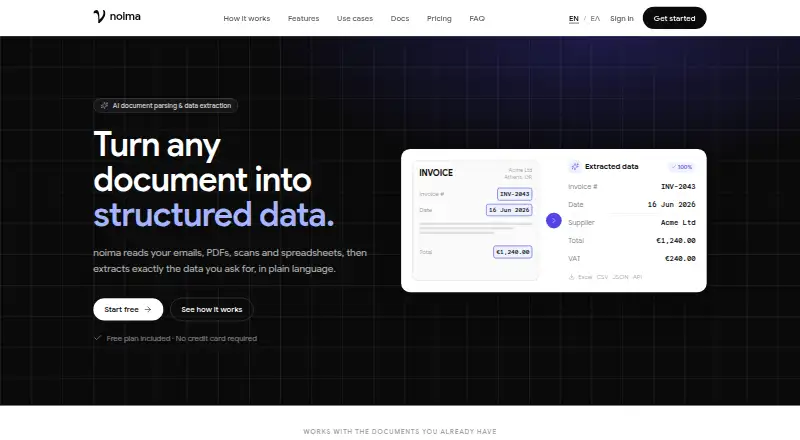
noima extracts requested information from emails, documents, scans and spreadsheets, then returns it in structured formats.
What noima is
noima extracts requested information from emails, documents, scans and spreadsheets, then returns it in structured formats. Users can describe what to extract in plain language or have AI build classifiers and extractors from sample documents. An AI splitter can separate multi-document PDFs or treat each page independently. Inputs can arrive by workspace inbox, upload or API; supported formats include PDF, EML, HTML, TXT, common image formats, DOCX, XLSX, XLS, CSV and Markdown, with a 20 MB per-file limit. Results can be exported as Excel, CSV, JSON or Markdown, or retrieved through the API. Small, Balanced and Pro models use one, two and three credits per document, respectively. Account quotas are shared across workspaces, and processing stops when the allowance runs out. Failed documents are retried automatically without extra document charges for retries, though an ultimately failed upload still consumes a document. The maker says data is hosted in the EU and handled in line with GDPR, with retention and deletion controls.
Good
- Accepts email, uploads and API submissions.
- Exports results in Excel, CSV, JSON or Markdown.
- Custom extraction fields are supported.
- Automatic retries do not add document charges.
- Retention controls and deletion options are available.
Watch out
- Files are limited to 20 MB each.
- Quota is shared across all workspaces on an account.
- Processing stops when the available quota is exhausted.
- Webhook delivery is listed as unavailable.
Who it suits
noima suits teams that need to extract structured fields from varied incoming documents, especially through email or API workflows. Its shared quotas and configurable retention may matter to organizations managing multiple workspaces or sensitive files.
Verdict
noima covers document intake, extraction and structured export across a broad set of file types. Keep its per-file limit, shared quota and failed-upload charge in mind when planning volume.
Plans and prices
From noima's own pricing page, checked 30 Sep 2026.
| Plan | Price | What it gives you |
|---|---|---|
| Free | Free | 10 documents / one-time · 30 days retention |
| Starter | €12 a month | 150 documents / month · 60 days retention · €12 / month |
| Growth | €29 a month | 500 documents / month · 90 days retention · €29 / month |
| Business | €59 a month | 1,200 documents / month · 180 days retention · €59 / month |
| Premium | €119 a month | 3,000 documents / month · 365 days retention · €119 / month |
| Enterprise | €299 a month | 10,000 documents / month · Unlimited retention · €299 / month |
The facts
Each one read from noima's own pages, with the date it was checked.
What it does
- AI pipelines
- Users can describe extraction needs in plain language or have AI create classifiers and extractors from sample documents.checked 30 Sep 2026
- Document splitting
- An AI splitter can divide multi-document PDFs into sections, or process each page as a separate document.checked 30 Sep 2026
- Exports
- Extracted results can be exported as Excel, CSV, JSON or Markdown, or retrieved through the API.checked 30 Sep 2026
- Founder and use
- The about page names Michalis Charatzoglou as founder and says noima processed more than 40 million pages for a Greek courts project.checked 30 Sep 2026
- Input
- Documents can be added through a workspace email inbox, file upload or API; supported types include PDF, EML, HTML, TXT, JPG, PNG, BMP, DOCX, XLSX, XLS, CSV and Markdown up to 20 MB per file.checked 30 Sep 2026
- Integrations
- Direct delivery to Google Sheets, webhooks and more than 6,000 other apps is marked as coming soon.checked 30 Sep 2026
- Languages
- The product is available in English and Greek.checked 30 Sep 2026
- Model credits
- Noima Small uses 1 credit per document, Balanced uses 2, and Pro uses 3; the model can be selected per workspace.checked 30 Sep 2026
- Payments
- Billing runs through Stripe, which the page describes as PCI-DSS compliant.checked 30 Sep 2026
- Product
- noima reads emails, PDFs, scans and spreadsheets and extracts requested data into structured formats.checked 30 Sep 2026
- Quota limits
- Plan allowances are shared across all workspaces on an account, and processing stops when the available quota is exhausted.checked 30 Sep 2026
- Retries
- Failed documents are retried automatically without extra document charges for retries, though an upload that ultimately fails still uses one document.checked 30 Sep 2026
- Security and privacy
- The maker says documents and extracted data are hosted in the EU and handled in line with GDPR, and users can choose retention and delete data or their account.checked 30 Sep 2026
- Support
- The documentation directs users to email support and says the team answers in English and Greek.checked 30 Sep 2026
The company
- Headquarters
- Thermi, Greecechecked 28 Sep 2026
The full review of noima
Overview
noima is a web and API service for turning incoming documents into structured data. It is a strong fit for teams handling varied email attachments and files that need tailored extraction, provided their document volumes fit its shared quotas.
Key features
Documents can come in through a workspace inbox, file upload or API. The service accepts PDF, EML, HTML, TXT, JPG, PNG, BMP, DOCX, XLSX, XLS, CSV and Markdown files up to 20 MB each. That covers a broad mix of office and scanned material, but larger files will need to be reduced or handled elsewhere.
Extraction can be defined in plain language, or AI can build classifiers and extractors from sample documents. An AI splitter can divide combined PDFs into sections or treat each page as a separate document. OCR and custom extraction fields make scans and tailored data capture part of the same workflow. Model choice affects consumption: Noima Small uses one credit per document, Balanced uses two and Pro uses three, so higher-capability model selection can use an allowance faster.
Results can be exported as Excel, CSV, JSON or Markdown, or retrieved through the API. Direct Google Sheets delivery, webhooks and connections to more than 6,000 apps are coming soon; teams that require those routes now should not count on them. Monthly email processing is capped at 150 emails.
Quota is shared across every workspace on an account, and processing stops when it runs out. Automatic retries do not add document charges, but a document that ultimately fails still consumes one. That is a reasonable safeguard against retry penalties, though failed uploads still reduce usable capacity.
The maker says documents and extracted data are hosted in the EU and handled in line with GDPR. Users can choose retention and delete data or their account. Stripe handles billing, and support is by email in English and Greek; the product itself is available in both languages.
Pricing
All paid plans are billed monthly, with document allowances shared across workspaces. The listed retention period grows with the tier, which matters for teams that need to revisit older records.
- Free: free, with 10 documents as a one-time allowance and 30 days’ retention. Useful for a small evaluation, but not recurring monthly processing.
- Starter: €12 a month, billed €12 / month, for 150 documents per month and 60 days’ retention. A modest ongoing allowance for a small workflow; model credits and failed documents can make the effective capacity lower.
- Growth: €29 a month, billed €29 / month, for 500 documents per month and 90 days’ retention. Suits a growing intake volume without stepping straight to a four-figure quota.
- Business: €59 a month, billed €59 / month, for 1,200 documents per month and 180 days’ retention. A better fit when both throughput and a longer retrieval window matter.
- Premium: €119 a month, billed €119 / month, for 3,000 documents per month and 365 days’ retention. The year-long retention is useful for workflows that need records kept across annual cycles.
- Enterprise: €299 a month, billed €299 / month, for 10,000 documents per month and unlimited retention. It is the highest stated capacity and retention tier; teams needing more than that should seek custom pricing.
Plan allowances are document counts, while model selection consumes credits at different rates. Check both when estimating throughput: a Pro-model document uses three credits, and the account stops processing once its available quota is exhausted.
Platforms
noima is available on the web and through an API, giving teams a workspace option as well as a route to incorporate processing into software. API access does not change the per-file size cap or shared quota.
Who it's for
Choose noima if incoming work spans emails, PDFs, scans and spreadsheets, and you need extraction rules adapted to your documents rather than a single fixed output. It is less suitable when volume is hard to predict, a failed upload must not consume capacity, files exceed 20 MB, or a workflow depends on webhooks or direct integrations that have not yet arrived.
Pros and cons
- Pros: Broad file support plus inbox, upload and API intake keeps varied sources within one workflow.
- Pros: Plain-language instructions, sample-driven pipeline creation and PDF splitting offer several ways to handle different document structures.
- Pros: Excel, CSV, JSON and Markdown exports cover common downstream uses, with API retrieval for software workflows.
- Cons: A 20 MB file ceiling excludes larger source files from direct intake.
- Cons: Shared quotas stop all processing at exhaustion, and an ultimately failed document still uses one document.
- Cons: Google Sheets, webhooks and broader app connections are not ready for workflows that need them today.
Alternatives
Compare email parsing software if you want to survey the category. For a similar freemium web and API option, MailFrame has a free tier with 100 parse operations per month, one active schema and webhook delivery; that is the clearer starting point when a webhook and parse-operation allowance suit the workflow. Parserr offers 15 emails and 10 documents per month on its free plan, alongside unlimited parsing rules and integrations, making it worth considering for low-volume email-centric intake.
Parsio Receipt OCR starts with 30 credits per month, 30-day retention and one user on its free plan, so it is an alternative when a small, single-user receipt OCR allowance is the priority. MailParse provides 100 emails per month, webhook delivery and REST polling on its free tier; choose it when those delivery methods matter more than noima’s document-oriented pipeline options.
Parsli offers 10 free pages on signup, unlimited parsers and API access with integrations, an alternative for a limited page-based start. DigiParser has a paid plan starting at $14/month for 100 payslips and enterprise pricing for 1,000 or more documents per month, making it a more specific fit for payslip processing.
Parseur has a free plan capped at 20 pages per month with one user and 90-day retention, but allows unlimited mailboxes and extracted fields; it may suit a small email parsing setup that values those allowances. MailParse is another alternative.
Verdict
noima is best for teams that need configurable extraction across varied document types and want both a web workspace and API access. Its strongest reason to choose it is the combination of flexible AI pipelines, splitting, OCR and structured exports; its chief reason to look elsewhere is the shared, finite quota, especially when failed documents count or planned integrations are essential.
Alternatives to noima
- 1

DigiParser
Free planAndroidiOSWebAPI7.9Free plan - 2

Parseur
Free planWebAPI7.6From $49 a month - 3

MailFrame
Free planWebAPI7.3From $19 a month - 4

Email Parser
WebAPIWindows7.0From $145 a year - 5

CloudMailin
Free planWebAPI6.8From $25 a month - 6

Parsio Receipt OCR
Free planWebAPI6.8From $24 a month