
CloudMailin
CloudMailin receives inbound email and delivers it to web applications through an HTTP POST webhook.
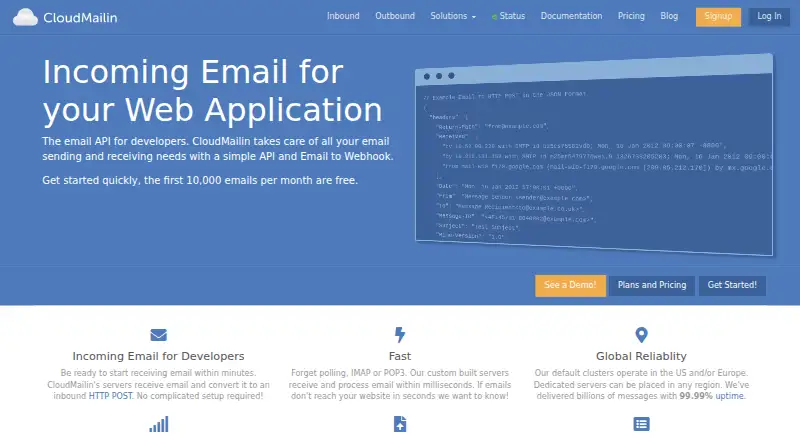
What CloudMailin is
CloudMailin receives inbound email and delivers it to web applications through an HTTP POST webhook. Messages can be sent as JSON, multipart form data, or raw text, while attachments can be forwarded to a webhook or stored in Amazon S3, Azure Storage, or Google Cloud Storage. The service also sends transactional email through an API or SMTP relay. Outbound tools include spam checking, link and open tracking, bounce handling, reporting, tagging, and priority queues. The inbound service keeps 30 days of delivery history with full-text search and information about errors and retries. It supports any language or framework, with examples including Node.js, Python, Ruby, PHP, Go, Rust, TypeScript, Java, and C#. The free plan allows 10,000 emails per month and 512KB per message. The company was founded in 2010 and is a product of Dynamic Edge Software Ltd.
Good
- Accepts inbound messages in three delivery formats.
- Stores attachments with Amazon S3, Azure, or Google Cloud.
- Offers both API and SMTP relay for outbound email.
- Free plan includes 10,000 emails per month.
- Supports TLS, 2FA, and Google or GitHub OAuth.
Watch out
- Free messages are limited to 512KB each.
- Inbound delivery history is kept for 30 days.
- Inbound metadata retention is 60 days.
Who it suits
CloudMailin suits developers who need to connect email handling to a web application through webhooks or an API. Its free plan may suit lower-volume use, while paid plans offer higher message limits and additional features.
Verdict
CloudMailin combines inbound email processing with transactional sending, so teams can handle both flows through one service. Its free plan has stated monthly and message-size limits, with paid plans starting at $25 a month.
Plans and prices
From CloudMailin's own pricing page, checked 5 Oct 2026.
| Plan | Price | What it gives you |
|---|---|---|
| Free Plan | Free | 10,000 emails/mo · 512KB per message · No card required |
| Starter | $25 a month | 10,000 emails/mo · 2MB per message · Full-text search · $25 /mo |
| Professional | $45 a month | 20,000 emails/mo · 10MB per message · Full-text search · 150GB/mo data transfer · $45 /mo |
| Premium | $85 a month | 40,000 emails/mo · 50MB per message · Full-text search · 400GB/mo data transfer · $85 /mo |
| Corporate | $200 a month | 100k — 7M emails/mo · 50MB per message · Full-text search · $200 — $1,799/mo |
| Dedicated | $1,499 a month | Dedicated cluster · Higher throughput · Full control · From $1,499 /mo |
The facts
Each one read from CloudMailin's own pages, with the date it was checked.
What it does
- Attachments
- Email attachments can be sent to a webhook or stored in Amazon S3, Azure Storage, or Google Cloud Storage.checked 5 Oct 2026
- Delivery tracking
- The inbound service stores 30 days of delivery history with full-text search and details of errors and retries.checked 5 Oct 2026
- Encryption and login
- The security policy says sending email requires TLS, data is encrypted at rest where possible, and accounts can use 2FA or Google and GitHub OAuth.checked 5 Oct 2026
- Formats
- Inbound messages can be delivered as JSON, multipart form data, or raw text.checked 5 Oct 2026
- Languages
- The inbound service says it works with any language or framework and names Node.js, Python, Ruby, PHP, Go, Rust, TypeScript, Java, and C# as examples.checked 5 Oct 2026
- Outbound email
- CloudMailin also sends transactional email through an API or SMTP relay.checked 5 Oct 2026
- Outbound features
- Outbound features include spam checking, link and open tracking, bounce handling, reporting, tagging, and priority queues.checked 5 Oct 2026
- Product
- CloudMailin receives and parses email, then delivers it to a web application as an HTTP POST webhook.checked 5 Oct 2026
- Regional processing
- Inbound data is processed in the region where received, which by default may be the EU, US, or Asia Pacific, and a specific region can be selected via DNS records.checked 5 Oct 2026
- Retention
- The security policy states that inbound metadata is retained for 60 days, while the product page describes 30 days of delivery history.checked 5 Oct 2026
- Security
- CloudMailin says its security program is aligned with ISO 27001 and that it has completed a SOC 2 Type 2 examination; reports are available to customers and prospects under NDA.checked 5 Oct 2026
The company
- Company
- CloudMailin is a product of Dynamic Edge Software Ltd, registered in England and Wales as company 7444971.checked 5 Oct 2026
- Founded
- 2010checked 28 Sep 2026
Money
- Plan limits
- The pricing page lists 10,000 monthly emails and 512KB per message for free, and says all paid plans include custom domains, catch-all receiving, cloud attachment storage, and delivery status reports with API access.checked 5 Oct 2026
The full review of CloudMailin
CloudMailin turns inbound email into webhook-ready data and also supports transactional sending through an API or SMTP relay. It suits development teams that want both email flows in one service; the combination is useful, but message-size limits make plan choice important.
Overview
For inbound mail, CloudMailin receives messages, parses them and forwards them to an application with an HTTP POST. Teams can choose JSON, multipart form data or raw text, and handle the result in the language or framework they already use. Attachments can be forwarded to a webhook or stored in Amazon S3, Azure Storage or Google Cloud Storage.
The other half is transactional email: send through an API or SMTP relay, with spam checking, link and open tracking, bounce handling, reporting, tagging and priority queues. That breadth makes CloudMailin more than an inbound parser, though teams looking only for a lightweight library or a small parsing quota may prefer a narrower alternative.
Key features
Inbound processing and delivery
Webhook delivery avoids building a separate mail-polling workflow, while JSON, multipart and raw text support give developers options for processing messages. CloudMailin cites examples from Node.js and Python to Java and C#, and says the inbound service works with any language or framework. That flexibility is useful for mixed or less common stacks, but the product’s value depends on having an application endpoint ready to receive the posts.
Delivery history includes 30 days of searchable records, with error and retry details. This gives teams a practical window to diagnose failed deliveries without relying only on their own logs. Attachments can go directly to a webhook or to one of three named cloud storage services, which can keep larger files out of the application’s immediate processing path.
Sending, security and regional handling
Transactional sending adds tracking and bounce handling alongside reporting and priority queues, so teams can manage outbound mail in the same service as inbound processing. The security program is aligned with ISO 27001 and has completed a SOC 2 Type 2 examination; reports are available to customers and prospects under NDA. Sending requires TLS, data is encrypted at rest where possible, and accounts can use 2FA or Google and GitHub OAuth.
Inbound data is processed in the region where it is received, with EU, US or Asia Pacific as possible defaults; a specific region can be selected through DNS records. The security policy says inbound metadata is retained for 60 days, while delivery history is described as available for 30 days. These are distinct periods, worth keeping in mind when setting operational or retention expectations.
Pricing
The Free Plan costs nothing, requires no card and allows 10,000 emails per month, but caps each message at 512KB. It is a useful starting point for modest traffic and small messages; the size ceiling can quickly rule it out for attachment-heavy mail. A 7-day trial is also offered.
Starter costs $25 a month and keeps the 10,000-email monthly quota while raising the message limit to 2MB and adding full-text search. It is the entry paid option for teams that need searchable history or more room per message, not a higher monthly volume. Professional costs $45 a month for 20,000 emails, 10MB per message, full-text search and 150GB per month of data transfer. Premium costs $85 a month for 40,000 emails, 50MB per message, full-text search and 400GB per month of transfer. Those tiers suit steadily higher volume or larger messages, with the transfer allowance rising alongside them.
All paid plans include custom domains, catch-all receiving, cloud attachment storage and delivery status reports with API access. Dedicated costs $1,499 a month and provides a dedicated cluster, higher throughput and full control, positioning it for teams that need a dedicated deployment rather than a standard quota tier. Corporate has a stated price range of $2,001,799 a month; its billing is shown as $200 — $1,799/mo for 100k — 7M emails per month, 50MB per message and full-text search. That broad range reflects a very different scale from the self-serve plans. A dedicated IP option is also available.
Platforms
CloudMailin is offered through API and web access. SMTP relay is also supported for outbound sending, making it an option for applications that use SMTP rather than an API integration.
Who it's for
CloudMailin is best for developers who need inbound email parsed into an application and want transactional sending, delivery visibility and attachment handling under one service. Teams with larger messages should compare the per-message caps as closely as the monthly quotas. It is less compelling for people who need only a PHP parsing library, or whose parsing needs fit a small, tightly limited allowance.
Pros and cons
- Pro: Inbound parsing and outbound transactional sending share one service, reducing the need to combine separate tools for those two flows.
- Pro: JSON, multipart and raw-text delivery, broad language compatibility and cloud attachment storage allow several integration patterns.
- Pro: Searchable delivery records with retry and error detail help teams investigate inbound failures.
- Con: The free tier’s 512KB message cap is restrictive for attachment-heavy mail, and Starter raises it only to 2MB.
- Con: Starter has the same 10,000 monthly emails as Free, so its value is in larger messages and search rather than added volume.
- Con: The higher-volume Professional and Premium tiers cost 45.00 USD and $85 a month respectively, while dedicated infrastructure starts at $1,499 a month.
Alternatives
For a broader set of options, see Email Parsing Software. PHP MIME Mail Parser is the better fit when a free, MIT-licensed PHP 8.2+ library is enough and self-hosting is preferable; it requires the mailparse extension and does not offer CloudMailin’s combined sending service.
MailFrame is worth considering for a low-volume API or web workflow: its free tier includes 100 parse operations per month, one active schema and webhook delivery. noima may suit document extraction with a small initial allowance, offering 10 documents once with 30 days of retention on its free tier. Parserr is an alternative for rule-based email workflows: its free plan allows 15 emails and 10 documents per month, with one inbox and unlimited parsing rules and integrations.
Parsio Receipt OCR is oriented to receipt OCR rather than general inbound email handling; its free plan includes 30 credits per month, 30-day data retention and one user. Parsli offers a free allowance of 10 pages on signup with unlimited parsers and API access, so it may fit a page-based parsing need. DigiParser is an alternative with a paid plan starting at $14 a month for 100 payslips, making it more directly relevant to payslip processing. MailParse offers a free plan with 100 emails per month, webhook delivery, REST polling and one inbound address for teams whose needs fit that smaller allowance.
Verdict
Choose CloudMailin if your application needs both inbound email parsing and transactional sending, especially when searchable delivery history and attachment routing matter. Its main advantage is that breadth; its main trade-off is that volume and message size are tied to paid tiers, while the free option’s 512KB cap is modest. If you need only a small parsing workflow or a self-hosted library, a narrower alternative is likely the better fit.
Getting started
- Open the CloudMailin website.
- Choose the free plan or a paid plan; a 7-day trial is offered.
- Connect using the API or web service.
- Select a region for inbound processing through DNS records if needed.
Limits worth knowing
The free plan allows 10,000 monthly emails and 512KB per message. Paid plans include custom domains, catch-all receiving, cloud attachment storage, and delivery status reports with API access; the Starter plan is $25 a month and allows 10,000 emails monthly, 2MB per message, and full-text search.
Questions
Is there a free plan?
Yes. The Free Plan is free and includes 10,000 emails per month, with a 512KB per-message limit.
How much do paid plans cost?
The listed Starter plan is $25 a month.
Is there a free trial?
Yes, a 7-day trial is offered.
What platforms does CloudMailin support?
The listed platforms are API and web.
Can CloudMailin send outbound email?
Yes. It sends transactional email through an API or SMTP relay.
Who makes CloudMailin?
CloudMailin is a product of Dynamic Edge Software Ltd, registered in England and Wales as company 7444971.
Alternatives to CloudMailin
- 1

DigiParser
Free planAndroidiOSWebAPI7.9Free plan - 2

Parseur
Free planWebAPI7.6From $49 a month - 3

MailFrame
Free planWebAPI7.3From $19 a month - 4

Email Parser
WebAPIWindows7.0From $145 a year - 5

Parsio Receipt OCR
Free planWebAPI6.8From $24 a month - 6

EmailEngine
WebAPILinuxmacOS6.7From $1,450 a year