
Nearpod
Nearpod is a platform for educators to create and deliver interactive lessons.
What Nearpod is
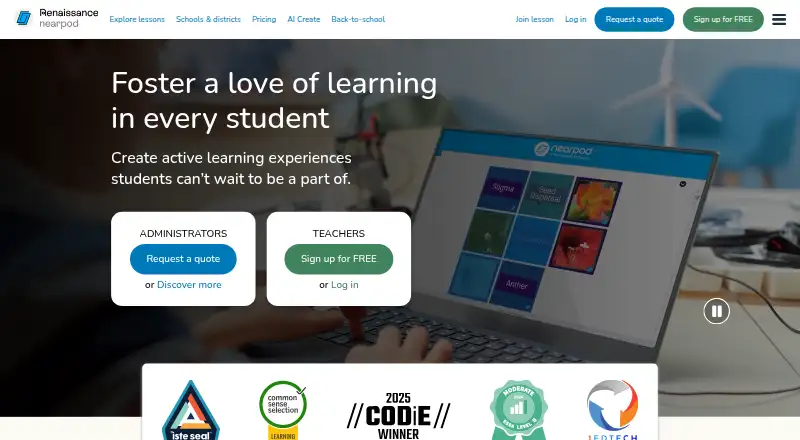
Nearpod is a platform for educators to create and deliver interactive lessons. Teachers can start from scratch or upload PowerPoints, Google Slides, PDFs, videos, and YouTube videos, then add formative assessments and media activities such as Draw It, Polls, Drag & Drop, VR Field Trips, and PhET simulations. Lessons can be delivered live with student participation, at each student’s pace, or at the front of the class.
The Nearpod Library has more than 22,000 ready-to-teach, customizable, standards-aligned lessons, videos, and activities, including K–12 content. Teachers can review real-time feedback and post-session reports on student understanding and work. AI Create can generate interactive lessons, activities, and multiple-choice questions; Gold lists an AI Create Question Generator, while school and district plans list AI Create. Nearpod works on Android, iOS, Linux, macOS, Windows, and the web, and can be embedded in an LMS through a lesson link. Silver is free and includes 300 MB of storage and 40 student joins per lesson; Gold costs $159 a year and includes 1 GB and 75 joins per lesson.
Good
- Supports three lesson delivery modes
- Library has 22,000+ customizable resources
- Includes real-time feedback and post-session reports
- Works across major desktop and mobile platforms
Watch out
- Free Silver includes 300 MB storage
- Free Silver allows 40 student joins per lesson
- Gold costs $159 a year
- School and district pricing is quote-based
Who it suits
Nearpod suits educators who want to build interactive lessons and review student responses. Its individual educator plans and school or district licenses serve classroom teachers as well as institutions.
Verdict
Nearpod combines lesson building, interactive activities, delivery options, and student feedback for educators. Compare storage and student-join limits across plans when choosing between free Silver, paid plans, and institutional licensing.
Plans and prices
From Nearpod's own pricing page, checked 14 Oct 2026.
| Plan | Price | What it gives you |
|---|---|---|
| Silver | Free | 300 MB storage · 40 student joins per lesson · core features · Free forever |
| Gold | $159 a year | 1 GB storage · 75 student joins per lesson · AI Create Question Generator · Google Slides add-on · Drag & Drop · Sub Plans · $159/year |
| Platinum | $397 a year | 5 GB storage · 90 student joins per lesson · student notes · all Gold features · $397/year |
| School & District | Priced on request | Unlimited storage · 250 student joins per lesson · LMS/LTI/rostering · admin reporting · dedicated Customer Success Manager · Request a quote |
| School or District | Priced on request | Unlimited storage · 250 student joins per lesson · LMS/LTI/rostering integrations · dedicated Customer Success Manager · Request a quote |
The facts
Each one read from Nearpod's own pages, with the date it was checked.
What it does
- AI
- AI Create can generate interactive lessons, activities, and multiple-choice questions; the pricing page lists the question generator with Gold and AI Create with school and district plans.checked 7 Oct 2026
- AI authoring
- AI Create can generate interactive lessons, activities, and multiple-choice questions from prompts or existing material.checked 14 Oct 2026
- Assessment insights
- Teachers can use real-time feedback and post-session reports to review student understanding and work.checked 7 Oct 2026
- Audience
- Nearpod offers individual educator plans and school or district licenses, and its Library content includes K–12 lessons, activities, and videos.checked 7 Oct 2026
- Collaboration
- Collaborate Board supports shared prompts with text, images, audio, video, and GIF responses, with optional anonymous display.checked 14 Oct 2026
- Content library
- Nearpod advertises more than 22,000 standards-aligned lessons, videos, and activities in its library.checked 14 Oct 2026
- Delivery modes
- Nearpod supports Live Participation, Student-Paced, and Front of Class lesson delivery.checked 7 Oct 2026
- Developer extensibility
- Public product pages document LTI 1.3, LMS connections, Google Classroom and Microsoft Teams workflows, a Google Slides add-on, and browser/device access; they do not present a public SDK.checked 14 Oct 2026
- Documentation and support
- Nearpod provides FAQs, a knowledge base, chat, email/help-desk and phone support, plus webinars, videos, documentation, and live online training.checked 14 Oct 2026
- Formative assessment
- The platform provides more than 20 assessment and media activities, including quizzes, polls, open-ended questions, Draw It, Matching Pairs, Fill in the Blanks, Collaborate Board, Interactive Video, and Time to Climb.checked 14 Oct 2026
- Funding history
- TechCrunch reported in February 2021 that Nearpod had raised more than $30 million in venture capital before its acquisition.checked 14 Oct 2026
- Gamification
- Time to Climb turns multiple-choice questions into a competitive game in which students race up a mountain.checked 14 Oct 2026
- Google Slides integration
- The Nearpod add-on lets Gold, Platinum, and School or District users add Nearpod activities and content directly inside Google Slides.checked 14 Oct 2026
- Integrations
- Nearpod supports LTI 1.3 with Canvas, Schoology, and Blackboard, plus assignments through Google Classroom and Microsoft Teams.checked 14 Oct 2026
- Interactive lessons
- Teachers can build interactive lessons from PowerPoint, PDF, Google Slides, video, and other content.checked 14 Oct 2026
- Interactive video
- Teachers can add multiple-choice or open-ended questions at points within uploaded or YouTube videos.checked 14 Oct 2026
- Learning activities
- Lessons can use more than 20 formative assessments and dynamic media features, including Draw It, Polls, Drag & Drop, VR Field Trips, and PhET simulations.checked 7 Oct 2026
- Lesson creation
- Teachers can build lessons from scratch or upload PowerPoints, Google Slides, PDFs, videos, and YouTube videos.checked 7 Oct 2026
- Library
- The Nearpod Library includes 22,000+ ready-to-teach, customizable, standards-aligned lessons, videos, and activities.checked 7 Oct 2026
- License model
- Renaissance terms describe its downloadable tools as copyrighted works and prohibit redistribution, reverse engineering, and decompilation, indicating proprietary software rather than open source.checked 14 Oct 2026
- Limit: connectivity and bugs
- Reviewers report recurring student connection problems that sometimes require refreshing, while Trustpilot includes a complaint that students could not see results because of bugs.checked 14 Oct 2026
- Limit: internet dependency
- A TrustRadius reviewer says students need internet access because presentations are not downloadable.checked 14 Oct 2026
The company
- Company founded and headquarters
- LinkedIn lists Nearpod as founded in 2012, headquartered in Dania Beach, Florida, and employing 201–500 people.checked 14 Oct 2026
- Founded
- 2012checked 23 Sep 2026
The full review of Nearpod
Nearpod is a lesson-building and delivery platform that helps educators turn classroom material into interactive learning. It is best suited to K–12 teachers who want to combine instruction with activities and feedback; individual plans are less suited to classes that exceed their student-join cap.
Overview
Teachers can create lessons from scratch or bring in PowerPoints, Google Slides, PDFs, videos, and YouTube videos. They can deliver lessons live, let students work at their own pace, or present from the front of the room. That range makes Nearpod useful across different classroom formats, though the storage and per-lesson join limits on individual plans matter when lessons or classes grow.
Key features
More than 20 formative assessment and media options include Draw It, Polls, Drag & Drop, VR Field Trips, and PhET simulations. The range supports more than passive slide presentation: teachers can ask students to respond or work with dynamic material during a lesson. The 22,000+ customizable, standards-aligned lessons, videos, and activities in the Nearpod Library can also reduce the effort of building every lesson from a blank page.
Real-time feedback and post-session reports give teachers ways to review student understanding and work. AI Create can generate interactive lessons, activities, and multiple-choice questions, but its availability varies by plan: the question generator is included with Gold, while AI Create is listed with school and district plans.
Nearpod integrates with Google Classroom, Microsoft Teams, Google and Microsoft SSO, Clever, ClassLink, and LTI 1.3 platforms including Canvas, Schoology, and Blackboard. Lessons can be embedded in any LMS through a lesson link, and the service works on any internet-connected device, browser, or operating system. School and district licenses add staff training during implementation and a dedicated Customer Success Manager.
Pricing
Nearpod is freemium. Silver costs nothing and includes core features, 300 MB of storage, and 40 student joins per lesson. It is a sensible starting point for an individual educator, but the storage and class-size caps are restrictive for larger groups or a growing lesson library.
Gold costs $159 a year, billed $159/year. It raises storage to 1 GB and the join limit to 75, and adds the AI Create Question Generator, Google Slides add-on, Drag & Drop, multiple sessions, and Sub Plans. This is the individual plan to consider when Silver’s caps or missing tools become obstacles.
Platinum costs $397 a year, billed $397/year. It includes all Gold features, 5 GB of storage, 90 student joins per lesson, and student notes. The extra capacity and notes may suit educators with larger classes or more extensive lesson collections; it still has a per-lesson join cap.
School or District has custom pricing and is billed by quote. It includes unlimited storage, 250 student joins per lesson, LMS/LTI/rostering integrations, and a dedicated Customer Success Manager. Its higher join limit and institutional support make it the relevant option for school-wide use, while its price requires a quote.
Platforms
Nearpod supports Android, iOS, Linux, macOS, Windows, and the web. Its browser and LMS-link access can accommodate mixed devices and operating systems, provided they have an internet connection.
Who it's for
Nearpod is aimed at individual educators as well as schools and districts, with library content spanning K–12 lessons, activities, and videos. Teachers who want interactive delivery and student feedback in one lesson workflow are its clearest audience. Institutions seeking LMS integrations, staff training, or more storage and student capacity should weigh the school or district license rather than assume an individual plan will cover those needs.
Renaissance says the educational institution controls the collection, use, retention, and disclosure of student information in its software, and that it acts on the institution’s instructions for parental inquiries. Its Privacy Compliance and Information Security & Compliance programs undergo annual SOC 2 Type 2 examinations; Nearpod certification is listed as coming soon.
Pros and cons
- Pros: Multiple lesson formats, interactive activities, and delivery modes let teachers adapt a lesson to live, self-paced, or front-of-class teaching.
- Pros: The large customizable library and real-time and post-session feedback can help teachers prepare lessons and review student understanding.
- Cons: Individual plans cap both storage and student joins per lesson, with even Platinum limited to 90 joins.
- Cons: AI Create is split across plans: Gold includes the question generator, while AI Create itself is listed with school and district plans.
Alternatives
For a different route to interactive teaching or lesson authoring, consider these options:
- Adapt Learning is a free, open-source e-learning authoring tool and framework, suited to readers who want open-source authoring rather than Nearpod’s classroom delivery plans.
- BookWidgets has a free plan for collecting, reviewing, and grading student work, plus a free trial; consider it when that workflow is the priority.
- Deck.Toys’s free plan allows two classrooms, three private decks, and 40 students per classroom, with seven-day classroom data retention and two assigned decks per classroom. It may fit teachers comfortable with those tighter classroom and deck limits.
- eXeLearning is free and open source, with online or desktop use; choose it if that authoring model is a better fit.
- LessonUp offers a free account with some interactive features and saved lesson results, as well as a free trial; it is an option for readers looking for a free starting point for interactive lessons.
- Mindsmith has a free plan with 450 one-time AI credits at signup, unlimited content and sharing, link, embed, and SCORM sharing, and basic chat; it may suit readers prioritizing AI-assisted content and those sharing formats.
- Edpuzzle’s free Basic plan includes 20 interactive activities to assign without limits and 10 supported assignments; it is worth considering when those assignment limits match your needs.
- Easygenerator offers one course on its Free plan after a 14-day trial; consider it if a single-course free option is sufficient.
Compare Interactive Lesson Makers, Interactive Presentation Software, and Interactive Classroom Software for more options by category.
Verdict
Nearpod is a strong fit for K–12 educators who want lesson creation, interactive activities, flexible delivery, and student feedback together. Its library and range of lesson formats are persuasive strengths; the key reason to look elsewhere is the individual plans’ storage and student-join caps, or the need to know institutional pricing before committing.
Getting started
- Visit the Nearpod website.
- Choose the free Silver plan or an individual paid plan; schools and districts can request a quote.
- Create a lesson from scratch or upload a supported presentation, document, or video.
- Add assessment or media activities and choose a delivery mode.
- Use Nearpod in a browser or install it on Android, iOS, Linux, macOS, or Windows.
- For LMS use, embed a lesson with its link or use a listed integration.
Limits worth knowing
Silver includes 300 MB of storage and 40 student joins per lesson. Gold costs $159/year and includes 1 GB and 75 joins per lesson; Platinum costs $397/year and includes 5 GB and 90 joins. School and district plans include unlimited storage and 250 joins per lesson.
Questions
Does Nearpod have a free plan?
Yes. Silver is free and includes 300 MB of storage and 40 student joins per lesson.
How much do the individual plans cost?
Gold costs $159/year and Platinum costs $397/year. School or district licenses require a quote.
What devices can I use Nearpod on?
Nearpod supports Android, iOS, Linux, macOS, Windows, and the web. It works with an internet connection through a device and browser.
Can Nearpod work with an LMS?
Yes. A lesson can be embedded through a link, and listed integrations include Canvas, Schoology, Blackboard, Google Classroom, and Microsoft Teams.
What is included in the Nearpod Library?
It includes more than 22,000 customizable, standards-aligned lessons, videos, and activities, including K–12 content.
Which plans include AI Create?
Gold lists an AI Create Question Generator. School and district plans list AI Create.
Alternatives to Nearpod
- 1
Wayground (formerly Quizizz)
Free planAndroidiOSWebExtension8.3From $18 a month - 2
Book Creator
Free planAndroidiOSWebmacOS8.1From $150 a year - 3
CK-12 FlexBook 2.0
Free planAndroidiOSWebExtension7.6Free plan - 4

CommonLit
Free planAndroidiOSWeb7.5From $4,200 a year - 5
Kahoot!
Free planAndroidiOSWebWindows7.5From $3 a month - 6

Edpuzzle
Free planAndroidiOSWebExtension7.4From $13.75 a month