
eXeLearning
eXeLearning is a free, open-source editor for building interactive educational resources with text, images, videos, and activities.
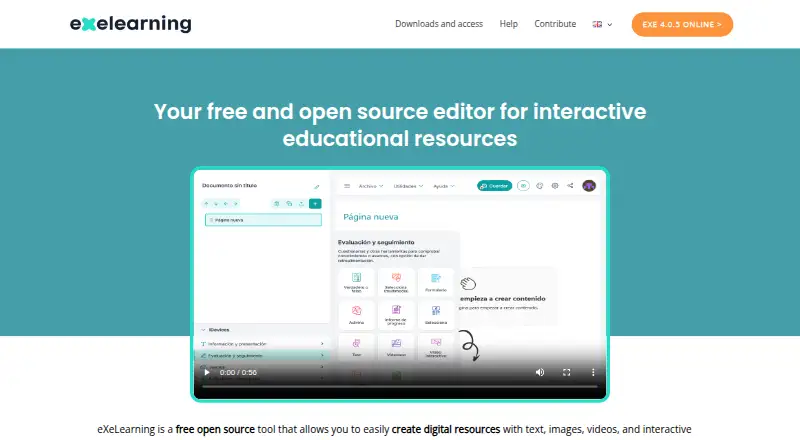
What eXeLearning is
eXeLearning is a free, open-source editor for building interactive educational resources with text, images, videos, and activities. Teachers and other creators can prepare materials without programming, then export them as SCORM, HTML, or EPUB. It runs online and has official desktop installers for Linux, Windows, and macOS. For server-based work, eXeLearning CLOUD provides collaborative editing and cloud storage, allowing multiple users to work on one project in real time. Official plugins connect it with Moodle SCORM, Moodle Web, WordPress, and Omeka-S; its Moodle SCORM plugin supports tracking and grade collection. Version 4.0 introduced accessibility improvements, and version 4.0.1 improved ZIP extraction, user authentication, and API access control. The software is licensed under the GNU Affero General Public License 3. There is no Android or iOS editing version, though eXeReader can display materials on mobile devices. Users can consult guides, tutorials, FAQs, and the manual, or contact the community through Telegram or email.
Good
- Creates interactive resources without programming.
- Exports content as SCORM, HTML, and EPUB.
- Available online and for Linux, Windows, and macOS.
- Cloud edition supports simultaneous project editing.
- Moodle SCORM plugin supports tracking and grade collection.
Watch out
- No Android or iOS version for editing.
- Real-time collaboration and cloud storage are described for eXeLearning CLOUD.
Who it suits
It suits teachers and creators who want to produce interactive learning materials without programming. Teams needing shared editing, or Moodle, WordPress, or Omeka-S integration, may also find it useful.
Verdict
eXeLearning covers resource authoring, assessment building, and several publishing formats in a free, open-source package. Mobile users can view materials with eXeReader, but editing is not available on Android or iOS.
Plans and prices
From eXeLearning's own pricing page, checked 1 Oct 2026.
| Plan | Price | What it gives you |
|---|---|---|
| eXeLearning | Free | free and open source · online or desktop use |
The facts
Each one read from eXeLearning's own pages, with the date it was checked.
What it does
- Accessibility
- eXeLearning 4.0 introduced accessibility improvements and enhancements to create more inclusive materials.checked 1 Oct 2026
- Authoring
- The tool lets teachers and creators develop interactive educational materials without programming knowledge.checked 1 Oct 2026
- Collaboration
- The cloud version allows multiple users to edit the same project simultaneously in real time.checked 1 Oct 2026
- Export formats
- Content can be exported in formats including SCORM, HTML and EPUB for publishing or sharing.checked 1 Oct 2026
- Governance
- The project is coordinated by CEDEC-INTEF under Spain’s Ministry of Education, Vocational Training and Sports with regional education administrations.checked 1 Oct 2026
- Integrations
- Official plugins integrate eXeLearning with Moodle SCORM, Moodle Web, WordPress and Omeka-S.checked 1 Oct 2026
- License
- eXeLearning is distributed under the GNU Affero General Public License 3.checked 1 Oct 2026
- Mobile limitation
- There is no Android or iOS version for editing; eXeReader can view materials on mobile devices.checked 1 Oct 2026
- Moodle tracking
- The Moodle SCORM plugin supports tracking and grade collection.checked 1 Oct 2026
- Online and server use
- eXeLearning can be used online, while eXeLearning CLOUD can be installed on a server for collaborative editing and cloud storage.checked 1 Oct 2026
- Purpose
- eXeLearning is a free open-source editor for creating interactive educational resources with text, images, videos and activities.checked 1 Oct 2026
- Security
- Version 4.0.1 improved ZIP extraction, user authentication and API-based access control.checked 1 Oct 2026
- Support
- Users can consult the manual, guides, tutorials and FAQs, and contact the community through Telegram or [email protected].checked 1 Oct 2026
Where it runs
- Desktop platforms
- Official installers are provided for Linux, Windows and macOS.checked 1 Oct 2026
The full review of eXeLearning
Overview
eXeLearning is a free, open-source authoring editor for teachers and other creators who need to build interactive learning materials without programming. It suits educators producing lessons, learning objects and assessments for several publishing destinations. The trade-off is clear: it provides a capable authoring and export workflow, but mobile devices are for viewing rather than editing.
Key features
The editor combines text, images, video and activities in a single project, with an assessment builder for checks and exercises. That focus is useful when subject-matter experts need to make their own resources instead of handing work to developers. Responsive output helps those resources remain usable across screen sizes, although the product remains an authoring tool rather than a complete learner-management system.
SCORM, HTML and EPUB export gives one project several routes to publication or sharing. The official Moodle SCORM plugin adds tracking and grade collection, which matters to schools that need results returned to Moodle. Plugins for Moodle Web, WordPress and Omeka-S can also place the content in established teaching or publishing workflows instead of leaving it as a standalone file.
eXeLearning CLOUD extends the desktop editor with cloud storage and simultaneous real-time editing by multiple users. It can be installed on a server, making it a plausible option for distributed teams, but that deployment is more involved than simply installing the desktop application. Version 4.0.1 strengthened ZIP extraction, authentication and API-based access control, while version 4.0 introduced accessibility improvements that help authors create more inclusive materials.
Pricing
The eXeLearning plan costs free. It is free and open source under the GNU Affero General Public License 3, with online or desktop use. There are no paid tiers, seat charges or subscription renewals to weigh for the core plan. That makes it suitable for individual teachers, schools and organisations that need a predictable no-cost authoring tool, while teams wanting hosted collaboration should account for the server setup required by eXeLearning CLOUD.
Platforms
Official installers cover Linux, Windows and macOS, and eXeLearning can also be used online or deployed on a server through eXeLearning CLOUD. Android and iOS have no editing application. eXeReader lets mobile users view finished materials, so phones and tablets work for consumption but not for authoring or project maintenance.
Who it's for
Choose eXeLearning if you are a teacher, instructional author or education organisation that wants to create interactive content directly, export it to SCORM, HTML or EPUB, and retain control through open-source software. It is particularly well matched to Moodle users who need tracking and grade collection, and to teams prepared to install a server for shared editing.
Look elsewhere if authors must work from Android or iOS, or if you need a turnkey cloud service centred on learner administration rather than content creation. The project is coordinated by CEDEC-INTEF under Spain’s Ministry of Education, Vocational Training and Sports with regional education administrations, which provides a public-education governance context rather than a conventional commercial vendor model.
Pros and cons
Pros
- Free and open source: the 0.00 USD plan removes subscription and renewal costs and uses the GNU Affero General Public License 3.
- Broad publishing options: SCORM, HTML and EPUB exports let authors reuse materials in different delivery contexts.
- Useful Moodle connection: the Moodle SCORM plugin supports both tracking and grade collection.
- Real-time team work: eXeLearning CLOUD allows multiple users to edit one project simultaneously and stores projects in the cloud.
- Desktop choice: official Linux, Windows and macOS installers support schools with mixed computer fleets.
Cons
- No mobile editing: Android and iOS users can view through eXeReader but cannot create or revise projects.
- Server responsibility for collaboration: CLOUD can be installed on a server, so collaborative deployments require infrastructure rather than a purely local workflow.
- Not a full learning platform: it authors and exports content; institutions needing broader learner-management functions will need another system alongside it.
Alternatives
ProProfs Training Maker is a better fit when you want a freemium service with Android and iOS support, a free tier capped at 10 learners, and a free trial rather than a wholly open-source desktop workflow.
Adapt Learning is another free, open-source authoring tool and framework, available across mobile, desktop, web and self-hosted environments, with no free trial.
Xerte suits organisations seeking free, open-source software that runs on a web server; commercial hosting and support are separate.
Lumi Education is worth choosing for a freemium desktop and web workflow with unlimited content on its free plan, a 15 MB per-file upload limit and HTML, SCORM and H5P export.
BranchTrack is an alternative for teams looking for a freemium authoring product available on Android, iOS and the web.
Mindsmith is a freemium option with Android, iOS, web and API access, including unlimited content and sharing on its free plan.
Open eLearning provides free, open-source authoring under GNU GPL v3.0+, with an optional premium membership at $39.99 a year.
ActivePresenter is aimed at macOS and Windows users who can accept a free edition limited to trial and non-commercial use, with watermarks when non-free features are used.
Verdict
eXeLearning is a strong recommendation for educators and institutions that want no-cost, code-free authoring with assessment tools, responsive output and exports that fit Moodle and other publishing systems. Its open license and optional server collaboration add control for organisations willing to manage their own environment. Choose another product when mobile authoring, a managed cloud service or a broader learning-management platform is the priority.
Alternatives to eXeLearning
- 1

ActivePresenter
Free planAndroidiOSWebAPI8.0$249 one-time - 2

Adapt Learning
Free planOpen sourceAndroidiOSWebAPI8.0Free plan - 3
H5P
Free planOpen sourceWebAPISelf-hosted8.0From $1,560 a year - 4

Mindsmith
Free planAndroidiOSWebAPI8.0From $39 a month - 5

BranchTrack
Free planAndroidiOSWebAPI7.9From $83 a month - 6

Xerte
Free planOpen sourceAndroidiOSWebLinux7.9Free plan