NEAITECH DiskHealth
NEAITECH DiskHealth displays disk and volume capacity, free space, health signals, and SMART information when available.
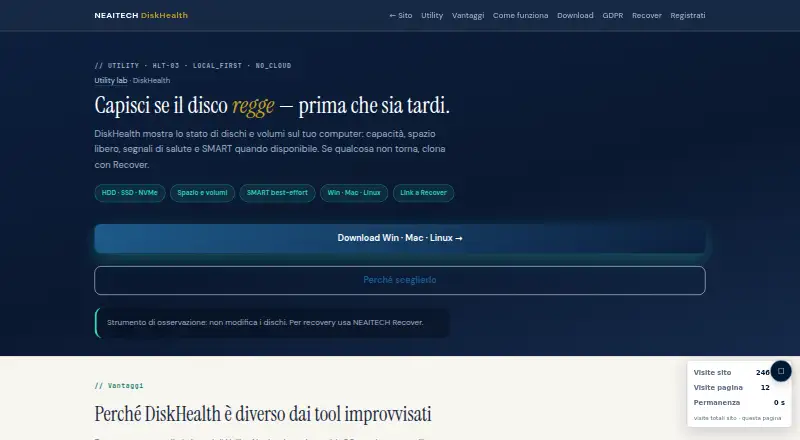
What NEAITECH DiskHealth is
NEAITECH DiskHealth displays disk and volume capacity, free space, health signals, and SMART information when available. It lists support for HDD, SSD, and NVMe drives on Windows, macOS, and Linux. The maker describes it as an observation tool that does not modify disks. Users can review disks and volumes, available space, health status, and SMART notes; the product recommends backup or cloning when a status is FAILED or space is low. SMART availability and results depend on the operating system and smartctl. The free edition is described as local and offline, with no content telemetry; logs and reports are saved only where the user chooses. Downloads include Windows and macOS installers with Python, plus full or lightweight Linux setup options. The free plan is free. Pro for one operating system is €49, paid once; Suite Utility is €129, paid once, and Enterprise is €249, paid once. Remote monitoring is not available. NEAITECH was founded in 2005 and is headquartered in Genova, Italy.
Good
- Supports Windows, macOS, and Linux.
- Lists HDD, SSD, and NVMe support.
- Local offline free edition is available.
- Does not modify disks.
- Logs and reports stay where users choose.
Watch out
- Remote monitoring is unavailable.
- SMART results depend on the operating system and smartctl.
- SMART information is shown only when available.
Who it suits
DiskHealth suits people who want to inspect local disk condition, space, and SMART information on Windows, macOS, or Linux. Its observation-only approach is relevant to users who want to review disks without modifying them.
Verdict
DiskHealth focuses on local inspection of storage capacity and health, with support for three desktop operating systems. SMART coverage can vary by system, and remote monitoring is not offered.
Plans and prices
From NEAITECH DiskHealth's own pricing page, checked 8 Oct 2026.
| Plan | Price | What it gives you |
|---|---|---|
| Free | Free | Funzionalità base · valutazione locale · offline |
| Pro · un OS | €49, paid once | Prodotto singolo · Win o Mac o Linux · perpetua · update 1 anno |
| Suite Utility | €129, paid once | HashGuard + DiskHealth + SecureWipe · 1 OS · tre tool · Update 12 mesi |
| Enterprise | €249, paid once | Suite · tutti gli OS · Win + Mac + Linux · uso aziendale |
The facts
Each one read from NEAITECH DiskHealth's own pages, with the date it was checked.
What it does
- Connectivity
- The free edition is described as local and offline, and the page labels the utility LOCAL_FIRST and NO_CLOUD.checked 8 Oct 2026
- Drives
- The product page lists HDD, SSD, and NVMe support.checked 8 Oct 2026
- Features
- Users can review disks and volumes, health, available space, and SMART notes, and the page recommends backup or cloning if status is FAILED or space is low.checked 8 Oct 2026
- Installation
- Downloads include a Windows EXE with Python, macOS installers with Python, and full or lightweight Linux setup options.checked 8 Oct 2026
- Privacy
- The maker says there is no content telemetry and that logs and reports are saved only where the user chooses.checked 8 Oct 2026
- Purpose
- DiskHealth shows disk and volume capacity, free space, health signals, and SMART information when available.checked 8 Oct 2026
- Read-only operation
- The page describes DiskHealth as an observation tool that does not modify disks.checked 8 Oct 2026
- Related product
- The page recommends NEAITECH Recover for cloning or recovery when disk health is at risk.checked 8 Oct 2026
- SMART limits
- The maker says SMART availability and results depend on the operating system and smartctl.checked 8 Oct 2026
- Support
- The page provides [email protected] for inquiries about Pro or Enterprise licenses, Recover bundles, and use cases.checked 8 Oct 2026
The company
- Founded
- 2005checked 28 Sep 2026
- Headquarters
- Genova, Italychecked 28 Sep 2026
Where it runs
- Platforms
- The same Python application and interface are offered for Windows, macOS, and Linux, including Intel and Apple Silicon Macs.checked 8 Oct 2026
The full review of NEAITECH DiskHealth
Overview
NEAITECH DiskHealth is a read-only desktop utility for examining drive capacity, free space, health indicators, and SMART data where the system can provide it. It is best suited to people who want a private, local check on Windows, macOS, or Linux rather than a cloud dashboard. The free edition is a credible starting point; paid licenses make more sense when you need a specific operating-system entitlement or a broader utility bundle.
Key features
DiskHealth covers HDD, SSD, and NVMe devices and brings disk and volume information into one view. Capacity and available-space readings help identify storage pressure, while health signals and SMART notes address possible hardware trouble. Those are complementary checks: a nearly full drive is not necessarily failing, and a drive with ample free space can still report warning signs. When a status is FAILED or space is low, the product points users toward backup or cloning, which is the appropriate next step rather than continued reliance on the affected disk.
The read-only design is valuable for inspection because the utility does not modify disks. SMART monitoring and failure warnings are included, but coverage is conditional: the maker says availability and results vary with the operating system and smartctl. Readers who need identical SMART detail on every machine should therefore treat results as system-dependent, not as a universal guarantee. There is no remote monitoring, so this is a workstation-checking tool, not a fleet or server-observability service.
The free edition is local and offline, identified as LOCAL_FIRST and NO_CLOUD. The maker says it performs no content telemetry, and logs and reports remain in locations chosen by the user. Installation packages include a Windows executable with Python, macOS installers with Python, and both full and lightweight Linux setups. That range is useful for Linux users who want to balance completeness against installation footprint.
Pricing
DiskHealth uses a freemium model. Free costs nothing and provides basic functionality, local evaluation, and offline use. It fits occasional personal checks, but it is not the choice for users who need a paid license or the bundled tools.
Pro · un OS costs 49.00 EUR once, with updates for one year. It is a single-product license for Windows, Mac, or Linux, so it suits an individual who knows which desktop operating system needs coverage. The one-OS limit means households or professionals working across platforms may need a broader plan.
Suite Utility costs 129.00 EUR once and includes 12 months of updates. It combines HashGuard, DiskHealth, and SecureWipe for one operating system, giving a multi-tool buyer more scope than Pro while retaining the single-OS restriction.
Enterprise costs 249.00 EUR once and includes the suite for all three operating systems—Windows, Mac, and Linux—for business use. It is the clearest fit for organizations standardizing on several desktop platforms. For Pro or Enterprise inquiries, Recover bundles, and use-case discussions, NEAITECH provides [email protected].
Platforms
Supported platforms are Windows, macOS, and Linux. Windows downloads include an EXE with Python; macOS has installers with Python; Linux offers full and lightweight setup options. SMART behavior can differ by platform because it depends on the operating system and smartctl.
Who it's for
Choose DiskHealth for private, on-device inspection of mixed HDD, SSD, or NVMe storage, especially when read-only operation and offline handling matter. It also suits users who want a single utility for both capacity checks and failure warnings. Look elsewhere if you require remote monitoring, centralized oversight, or predictable SMART results across unlike systems. When a drive is already at risk, the related NEAITECH Recover product is the recommended route for cloning or recovery rather than a substitute for DiskHealth's inspection role.
Pros and cons
Pros
- Broad desktop coverage: Windows, macOS, and Linux plans support a cross-platform workflow.
- Read-only inspection: DiskHealth observes disks without modifying them, reducing the risk of an inspection tool altering data.
- Useful storage scope: Capacity, free space, health signals, and SMART notes cover both everyday capacity problems and potential failures.
- Privacy-oriented operation: The free edition is local and offline, with no content telemetry and user-chosen report locations.
- Flexible purchasing: A free edition, single-OS Pro license, three-tool suite, and all-OS Enterprise tier address different scales of use.
Cons
- SMART is not uniform: Availability and results depend on the operating system and smartctl, limiting cross-machine consistency.
- No remote monitoring: It cannot watch drives on other computers or provide centralized fleet visibility.
- Paid plans are platform-bound: Pro and Suite Utility cover one OS, so multi-platform users must consider Enterprise pricing.
- Updates are time-limited: The paid plans specify one year or 12 months of updates despite perpetual purchase terms.
Alternatives
Disk Health Monitoring Software is the broader category starting point for comparing drive-health utilities.
Pick DA Drive Analyzer instead when QNAP or ASUST NAS coverage, web access, self-hosting, or a one-week all-drive trial is more important than DiskHealth's desktop-first local approach.
smartmontools is a free, GPL-licensed option for readers who want the smartctl and smartd command-line utilities across Linux, macOS, and Windows.
GSmartControl is another free GPLv3 desktop choice for drive-health inspection on those three operating systems.
Consider Hard Disk Sentinel when a paid product with free and trial offerings for Linux or Windows better matches your platform needs.
Scrutiny suits readers seeking a free, MIT-licensed self-hosted service with API and web access.
Apacer SSDWidget 2.0 is a free alternative aimed at Apacer PCIe or SATA3 products, with Windows, Android, and iOS availability.
DiskMaster is a free, single-purpose desktop tool available for Linux, macOS, and Windows.
SMART Sniffer is a free MIT-licensed Home Assistant integration and Go agent for API, self-hosted, and desktop environments.
Verdict
DiskHealth is a strong fit for individuals and small teams that want read-only, offline inspection of storage across Windows, macOS, and Linux, with capacity and SMART-oriented warnings in one place. Its main reason to choose it is the combination of privacy-conscious local operation and straightforward paid tiers. Look elsewhere if remote monitoring or dependable, identical SMART coverage across every system is essential.
Alternatives to NEAITECH DiskHealth
- 1
SMART Sniffer
Free planOpen sourceWebAPILinuxmacOS7.5Free plan - 2
Active@ Hard Disk Monitor
Free planWindows7.3$49.95 one-time - 3
DA Drive Analyzer
Free planWebmacOSSelf-hostedWindows7.0From $5 a year - 4
Hard Disk Sentinel
Free planLinuxWindows6.9$22 one-time - 5

HDDlife
Windows6.8$19 one-time - 6
smartmontools
Free planLinuxmacOSWindows6.8Free plan