Myrling Sprite Editor
Myrling Sprite Editor is a free, open-source pixel editor for game creatures, built for Realms of Eldermyr.
What Myrling Sprite Editor is
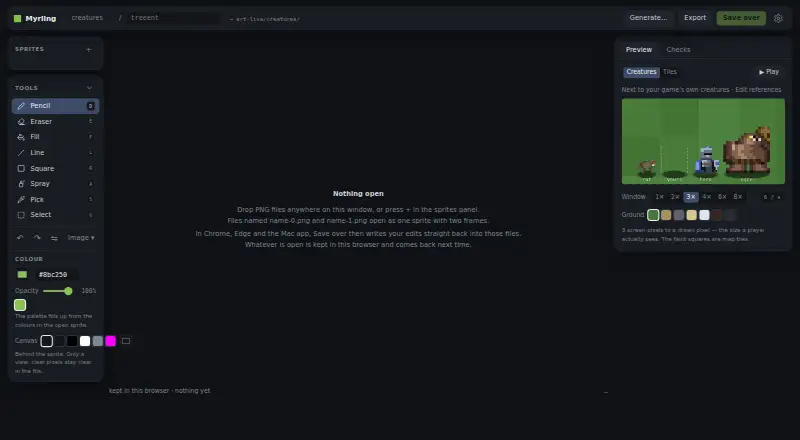
Myrling Sprite Editor is a free, open-source pixel editor for game creatures, built for Realms of Eldermyr. Its browser version runs without installation, and a native Mac app is also available for macOS 11.3 or later on Apple silicon and Intel. It opens and exports PNG files; Chrome, Edge, and the Mac app can save edits back to opened files. Drawing tools include pencil, eraser, fill, line, square, spray, colour pick, and selection. For animation, it supports multiple frames, onion skin, and playback previews. Grid-based tilesheets can be split into sprites by row or cell. Work is saved in the browser after each change and restored on a later visit, but undo history is not retained. Images over 4096 pixels on a side are refused, and sprites above about one million pixels are not retained in browser storage. Drawings stay on the user's machine unless the optional PixelLab generator is used; that feature needs the user's API key and sends it to PixelLab when Generate is pressed.
Good
- Free and MIT licensed.
- Runs in a browser without installation.
- Supports multiple frames, onion skin, and playback previews.
- Can split tilesheets by row or cell.
- Mac app verifies downloaded updates with a signature and hash.
Watch out
- Images over 4096 pixels on a side are refused.
- Large sprites are not retained in browser storage.
- Browser saves do not retain undo history.
- Optional PixelLab generation requires an API key.
Who it suits
Myrling suits sprite artists who want a browser or Mac pixel editor with animation and tilesheet tools. Its hosted editor can be tried without downloading anything.
Verdict
Myrling brings drawing, animation, and tilesheet tools to a browser editor and a Mac app. Its image-size and browser-storage limits are worth noting for larger projects.
Plans and prices
From Myrling Sprite Editor's own pricing page, checked 12 Oct 2026.
| Plan | Price | What it gives you |
|---|---|---|
| Myrling Sprite Editor | Free | MIT licensed · web editor and macOS app |
The facts
Each one read from Myrling Sprite Editor's own pages, with the date it was checked.
What it does
- Animation
- Users can add, copy, delete, and reorder frames, view onion skinning, and play frames as an animation.checked 12 Oct 2026
- Drawing tools
- The editor includes pencil, eraser, fill, line, square, spray, color picking, selection, palette, zoom, undo, and redo tools.checked 12 Oct 2026
- Integration
- An optional PixelLab generator uses the user's PixelLab API key and spends PixelLab credits for generated images.checked 11 Oct 2026
- Integrations
- An optional PixelLab generator requires the user's PixelLab API key and sends it to api.pixellab.ai when Generate is pressed.checked 12 Oct 2026
- License
- The editor is MIT licensed, and the maker invites users to fork and ship their own creatures with it.checked 12 Oct 2026
- Limits
- Images larger than 4096 pixels on a side are refused, and sprites above about one million pixels are not retained in browser storage.checked 12 Oct 2026
- Local persistence
- Open work is saved in the browser after each change and restored on a later visit, but undo history is not retained.checked 12 Oct 2026
- PNG editing
- It opens PNG files and can save edits back over the files in Chrome, Edge, and the Mac app.checked 11 Oct 2026
- PNG workflow
- Users can open and export PNGs, and Chrome, Edge, and the Mac app can save edits back to opened files.checked 12 Oct 2026
- Privacy
- The maker says drawings stay on the user's machine; a text prompt is sent only when the optional PixelLab generator is used.checked 11 Oct 2026
- Purpose
- Myrling is a pixel editor for game creatures, originally made for Realms of Eldermyr.checked 12 Oct 2026
- Runs locally
- The editor runs as a standalone HTML file without a build, server, or installation, and says drawings stay on the user's machine except for an optional PixelLab prompt.checked 12 Oct 2026
- Security
- The Mac app verifies downloaded editor updates using an Ed25519 signature and SHA-256 hash before keeping them.checked 12 Oct 2026
- Tilesheets
- The editor supports drawing on tilesheets and splitting sheets into sprites by row or cell.checked 12 Oct 2026
- Update security
- The Mac app verifies downloaded editor updates with an Ed25519 signature and SHA-256 hash before keeping them.checked 11 Oct 2026
Where it runs
- Browser access
- The maker provides a hosted browser editor that can be tried without downloading anything.checked 12 Oct 2026
- Browser editor
- The editor runs in a browser without a build, server, or installation.checked 11 Oct 2026
- Browser limits
- Images over 4096 pixels on a side are refused, and sprites over about one million pixels are not kept in browser storage between visits.checked 11 Oct 2026
- Mac support
- The native Mac app supports macOS 11.3 or later on Apple silicon and Intel Macs, and its releases are signed with an Apple Developer ID and notarised by Apple.checked 12 Oct 2026
Alternatives to Myrling Sprite Editor
- 1
LibreSprite
Free planOpen sourceAndroidWebAPILinux8.0Free plan - 2
Pixelc
Free planOpen sourceAndroidWebLinuxmacOS7.8Free plan - 3

PixelWall
Free planWebAPILinuxmacOS7.6$15 one-time - 4
Avidemux
Free planOpen sourceWebLinuxmacOSWindows7.3Free plan - 5
Hexcalibur
Free planWebLinuxmacOSWindows7.2Free plan - 6
PixelAoi
Free planAPIWindows7.2$17 one-time