MyProposer
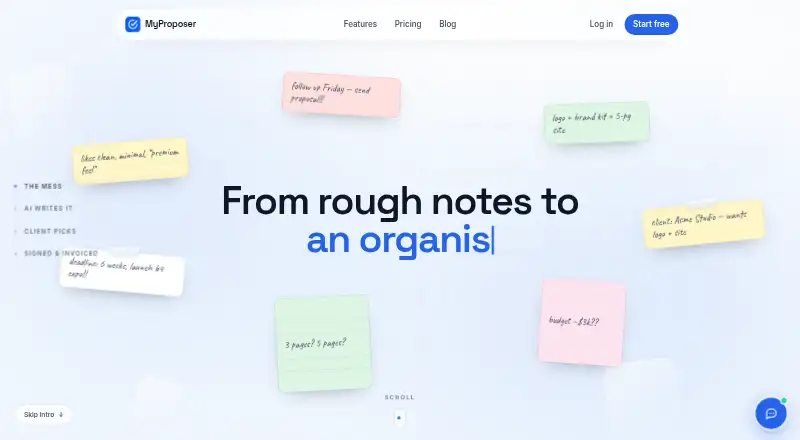
MyProposer turns rough notes into interactive proposals for freelancers and service businesses.
What MyProposer is
MyProposer turns rough notes into interactive proposals for freelancers and service businesses. Its AI can draft a proposal from call notes, a project brief or scope bullets, and the draft remains editable before it is sent. Clients can choose packages and add-ons, with the total updating as they make selections, then approve and sign the accepted version through a link. The signature stays tied to the version and options the client accepted. After a proposal is accepted, MyProposer helps turn it into a quote and invoice.
The dashboard keeps client history alongside proposals, quotes and invoices. Users can see whether a proposal has been opened and receive notifications for opens and approvals; email alerts are available on Starter and Pro. Gmail sending is supported, while other email providers are described as coming soon. MyProposer has web, iPhone/iPad and Android apps that use the same account. Built-in e-signatures, client activity tracking, custom branding, and analytics and reporting are included. Its privacy policy describes encryption in transit, access controls, hashed passwords and least-privilege team access. Text submitted for AI drafting goes to an AI model on MyProposer infrastructure or to a contracted third-party model provider. The service says it does not sell personal data or use client data for marketing to those clients.
Good
- AI drafts editable proposals from notes and briefs.
- Clients can select packages and add-ons with live total updates.
- Signatures are tied to the accepted version and options.
- Client history, proposals, quotes and invoices share a dashboard.
- Available on web, iPhone/iPad and Android with one account.
Watch out
- The Free plan allows only 2 documents of each type every 30 days.
- Free includes 10 AI generations monthly and 4 live proposal links.
- Gmail is the supported email sending integration; other providers are coming soon.
Who it suits
MyProposer suits freelancers and service businesses that prepare proposals, quotes and invoices for clients. It is useful for teams that want clients to select options, approve and sign proposals, with client activity visible in the dashboard.
Verdict
Pick MyProposer if you want to turn project notes into interactive proposals and carry accepted work into quotes and invoices. The Free plan has tight document and live-link allowances, while paid plans start at $2.99/mo. Consider the AI data flow if you handle sensitive client material.
Plans and prices
From MyProposer's own pricing page, checked 8 Oct 2026.
| Plan | Price | What it gives you |
|---|---|---|
| Free | Free | 2 proposals, quotes, contracts and invoices every 30 days · 10 AI generations/month · 4 live proposal links · Free forever |
| Starter | $2.99 a month | 20 proposals, quotes, contracts and invoices every 30 days · 50 AI generations/month · custom branding · email alerts on approval · Per month, billed monthly. |
| Pro | $6.99 a month | 100 documents every 30 days · 250 AI generations/month · reusable templates · PDF downloads · send via Gmail · Per month, billed monthly. |
The facts
Each one read from MyProposer's own pages, with the date it was checked.
What it does
- AI and data handling
- Text submitted for AI drafting is sent to an AI model, either on MyProposer infrastructure or to a third-party model provider acting as a contracted sub-processor.checked 8 Oct 2026
- AI drafting
- The AI drafts proposals from notes such as call notes, project briefs or scope bullets, and drafts remain editable before sending.checked 8 Oct 2026
- Analytics and reporting
- Yeschecked 20 Sep 2026
- Built-in e-signatures
- Yeschecked 20 Sep 2026
- Client activity tracking
- Yeschecked 20 Sep 2026
- Client workflow
- The product keeps client history and proposals, quotes and invoices together in a dashboard.checked 8 Oct 2026
- Custom branding
- Yeschecked 20 Sep 2026
- Integrations
- Gmail sending is supported, while the features page says other email providers are coming soon.checked 8 Oct 2026
- Interactive quotes
- Clients can select packages and add-ons, with totals recalculated live as they change selections.checked 8 Oct 2026
- Privacy
- The privacy policy says MyProposer does not sell personal data and does not use customer client data to market to those clients.checked 8 Oct 2026
- Security
- The privacy policy states that MyProposer uses encryption in transit, access controls, hashed passwords and least-privilege team access.checked 8 Oct 2026
- Support
- The contact page says support is handled by the small team through [email protected] and that messages are answered in arrival order.checked 8 Oct 2026
- Tracking
- Users can see whether proposals have been opened and receive notifications on opens and approvals; email alerts are on Starter and Pro.checked 8 Oct 2026
- What it does
- MyProposer turns rough notes into interactive client proposals that clients can price, approve and sign, then helps turn accepted proposals into quotes and invoices.checked 8 Oct 2026
- Who it is for
- MyProposer describes itself as built for freelancers and service businesses.checked 8 Oct 2026
Where it runs
- Approvals and signatures
- Clients can approve proposals through the link, and the signature is tied to the version and options accepted.checked 8 Oct 2026
- Platform availability
- The site says MyProposer is available on the web and as iPhone/iPad and Android apps, using the same account.checked 8 Oct 2026
Money
- Free plan
- Yeschecked 20 Sep 2026
The full review of MyProposer
MyProposer is a proposal tool for freelancers and service businesses that want to shape project notes into client-ready documents and manage the next steps in one place. Its interactive pricing and connected quote-to-invoice workflow stand out; low plan quotas make it less suited to consistently high document volume.
Overview
MyProposer brings proposals, quotes, contracts and invoices together with client history in a shared dashboard. That can simplify the handoff from a proposal to accepted work and billing, rather than leaving each stage in a separate workflow. The core appeal is practical: clients can choose options, approve a proposal and sign the version they accepted. The recurring document caps, however, mean the low entry price is most useful to businesses with modest volume.
Key features
- AI proposal drafting: Turn call notes, project briefs or scope bullets into an editable draft. This can speed up first drafts while leaving room to correct or tailor the wording before a client sees it. Text submitted for drafting is sent to an AI model, either on MyProposer infrastructure or to a contracted third-party provider, so businesses handling sensitive client material should weigh that data flow.
- Interactive quotes and approvals: Clients can select packages and add-ons, with totals recalculated as they make choices. Approval and signature attach to the version and options accepted, which helps keep the agreed scope clear.
- Activity tracking: Users can see when a proposal is opened and receive notifications for opens and approvals. Email alerts are on Starter and Pro, making those plans more useful for users who want updates without repeatedly checking the dashboard.
- Client-facing tools: E-signatures, custom branding, and analytics and reporting support a more complete proposal workflow. Gmail sending is supported; other email providers are described as coming soon.
Pricing
MyProposer is freemium, with a 30-day trial and paid plans billed monthly. The main constraint across the tiers is document throughput; Free also has a particularly small live-link allowance.
- Free — free, billed Free forever: Two proposals, quotes, contracts and invoices every 30 days, 10 AI generations per month and four live proposal links. It is a reasonable way to handle occasional client work, but four links and two documents of each type can quickly bind a freelancer with several active projects.
- Starter — $2.99 a month, billed monthly: 20 proposals, quotes, contracts and invoices every 30 days, 50 AI generations per month, custom branding and email alerts on approval. This is the natural step up for a solo operator who needs more room and a branded client presentation, though its document allowance remains finite.
- Pro — $6.99 a month, billed monthly: 100 documents every 30 days, 250 AI generations per month, reusable templates, PDF downloads and Gmail sending. It fits heavier use and repeatable proposal work, but the document quota still makes it a poor match for a business that routinely exceeds 100 documents per 30 days.
Platforms
MyProposer is available on the web, iPhone and iPad, and Android, with the same account across platforms. That gives users a choice of desktop browser or mobile app for keeping up with client work.
Who it's for
Freelancers and service businesses that prepare proposals, adjust scope with clients, and then need quotes or invoices are the clearest fit. It is especially compelling when interactive package choices, linked approvals and signatures can replace a more fragmented process. Businesses with large document volume, or teams that need email providers beyond Gmail, should consider whether the quotas and integration coverage fit their workflow.
Pros and cons
- Pro: Clients can price options interactively, and accepted signatures stay tied to the selected version and options. That makes scope decisions clearer than a static proposal alone.
- Pro: Proposals, quotes and invoices sit alongside client history, with contracts and e-signatures also supported. This reduces the number of separate stages a small service business needs to manage.
- Pro: Starter begins at $2.99 a month and adds custom branding and approval alerts, a useful upgrade from the free caps without jumping to the highest tier.
- Con: Free allows only four live proposal links and two documents of each type every 30 days, so it is a narrow trial for anyone juggling multiple clients.
- Con: AI drafting sends submitted text to a model on MyProposer infrastructure or to a contracted third party. Encryption in transit, access controls, hashed passwords and least-privilege team access are stated safeguards, but sensitive project content still deserves care.
- Con: Gmail is the supported sending integration, while other email providers are coming soon. That may be restrictive for businesses whose client communication is organized elsewhere.
Alternatives
Consider these options if their pricing, platform coverage or proposal workflow better matches your needs:
- PandaDoc is another freemium option, with a Free plan described as allowing 60 documents per year and two recipients per document; choose it if that annual allowance and its Android, iOS, web and API coverage suit you better.
- Create My Proposal offers a free plan with three proposals per month and a Pro plan at $29 a month for unlimited proposals; it may suit someone who prioritizes proposal volume over MyProposer's broader document workflow.
- Pitchsite has a free tier with one proposal, one offer, three AI generations, a Bold template and a Free Offer Scorer; consider it if that smaller offer-focused package is a better starting point.
- Pactiamo has a free plan that includes proposals, contracts and e-signatures; it is worth considering if those are the core tasks you need covered.
- Proposify is a paid alternative with a Basic plan at $29 a month for 10 sends per month, a $0.50 per-send overage and unlimited documents; choose it if that send-and-overage structure is preferable.
- Upland Qvidian is another proposal option.
- Storydoc is a paid alternative with a Starter plan that includes five active documents, 20 AI image credits and 25 AI text credits per month, among other limits; consider it if that document-and-credit model fits your work.
- Expedience Software uses custom pricing based on users, features and add-ons; it may be a better fit if you need a quote tailored to those requirements.
For more options, browse Proposal Management Software and Proposal Software.
Verdict
MyProposer is a strong fit for freelancers and service businesses that want proposals to lead naturally into approved, signed work and billing. Interactive options, version-linked signatures and a shared client workflow justify its modest monthly entry price. Look elsewhere if your document volume outgrows the caps, you depend on non-Gmail sending, or your AI drafting process cannot send client text to a model provider.
Getting started
- Open https://www.myproposer.com/.
- Choose the Free plan or a paid plan; paid plans start at $2.99/mo and a 30-day trial is offered.
- Use the web app or install the iPhone/iPad or Android app and sign in with the same account.
- Draft a proposal from call notes, a project brief or scope bullets, then edit it before sending.
- Send through Gmail and share the proposal link for client selections, approval and signature.
Limits worth knowing
The Free plan allows 2 proposals, quotes, contracts and invoices every 30 days, 10 AI generations per month and 4 live proposal links. Starter allows 20 documents every 30 days and 50 AI generations monthly; Pro allows 100 documents every 30 days and 250 AI generations monthly.
Questions
Is there a free plan?
Yes. Free is billed at no cost and includes 2 proposals, quotes, contracts and invoices every 30 days, 10 AI generations a month and 4 live proposal links.
What do paid plans cost?
Starter is $2.99 a month and Pro is $6.99 a month, both billed monthly. A 30-day trial is also offered.
Which platforms does MyProposer support?
It is available on the web and as iPhone/iPad and Android apps. The apps use the same account.
Can clients approve and sign proposals?
Yes. Clients can approve through a link and sign the version with the options they accepted.
How does AI drafting handle submitted text?
Text submitted for drafting is sent to an AI model, either on MyProposer infrastructure or to a contracted third-party model provider.
Which email provider can I send through?
Gmail sending is supported. The features page says other email providers are coming soon.
Alternatives to MyProposer
- 1

PandaDoc
Free planAndroidiOSWebAPI9.0From $19 a month - 2

Anchor
Free planAndroidiOSWebAPI8.6Free plan - 3

Proposify
iOSWebAPI8.3 - 4

Proposal Expert
Free planWebAPI8.2From €24 a month - 5
Proposal.biz
Free planWeb8.1Free plan - 6
PowerPropose
Free planWeb8.0From £25 a month